Archive
Python: My Orders Tracker P-4
Learning : Pythn, sqlite, Database, SQL
Subject: Create a system to track the orders
In this last part we will write the code to Edit an Order, in editing an order function first we will show all orders and will ask the user to select the one to be EDIT, then we will display that order detail on the screen and ask the user to confirm the action by entering ‘Y’ [our code will handel both y and Y]. We will ask the user about each attribute in the Order details if it need to be change or [Just press Enter to Keep the Current Data], also if the user enter ‘e’ or ‘E’ we will exit from the Editing mode.
Here is the code ..
# Function to Edit an Order

def edit_order():
    os.system('clear')
    print("\n==========[ Edit Orders ]==========")

    show_order('yes')

    edit_order = input('   Select the Order ID to be Edited. [E to Exit] > ')

    if edit_order in ['e','E'] :
        return
    elif not edit_order.isnumeric() :
        input('\n   You need to enter an Order''s ID [Numeric]. .. Press any Key .. ')
        return

    try:

        c.execute ("select * from orders where o_id ={}".format(edit_order))
        order_list = c.fetchone()

        if order_list == [] :
            input('\n   ID {} Not Exsist. .. Press any key to continue.  '.format(edit_order))
            return

        os.system('clear')
        print("\n==========[ Edit Orders ]==========\n")
        print('\n   Details of the Order you select:\n ')

        print(" "*15,"ID: ",order_list[0])
        print(" "*13,"Date: ",order_list[1])
        print(" "*5,"Order Number: ",order_list[2])
        print(" "*12,"Price: ",order_list[4])
        print(" "*9,"Quantity: ",order_list[5])
        print(" "*3,"Shipment Price: ",order_list[6])
        print(" "*7,"Total Cost:  {:.2f}".format((order_list[4]*order_list[5]) + order_list[6]))
        print(" "*6,"Description: ",order_list[3])
        print(" "*12,"Image:",order_list[8])
        print(" "*13,"Link:",order_list[7])

        user_confirm = input("\n\n   You Select to EDIT the above Order, Enter Y to confirm, E to Exit. > ")
        if user_confirm in ['e','E'] :
            input('\n   You entered ''E'' to Exit. Nothing  will be change. Press any key. ')
            return

        if user_confirm in ['y','Y'] :
            #To Edit the order..

            print("#"*57)
            print("##"," "*51,"##")
            print("##   NOTE: Enter E any time to EXIT/Quit."," "*12,"##")
            print("##     OR  JUST Press Enter to keep the Current data."," ##")
            print("##"," "*51,"##")
            print("#"*57,)

            while True :

                new_date = input (f'\n   The current date is: {order_list[1]}, Enter the New date as[dd-mm-yyyy] > ')

                if e_to_exit(new_date) =='e' : return
                if new_date =="" : break   # Break the while loop if the user want to keep the current Date.

                if date_validation (new_date) == 'valid' :
                    break
                else :
                    print(date_validation (new_date))


            new_onum = input (f'\n   The current Order Number is: {order_list[2]}, Enter the New Order Number. [E to Exit]. > ')
            if e_to_exit(new_onum) =='e' : return

            new_qunt = input (f'\n   The current Quantity is: {order_list[5]}, Enter the New Quantity. [E to Exit]. > ')
            if e_to_exit(new_qunt) =='e' : return

            new_price = input (f'\n   The current Price is: {order_list[4]}, Enter the New Price. [E to Exit]. > ')
            if e_to_exit(new_price) =='e' : return

            new_ship_price = input (f'\n   The current shipment Price is: {order_list[6]}, Enter the New Quantity. [E to Exit]. > ')
            if e_to_exit(new_ship_price) =='e' : return

            new_link = input (f'\n   The current link is: {order_list[7]}, Enter the New Link. [E to Exit]. > ')
            if e_to_exit(new_link) =='e' : return

            new_image = input (f'\n   The current Image is: {order_list[8]}, Enter the New Image (path). [E to Exit]. > ')
            if e_to_exit(new_image) =='e' : return


            new_desc = input (f'\n   The current Description is:\n     {order_list[3]}.\n\n      Enter the New Description. [E to Exit]. > ')
            if e_to_exit(new_image) =='e' : return


            # Updating the record in the DataBase.
            if new_date > '' and new_date != "e" :
                c.execute("update orders set order_date = '{}' where o_id = {}".format(new_date,int(order_list[0])))
                db_conn.commit()

            if new_onum > '' and new_onum != "e" :
                c.execute("update orders set order_num = '{}' where o_id = {}".format(new_onum,int(order_list[0])))
                db_conn.commit()

            if new_qunt > '' and new_qunt != "e" :
                c.execute("update orders set order_quantity = '{}' where o_id = {}".format(new_qunt,int(order_list[0])))
                db_conn.commit()

            if new_price > '' and new_price != "e" :
                c.execute("update orders set order_price = '{}' where o_id = {}".format(new_price,int(order_list[0])))
                db_conn.commit()

            if new_ship_price > '' and new_ship_price != "e" :
                c.execute("update orders set order_price = '{}' where o_id = {}".format(new_ship_price,int(order_list[0])))
                db_conn.commit()

            if new_link > '' and new_link != "e" :
                c.execute("update orders set order_link = '{}' where o_id = {}".format(new_link,int(order_list[0])))
                db_conn.commit()

            if new_image > '' and new_image != "e" :
                c.execute("update orders set order_img = '{}' where o_id = {}".format(new_image,int(order_list[0])))
                db_conn.commit()

            if new_desc > '' and new_image != "e" :
                new_desc = " ".join([word.capitalize() for word in new_desc.split(" ")])

                c.execute("update orders set order_desc = '{}' where o_id = {}".format(new_desc,int(order_list[0])))
                db_conn.commit()

            input('\n   One record has been EDITED and Saved... \n      ... Press any key to Continue ...')

        else:
            input('\n      Wrong input ... Press any key to continue ..')

    except:
        pass
[All the System Codes available in Download Page.]
Finish: Now we have an application that will store and retrieve our simple order data.
Enhancement: We can do some enhancement in [link and image] data part to show and display them in better way.
| Part 1 | Part 2 | Part 3 | Part 4 |
To Download my Python code (.py) files Click-Here
By: Ali Radwani
Python: My Orders Tracker P-3
Learning : Pythn, sqlite, Database, SQL
Subject: Create a system to track the orders
In this part we will write the code to Delete an Order that we have from our system, also we will add some validations on the user input, like if the user enter something not from the menu, or to do so, first we will re-call the show_orders() function that we have and passing the ‘yes’ parameter which means we are calling the function from inside another function [we will not print the function header, and will not clear the screen]. Then we will ask the user to select/Enter the ID of the order to be Deleted, after that we will print tha order details again on the screen and ask the user to confirm Deleting command by entering ‘Y’ … thats it.. let’s write the code..
# Delete Order

def del_order():
    os.system('clear')
    print("\n==========[ Delete Orders ]==========\n")

    show_order('yes')

    del_order = input('   Select the Order ID to be Deleted. [E to Exit] > ')

    if not del_order.isnumeric() :
        input('\n   You need to enter an Orders ID [Numeric]. .. Press any Key .. ')
        return

    elif del_order in ['e','E'] :
        return

    try:
        c.execute ("select * from orders where o_id ={}".format(del_order))
        order_list = c.fetchone()

        if order_list == [] :
            input('\n   ID {} not exsist.'.format(del_order))
            return

        os.system('clear')
        print("\n==========[ Delete Orders ]==========\n")
        print('\n   Details of the Order you select:\n ')

        print("   ID: ",order_list[0])
        print("   Date: ",order_list[1])
        print("   Order Number: ",order_list[2])
        print("   Price: ",order_list[4])
        print("   Quantity: ",order_list[5])
        print("   Shipment Price: ",order_list[6])
        print("   Total Cost: {:.2f}".format((order_list[4]*order_list[5]) + order_list[6]))
        print("\n   Description:",order_list[3])
        print("   Image:",order_list[8])
        print("   Link:",order_list[7])

        user_confirm = input("\n\n   You Select to DELETE the above Order, Enter Y to confirm, E to Exit. > ")
        if user_confirm in ['y','Y'] :
            #To Delete the order..
            c.execute ("delete from orders where o_id ={}".format(int(del_order)))
            db_conn.commit()

            input('\n   One record has been DELETED ... \n      ... Press any key to Continue ...')

        elif user_confirm in ['n','N']:
            input("\n    You select not to DELETE any thing.   Press any key to Continue .. ")

        elif user_confirm in ['e','E']:
            input("\n    You select stop the process and EXIT.    ... Press any key to Continue .. ")
            return

        else:
            input('\n      Wrong input ... Press any key to continue ..')

    except:
        pass
The user select #3 from the menu to Delete an Order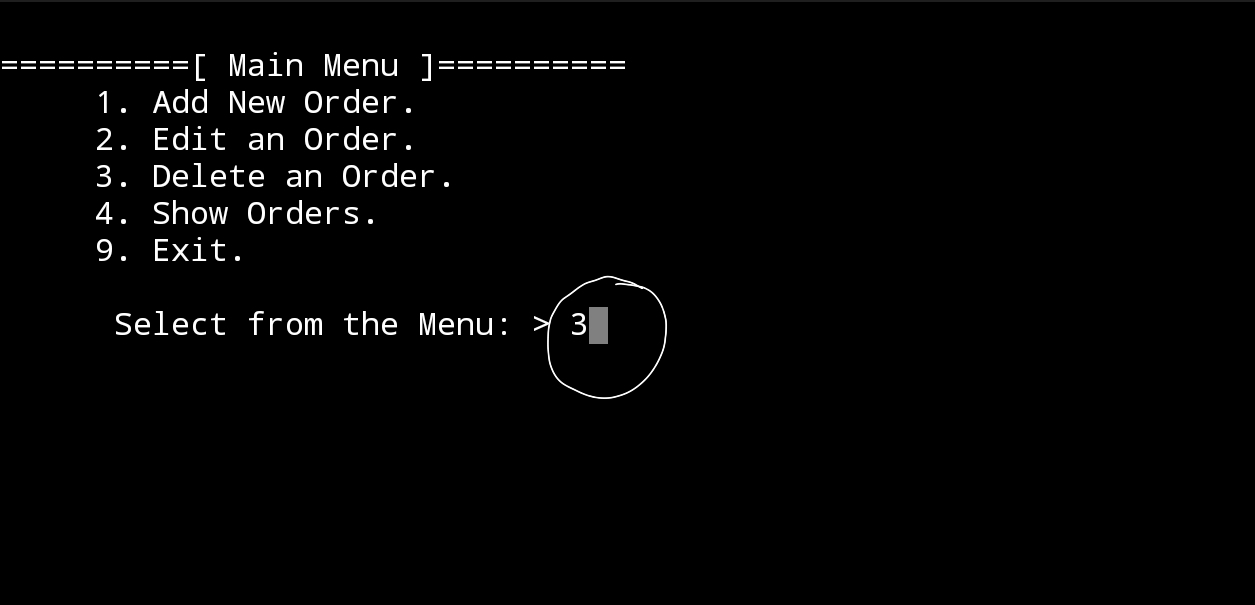 |
The screen display the list of orders we have in the system, and the user select Order ID Number 3 to delete it. |
The screen display the details of the order ID 3 and ask the user to confirm the deleting by entering ‘Y’ |
In Next Post: In the coming post P4 , we will write the codes to Edit an order information.
| Part 1 | Part 2 | Part 3 | Part 4 |
To Download my Python code (.py) files Click-Here
By: Ali Radwani
Python: My Orders Tracker P-2
Learning : Pythn, sqlite, Database, SQL
Subject: Create a system to track the orders
In this part we will write the code to Add new Order to the system, and to Show the orders we have in the database. Also we will write tow new functions that we will use in our application, one is the Date Validation and the other is just to check if the user enter a [q or Q] during collecting data [Q mean Quit] then we will call the quit() function.
Before we start the Add new order function, we will write the def date_validation (the_d) : and we will pass the date that the user enter and will check if it is in the right format, here in our application we will check if it is in [dd-mm-yyyy] format, the function will return the ‘valid’ string if the date in in right format, otherwise it will return a message of error.
Here is the function code ..
# Date Validation function.
def date_validation (the_d) :

    if the_d=="" or the_d[2] !='-' or the_d[5] !='-' :
        return '\n   Date Not Valid. [Date format: dd-mm-yyyy]'
    else:

        if not(len((the_d.split("-")[2])) == 4 ):
            return '\n   Date Not Valid "Bad Year". [Date format: dd-mm-yyyy].'
        if not (len((the_d.split("-")[1])) == 2 and (int(the_d.split("-")[1]) > 0 and  int(the_d.split("-")[1])  0 and  int(the_d.split("-")[0]) <=31)) :
            return '\n   Date Not Valid "Bad Day". [Date format: dd-mm-yyyy].'

    return 'valid'
 |
The other function as we said, we will call it after each data entry to check on user input if it is ‘Q’ or Not. Here is the code..
def q_to_quit(check):

    # If the user enter [q or Q] the function will return quit function.
    if check in ['q','Q'] :
        return quit()
Now, we will start to write the function to Add new order, we will ask the user to enter the date for the order, such as Order date, order number, the description, price and so-on. Here is the code..
# Function to add new order to the system.
def add_order():
    os.system('clear')
    print("\n==========[ Add New Order ]==========\n")

    while True :
        print('   NOTE: Enter Q any time to EXIT/Quit. \n')
        order_date = input('   Enter the Date of the Order. as[dd-mm-yyyy] > ')

        q_to_quit(order_date)

        if date_validation (order_date) == 'valid' :
            break

        else :
            print(date_validation (order_date))

    order_Num = input('   Enter the order ID or Number. > ')
    q_to_quit(order_Num)

    order_desc = input('   Enter the order Description. > ')
    q_to_quit(order_desc)

    order_price = input('   Enter the Order Price. > ')
    q_to_quit(order_price)

    order_quantity  = input('   Enter the quantity of the order. > ')
    q_to_quit(order_quantity)

    shipment_price  = input('   Enter the shipment_price. > ')
    q_to_quit(order_price)

    order_link = input('   Enter the hyper Link to the Order. > ')
    q_to_quit(order_link)

    order_img = input('   Enter the Image file path. > ')
    q_to_quit(order_img)

    order_desc = " ".join([word.capitalize() for word in order_desc.split(" ")])
    c.execute ("INSERT INTO orders (order_date, order_num, order_desc, order_price,order_quantity, shipment_price , order_link, order_img ) VALUES(:order_date, :order_Num, :order_desc, :order_price, :order_quantity, :shipment_price , :order_link, :order_img)",	{"order_date":order_date, "order_Num":order_Num , "order_desc":order_desc, "order_price":order_price,"order_quantity":order_quantity, "shipment_price":shipment_price , "order_link":order_link, "order_img":order_img})

    db_conn.commit()

    input('\n      Press any key to Contenu..')
After adding a records to the database, now we want to show what we have and print it on the screen, so we will write a function to Show the data. Here is the code..
# Function to display the data on the screen.


def show_order():
    os.system('clear')
    print("\n==========[ Show Orders ]==========\n")

    c.execute ("select * from orders where o_id >0")
    order_list = c.fetchall()

    for x in range (0,len(order_list)):
        print("   ID: ",order_list[x][0]," "*(10-(len(str(order_list[x][0])))), end='')
        print("Date: ",order_list[x][1]," "*2, end='')
        print(" Order Number: ",order_list[x][2]," "*(8 - len(order_list[x][2])))
        print("Price: ",order_list[x][4]," "*(6 - len(str(order_list[x][4]))), end='')
        print("Quantity: ",order_list[x][5]," "*(11 - len(str(order_list[x][5]))), end='')
        print("Shipment Price: ",order_list[x][6]," "*(10 - len(str(order_list[x][6]))), end='')
        print("[ Total Cost: ",(order_list[x][4]*order_list[x][5]) + order_list[x][6],"]")

        print("\nDescription:",order_list[x][3])
        print("Image:",order_list[x][8])
        print("Link:",order_list[x][7])

        print("-------------------------------------------------------------------\n")

    input('\n      Press any key to Contenu..  ')
 |
In Next Post: In the coming post P3 , we will write the codes to Delete an Order and to Edit an order.
To Download my Python code (.py) files Click-Here
By: Ali Radwani
Python: My Orders Tracker P-1
Learning : Pythn, sqlite, Database, SQL
Subject: Create a system to track the orders
Overview:
To track and manage the orders we making through the Internet, we will use the SQlite DateBase to store the data and Python to write the code.
Data we collect:
We will collect the following: order_date, order_ID, order_desc, order_price, shipment_price, order_quantity, order_link, order_img,
Functions: In this project we will create several functions related to the Order Management such as
– Add new Order.
– Edit an Order.
– Delete an Order.
– Show the orders.
Also we will use some of our older functions like date validation.
In Part 1:
– We will set-up the database, create the connection.
– We will create wote the code to create the table, and insert the zero-record.
– We will create the functions names, and the Main-Menu.
So, first code in this part is to import sqlite3, os
then, we will write the database connection as the commeing code:
# Create the data-base and name it as myorders.
db_conn = sqlite3.connect (“myorders.db”)
# set the connection.
c = db_conn.cursor()
Then, we will start writing the the code for the main menu and the functions names that we may have in the application, as in all our systems we will have the three most used function to Add, Edit and Delete the an Order, also we need to show the orders in our system/database, we also will use other function that will help us to Validate the user input such as Date-Validating.
Now, we will start to write the code, first the Main-Menu:
# The Main Menu

def main_menu():
    os.system('clear')
    print("\n==========[ Main Menu ]==========")
    print('     1. Add New Order.')
    print('     2. Edit an Order.')
    print('     3. Delete an Order.')
    print('     4. Show Orders.')
    print('     9. Exit.')

    user_choice = input("\n      Select from the Menu: > ")

    # we will return the user choice.
    return user_choice
Now, we will have the all functions name with header code.
# All functions names with Header


def add_order():
    os.system('clear')
    print("\n==========[ Add New Order ]==========")
    input('\n      Press any key to Contenu..')

def edit_order():
    os.system('clear')
    print("\n==========[ Edit an Order ]==========")
    input('\n      Press any key to Contenu..')

def del_order():
    os.system('clear')
    print("\n==========[ Delete an Order ]==========")
    input('\n      Press any key to Contenu..')

def show_order():
    os.system('clear')
Last thing in this part, we will write the main while function in the body part that will call the Main_Menu and keep the user in the application until he/she select number 9 in the menu that mean Exit.
# running the menu and waiting for the user input.


while True :

    user_select = main_menu()

    if user_select == '1' :
        add_order()

    elif user_select == '2' :
        edit_order()

    elif user_select == '3' :
        del_order()

    elif user_select == '4' :
        show_order()

    elif user_select == '9' :
        print('\n\n   Thank you for using this Appliation. ')
        break

    else :
        input('\n   Select Only from the list..  Press any key and try again..')
In Next Post: In the coming post P2, we will write the codes for the Add new Order to the system also to Show the list of orders we have in the databse.
| Part 1 | Part 2 | Part 3 | Part 4 |
To Download my Python code (.py) files Click-Here
By: Ali Radwani
Python: Data Visualization Part-2
Learning : python, pygal, Data Visualization,Line Chart
Subject: Data visualization using pygal library
In this post we will talk about Line-chart using pygal library in python, Line-chart has three sub-type as: Basic, Stacked ,Time. We will use the data-set for Average age of Males and Females at first Marage during 6 yeaars (2000 and 2006), the code line to set the data data will be as :
line_chart.add(‘Females’,[22,25,18,35,33,18])
line_chart.add(‘Males’, [30,20,23,31,39,44])
Line-chart: Basic
This is very normal and basic chart we use in all reports, we are feeding the data for Males and Females average age in first marage.. here is the code and the output ..
import pygal

line_chart = pygal.Line()

line_chart.add('Females',[22,25,18,35,33,18])
line_chart.add('Males', [30,20,23,31,39,44])

line_chart.x_labels=map(str,range(2000,2006))

line_chart.title = "Males and Females first Marage Age (average)"

line_chart.render()
 |
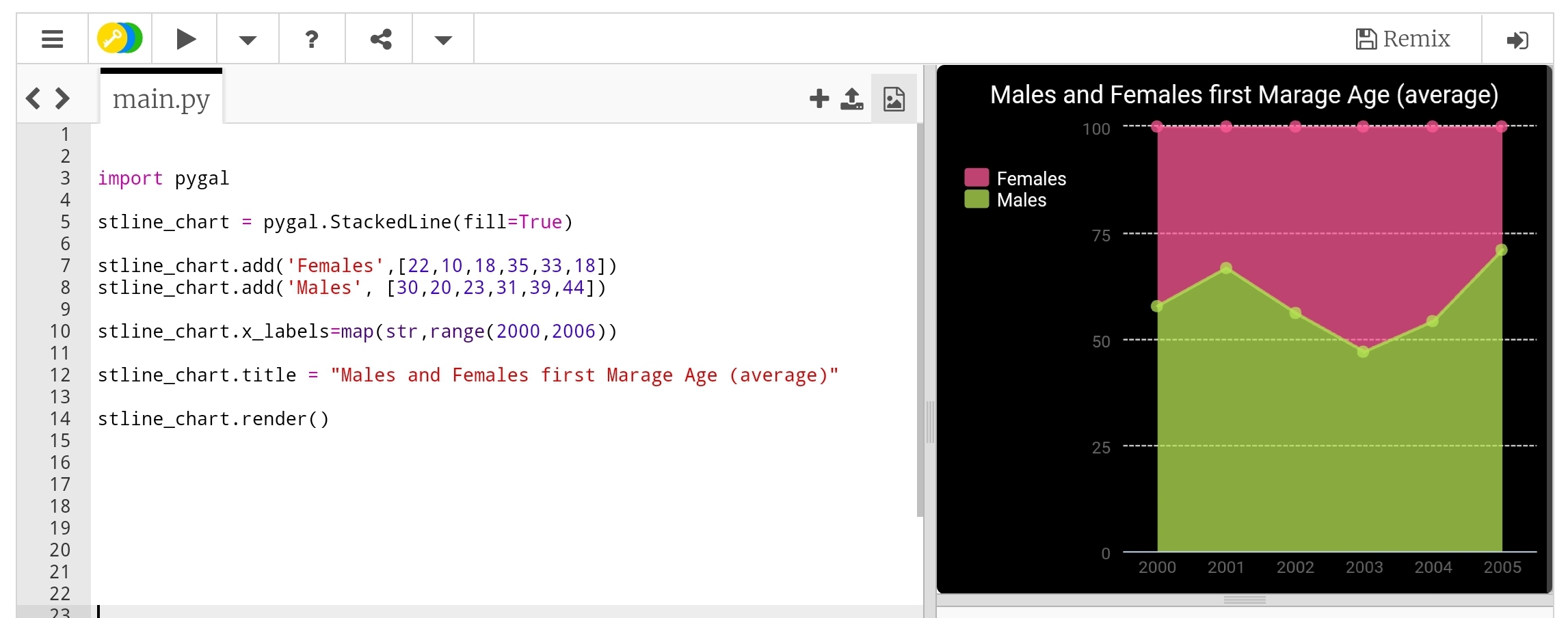
Line-chart: Stacked Line Stacked chart (fill) will put all the data in top of each other. Here is the code.
 |
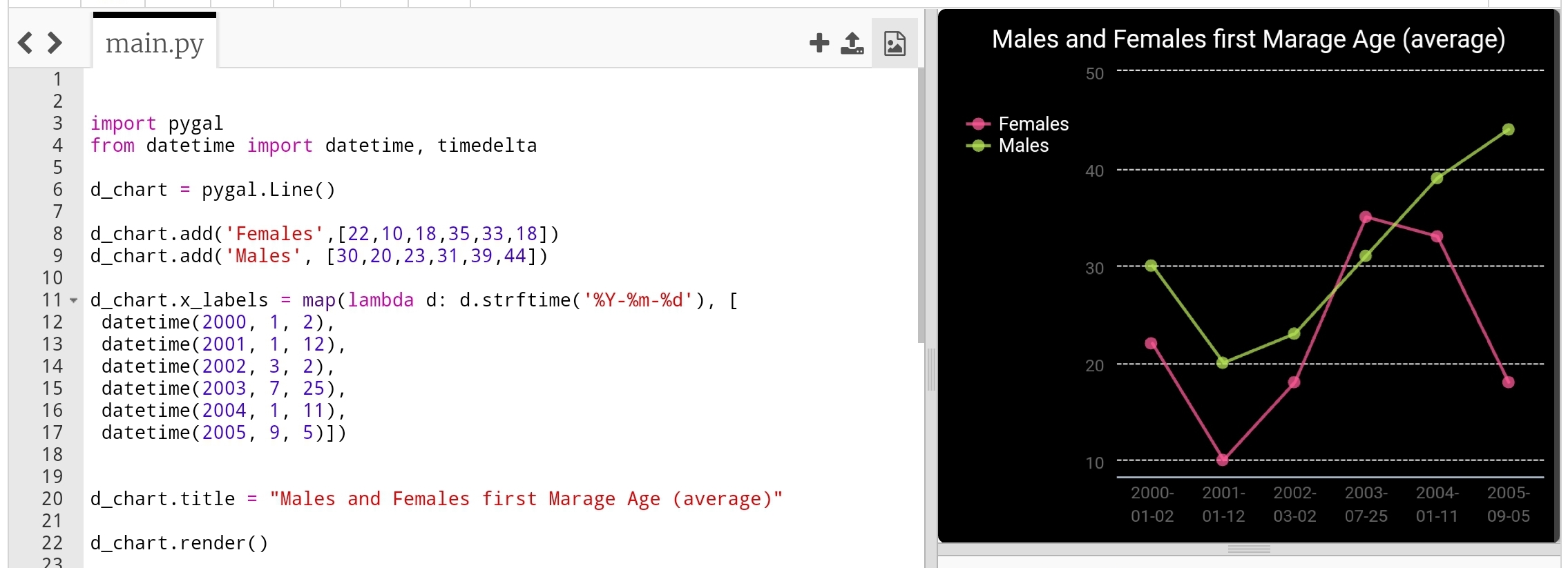
Line-chart: Time Line Last type just to add or format the x_lables of the chart, we can use lambda function to do this (we can use lambda function with any other chart types), here we will do two example, one is using full time/date and another just write the month-year as string and will use the lambda function to calculate second data-set of Tax’s based on the salary amount..
import pygal
from datetime import datetime, timedelta

d_chart = pygal.Line()

d_chart.add('Females',[22,25,18,35,33,18])
d_chart.add('Males', [30,20,23,31,39,44])

d_chart.x_labels = map(lambda d: d.strftime('%Y-%m-%d'), [
 datetime(2000, 1, 2),
 datetime(2001, 1, 12),
 datetime(2002, 3, 2),
 datetime(2003, 7, 25),
 datetime(2004, 1, 11),
 datetime(2005, 9, 5)])

d_chart.title = "Males and Females first Marage Age (average)"

d_chart.render()
 |
To give better example of using lambda function, we will say: we have a salaries for 6 years (May-2000 to May-2006) and a Tax of 0.25, we will let the lambda function to calculate the Tax amount for each salary. Here is the code ..
 # Using lambda to calculate Tax amount

import pygal

d_chart = pygal.Line()

d_chart.add('Salary', [550,980,1200,1800,2200,3500])

d_chart.add('Tax',map(lambda t: t*0.25, [550,980,1200,1800,2200,3500]))
d_chart.x_labels = map(str,(
  'May-2001','May-2002',
  'May-2003','May-2004',
  'May-2005','May-2006'))

d_chart.title = "Salary and Tax (0.25) payment in 6 years"

d_chart.render()
 |
Next we will talk about Histogram chart.
:: Data Visualization using pygal ::
| Part-1Bar-Chart | Part-2 Line Chart | Part-3 | Part-4 |
By: Ali Radwani
Python: Data Visualization Part-1
Learning : python, pygal, Data Visualization, Bar Chart
Subject: Data visualization using pygal library
pygal is a Data Visualization library in python to help us showing our Data as a graph. In coming several posts we will discover and learn how to use the pygal library in simple and easy configuration and style.
First we need to install pygal packeg, to do so write this:
pip install pygal
Now we need some Data to show, in this leson I am using aGalaxy Tab S4, so all the codes will be tested and applyed on trinket.io website [trinket.io alow us to use pygal package online so we don’t need to install it on our divice]
Type of Chart:
pygal has several types of charts that we can use, here we will list them all then in coming posts will use each one with simple data. So what we have:
Line, Bar, Histogram, XY, Pie, Radar, Box, Dot, Funnel, SolidGauge, Gauge, Pyramid, Treemap, Maps
Some of those charts has a sub-types such as in Bar char we have: Basic, Stacked and Horizontal. Also for each chart we can add a title and labels and we can use some styles.
So let’s start ..
First we will go for the Bar chart, and we have three sub-types as Basic, Stacked and Horizontal.
First chart: Bar chart:
In this part we will demonstrate the Bar Chart, it has three sub-types as Basic, Stacked and Horizontal.
We assume that our data is the Males and Female ages on first marage, the data will be as dictionary (later we will see how to customize each bar)
 # Basic Bar Chart using pygal

import pygal
bar_chart = pygal.Bar() # To create a bar graph object
bar_chart.add('Females', [22,25,18,35,33,18])
bar_chart.add('Males', [30,20,23,31,39,44])

bar_chart.title = "Males and Females First Marage Age"
bar_chart.x_labels=(range(1,6))

bar_chart.render()
Sample code for Basic bar chart |
Another sub-type in Bar chart is Horizontal-Bar, it is semelar to the Basic but as if fliped 90 degree. Here is the code ..
 # Horizontal Bar Chart using pygal

import pygal

# HorizontalBar()
HBar = pygal.HorizontalBar()
HBar.add('Females', [22,25,18,35,33,18])
HBar.add('Males', [30,20,23,31,39,44])

HBar.title = "Males and Females First Marage Age"

HBar.x_labels=(range(1,6))

HBar.render()
Sample code for Horizontal Bar chart |
Last sub-type in Bar chart is Stacked Bar were all data of each element will be in one bar. Here is the code and example..
 # Stacked Bar Chart using pygal

import pygal
# StackedBar()
stackedbar = pygal.StackedBar()
stackedbar.add('Females', [22,25,18,35,33,18])
stackedbar.add('Males', [30,20,23,31,39,44])
stackedbar.x_labels=(range(1,0))
stackedbar.title = "Males and Females First Marage Age"

stackedbar.render()
If we say we have another data-set as “age in First-Divorces” and we want to add this set to the Stacked Bar chart, then we first will create the data-set as:
stackedbar.add(‘Divorses’, [35,22,45,33,40,38])
and we will arrange the code line to be at top,middle or bottom of the bar. Here is the code..
Sample code for stacke Bar chart with Divorce data
|
Next we will talk about Line chart.
:: Data Visualization using pygal ::
| Part-1Bar-Chart | Part-2 | Part-3 | Part-4 |
By: Ali Radwani
Python: Password Generator
Learning : Python Project
Subject: Password Generator
In this function we will use the string library to select a random X numbers of letters as a Password length and print it on the screen.
First: We create a list of letters type l_type that hold the following: lowercase, uppercase, digits, punctuation and we will use the (random.choice) to select from the list.Then we will call the ‘password Generator’ pass_generator function torandomly select a letter based on the selected type, we will do so for a X time (X is the length of the password). In this project we will print the password on the screen, in real-life we can send the password via email or SMS. Here is the Code ..
# Password Generator Function

"""

Project: Python Password Generator
By: Ali Radwani
Date: Des-2020


    This function will use the string library to select a random X numbers of letters as a Password and print it on the screen.

    We create a list of letter type l_type that hold the following lowercase, uppercase, digits, punctuation and we will
    use the (random.choice) to select from the list, then we will call the 'password Generator' pass_generator function to
    randomly select a letter, we will do so for a X time (X is the length of the password). In this project we will print
    the password on the screen, in real-life we can send the password via email or SMS.

"""

import random, string

l_type = ["lowercase","uppercase","digits","punctuation"]

the_password =[]

def pass_generator(lt) :
    if lt =="lowercase":
        the_password.append(random.choice(string.ascii_lowercase))

    elif lt =="uppercase" :
        the_password.append(random.choice(string.ascii_uppercase))

    elif lt =="digits" :
        the_password.append(random.choice(string.digits))

    elif lt =="punctuation":
        the_password.append(random.choice(string.punctuation))

    return the_password


pass_length = int(input("\n   Enter the password Length: > "))


while len(the_password) < pass_length:
    pass_generator(random.choice(l_type))


print("\n   The New Generated Password is: ","".join(the_password))
To Download my Python code (.py) files Click-Here
By: Ali Radwani
Python: Spirograph
Learning : Python
Subject: Writing Python codes to generate Spirograph Art
Writing codes to draw always funny time for me, playing around numbers, changing attributes to get something new and changing it again .. and again ..
In this post, we will write a code to draw some spirograph shapes, easy and shrort code will do the job. So lets Start ..
We will use Python Library turtle to draw, and will write one Function call it def draw_it(h,sz,ang) will take three arguments: h:number of heads, sz: size, ang: angle, then we will call this function to draw our Spirograph Art.
Code:
First we will set-up the turtle:
# turtle set-up
import turtle
t = turtle.Turtle()
t.shape("dot")
t.speed(0)

t.hideturtle()
Then here is the main Function to draw our graphs
# draw_it() function

def draw_it(h,sz,ang) :
  c = 0
  while True :
    for i in range (h) :
      t.forward(sz)
      t.right(360/h)

    t.right(ang)
    c +=1
    if c >=360/ang :
      break
Then we call the function and pass the parameters, I tried several combinations and will include them in the source file in Download section. Here are some out-puts.
| Calling: t.pencolor(‘lightgray’) draw_it(19,19,19) t.pencolor(‘gray’) draw_it(17,17,17) t.pencolor(‘black’) draw_it(15,15,15) 
|

|
 |
Hope you enjoy, have fun and change the numbers to get new shapes ..
To Download my Python code (.py) files Click-Here

By: Ali Radwani
Python: Shares Speculation System – Part 7
Learning : Python, DataBase, SQL, SQlite3
Subject: Plan, Design and Build a Shares Speculation System
Project Card:
Project Name: Shares Speculation System
By: Ali
Date: 2.7.2020
Version: V01-2.7.2020
In this Part we will write the Function to Delete a Transaction from the System, and will write the last part of show_all_Transaction function.
First we will write a Function to Delete a Transaction, we have two types of Transactions “Buying” and “Selling” so the user will select the Transaction Type to delete.
1. Buying Transaction: If the user select to Delete a Buying Transaction, we will call show_all function to display all the Buying Transactions and the ask the user to Enter the ID of the record to be Deleted. Here is the Code ..
 |
Then we will print-out the Selected Transaction Details and ask the user to Confirm the Deleting action by Entering ‘Y’.
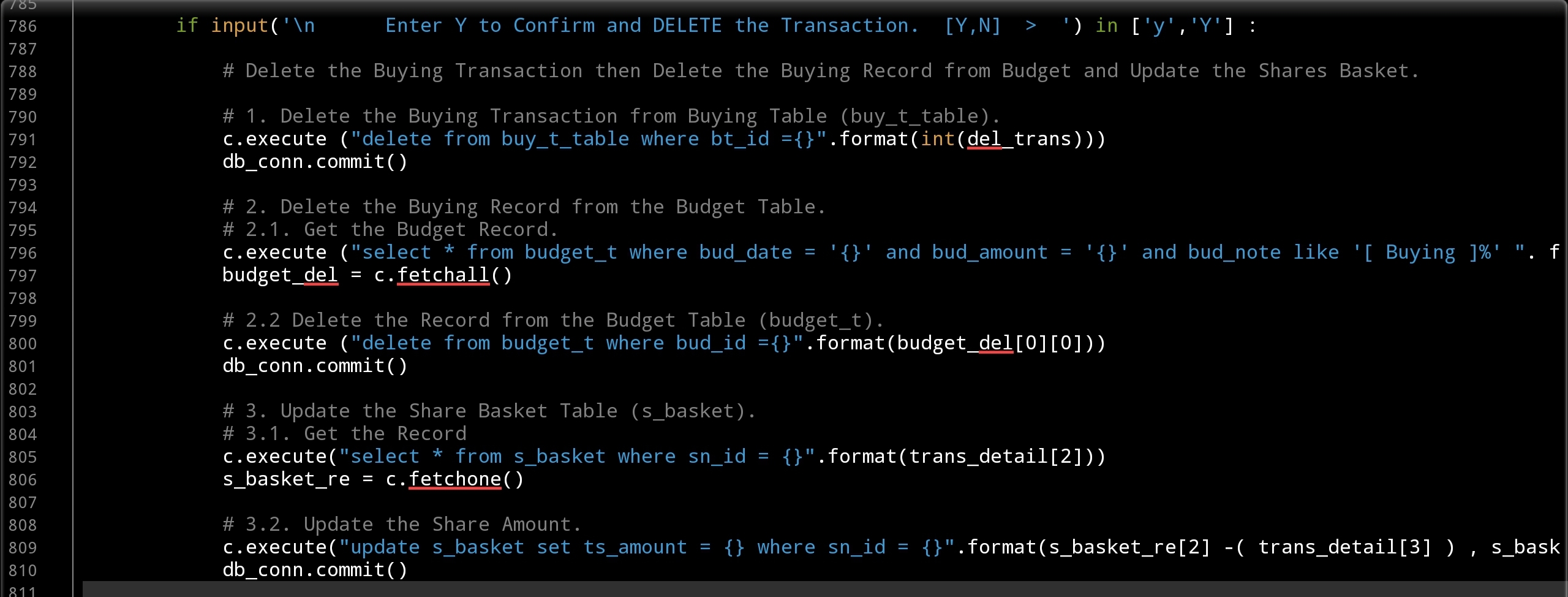
After Confirming we need to perform or to Aplay three parts of code:
1. Deleting the Buying Transaction from Buying Table (buy_t_table).
2. Deleting the Buying Record from the Budget Table.
3. Updating the Share Basket Table (s_basket).
For the “Update the Share Basket Table (s_basket).” we need to Subtract the amount of the shares from the Share Basket.
Here is the code for all three action..
 |
The Same actions will be taken if the user select to Delete a Selling
transaction. So if the user select “2. Selling Transaction:” we will call show_all function to display all the Selling Transactions and the ask the user to Enter the ID of the record to be Deleted and will display the Transaction Details. Here is the Code ..
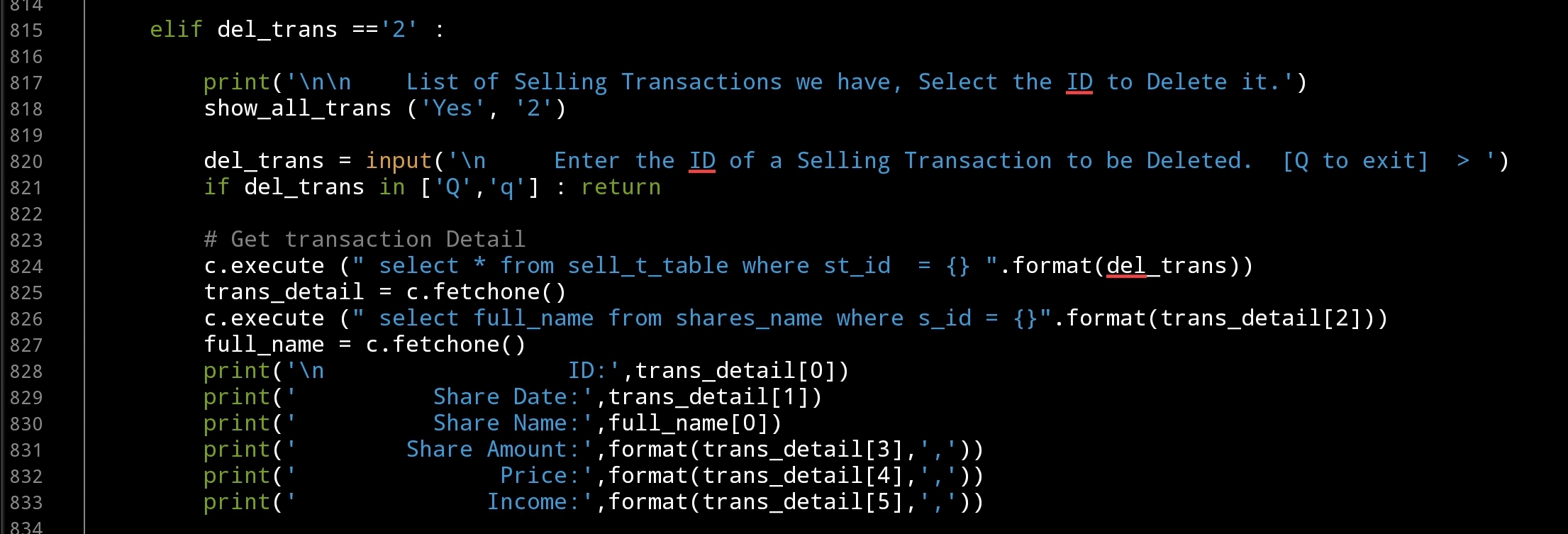 |
And will waite for the user to Confirm the Deleting action, then again three blocks of code will Delete and update records in our system, here are the code ..
 |
Now we finish the def del_trans(): Function to Delete a Buying or Selling Transaction and will work on the last part of def show_all_trans (inside = ‘No’, show=’3′): to Show/Display both Buying and Selling Transactions in one table format. To do so First we will RUN two SQL commands to ‘fetchall’ Buying and Selling Transaction… Here is the code ..
# Get All Sell Transactions Order by id desc
c.execute (" select * from sell_t_table where st_id > 0 order by st_id desc")
show_s_trans = c.fetchall()

# Get All buy Transactions Order by id desc
c.execute (" select * from buy_t_table where bt_id > 0 order by bt_id desc")
show_b_trans = c.fetchall()
Then we print-out the Table header as the following line:
print(“\n”,” “*11,”{:<9}{:<13}{:<30}{:<16}{:<11}{:<15}{}”.format(‘ID’,’Date’,’Share Name’,’SAmount’,’Price’,’Cost’,’Income’))
Then using a For loop we will print-out the transactions in same format of the table header .. Here is the full Code
 |
Last thing we will print the Totals of Investment, Incomes and the Net Profit.
print(" "*73,'Total Investment is: {:,}'.format(total_inv))
print(" "*76,'Total Incomes is: {:,}'.format(total_inc))
print(" "*75,"-"*30,"\n"," "*75,'   Net Profit is: {:,} '.format(total_inc - total_inv))
We Done with this Part ..
Coming Up: In the Next post we will write the Function to Edit a Transaction.
[NOTES]
1. Part-1 has no code file.
2. We are applying some basic Validations on some part of the code, and assuming that the user will not enter a messy data.
3. This Application Purpose for Saving Transactions and NOT for Desetion Making and Dose’t Have any type of AI or ML Model to Predict the Prices and/or Giving Sugestions on Buying or Selling Shares.
:: Shares Speculation System ::
| Part 1 | Part 2 | Part 3 | Part 4 | Part 5 |
| Part 6 | Part 7 | Part 8 |
All the code are available ..
To Download my Python code (.py) files Click-Here
By: Ali Radwani
Python: Shares Speculation System – Part 6
Learning : Python, DataBase, SQL, SQlite3
Subject: Plan, Design and Build a Shares Speculation System
Project Card:
Project Name: Shares Speculation System
By: Ali
Date: 2.7.2020
Version: V01-2.7.2020
In Part-5 we wrote the function to submit the Buying Transactions ..[Click to Read] also we wrote the section of showing/displaying the Buying records on the screen. In this part we will continu on same function to write the code to Save Selling Transaction and display them on the screen in Show all Transactions Function.
So First we will writing the code to Save/Submit Selling Transactions. Now let’s start coding ..
Before we start I want to focus on a one-line If statement that we will use to give the user the ability or the chance to Quit or Exit from the function in any time before saving the Transaction by just entering ‘Q’, here is the code: if s_s_id in [‘Q’,’q’] : return (s_s_id is the user input).
In def sell_share(): function we will display all the Shares Name (by calling show_share() function) on the screen and ask the user to select the ID for the share, then we will Run tow SQL statements to get some data about that share such as it Full Name and the amount of shares we have (from s_basket table), if the return value of the s_basket is None or we Don’t have any shares we can’t do any Sell process so we will Exit. Here is the code ..
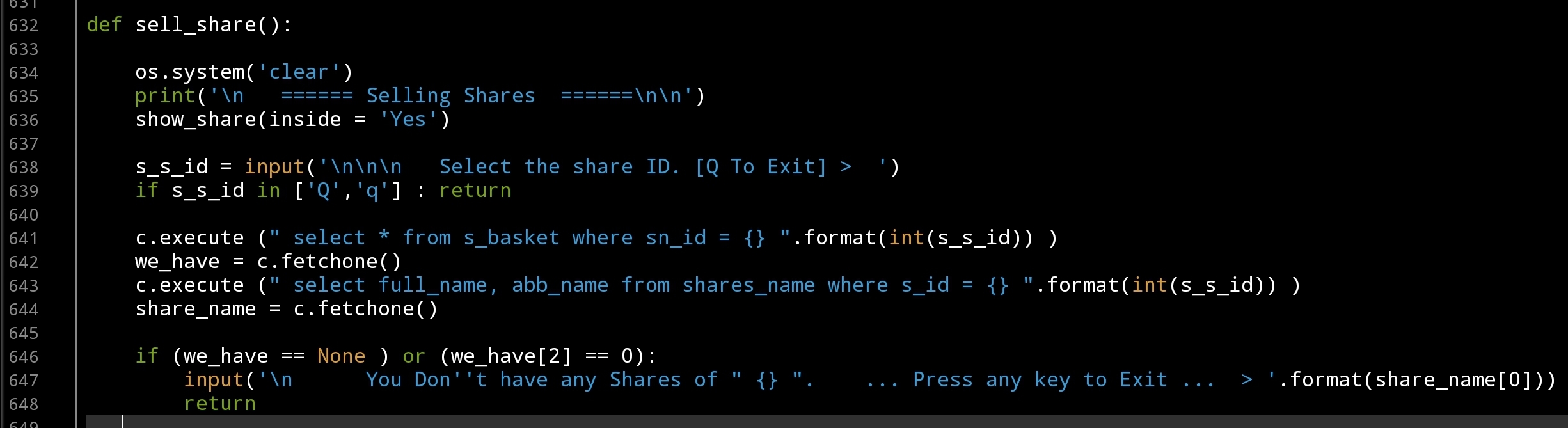 |
If we have shares, then we will print on the screen to show total amount of shares we have and will ask the user to Enter the new selling share information like the Date, The Amount of Selling and the Price, here is the code ..
 |
After that, we will ask the user to CONFIRM Saving by pressing ‘Y’, and will use the SQL Insert statement to submit the data to the Database, also to update the s_basket table…. Here is the code.
 |
Now we finish the def sell_share(): function and will start to writing the corresponding part to show the Selling Transactions in def show_all_trans ():, in this section of the code as we did to show the Buying Transactions we will RUN an SQL statement to get all selling transaction in the table, we will use the formatting to output the data as a table format. Here is the code
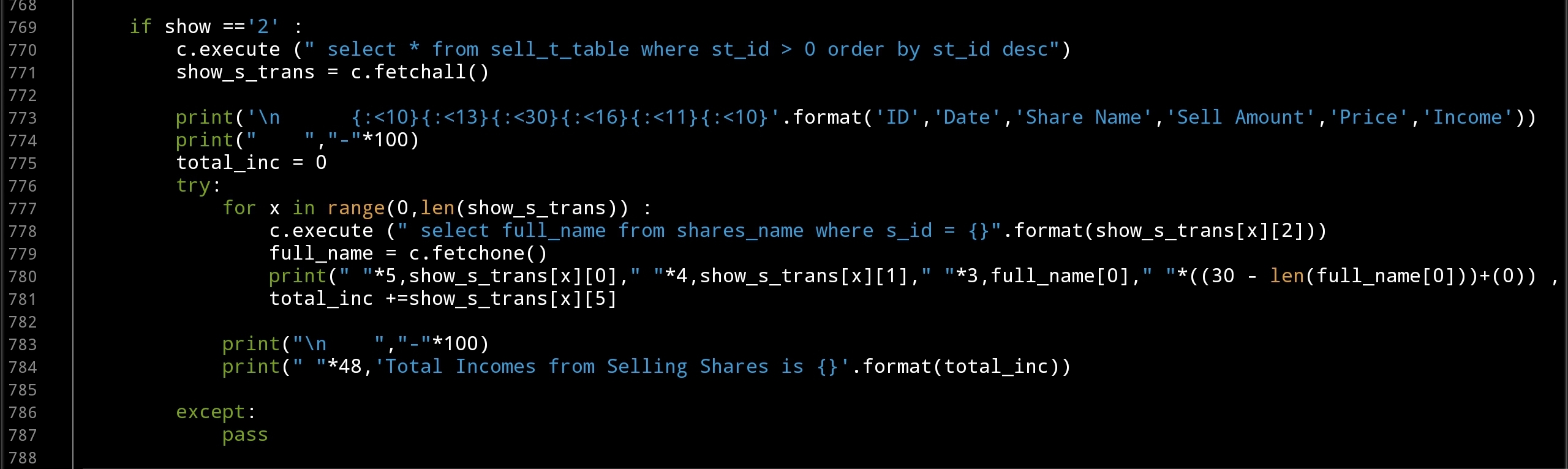 |
Coming Up: In Next part we will Write the Function to Delete Transactions from the System, also will write a code to Show All Transactions Buying and Selling in one Table.
[NOTES]
1. Part-1 has no code file.
2. We are applying some basic Validations on some part of the code, and assuming that the user will not enter a messy data.
3. This Application Purpose for Saving Transactions and NOT for Desetion Making and Dose’t Have any type of AI or ML Model to Predict the Prices and/or Giving Sugestions on Buying or Selling Shares.
:: Shares Speculation System ::
| Part 1 | Part 2 | Part 3 | Part 4 | Part 5 |
| Part 6 |
To Download my Python code (.py) files Click-Here
By: Ali Radwani

Taking pictures is not my main daily practices, but when i start playing with my camera, i really enjoy my self.
Thanks for visiting my Space..


 Ali's Photography Space...