Archive
Python: SQlite Project – P1
Learning : Python and Sqlite3
Subject: Sqlite3, Database functions ” Employee App” P1
One of the most important thing about writing applications is to save or store some Data for later use. This data could be simple as setting information or basic user information or can be a full records about something you need to keep, such as health data, or employee contacts or other projects data. To store a huge data we use a Data-Base, some databases are free and open to be downloaded from the internet, one of them is SQLITE3, in Python we can use the Sqlite for small and personal projects. In this post We will use the Sqlite to write a simple project for Employees.
As that our goal is to learn how to use Sqlite and python code to track our employees, and to keep every thing as simple as we can, we will collect only three piece of information that’s will be First Name, Last Name and the Salary.
Functions: In any application there must be several functions to complete our works and tasks that we need to perform, in our Employee System we need to perform these tasks:
1. Show the Data we have.
2. Insert New Employee.
3. Delete an Employee.
4. Editing Employee information.
5. Search for Employee.
This is the most important functions in any application, we will start working on the system and see how things goes on.
First we MUST Creating the data base and set the connection, here is the code to do this and we will call our database as test.db.
 # Create the database.

import sqlite3, os

db_conn = sqlite3.connect ("test.db")    # set the data-base name

c = db_conn.cursor()  # set the connection
To create the Employee table we will write this code and run it only ONE Time.
 # Create the Employee Table.

def create_tabels_() :    # to create tables.

    # employee table
    sql_s= "CREATE TABLE if not exists emp (emp_id INTEGER PRIMARY KEY AUTOINCREMENT, fname text,lname text, pay integer)"

    c.execute(sql_s)
    db_conn.commit()
    print(input('\n   .. Employee TABLE created..  Press any key .. '))
Since we are learning and playing with our code, we may need to drop the table for some reasons, so here is the code to Drop the table we will re-call the function if we need-so.
 # Function to DROP a Table.

def drop_table(tname):

    c.execute("DROP TABLE {}".format(tname))
    db_conn.commit()
Now after the creating of the Table we need to feed it with some data so we can see the records. To do so we will run a function called dummy_data.
 # Function to INSERT Dummy data into the Employee Table.


def dummy_data():
    """
        This Function will Insert 4 Dummy rows in the temp table, first record will set the emp_id to 1, the other
        record the emp_id will be AUTOINCREMENT.

        This Function to be run one time only.

    """
# First record will have the emp_id set as 1, other records will be AUTOINCREMENT.
    c.execute ("INSERT INTO emp (emp_id, fname,lname,pay) VALUES(:emp_id, :fname,:lname, :pay)",{"emp_id":1,"fname":"James","lname":"Max", "pay":"2000"})
    c.execute ("INSERT INTO emp (fname,lname,pay) VALUES(:fname,:lname, :pay)",{"fname":"Robert","lname":"Ethan", "pay":"1500"})
    c.execute ("INSERT INTO emp (fname,lname,pay) VALUES(:fname,:lname, :pay)",{"fname":"Jack","lname":"Leo", "pay":"890"})
    c.execute ("INSERT INTO emp (fname,lname,pay) VALUES(:fname,:lname, :pay)",{"fname":"Sophia","lname":"Jack", "pay":"320"})
    db_conn.commit()

    print(input('\n  Dummy Data has been INSERTED\n\n  .. Press any key .. '))
Main Menu To use the application we need a Menu to jump between the tasks in the app. Here is the Main-Menu, it will return the user selection.
 # The Main Menu.

def menu():
    os.system("clear")
    print("\n\n      ::: The Menu :::")

    print("   1. Show the Data.")
    print("   2. Insert a New  Employee.")
    print("   3. Delete an Employee.")
    print("   4. Edit/Change employee data. ")
    print("   5. Search.")
    print("   6. Setting.")
    print("   7. Data-Base Information.")
    print("   9. Exit. ")

    uinput = input("\n     Enter a selection: ")

    return uinput
Here is the loop for the Menu and the user selection until (9. Exit) will be selected.
 # The Main Menu.

while True :

    uinput = menu()

    if uinput == '1' :
        show_data()

    elif uinput =='2' :
        insert_emp ()

    elif uinput =='3' :
        delete_record()

    elif uinput =='4' :
        print("Edit")

    elif uinput =='5' :
        search_emp()

    elif uinput =='6' :
        setting_menu()

    elif uinput =='7' :
        #print("DataBase Information.")
        get_db_info()

    elif uinput =='9' :
        break

    else: # If the user select something out of the menu (Numbers or Character)
        print("  You need to select from the list")

|
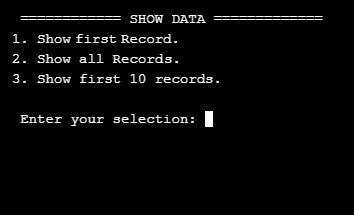
Now we remember that we run the dummy_data() function (above) so we have four records in our Employee Table, so if we want to see the records we will select first option in the Main Menu: 1. Show the data. this will call a function called show_data() as in this screen shot.
|
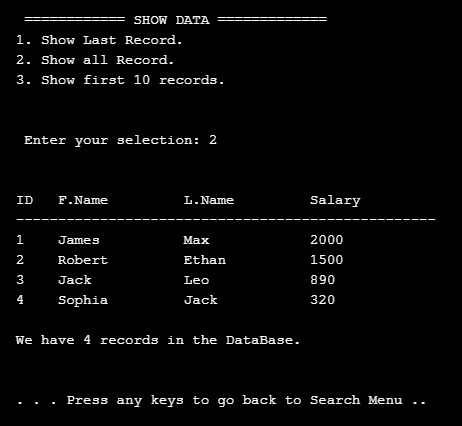
The screen prompt will wait for an input of the number that present the task we want. So if we select No. 2 then we will get all the records in the table as this .. .
|
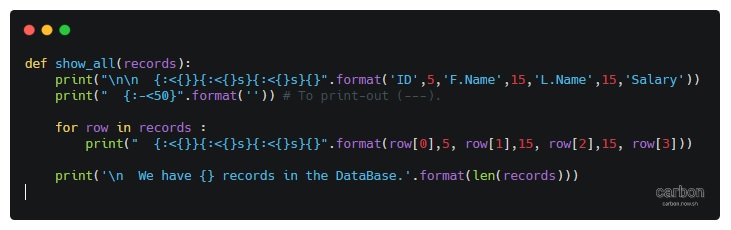
And here is the code behind this function..
|
Done with Part 1, in part 2 we will cover more functions to Search and Add records to the Table.
To Download my Python code (.py) files Click-Here
 Follow me on Twitter..
By: Ali Radwani
Python: My Fake Data Generator P-6
Learning : Python: Functions, Procedures and documentation
Subject: About fake data P-6: (Fake Food List)
In the last post the function we create def get_animal_name() get it’s data or let’s say select a random animal names from a dictionary data-set after loading the data from json file through URL, and I upload the Python functions on my Download Page so you can use it. Also I am working on standardizing my data-sets json file and adding information key for each file.
In this post we will write the code to print-out a random selected Food. The function will ask the user if he/she wants random list of Fruit, Vegetables or Meals. The Food data-set is growing up and i am adding more items to it, from the last update, the Meals contains: breakfast from UK, France and USA and Planning to add Dinners and Lunches recipes from more countries.
Let’s Start .. First we will load the json file, here is the code..
 #Calling and loading the json data-set file

 #Importing libraries
import json , requests, random


fname = "https://raw.githubusercontent.com/Ali-QT/Ideas-and-Plan/master/foods.json"

def call_json_url(fname):
 #    """
    Function to load the json file from URL.
    Argument : str  : fname
    return   : dict : data
    """
    req = requests.get(fname)
    cont = req.content
    data = json.loads(cont)
    return data  # retuning the data-set

data = call_json_url(fname)
Now, we have several other functions in this application, first we will list them and then we will see the code in each one.
So here is the list:
- get_type_index (adata,akey,subkey,aval)
Function to return a list with index numbre of akey (atype).
Argument: dic : adata, str : atype
Return : list : ind_list - get_f_or_v(adata,atype)
Function to print-out the Fruits or Vegetables as the user ask for.
Argument: dict : adata, str : atype - get_meals (adata)
Function to print-out the Meal as user will select. The user can select the Type of Meal: Breakfast, Dinner and Lunch. Also the user can select the countries of the Meals.Argument: dict: adata
- def mmenu()
This is the main menu to help the user to select whatever he/she want to be ptint-out.
Main Menu: Very short easy menu of four selection number as following:
 #The menu function


def mmenu() :
    """
        This is the main menu to help the user to select whatever want to be ptint-out.


    """
    print('\n\n  In the Food data-set we have several keys, here they are:')
    print('  Fruits, Vegetables and Meals. This application will select a random items\n  of your selection to print it on the screen.')
    print('  also you can select the number of items you want.\n ')
    print('  First, What type of Food do you want? ')
    print('   1. Fruits.')
    print('   2. Vegetables.')
    print('   3. Meals')
    print('   4. To exsit enter Q or q')

    ft = input('  Select one item:')
    if ft =='1' :
        get_f_or_v(data,'1')

    elif ft =='2' :
        get_f_or_v(data,'2')
    elif ft == '3' :
        get_meals (data)
    elif ft in ['q','Q']:
        print('Close')
        return 'q'
    else :
        print('\n   We only have three items')
If the user select (1 or 2 ), then we will call the get_f_or_v(data,the user selection), the first argument is the data-set, the second one is the user selection between Fruit, Vegetables or Meal. Here is the function ..
 #Calling and Menu

def get_f_or_v(adata,atype):
"""
       Function to print-out the Fruits or Vegetables as the user ask for.
       Argument:   dict   :  adata
                     str  :  atype
    """
    if atype == '1': ft = 'fruits'
    else: ft = 'vegetables'
    fts = len(adata[ft])
    while True :
        s = input('\n  You select {}, we have list of {} {}, So how many\n  {} you want to print: '.format(ft,fts,ft,ft))

        if int(s) < fts :
            break
        else :
            print('  Enter a number in range 0 to {}.'.format(fts))
    print('Random {} names are:'.format(ft))
    for x in range (int(s)) :
        ind = random.randint(1,fts)
        print('   ',adata[ft][ind]['name'])

    input('\n    ... Press any key ... ')
Last function we will see here is to get random Meals, I am loading the data from a json file that i create, for-now we have a breakfast only from UK, USA and France. If the user select the Meals from first menu, then another short menu will pop-up here it is ..
 #Calling get Meals

def get_meals (adata) :
	    """
	        Function to print-out the Meal as user will select. The user can select the Type of Meal: Breakfast, Dinner and Lunch.
	        Also the user can select the countries of the Meals.

	        Argument:    dict: adata
	    """

    ft = 'meals'
    fts = len(adata[ft])

    while True :
        s = input('\n  You select {}, we have list of {} {}, So how many\n  {} you want to print: '.format(ft,fts,ft,ft))

        if int(s) < fts :
            break
        else :
            print('  Enter a number in range 0 to {}.'.format(fts))

    print('\n  For Meals we have Breakfast from three counties:')
    print(' 1. UK.')
    print(' 2. USA.')
    print(' 3. France.')
    co = input(' Select a country:')
    if co == '1' : co ='UK'
    elif co == '2' : co ='USA';
    else : co ='FR'

    ind_list = get_type_index(adata,ft,'country',co)

    for x in range (0,int(s)):
        ind = random.choice(ind_list)
        print(adata[ft][ind]['name'],'is a ', adata[ft][ind]['time'],'from ',adata[ft][ind]['country'])

    input('\n    ... Press any key ... ')
Notes that in def get_meals() I use a hard-coded keys for the menu. I am working on a function to read any json file and get a list of all keys and sub-keys in any level, then giving the user the ability to walk-through all the data. This will be in coming post.
:: Fake Function List ::
| Function Name | Description |
| Color | To return a random color code in RGB or Hex. |
| Date | To return a random date. |
| Mobile | To return a mobile number. |
| Country | To return a random country name. |
| City | To return a random City name. |
| ID | To return X random dig as ID. |
| Time | To return random time. |
| Car’s Brand | |
| file_name | file name: list for fake file names. |
| Creatures | Random animal names of a certain type: Mammals, Birds, Insect, Reptiles |
| Foods | To return a random list of foods |
| Done |
By: Ali Radwani
Python: My Fake Data Generator P-4
Learning : Python: Functions, Procedures and documentation
Subject: About fake data P-4: (Fake Dates)
The fourth function of our Fake Data Generator will be the date function, from it’s name this one will generate a FAKE Date in yyyy/mm/dd format. The function will have one argument (go_back) for range, the max-limit is current date (today) and mini-limit will be (1/1/1900), if the user did’t pass any thing for (go_back) then the range is (from current to 1/1/1900) and if the user pass (X) then the range will be ((current date) to current – X_YEARS). Also in dates we need to take care of Leap Years, In leap year, the month of February has 29 days instead of 28. To solve this in our function we can use two ways, first one (the easy way) we know that we are generating a random numbers for months and days; so we can say if the month is February, then days can’t be more than 28. But if we want this thing to be more realistic we need to add more conditions such as :
1. The year can be evenly divided by 4.
2. If the year can be evenly divided by 100, it is NOT a leap year, unless the year is also evenly divisible by 400. Then it is a leap year (February has 29 days).
'''
10/12/2019
By: Ali Radwani
To get Fake Date.

'''

import random, datetime

def fdate(go_back = 0):
    """
        ###   Fake Date Generator V.01  ###
        Date: 10.12.2019, By: Ali Radwani

        This function will generate and return a fake date in string format.
        The function accept one int argument go_pback.
        If go_past = X, and current year - X is less than 1900 then
        the range of FAKE time will be (current year to current year - X).

        If NO argument passed to the function, then default limit set to 1900.

        Default limits:  Date are from current (today) and back to 1900.

        Import: random, datetime

        Argument: int : go_back to set the upper limit of the date

        Return: str: dd/mm/yyyy

    """

    # Get current year.
    c_year = datetime.datetime.today().year

    # set the maximum year limit.
    if go_back > 0 :
        max_y_limit = c_year - go_back
    else :
        max_y_limit = 1900

    if max_y_limit < 1900 :
        max_y_limit = 1900

    yy = random.randint(max_y_limit, c_year)

    mm = random.randint(1,12)

    if mm in [1,3,5,7,8,10,12] :
        dd = random.randint(1,31)
    elif mm in [4,6,9,11]:
        dd = random.randint(4,30)

    else :
        # IF the month is February (2)
        if (yy % 4 == 0 ) or ((yy % 100 == 0)and (yy % 400 == 0)):
            # It is a leap year February has 29 days.
            dd = random.randint(1,29)

        else : # it is NOT a leap year February has 28 days.
            dd = random.randint(1,28)

    d = (str(dd) +'/'+ str(mm)+'/' + str(yy))

    return (str(dd) +'/'+ str(mm)+'/' + str(yy))


# To check the output.
for x in range (30):
    print(fdate())
<
Here is a screenshot of the code, also available on the Download Page . . .

|
:: Fake Function List ::
| Function Name | Description |
| Color | To return a random color code in RGB or Hex. |
| Date | To return a random date. |
| Mobile | To return a mobile number. |
| Country | To return a random country name. |
| City | To return a random City name. |
| ID | To return X random dig as ID. |
| Time | To return random time. |
| Car’s Brand | |
| file_name | |
| Done |
By: Ali Radwani
Python: My Fake Data Generator P-3
Learning : Python: Functions, Procedures and documentation
Subject: About fake data P-3: (Fake Time)
The third function of our Fake Data Generator will be the Time function, Fake Time is very easy to implement, all we need is call random function two times, one for minutes (0,60) and another for hours (0,12 or 0,23) based on the argument s (style).
Let’s start: First we need to Import random, the function def ftime() will take one integer argument (s) represent the time style.
If the s = 12 then the time format will be regular start from 1 and end at 12, the number will be generated randomly using random.randint, also we will select random.choice([‘ AM’,’ PM’]) to be added to the time and return it back.
If the s = 24 or nothing been passed then the time format will start from 0 to 23 (Military Time Format). Another random integer (0,60) to be generated as minutes.
'''
  Fake Data Generator
  Function for:  Fake Time
  Ali Radwani
  11/12/2019
'''

import random

def ftime(s = 24):

    """
        ###   Fake Time Generator   ###
        Date: 11.12.2019, By: Ali Radwani

        This function will generate a fake time, the
        function accept one int argument s.

        If s = 12 function return Regular time format,
        If s = 24 function return military time format
        (the 24 format system).

        If No argument passes then default time system
        format will be 24 system (military time)

        Argument: int : s, if No argument then default is 24.

        Return: str : ftimes
    """

    m = str(random.randint(0,60))
    if (len(m)) == 1 :
            m = '0' + str (m)

    if s == 12 :
        h = str(random.randint(1,12))
        if (len(h)) == 1:
            h = '0' + h
    else :
        h = str(random.randint(0,23))
        if (len(h)) == 1:
            h = '0' + h

    ftimes = str(h) + ':' + str(m)
    if s == 12 :
        ftimes = ftimes + random.choice([' AM',' PM'])

    return ftimes

# Testing the function.
for x in range (10):
    print (ftime(12))
:: Fake Function List ::
| Function Name | Description |
| Color | To return a random color code in RGB or Hex. |
| Date | To return a random date. |
| Mobile | To return a mobile number. |
| Country | To return a random country name. |
| City | To return a random City name. |
| ID | To return X random dig as ID. |
| Time | To return random time. |
| Car’s Brand | |
| Foods | |
| Done |
By: Ali Radwani
python: Fake Data-set
Learning : Python to generate fake data-set
Subject: About Fake data library
Most of the time when we working on a project, we need to test our procedures and functions with some data. In most cases we need just dummy data such as dates, names, address .. and so-on.
Last week, I was reading on the net and i fond an article about generating fake data using a library in PHP (PHP is a Computer Programming Language) so I start to find if we have one in Python! and the answer is YES there is a library that we can import called ‘Fake’. I start to work on it and discover it. This post is about the Fake Data-set Library.
The library called ‘Faker’ and we need to install it in our python environment, i use : pip install Faker to install it. In it’s documentation we can use some properties like : name, city, date, job .. and others. So if we want to generate a fake name we write this:
# Using lib:fake to generate fake name

print(fake.name())
[Output]: Victoria Campbell
Here is a screen-shot from Jupyter notbook screen.

|
To generate more than one name we can use for loop as:
# Using lib:fake to generate (X) fake name

for x in range (10) :
    print(fake.name())
[Output]: Jared Hawkins
Michael Reid
Ricky Brown
Mary Tyler
Kristy Dudley
Karen Cain
Jennifer Underwood
Desiree Jensen
Carla Rivera
Brandon Cooper
Other properties that we can use are :address, company, job, country, date_time and many other, and with all this we can create a data-set full of fake data.
So if we want to create a fake data-set contain:
Name, Date-of-birth, Company, Job, Country as one person data we will use it like this:
# Using lib:fake to generate (X) person fake data
# Data-set contain: Name, Date-of-birth, Company, Job, Country
p_count = 1
for x in range (p_count):
    print('Name:',fake.name())
    print('DOB:',fake.date())
    print('Company:',fake.company())
    print('Job:',fake.job())
    print('country:',fake.country())


[Output]:
Name: Crystal Mcconnell
DOB: 2002-09-30
Company: Bailey LLC
Job: Insurance underwriter
country: Pakistan

|
Now if we want to store the person data in a dictionary type variable and use it later, we can do this as following:
# Using lib:fake to generate (X) person fake data and store it in a dictionary
people_d ={}
p_count = 5
for x in range (p_count):
    ID = x
    people_d[ID]={'name':fake.name(),'date':fake.date(),'company':fake.company(),'job':fake.job(),'country':fake.country()}

# To print-out the people_d data-set.
for x in people_d :
    print(people_d[x])
Just in case we want a complicated ID we can use a random function (8-dig) integer, or combining two fake numbers such as (fake.zipcode() and fake.postcode()) just to make sure that we will not have a duplicate ID.
Using fake library will help a lot, and it has many attributes and properties that can be inserted in a data-set. For more information on this document you may read it here: Fake Library
To Download my Python code (.py) files Click-Here
By: Ali Radwani
Python: Machine Learning – Part 3
Learning :Python and Machine Learning Part 3
Subject: Implementation and saving ML-Model
After creating a data-set and use it to train a ML model and make sure that it works fine and give a height accuracy predictions (Click here to read: Python and Machine Learning Part 2 ), we may or say we need to keep this model trained and re-use it on any actual data. In many real-life ML to training the model may take time with huge train data in image recognition or voice recognition models, so we need to keep the model trained even if we exit the application. To do this in sklearn we will use the “Model persistence” document page and use the joblib serialization.
First we need to import joblib , also import so to print out the file name and the path, we will use two functions in joblib (dump and load) in save_trained_model we will use the dump. Her is the code.
 # Function to save a trained ML-Model

  import joblib, os  # To Import  joblib and os

  def save_trained_model(model_name):

      print('\n  You select to save the trained ML model.')
      ml_name = input('  Enter a file name: ')
      joblib.dump(model_name, ml_name)
      print('\n  --> ML Model been saved.\n')
      print('   File Name is :',ml_name)  # To print-out the file name
      print('   File Path is :',os.path.abspath(ml_name))  # To print-out the file path
      print('\n\n Do you want to save the ML trained Model? (Y,N): ' )
      if input('') in ['y','Y'] :
        save_trained_model(ML_trained_model)
Now after we save our trained ML-Model we want to load it and use it in our ML program without training our machine. I will use the function new_test_data() from part 2 and pass the ML trained model to it. And to do this, first we need to load the trained ML-Mode. So let’s do it.
 # Function to load trained ML-Model

def load_ML_Model(ML_filename):
    the_trained_model= joblib.load(ML_filename)

    return the_trained_model

# we call the function in the main application code.
ML_model = load_ML_Model(ML_t_model_filename)
And now we will call our new_test_data() function and pass ML_model to see the prediction.
 # Function to load trained ML-Model


def new_test_data(ML_model):
    print('\n\n====================================================')
    print('---------  START PREDICTION  for New Data Set ---------')
    print('\n   In this function a new data set will be generated, ')
    print('  and a trained ML-Model for "mouse on the coordinate plane" ')
    print('  will be loaded from the disk. So we will not train the Model.')
    #print('  So we will not train the Model. ')
    #print('  will use the IF loops.')

    new_data_size = 1000
    new_data_range = 100
    print('\n\n  The new data range is {}, and the new data size is {}.'.format(new_data_range,new_data_size))

    # generate new data
    new_test_data1= []
    for x in range (new_data_size):
        new_test_data1.append([round(random.uniform(-new_data_range,new_data_range),2),round(random.uniform(-new_data_range,new_data_range),2)])

    print('\n  This is the prediction for the New Data set..\n')
    # Do prediction using ML_model.
    prediction = ML_model.predict(new_test_data1)
    cot = 0
    # check the predictions accuracy .
    for i in range (len(prediction)) :
        if prediction[i] =='Up_r':
          if ((new_test_data1[i][0]) > 0 and (new_test_data1[i][1]) > 0) :
            cot = cot + 1
        elif  prediction[i] =='Up_l':
          if ((new_test_data1[i][0])  0) :
            cot = cot + 1
        elif  prediction[i] =='D_r':
          if ((new_test_data1[i][0]) > 0 and (new_test_data1[i][1]) < 0) :
            cot = cot + 1
        elif  prediction[i] =='D_l':
          if ((new_test_data1[i][0]) < 0 and (new_test_data1[i][1]) < 0) :
            cot = cot + 1

    print('\n  We count {} correct prediction out of {} Instances.'.format(cot,(new_data_size)))
    print('\n  The Accuracy is:',round((cot/len(prediction))*100,3),'%')

|
To Download my Python code (.py) files Click-Here
Python: Machine Learning – Part 2
Learning :Python and Machine Learning Part 2
Subject: Requirements, Sample and Implementation
Machine Learning Implementation : In the previous post (Click to Read: Python and Machine Learning Part 1) we start to learn about the ML Machine Learning and we use the sklearn model with Iris data-set. In this post we will generate our own data-set and tray to pass it to the ML model and find-out if the result are satisfying our needs.
First of all let’s talk about the data we want to collect, since we are doing tests and we can’t do anything on the accuracy checking part, I will select a very easy data so we can make sure that IF our ML-model select the right labels. So I will write a function to generate numbers (two pairs) positives and negatives to present the mouse location on the coordinate plane and the labels will be:
Up_r = Up Right, Up_l= Up Left,
D_r= Down Right, D_l= Down Left
So we have (4) classes 20 Instances in each, that’s 80 Instances in total.
The data will be passed into get_test_train_data() function, and it will return train, test data and labels, then we will train the model using the train_data() function, after that we will run the model on the test data to see if the model succeed in predicting the correct labels.
In this post I will cover the function that will generate the data and converting the data set into object data-set so we can use it in sklearn model without changing our code in part-1. I will use same data-set names as in sklearn Iris data-set.
Also we will write some information or say summary about the data we have and classes. So let’s see this part first..
   ## Data Set Characteristics :::
      Creator: Ali Radwani 26/11/2019

     Summary:
              This function will generate a dataset for Machine Learning for
              test and learning purpose. Numeric x,y represent the position
              of the mouse on the coordinate plane.
              Up_r = Up Right, Up_l= Up Left, D_r= Down Right, D_l= Down Left

     Number of Instances: 80 (20 in each of four (4) classes)
     Number of Attributes: 2 numeric (x,y), predictive attributes and the class.
     Attribute Information:
                 x (Position)
                 y (Position)
              class:
                 Up_r
                 Up_l
                 D_r
                 D_l
Once we create the data-set object we can append this information as description, adding descriptions to your data and applications is a good habit to learn and to have.
What is our data-set: From the summary part above we can see that we need to write a function to randomly generate two float number ranged from (-N) to (+N), N is our data_range. We assuming that these two numbers (pairs) are x, y of the mouse on the coordinate plane, so depending on each pairs (if it is negative or positive) we will add the corresponding class name, at the end we will have a list with tree values: x,y,label. Let’s see the code .
 # Function to generate data-set

  def data_set_generator():

      d_size = 400     # data-set size
      d_range = 200    # Data-set range
      data_list=[]
      nd1=[]

 # FOR loop to generate the random float numbers
      for x in range (d_size  ):
          nd1 =([round(random.uniform(-d_range,d_range),2),round(random.uniform(-d_range,d_range),2)])

 # Here we append the x,y pairs with labels.
          if nd1[0] > 0 and nd1[1] > 0 :
            data_list.append([nd1[0],nd1[1],'Up_r'])
          if nd1[0]  0 :
            data_list.append([nd1[0],nd1[1],'Up_l'])
          if nd1[0] > 0 and nd1[1] < 0 :
            data_list.append([nd1[0],nd1[1],'D_r'])
          if nd1[0] < 0 and nd1[1] < 0 :
            data_list.append([nd1[0],nd1[1],'D_l'])


 # We use shuffling the data-set to mix the data more
      for x in range (5):       # To mix the data
          random.shuffle(data_list)

      return data_list   # Return the data-set
 |
During writing the Machine Learning ML code to use Iris data-set, the data itself, the labels and other parts was called as an object from the main data-set. So here we need to create several sets of our data then we append them all to-gather. First I will split the data into two sets, one for the data and one for the targets(labels).
 # Function to prepare data-set

def dataset_prepare(the_dataset):
      '''
      input: dataset
      The function will split the dataset into 2 sets, one for data (data_set)
      and one for labels (target_set)

      '''
      target_set = []
      data_set = []

      for x in range (len(the_dataset)) :
          data_set.append([the_dataset[x][0],the_dataset[x][1]])
          target_set.append([the_dataset[x][2]])

       return data_set, target_set
prepare data set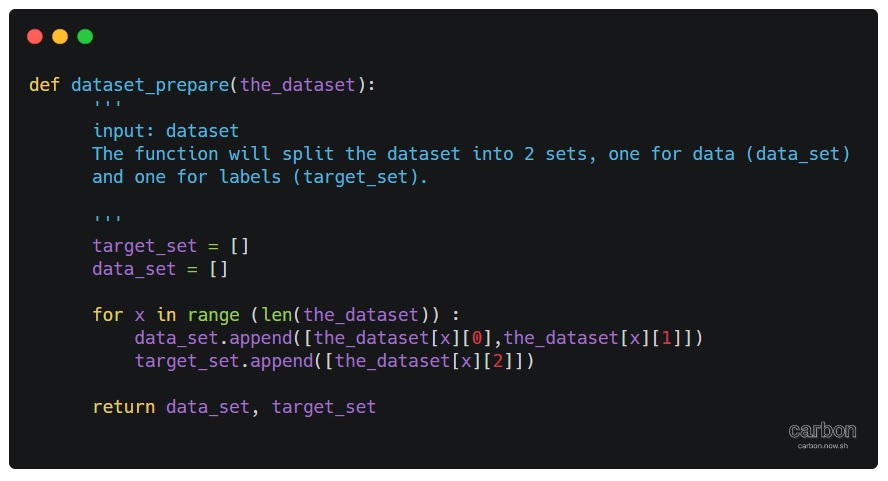
|
With above two functions we can now train our model and test it to see accuracy predictions. To make sure again that we can let our ML model to predict more new data-set, I create another function that will generate another set of data, I create this function to see try or say to be confident that YES the model is working. So let’s see the code. .
 # Function to create New dataset

def new_test_data():
    print( '\n\n====================================================' )
    print( '---------  START PREDICTION  for new data set ---------' )
    print( '\n  This is new data set, not the test one.. so there is ' )
    print( '  no labels to do comparing and to get the accuracy we ' )
    print( '  will use the IF loops.' )
    new_data_size = 5000    # data-set size
    new_data_range = 300   # data-set range
    print( '  The new data range is {}, and the new data size is {}.'.format( new_data_range, new_data_size ) )

    new_test_data1 = []
     # To generate the new data set.
    for x in range( new_data_size ):
        new_test_data1.append( [round( random.uniform( -new_data_range, new_data_range ), 2 ),
                                round( random.uniform( -new_data_range, new_data_range ), 2 )] )

    print( '\n\n  This is the prediction for the New Data set..\n' )

    prediction = clf.predict( new_test_data1 )
    cot = 0

    # Here we start counting the accuracy
    for i in range( len( prediction ) ):

        if prediction[i] == 'Up_r':
            if ((new_test_data1[i][0]) > 0 and (new_test_data1[i][1]) > 0):
                cot = cot + 1
        elif prediction[i] == 'Up_l':
            if ((new_test_data1[i][0])  0):
                cot = cot + 1
        elif prediction[i] == 'D_r':
            if ((new_test_data1[i][0]) > 0 and (new_test_data1[i][1]) < 0):
                cot = cot + 1
        elif prediction[i] == 'D_l':
            if ((new_test_data1[i][0]) < 0 and (new_test_data1[i][1]) < 0):
                cot = cot + 1

    print( '\n  We count {} correct prediction out of {} Instances.'.format( cot, (new_data_size) ) )
    print( '\n  The Accuracy is:', round( (cot / len( prediction )) * 100, 3 ), '%' )
Wrapping-up: In this post we wrote a function to generate a data-set and split it into two parts one for training and one for testing. Then we test the model with fresh new data-set that been generated via another function. Here is a screenshot of the final result.

|
To Download my Python code (.py) files Click-Here
Python: Machine Learning – Part 1
Learning :Python and Machine Learning
Subject: Requirements, Sample and Implementation
Machine Learning: I will not go through definitions and uses of ML, I think there is a lot of other posts that may be more informative than whatever i will write. In this post I will write about my experience and learning carve to learn and implement ML model and test my own data.
The Story: Two, three days ago I start to read and watch videos about Machine Learning, I fond the “scklearn” site, from there I create the first ML to test an Iris data-set and then I wrote a function to generate data (my own random data) and test it with sklearn ML model.
Let’s start ..
Requirements:
1. Library to Import: To work with sklearn models and other functions that we will use, we need to import coming libraries:
import os # I will use it to clear the terminal.
import random # I will use it to generate my data-set.
import numpy as np
import bunch # To create data-set as object
from sklearn import datasets
from sklearn import svm
from sklearn import tree
from sklearn.model_selection import train_test_split as tts
2. Data-set: In my learning steps I use one of sklearn data-set named ” Iris” it store information about a flower called ‘Iris’. To use sklear ML Model on other data-sets, I create several functions to generate random data that can be passed into the ML, I will cover this part later in another post.
First we will see what is the Iris dataset, this part of information is copied from sklearn site.
::Iris dataset description ::
dataset type: Classification
contain: 3 classes, 50 Samples per class (Total of 150 sample)
4 Dimensionality
Features: real, positive
The data is Dictionary-like object, the interesting attributes are:
‘data’: the data to learn.
‘target’: the classification labels.
‘target_names’: the meaning of the labels.
‘feature_names’: the meaning of the features.
‘DESCR’: the full description of the dataset.
‘filename’: the physical location of iris csv.
Note: This part helps me to write me data-set generating function, that’s why we import the Bunch library to add lists to a data-set so it will appear as an object data-set, so the same code we use for Iris data-set will work fine with our data-set. In another post I will cover I will load the data from csv file and discover how to create a such file..
Start Writing the code parts: After I wrote the code and toned it, I create several functions to be called with other data-set and not hard-code any names in iris data-set. This way we can load other data-set in easy way.
The Code
 # import libraries

import numpy as np
from sklearn import datasets
#from sklearn import svm
from sklearn import tree
from sklearn.model_selection import train_test_split as tts
import random, bunch
Next step we will load the iris dataset into a variable called “the_data”
 # loading the iris dataset.

the_data = datasets.load_iris()
From the above section “Iris dataset description” we fond that the data is stored in data, and the classification labels stored in target, so now we will store the data and the target in another two variables.
 # load the data into all_data, and target in all_labels.
all_data= the_data.data
all_labels = the_data.target
We will create an object called ‘clf’ and will use the Decision Tree Classifier from sklearn.
 #  create Decision Tree Classifier

clf = tree.DecisionTreeClassifier()
In Machine Learning programs, we need some data for training and another set of data for testing before we pass the original data or before we deploy our code for real data. The sklearn providing a way or say function to split a given data into two parts test and train. To do this part and to split the dataset into training and test I create a function that we will call and pass data and label set to it and it will return the following : train_data, test_data, train_labels, test_labels.
 #  Function to split a data-set into training and testing data.

def get_test_train_data(data,labels):

  train_data, test_data, train_labels, test_labels = tts(data,labels,test_size = 0.1)
  return train_feats, test_feats, train_labels, test_labels
After splitting the data we will have four list or say data-sets, we will pass the train_data and the train_labels to the train_me() function, I create this function so we can pass the train_data, train_labels and it will call the (clf.fit) from sklearn. By finishing this part we have trained our ML Model and is ready to test a sample data. But first let’s see the train_me() function.
 #  Function train_me() will pass the train_data to sklearn Model.

def train_me(train_data1,train_labels1):
  clf.fit(train_data1,train_labels1)
  print('\n The Model been trained. ')
As we just say, now we have a trained Model and ready for testing. To test the data set we will use the clf.predict function in sklearn, this should return a prediction labels list as the ML Model think that is right. To check if the predictions of the Model is correct or not also to have the percentage of correct answers we will count and compare the prediction labels with the actual labels in the test_data that we have. Here is the code for get_prediction()
 #  get_prediction() to predict the data labels.

def get_prediction(new_data_set,test_labels2,accu):

  print('\n This is the prediction labels of the data.\n')

  # calling prediction function clf.predict
  prediction = clf.predict(new_data_set)
  print('\n prediction labels are : ',prediction,len(prediction))

  # print the Accuracy
  if accu == 't' :
    cot = 0
    for i in range (len(prediction)) :
      print(prediction[i] , new_data_set[i],test_labels2[i])
      if [prediction[i]] == test_labels2[i]:
        cot = cot + 1
    print('\ncount :',cot)
    print('\n The Accuracy:',(cot/len(prediction))*100,'%')
The accuracy value determine if we can use the model in a real life or tray to use other model. In the real data scenario, we need to pass ‘False’ flag for accu, because we can’t cross check the predicted result with any data, we can try to check manually for some result.
End of part 1: by now, we have all functions that we can use with our data-set, in coming images of the code and run-time screen we can see that we have a very high accuracy level so we can use our own data-set, and this will be in the coming post.

|
Result screen shot after running the Iris dataset showing high accuracy level.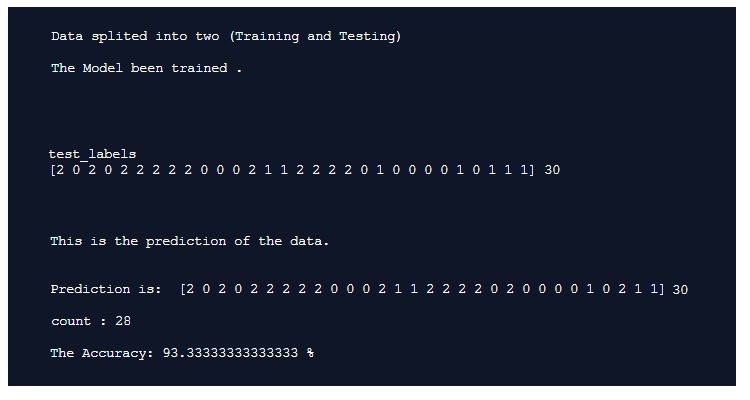
|
To Download my Python code (.py) files Click-Here
Python ploting
Learning : Plotting Data using python and numpy
Subject: Plotting Data
The best way to show the data is to make them as a graph or charts, there are several charts type and names each will present your data in a different way and used for different purpose. Plotting the data using python is a good way to show out your data and in coming posts we will cover very basic aspects in plotting data. So if we just want to show a sample for what we are talking about, we will say: we have a sample of hospital data for born childs (male m, female f, in years 200 to 2003).
:: Click to enlarge :: 
|
There are some libraries we can use in python to help us plotting the data, here are some of them. Matplotlib, Plotly and Seaborn are just samples of what we may use, in this post we will use the Matplotlib. To use Matplotlib we need to install it, so if it is not installed in your python you need to do so.
pip install Matplotlib
Then we need to import it in our code using :
import matplotlib.pyplot as plt
To show the data we need to have some variables that will be used in our first example, So the case is that we have some data from a hospital, the data are numbers of born childs (male m, female f) in years 2000 to 2003. We will store/save the data in list, we will have data_yesrs =[2000,2001,2002,2003], then we will have male born data in data_m=[2,2.5,3,5] and female born data data_f = [3,3.8,4,4.5], the chart will have two axis vertical is Y y_data_title =’In Hundreds’ and horizontal is X x_data_title =’ Years’, now to project all this information on a chart we use this code ..
import matplotlib.pyplot as plt
data_yesrs = [2000,2001,2002,2003] # years on X axis
data_m = [2,2.5,3,5]   # y data males born
data_f = [3,3.8,4,4.5]  # y data female born
y_data_title ='In Thousands'
x_data_title =' Years'

plt.title('New Born babies')

plt.plot(data_yesrs,data_m,'r-', data_yesrs,data_f,'b--')
plt.ylabel(y_data_title)
plt.xlabel(x_data_title)
plt.show()
Another way to plot the data were we can use a one line for each data set as:
plt.plot(data_x,data_m,’r-‘)
plt.plot(data_x,data_f,’b–‘)
We can see that male data is red line, and female data is blue dashes, we can use some line style to present the data as mentioned bellow:
‘-‘ or ‘solid’ is solid line
‘–‘ or ‘dashed’ is dashed line
‘-.’ or ‘dashdot’ is dash-dotted line
‘:’ or ‘dotted’ is dotted line
‘None’ or ‘ ‘ or ” is draw nothing
And also we can use colors such as :
r: red, g: green,
b: blue, y: yellow .
If we want to add the map or chart key, we need first to import matplotlib.patches as mpatches then to add this line of code:
plt.legend([‘Male’,’Female’])
and the keys [‘Male’,’Female’] MUST be in the same sequence as the main plot code line :
plt.plot(data_yesrs,data_m,’r-‘, data_yesrs,data_f,’b–‘)

|
To Download my Python code (.py) files Click-Here
Python: Circle Packing
Circle Packing Project
Subject: Draw, circles, Turtle
Definition: In geometry, circle packing is the study of the arrangement of circles on a given surface such that no overlapping occurs and so that all circles touch one another. Wikipedia
So, we have a canvas size (w,h) and we want to write a code to draw X number of circles in this area without any overlapping or intersecting between circles. We will write some functions to do this task, thous functions are:
1. c_draw (x1,y1,di): This function will take three arguments x1,y1 for circle position and di as circle diameter.
2. draw_fram(): This function will draw the frame on the screen, we set the frame_w and frame_h as variables in the setup area in the code.
3. c_generator (max_di): c_generator is the circles generating function, and takes one argument max_di presenting the maximum circles diameter. To generate a circle we will generate three random numbers for x position, y position and for circle diameter (max_di is the upper limit),also with each generating a while loop will make sure that the circle is inside the frame, if not regenerate another one.
4. can_we_draw_it (q1,di1): This is very important, to make sure that the circle is not overlapping with any other we need to use a function call (hypot) from math library hypot return the distance between two points, then if the distance between two circles is less than the total of there diameters then the two circles are not overlaps.

|
So, lets start coding …
First: the import and setup variables:
from turtle import *
import random
import math

# Create a turtle named t:
t =Turtle()
t.speed(0)
t.hideturtle()
t.setheading(0)
t.pensize(0.5)
t.penup()

# frame size
frame_w = 500
frame_h = 600

di_list = [] # To hold the circles x,y and diameters
 |
Now, Drawing the frame function:
def draw_fram () :t.penup()
t.setheading(0)
t.goto(-frame_w/2,frame_h/2)
t.pendown()
t.forward(frame_w)
t.right(90)
t.forward(frame_h)
t.right(90)
t.forward(frame_w)
t.right(90)
t.forward(frame_h)
t.penup()
t.goto(0,0)
Now, Draw circle function:
def c_draw (x1,y1,di):t.goto(x1,y1)
t.setheading(-90)
t.pendown()
t.circle(di)
t.penup()
This is Circles generator, we randomly select x,y and diameter then checks if it is in or out the canvas.
def c_generator (max_di):falls_out_frame = True
while falls_out_frame :
x1 = random.randint(-(frame_w/2),(frame_w/2))
y1 = random.randint(-(frame_h/2),(frame_h/2))
di = random.randint(3,max_di)
# if true circle is in canvas
if (x1-di > ((frame_w/2)*-1)) and (x1-di < ((frame_w/2)-(di*2))) :
if (y1 ((frame_h/2)-(di))*-1) :
falls_out_frame = False
di_list.append([x1-di,y1,di])

|
With each new circle we need to check the distances and the diameter between new circle and all circles we have in the list, if there is an overlap then we delete the new circle data (using di_list.pop()) and generate a new circle. So to get the distances and sum of diameters we use this code ..
 # get circles distance

    cs_dis = math.hypot(((last_cx + last_cdi) - (c_n_list_x + c_n_list_di)) , (last_cy - c_n_list_y))
    di_total = last_cdi + c_n_list_di
To speed up the generation of right size of circles I use a method of counting the trying times of wrong sizes, that’s mean if the circles is not fit, and we pop it’s details from the circles list we count pops, if we reach certain number then we reduce the upper limits of random diameter of the new circles we generate. Say we start with max_di = 200, then if we pop for a number that divide by 30 (pop%30) then we reduce the max_di with (-1) and if we reach max_di less then 10 then max_di = 60. and we keep doing this until we draw 700 circles.
# if di_list pops x time then we reduce the randomization upper limits
  if (total_pop % 30) == 0:
    max_di = max_di - 1
    if max_di < 10 :
      max_di = 60
Here are some output circles packing ..
 |
 |
With current output we reach the goal we are looking for, although there is some empty spaces, but if we increase the number of circles then there will be more time finding those area with random (x,y,di) generator, I am thinking in another version of this code that’s will cover:
1. Coloring the circles based on the diameter size.
2. A method to fill the spaces.
To Download my Python code (.py) files Click-Here

Taking pictures is not my main daily practices, but when i start playing with my camera, i really enjoy my self.
Thanks for visiting my Space..


 Ali's Photography Space...