Archive
Arduino: First App
Learning : Arduino Projects, Arduino Coding, Electronic Circutes
Subject: First Application, Light the LED
[NOTE: We are working on Electronic Devices, Voltage, Resistors and other Electronic Parts that may Become HOT due to un-stable current or Wrong Wire Connections.. PLEASE BE CAUTIOUS AND TAKE SAFETY NEEDED PROCEDURES.]
The Task: In our First Application on ARDUINO we will write a code to Light ON then OFF an LED or say Two Led’s each will go On and Off for several time to show a Blinking light.
What We Need: We will try to be simple on our first project, we will put the Led’s on a braedboard connected to ARDUINO Nano (Any other Arduino Chip can be use). So, we will use Arduino-Board, BreadBoard, Two resistors and tow Led light (I will use One Red, and One Green).
Set-up: We will connect the Red-Led on Pin A3, and the Green-Led on Pin D12, the ARDUINO-Board will take power from it’s USB cable connected to the Laptop.
Coding: The Application will make the Led’s to BLINK in some sequence.
 # CODE: Function to turn led On, wait for some delay-time and Turn it off. Two Led's (Red, Green) Blinking


const int red_led = A3 ;  // set pin A3 for red-led.
const int green_led = D12 ;  // set pin D12 for green-led.

void setup()
{
pinMode(red_led, OUTPUT);
pinMode(green_led, OUTPUT);
}

void led_on_off (int led, int dt)  // Function to Turn led On Wait for delay = dt then turn it off.
{
digitalWrite(led, HIGH);
delay(dt) ;
digitalWrite(led, LOW);
delay(dt) ;
}

void loop ()
{
// in both for-loops, change the delay and/or numbers to have different lighting sequences.
  for (int R = 0; R < 3; R ++) //loop for Red-Led
  {
    led_on_off(red_led, 300);
    for (int G = 0; G < 2; G ++ )  //loop for Green-Led
        {
           led_on_off(green_led,110) ;
         }
   }

  exit(0) ; // To stop the action after executing One-Time.
}
Image of set-up and Running ..
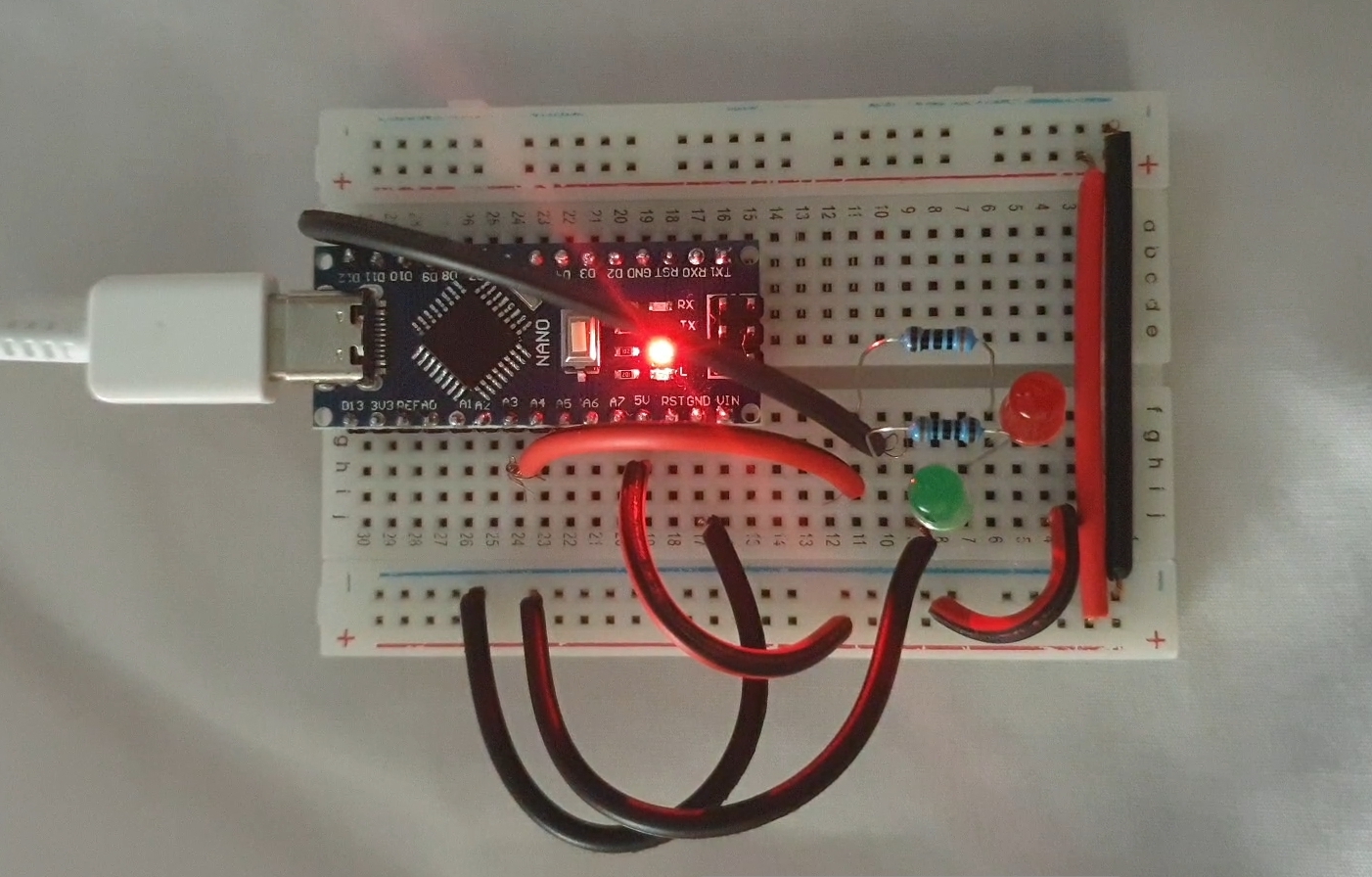
|
GIF of the Out-Put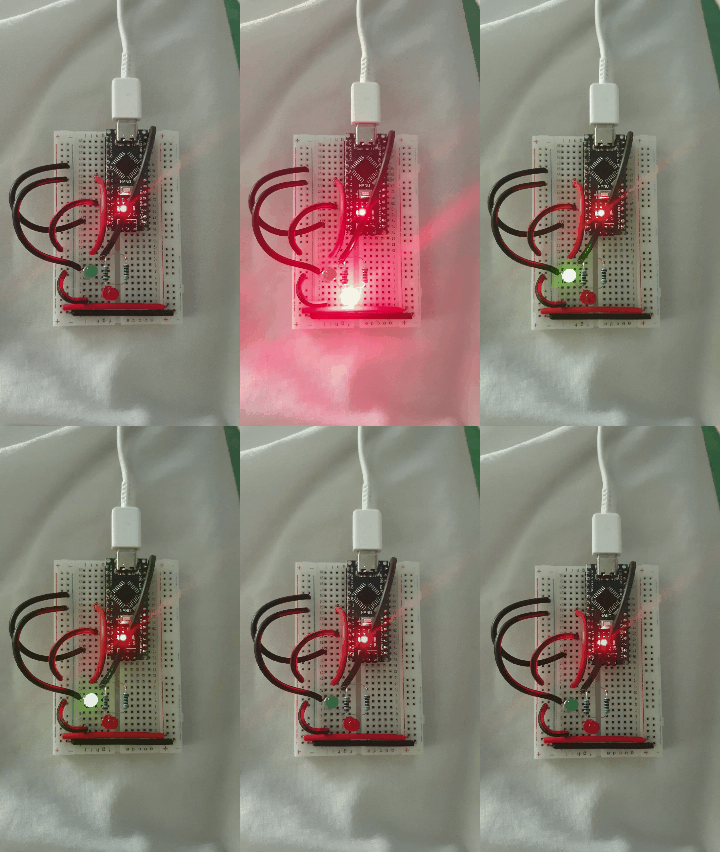 |
I am not sure if i will continue in this way or say “New Learning Curve”, The Coding and Commanding an Electronic-Bord to Work as my Application says .. THIS PART WAS WHAT LIT THE FUSE IN MY BRAIN.
:: ARDUINO PROJECTS LIST ::
| 3 | First Application |
| 2 | Code Editor, coding Blocks, learn Coding |
| 1 | Arduino, The Story, Components, Parts and What we will Do? |
To Download the ARDUINO Project [Code and Diagram] files Click-Here
 Follow me on Twitter..
By: Ali Radwani
Arduino: IDE and Coding
Learning : Arduino Projects, Arduino Coding, Electronic Circutes
Subject: First Application, Light the LED
[NOTE: We are working on Electronic Devices, Voltage, Resistors and other Electronic Parts that may Become HOT due to un-stable current or Wrong Wire Connections.. PLEASE BE CAUTIOUS AND TAKE SAFETY NEEDED PROCEDURES.]
IDE: IDE is the place or the editor that we can write the code in. Arduino has one that can be Downloaded from [ www.arduino.cc] then from the menu > Software.
Coding: The coding rules and best practes:
- Essentially consist of Two Main Functions: void setup() and void loop().
- Each Code line MUST end with Semicolon ;
- Code block Must be between two Curly-Brackets { }
- Declaration: if we have variavbles we need to declare them before we use them. Best-Practice: we put them at the top of our code page.Sample: int x ; int y = 50; const int t = 250
- Our Functions: Best-Practice: Put them between the void setup() and void loop(). SAMPLE: void led_on ( ){ digitalWrite(12, HIGH);}
- To put a comments in the code we use double front-slash // use it for one line comments. Best-Practice: Use comments to describe your codes and Functions.
- To Comments several lines we use /* /* all the lines between it will be as comments.*/
- IF Statment: if (int x > 10) { your code }
- For-loop: for(int x = 0; x < 5; x++) { your code }
So, I think this is the most important things we have to know to start coding our Arduino. With each practice and project we will work on we will describe coding-lines and commends we use.
I am not sure if i will continue in this way or say “New Learning Curve”, The Coding and Commanding an Electronic-Bord to Work as my Application says .. THIS PART WAS WHAT LIT THE FUSE IN MY BRAIN.
:: ARDUINO PROJECTS LIST ::
| 3 | First Project: Coming Soon.. |
| 2 | Code Editor, coding Blocks, learn Coding |
| 1 | Arduino, The Story, Components, Parts and What we will Do? |
To Download the ARDUINO Project [Code and Diagram] files Click-Here
By: Ali Radwani
Daily Sketch challenge..
This sketch back to last week, but I am trying to keep myself in the challenge of “A Sketch A Day ” as far as I can. Here is a sketch and I color it using Autodesk sketchbook Application.

Arduino Projects: The Story
Learning : Arduino, Arduino Coding, Electronic Circutes
Subject: The Story and Orders
[NOTE: We are working on Electronic Devices, Voltage, Resistors and other Electronic Parts that may Become HOT due to un-stable current or Wrong Wire Connections.. PLEASE BE CAUTIOUS AND TAKE SAFETY NEEDED PROCEDURES.]
The Story: Last month i was searching the net for something, Someway, Some projects make my Kids love Math and Science Subjects, I went through several pages … then I fond classes teaching the young students how to build simple circuits, using Led’s and 9V Batteries.. I start reading more in this subject then I found the ARDUINO Chip, were the students can write a code to switch on/off some LED’s. This thing Triggered the Passion of learning and trying new things. So I spend two/three days reading about it, and decide to give it a try.
What I Need: This is my first time reading about Electrical Circuits, I have some ides, but I Don’t have any Equepments to start. So from there I start submitting orders to buy things that I will need, i got the list from tutorial youtube. Here is the list of my orders:
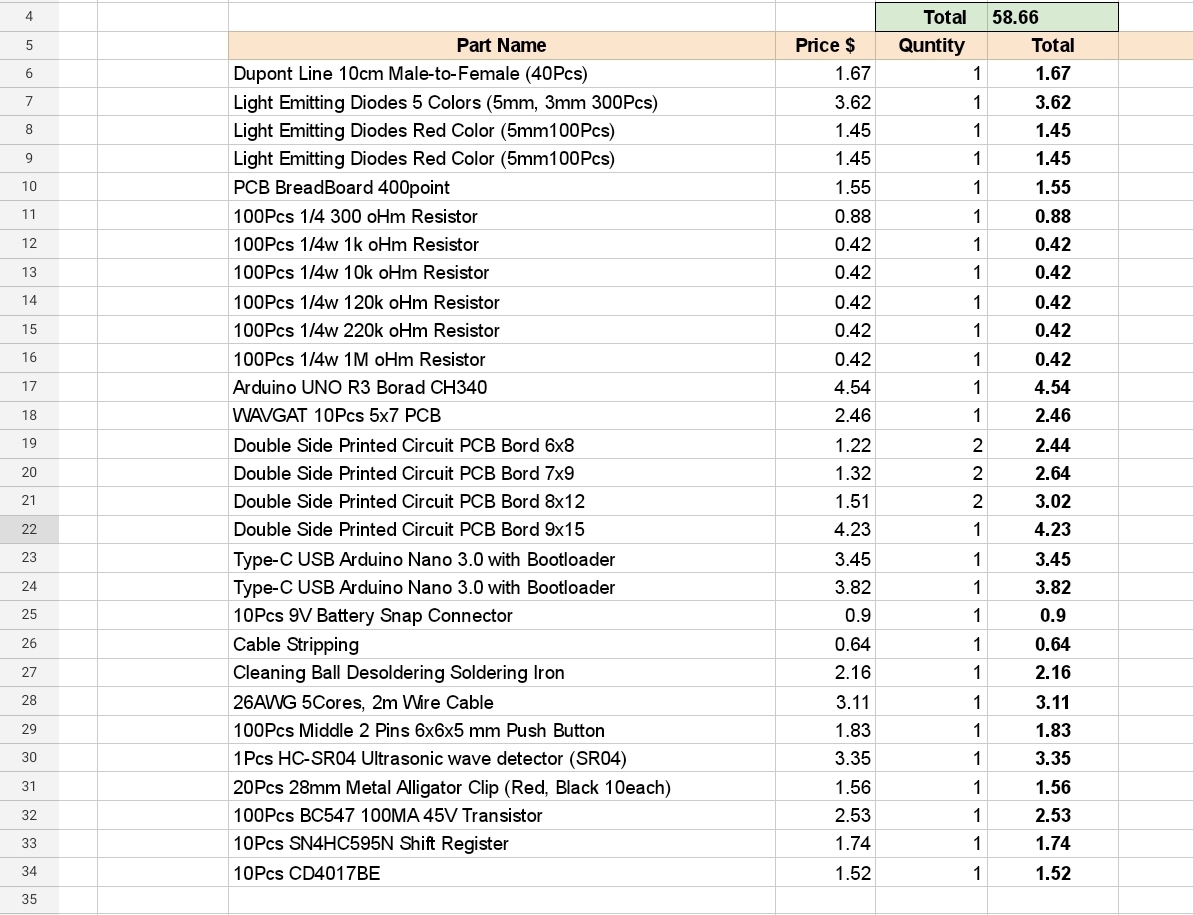 |
I am not sure if i will continue in this way or say “New Learning Curve”, The Coding and Commanding an Electronic-Bord to Work as my Application says .. THIS PART WAS WHAT LIT THE FUSE IN MY BRAIN.
.. NEXT POST .. In Next post I will write about ARDUINO [simple information as far I know 🙂 ] How it Works, and Firs simple Project [without coding].
:: ARDUINO PROJECTS LIST ::
| 2 | Code Editor, coding Blocks, learn Coding |
| 1 | Arduino, The Story, Components, Parts and What we will Do? |
To Download the ARDUINO Project [Code and Diagram] files Click-Here
 Follow me on Twitter..
By: Ali Radwani
Python Project: Properties Maintenance System P7
Subject: Writing a Full Application for Properties Maintenance System [Property: Showing the Records in Main property Table]
Learning : Python, Math, SQL, Logeic
[NOTE: To keep the code as simple as we can, We WILL NOT ADD any user input Varevecations. Assuming that our user will Enter the right inputs.]
After adding Records to the Main Property Table, we need to display the records on the screen. So now in this part (Part -7) we will write a function to display all the records. The Function name will be def show_property() the function is not taking any attribute and is Not returning any things. First we will print-out the Table-Header then we will run an [SQL: select * from table-name] command to fetch all the records, then will [for loop] and test-format to print all the records on the screen. Here is the Code ..
 |
After i display the records, I notes that the Address-Column needs more than one row (in some cases), and it miss the line formating, so I wrote a function and call it def warp_text(tex,warp_on,nl_space) the function takes three arguments, the test: it the text/string you want to print.warp_on: is a number of character before the new-line.nl_space: is the number of white-character in the new-line.
Here is the Code ..
 # Function to warp

def warp_text(tex,worp_on,nl_space) :
    c = 0

    for t in range (len(tex)) :
        print(tex[t],end="")
        c += 1
        if c == worp_on :
            print('\n', ' '*nl_space, end="")
            c = 0
Check all the codes in the Download Page..
End of Part 7
NOTE: If you Download this Part you MUST Run the Option 82 (82. Delete the Data-Base and Start Again.) from the Main Menu to do the following Updates:
- Update the properties_t Table (Adding the number of BathRooms)
- Update on create_tables Function.
- Update on insert_zero_records Function.
If you did this in last part (6) then you don’t need to do it again
In Part-8 In the Next Part, after adding and showing the records we will write the Function to Delete a record from the Table.
:: PMS Parts ::
| Part 1 | Part 2 | Part 3 | Part 4 |
| Part 5 | Part 6 | Part 7 | Part 8 |
..:: Have Fun with Coding ::.. 🙂
To Download my Python code (.py) files Click-Here
By: Ali Radwani
Mosque: Nikon S9900 shot – 16
Subject: Mosques in Qatar using Nikon S9900
This Shot: This is one of the Mosque Series shots,I use the Nikon S9900 camera and built-in Black-White mode, I was standing about 6-meter away, the camera in-hand almost at ground-level.
…Click Image to Enlarge… Camera in Hand, F:4.8, ISO:125, Shutter:1/2000s, Focal-Point:5mm Camera in Hand, F:4.8, ISO:125, Shutter:1/2000s, Focal-Point:5mm
|
::.. To see all my Nikon S9900 Photos Click-Here
::.. To see all my Nikon D7100 Photos Click-Here
::.. To see all my Nikon D90 Photos Click-Here
By: Ali Radwani
Python Project: Properties Maintenance System P4
Subject: Writing a Full Application for Properties Maintenance System [Property Type Functions]
Learning : Python, Math, SQL, Logeic
[NOTE: To keep the code as simple as we can, We WILL NOT ADD any user input Varevecations. Assuming that our user will Enter the right inputs.]
In Part-4 We will writing the Functions to Manage the Maintenance Property Types Functions. Property Type is a Look-up Table that will help the user to select some values, as other Look-up Tables, in Part-1 when we set-up the application and select to create the database we Insert some data in to it. Now will will write three Functions to Add New Property Type, Edit a Property Type and Delete a Property Type from the DataBase.
[.. ALL THE CODE ARE AVAILABLE IN DOWNLOAD PAGE.. ]
Starting with Add New Property Type, We will ask the user to write the New Property Type then will run the SQL command to Insert it into the data-base.. Hear is the Code ..
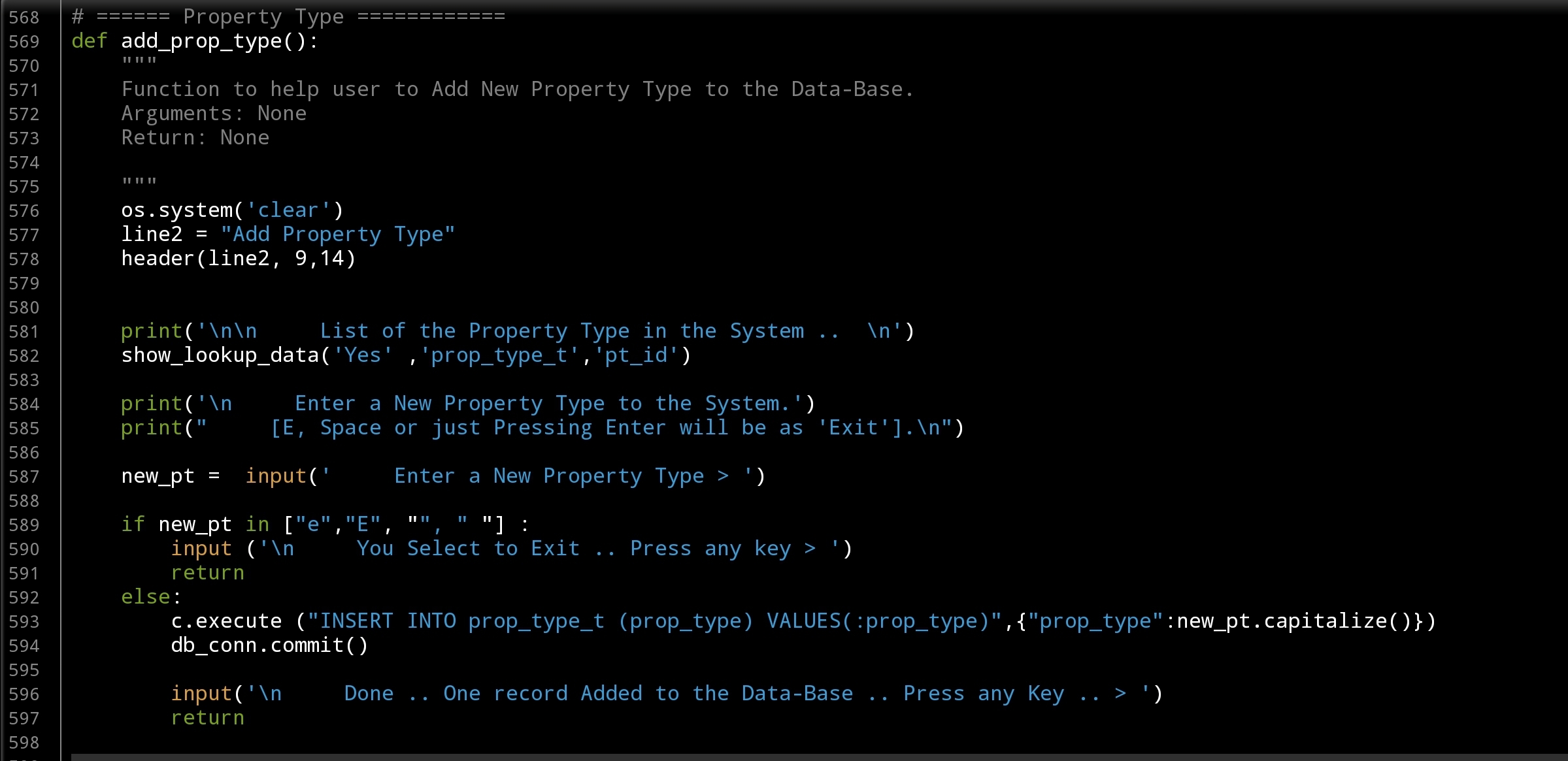 |
Now we will write the Edit Function we if we have any error in the typpiing of the Property Type we can correct it using this Function.. Fisr we will display all the Properies Type we have, asking the user to Select an ID of the one to-be Edit, then we will check for the availability of the user input [simple valitation proccess] and will ask the user to Insert the correct Value/Text to replace the exsist one. Here is the code ..
 |
The Last Function in this part is to Delete a selected Property Type, in this Functioin we will List down all the Property Types we have in the data-base and ask the user to select the ID for the one to be deleed, then we cal the SQL commands that will Delete the record. Here is the code ..
 |
.. DONE WITH PART – 4 ..
In Part-5 In coming post we will continue writing Lookup Table Functions to Add, Edit and Delete there data.
:: PMS Parts ::
| Part 1 | Part 2 | Part 3 | Part 4 |
| Part 5 | Part 6 | Part 7 | Part 8 |
..:: Have Fun with Coding ::.. 🙂
To Download my Python code (.py) files Click-Here
By: Ali Radwani
Python Project: Properties Maintenance System P3
Subject: Writing a Full Application for Properties Maintenance System [Property: Job Status Functions]
Learning : Python, Math, SQL, Logeic
[NOTE: To keep the code as simple as we can, We WILL NOT ADD any user input Varevecations. Assuming that our user will Enter the right inputs.]
In Part-3 We will start writing the Functions to Manage the Maintenance Job Status Functions. Job Status is a Look-up Table that will help the user to select some values, by defualt when you install the application and select to create the database, [we talk about this in Part-1] we Insert some data in to it such as [Pending, Compelete, In-Progress]. Now will will write three Functions to Add New Job Status, Edit a Job Status and Delete a Job Status from the DataBase.
So, let’s start with Add New Job Status, We will ask the user to write the New Job Status then will run the SQL command to Insert it into the data-base.. Hear is the Code ..
 |
The second Function will be to Edit a Job-Status, in this case we will display all the Job-Status we have in the table, and ask the user to select the ID of the one to be Edited, then we will ask again to enter the new/updated one, and using UPDATE command in SQL we will update the record. Here is the code ..
 |
Last Function will be to Delete a record from the Job-Status Table. Here we also will ask the user to select an ID then to confirm the deleting action. Here is the code ..
 |
In Part-4 In coming post we will continue writing Lookup Table Functions to Add, Edit and Delete there data.
:: PMS Parts ::
| Part 1 | Part 2 | Part 3 | Part 4 |
..:: Have Fun with Coding ::.. 🙂
To Download my Python code (.py) files Click-Here
By: Ali Radwani
Python Project: Properties Maintenance System P2
Subject: Writing a Full Application for Properties Maintenance System
Learning : Python, Math, SQL, Logeic
[NOTE: To keep the code as simple as we can, We WILL NOT ADD any user input Varevecations. Assuming that our user will Enter the right inputs.]
In Part-2 we will start writing the Functions in our app, to start I select the Payment Methods, this is a Look-up Table that will help the user to select come values, by defualt when you install the application and select to create the database, [in Part-1] we Insert some data all lookup-tables, So here in payment Method we have [Cash, Card, Cheque]. Our Functions will be Add New Payment Method, Edit a Payment Method and Delete a Payment Method.
Once i start writing the Edit Function, i notes that we need another two Functions to Help-up theyare: get_lookup_values(tname,t_id,key_id) and check_availabilty(dt, d_id, check_id) both not printing any thing on the screen just returning a Value.
get_lookup_values(tname,t_id,key_id) Here we pass the Table-Name, the ID field and key_id we want to return it’s Value.
check_availabilty(dt, d_id, check_id) This function will return True if the ID we send in ‘check_id’ is in the Data-Table dt.
So, let’s start with Add New Payment Method, We will ask the user to write the New Payment Method the will run the SQL command to Insert it into the data-base.. Hear is the Code ..
 # Add Payment Method

def add_pay_method():
    os.system('clear')
    line2 = "Add Payment Method"
    header(line2, 9,14)

    print('\n\n     List of the Payment Methods in the System ..  \n')
    show_lookup_data('Yes' ,'pay_meth_t','pm_id')

    print('\n     Enter a New Payment Method to the System.')
    print("     [E, Space or just Pressing Enter will be as 'Exit'].\n")

    new_pm =  input('     Enter a New Payment Method > ')

    if new_pm in ["e","E", "", " "] :
        input ('\n     You Select to Exit .. Press any key > ')
        return
    else:
        c.execute ("INSERT INTO pay_meth_t (p_method) VALUES(:p_method)",{"p_method":new_pm.capitalize()})
        db_conn.commit()

        input('\n     Done .. One record Added to the Data-Base .. Press any Key .. > ')
        return
Now, we will go to Edit a Payment Method that we have in the DataBase, here we will list all the Data we have on the screen, and will ask the user to Select the one to be edit, we will check the availability of the ID using the def check_availabilty(dt, d_id, check_id) Function and then [if the ID is available] we will use the def get_lookup_values(tname,t_id,key_id): function to fetch the key-value of that ID, then asking the user to Enter the New/Edited one. Here is the code..
 |
Last Function in this part is to Delete a Payment Method from the Databsae, here also we will display all the contents of the table on the screen, and ask the user to select the one tobe deleted, we will check the availability of the ID and ask the user to confirm the Deleting action, then will call the SQL command to delete the entry. Here is the code..
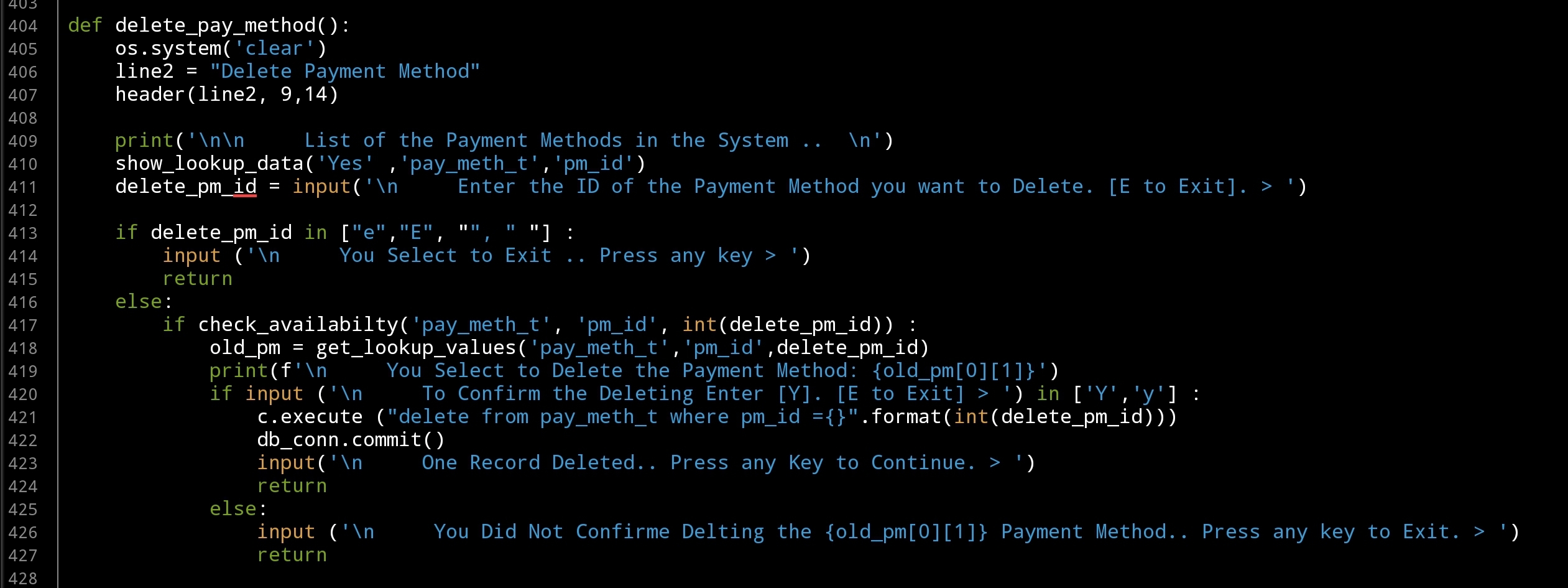 |
In Part-3 In coming post we will continue writing Lookup Table Functions to Add, Edit and Delete there data.
:: PMS Parts ::
| Part 1 | Part 2 | Part 3 | Part 4 |
..:: Have Fun with Coding ::.. 🙂
To Download my Python code (.py) files Click-Here
By: Ali Radwani
Python: Coffee Consumption P10
Learning : Python, SQlite3, Dataset, Pandas,
Subject: Create Coffee Consumption Application.
[NOTE: To keep the code as simple as we can, We WILL NOT ADD any user input Varevecations. Assuming that our user will Enter the right inputs.]
[ IF THE IS FIRST TIME DOWNLOADING THE CODE FILE, SELECT OPTION 7 FROM MAIN-MENU TO CREATE THE DATABASE]
In this Last part (Part-10) of Coffee Consumption App, we will write a Function to Export the Data to an Excel Fiel, So this will be the Last part of this application and any other Enhancement will be added as new version of the application.
Exporting The Data: To Export the data to or say “writing into” Excel file we need to import New library Named: xlsxwriter [if you don’t have the library then you need to install it first, using this command: pip install xlsxwriter]. After installing we will call it into our python file using this command: import xlsxwriter. The Excel file [in this case] will have four Sheets, named as follow:
coffee_con, coffee_name, coffee_type, coffee_size
each sheet will contains the table header and the date.
File Name: The file name will be as: coffee_consumption_[Current Date & Time].xlsx, the date and time will be formated as: yyyymmdd_HM, the python code to generate this is:
now = datetime.now()
date_t = now.strftime(“%Y%m%d_%H%M”)
Also we need to know that the file will be saved in the same directory of the application or (python .py file)
New Function: from our back_up function we will call another Function called: write_data(data_set,col_list,the_sheet): this Function will write the data-set into Excel file sheet, so we need to pass the data_set, column list and the Sheet Name as arguments to the function and it will use the command: write(row,col,data) to write the row to the sheet. Here is the code
# Writing the data into the sheet

def write_data(data_set,col_list,the_sheet):
    """
    Function to write the data-set into Excel file sheet.

    Argument:
        data_set:
        col_list: List of the columns in the data_set.
        the_sheet: the Sheet Name.

    """
    # write the Table Header
    for x in range (0,len(col_list)):
        the_sheet.write(0,x,col_list[x])

    rows = len(data_set)
    for row in range (1,rows) :
        for col in range (0,len(col_list)) :
            the_sheet.write(row,col,data_set[row][col])
In our main back-up function, we prepare the data-set and column list, then we call the new Function write_data passing the variable. Here is two parts of the code, first one is generating the file name, and calling the datetime function, second part is dealing with the data tables in the database, fetching the data, listing the columns and passing this to write_data function.. Here is the code
 |
 |
… Done. We finish the Coffee Consumption Application using Python and Sqlite. Next Week we will start New Application ..
..:: Have Fun with Coding ::.. 🙂
| Part 1 | Part 2 | Part 3 | Part 4 | Part 5 |
| Part 6 | Part 7 | Part 8 | Part 9 | Part 10 |
To Download my Python code (.py) files Click-Here
By: Ali Radwani

Taking pictures is not my main daily practices, but when i start playing with my camera, i really enjoy my self.
Thanks for visiting my Space..


 Ali's Photography Space...