Archive
Python: Simple Ticket System _Part2
Subject: Writing a Simple Ticket System Application
Learning : Python, SQL, Logeic
In this part we will do the following:
- Write the code for [show_list] function.
- Write the code for [check_availabilty] function.
- Write the code for Priority function in Setting.
- Add New Priority.
- Edit a Priprity.
- Delete Priority.
- Write the code for Status function.
- Add New Status.
- Edit a Status.
- Delete Status.
Helping Function
Show List Function: Once the user to Edit or Delete a record from the dataBase, we will call this function to list-down whatever in the table, then the user will select the ID number of the entity to be Edited/Deleted.
Show List Function:
def show_list(dt,d_id):
“””
Function to Display the Data we have in the Lookup Tables based on the user selection function.Return: None
“””c.execute (f”select * from {dt} where {d_id} > 1 “)
dataset = c.fetchall()for d in range (0,(len(dataset)),3):
try:
print(‘ ‘*5,'{:<3}{:<20}'.format(dataset[d][0],dataset[d][1]),end="")
print(' '*5,'{:<3}{:<20}'.format(dataset[d+1][0],dataset[d+1][1]),end="")
print(' '*5,'{:<3}{:<20}'.format(dataset[d+2][0],dataset[d+2][1]))except:
pass
print('\n')
Check Availabilty Function:def check_availabilty(dt, d_id, check_id):
“””
Function to check if the passed ID available in the data-set or not.Arguments:
dt : Data-Table
d_id : Name of id column.
check_id : The id we want to search for.Return : True if ID is available, False if not.
“””c.execute (f”select * from {dt} where {d_id} = {check_id} “)
dataset = c.fetchone()return (dataset)
Priority Function:
In coming code section we will write three functions to Add, Edit and Delete a Priority [All the code is available in the file for downloading FREE].
Add New Priority:
def add_priority ():
os.system(‘clear’)
line2 =”Add New Priority Level”
header(line2,2,4)print(‘\n\t List of Priority Levels we have in the system:\n’)
show_list(‘priority_t’,’pr_id’)
new_pri = input(‘\n Enter the New Priority Level to be Added to the List. [E to Exit]. > ‘)# Check user input
if new_pri in [‘e’,’E’] or new_pri ==’ ‘ or new_pri == ”:
input(“\n\t You select to Exit from ‘Adding New Priority Level’.. Press any key to Exit. > “)
return
else:
# Code to add New priority level to the database
# Capitalize user input
new_pri = ” “.join([word.capitalize() for word in new_pri.split(” “)])
# Insert onto database
c.execute (“INSERT INTO priority_t (pri_level) VALUES(:pri_level )”,{“pri_level”:new_pri})
db_conn.commit()input(‘\n\t One Priority level been Added to the database. Press any key to Continue. > ‘)
Edit Priority:
 Click the image to enlarge Click the image to enlarge |
In this function, first we call show_list function to list down the priorities we have in the system and ask the user to select the ID of one to be Edit. Then we check if the user want to Exit from here!, If Not then we show him his selection and give the prompt so he can insert the corrected priority, and saving the changes. |
Delete Priority:
 Click the image to enlarge Click the image to enlarge |
In this function, first we call show_list function to list down the priorities we have in the system and ask the user to select the ID of one to be Deleted. Then we check if the user want to Exit from here!, If Not then we show him his selection and give the prompt so he can insert the corrected priority, and saving the changes. |
Show Priority:
 Click the image to enlarge Click the image to enlarge |
Last function is Show Priority, her we will list all the priorities we have in the table. |
Status Functions
For Status also we have three functions to Add, Edit and Delete a Status. In Status of a task we have “Not Started, In progress, Finished” and the user can add more to the list. [All the code is available in the file for downloading FREE].
Add New Startus
 [Click image to enlarge] [Click image to enlarge] |
First, we will display all the status we have in the system, and will ask the user to enter the new one to be added, we will perform a simple validation and then will save the New status into the table and show a confirmation of that on the screen. |
Edit Startus
 [Click image to enlarge] [Click image to enlarge] |
Her the user must select an ID of the status he want to edit, then entering the new one, confirming that, and we will save the change. |
Delets Startus
 [Click image to enlarge] [Click image to enlarge] |
Her the user must select an ID of the status he want to Delete,user must confirm that, and we will Delete and Save the change. |
Show Startus
def show_status():
os.system(‘clear’)
line2 =”Show Status List”
header(line2,2,4)
c.execute (“select * from status_t where st_id > 0 “)
stat_list = c.fetchall()
print(‘\n\n\t List of Status in the System…> ‘)
for stat in range (0,(len(stat_list)),4):
try:
print(‘ {:<3}{:<20}'.format(stat_list[stat][0],stat_list[stat][1]),end="")
print('{:<3}{:<20}'.format(stat_list[stat+1][0],stat_list[stat+1][1]),end="")
print('{:<3}{:<20}'.format(stat_list[stat+2][0],stat_list[stat+2][1]),end="")
print('{:<3}{:<20}'.format(stat_list[stat+3][0],stat_list[stat+3][1]),end="")
except:
pass
End of part two, we create all the sub functions in Priority and Status. In part 3, we will do all the sub functions in Department and category.
:: Ticket System ::
| Intorduction | Part 1 | Part 2 | Part 3 |
..:: Have Fun with Coding ::.. 🙂
To Download my Python code (.py) files Click-Here
 Follow me on Twitter..
By: Ali Radwani
Python: Simple Ticket System
Subject: Writing a Simple Ticket System Application
Learning : Python, SQL, Logeic
Introduction:
A Ticket System serves is a tool for managing and tracking customer support interactions or internal task requests efficiently. It offers a centralized platform where users can submit their issues, questions, or requests, known as Tickets, and designated personnel can address them promptly. This article outlines the structure and functionality of a Ticket System, emphasizing the importance of organization, efficiency, and accountability in handling various requests.
In coming weeks I will work to create Python “Simple Ticket System”, using DataBase to store the data,I will try to publish the code and documentation about this project. In this post I will draft-down a brain-storming session with myself of what may we need in this system, tables and functions. So points may not be consistent and organized and ordered in the right way.
Notes:
- Anything in this articale concidered as draft and may changed later.
- Functions and Tables in coming lines are not in order
- creation of the database will not be in one time, so we will use ALTER many times to add or change the tables.
- All the data will be as test and not real.
Functions:
Main Functions in the system to add and manage the data and interact with the Database and records.
- 1. Tickets:
- 2. Priority.
- 3. Department.
- 4. Status.
- 5. Category.
Add, Edit, Delete and Show Tickets in the system.
Add, Edit, Delete and Show Priorety in the system.
Add, Edit, Delete and Show Department in the system.
Add, Edit, Delete and Show Status in the system.
Add, Edit, Delete and Show Category in the system.
Helping Functions:
Functions that will help to perform some action within the system or other main function.
- 1. Show List:
- 2. Export to Excle:
- 3. Check Availability:
To list/show the data we have in a lookup table.
Exporting the data to an excel file.[Backup]
To check if the user input is exist in the lookup table or not.
Tables:
All the Tables Names and fields are subject of change during the implementation.
1. Staff Table (staff):
- s_id (Staff ID)
- name
- mobile
- position (manager, technical, etc.)
2. Ticket Table (ticket):
- t_id (Ticket ID)
- dep_id (Department ID)
- date (Creation Date)
- asignto (Assigned To: s_id)
- description
- priority_id (High, Medium, Low)
- status_id (Open, In Progress, Resolved, Closed)
- updated_date
- category
3. Category Table:
- c_id (Category ID)
- cat_name (Category Name)
4. Ticket Notes Table (t_notes):
5.Priority Table (priority):
- pr_id (Priority ID)
- pri_level (Priority Level: High, Medium, Low)
6.Status Table (status):
- stat_id (Status ID)
- stat (Status: Open, In Progress, Resolved, Closed)
7.Staff Job Table (staff_job):
- sj_id (Job ID)
- job_id
- received_date
- finished_date
- status_id
- note_id
8.Departments Table (departments):
Versions Policy:
In this system i will create version 1 and will be released with all esintial functions to perform and work, however there will be some ideas to enhance the data entry and reporting also some validations that will be done later in version 2.
Part 1:
in Part1 we will do the folloeing:
- Define the Tables and their fields initially.
- Write the code to create the database and selected tables.
- Writing the code to insert initial data in selected tables .
- Initial naming of functions.
- Create the Main Menu
- Create the Menu for the Lookups Table
:: Ticket System ::
| Intorduction | Part 1 | Part 2 | Part 3 |
..:: Have Fun with Coding ::.. 🙂
To Download my Python code (.py) files Click-Here
By: Ali Radwani
Python: Grade_2 Math Questions V1
Learning : Python, Math
Subject: Math Questions for Grade-2 V.1
[NOTE: To keep the code as simple as we can, We WILL NOT ADD any user input Varevecations. Assuming that our user will Enter the right inputs.]
In the process of studing with/for my kids [specialy Math] i always need to give them some Questions in [+ -], I need to write the Questions on a paper then they solve it and i check the answers. So I thought if I create an app to solve this Problem.
Application to Do What?
- Select Two random numbers from a given range.
- Select a Math operator [+ -].
- Writing the Question on the Screen.
- Comparing the user input with the real answer.
- Writing a message on the screen acoording to the user answers.
Application Menu
x
y (+ -)
_______________
??
In this Version (V.1) of the application, there will be some limitations on the Questions Difficulties, Number ranges and type of Questions.
Start Coding
The Menu
As we can see above, we will have 7 keys for the Menu, Menu 9 is for Exit. Menu 3 will ask the user to Enter the Kid Name. Menu 2 will ask for the Number Ranges (From/To as 0 to 9 so all the questions will be in this rage). Menu 4, 5 and 6 each will be for type of questions. Menu 1 will ask the user about All the questions type. In all menus 1,4,5 and 6 if the user did’t enter a Name or a number ranges, the application will as for it before srating.
Here is the code for the Main Menu.
 # Code for Main Menu

 # ---------------- Main Menu -------------------------
def menu () :
    os.system('clear')
    print('\n\n\t This is a Math Revision Game.',version)
    print('\t --------------------------------------------')
    print(' '*34,'By:[AHRADWANI.COM]')

    print('\n\n\t')
    print('\t 1. Start Play the Game. [All Math Lessons]')
    print('\t 2. Re-set the Numbers Range.')
    print('\t 3. Register New Kid to Play.')
    print('\t \n ')
    print('\t 5. Questions Like:   x (+ -) y = ?? \n')
    print('\t 6. Questions Like:   x (+ -) ?? = y \n')
    print('\t 7. Questions Like:      x','\n\t\t\t\t y   (+ -)','\n\t\t\t     ___________')

    print('\t ')
    print('\t 9. Exit.')

    user_select = input ('\n\n\t Select from the Menu. > ')

    return user_select
Get the Numbers Range
In this Function the user will be asked to Enter the Number range as from and to, we will check if the user Enter a valid input, No space, No Alphabetics.
 #  Get the Numbers Range

 def get_numbers_range () :

     """
        Function to get the Number range from the user, we will check if the user Enter
        a valid input, No space, No Alphabetics.

        return:
            nfrom: is the lower number range.
            nto  : is the upper number range.
    """


    nfrom = check_user_input("\t Enter the Lower Range Number > ","\t ... You Need to Enter a Lower Range Number.") #(input('\n\t Enter the Lower Range > '))
    nto = check_user_input("\t Enter the Upper Range Number > ","\t ... You Need to Enter an Upper Range Number.")

    if (int(nfrom)) > (int(nto)) :
        nfrom, nto =  nto, nfrom

    return int(nfrom), int(nto)
Check user input
With each user input we will call this Function with two messages, statement message will be the one to gaid the user to What is need to Enter, error message will be display if the user input something wrong or not expected. Then the Function will return back the user input.
 # check_user_input

def check_user_input(statment_m,error_m):
     """
    Function to check on the user input if it is a valid or not.

    Arguments:
        statmen_m: will be the one to gaid the user to What is need to Enter
        error_m: will be display if the user input something wrong or not expected.

    Return:
        uinput

    """
    while True :
        print(statment_m,end="")
        uinput = input()
        if ((uinput) in [" ",""] or (not uinput.isnumeric()) or ((uinput) in schar) or ((str(uinput).isalpha()))):
            print(error_m)
        else:
            break
    return uinput
Get the Kid Name
A small and short Function to return the user/Kid Name.
 # Get the Kid Name

 def get_kid_name () :

    return input('\n\t Enter Your Name > ')
Setting and Variabls
This is the first upper part of the application, we just import the random and os also we set some variables.
 # Variables


import random, os, operator

score1 = 0
good = ['Correct','You are Right', 'Well Done..','Nice..','Excellent..','Amazing..','Good job',' YES .. Keep it up .. ','So Proud of You','Yes .. Another Point for You',]
bad = ['Wrong ..','Sorry .. No!','Try Your Best','No!','No..Think Harder','ooops .. No','Not this Time']
oper_dict = { '+': operator.add, '-': operator.sub,} # '*': operator.mul, }
schar = "@_!#$%^&*()?/\|}{~,.:'"

nfrom = 0
nto = 0
name = 0
version = 'V.10.2022.R1'
Math Question Type-1
This Function will ask the user 10 Questions of Math according to the Numbers Range were the question will looks like: X [+ -] Y = ??, then if the answer is right good message will display on the screen.
 #  Math Question Type-1 (X [+ -] Y = ??)

 def Math_G2_type_1():
   os.system('clear')
   score =0
   for q in range(0,10):
      n1 = random.randint(nfrom,nto)
      n2 = random.randint(nfrom,nto)
      op = random.choice(list(oper_dict.keys()))

      if op == '-' :
          if n1 ')
      print('   ', n1, op ,n2,end='')

      ans = check_user_input(" = ","  You Need to Enter an Answer .. ")

      if  int(ans) == oper_dict[op](n1,n2):
          print('   ',random.choice(good),'   .. ')
          score = score +1
      else:
          print('   ',random.choice(bad),'   .. ')

   return score
Math Question Type-2
This Function will ask the user 10 Questions of Math according to the Numbers Range were the question will looks like: X [+ -] ?? = Y, then if the answer is right good message will display on the screen.
 # Math Question Type-1 (X [+ -] ?? = Y)


def Math_G2_type_2():
    os.system('clear')
    print('\n\n\t ', name ,' Now try to solve these once\n ')
    score =0
    for q in range(0,10):
        n1 = random.randint(nfrom,nto)
        n2 = random.randint(nfrom,nto)
        op = random.choice(list(oper_dict.keys()))
        if op == '-' :
          if n1 < n2 :
              n1,n2 = n2,n1

        print('\t\t   ',n1)
        print('\t\t   ',n2,' ',op)
        print('\t\t __________')
        ans = int(input('\t\t    '))

        if ans in [" ",""]:
          print('   ',random.choice(bad),'  You Need to Enter an Answer .. ')
        else:
            if ans == oper_dict[op](n1,n2):
                print('   ',random.choice(good),'   .. \n\n')
                score = score +1
            else:
                print('   ',random.choice(bad),'   .. \n\n')

    return score
Math Question Type-3
This Function will ask the user 10 Questions of Math according to the Numbers Range were the question will looks like:
X
Y [+ -]
__________
??? then if the answer is right good message will display on the screen.
 #

 def Math_G2_type_3 ():
    os.system('clear')
    print('\n\n\t ', name ," let's try this.")
    print('\t Complete with correct number.\n')
    score = 0
    for q in range(0,10):
        n1 = random.randint(nfrom,nto)
        n2 = random.randint(nfrom,nto)
        op = random.choice(list(oper_dict.keys()))
        if op == '-' :
            if n1  n2 :
                n1,n2 = n2, n1

        print('\t ',n1,op, ' ______ = ', n2)
        ans = int(input('  Your Answer > ') )

        if ans in [" ",""]:
          print('   ',random.choice(bad),'  You Need to Enter an Answer .. ')
        else:
            if n2 == oper_dict[op](ans,n1):
                print('   ',random.choice(good),'   .. \n\n')
                score = score +1
            else:
                print('   ',random.choice(bad),'   .. \n\n')
    return score
Application Body
In the Application Body itself I use a while loop to call and detect the User input from the menu and using that input to call the corresponding Function. All the codes and functions also the application Body code is on the Source file and can be Downloaded.
I test the code and RUN the app several times, but errors can be found, so next version of this Application will solve any errors also will add more Math Questions Type.
..:: Have Fun with Coding ::.. 🙂
To Download my Python code (.py) files Click-Here
By: Ali Radwani
Python Project: Properties Maintenance System P12
Subject: Writing a Full Application for Properties Maintenance System [Delete Maintenance Request]
Learning : Python, Math, SQL, Logeic
[NOTE: To keep the code as simple as we can, We WILL NOT ADD any user input Varevecations. Assuming that our user will Enter the right inputs.]
In this part we will continue write the Functions in Maintenance Request Service. Here we will write the Function to Delete a Maintenance Request.
This is very easy and short Function, first we will list all the requests by calling the def show_maintenance_request, after that we will ask the user to Select the ID of the request to be Delete.
Validation
We will use simple validation code on the User input for the following aspects:
- If the user input E to Exit.
- If the user input digits or Not.
- If the ID is available in the system/Database.
- If the user input Y to confirm the Deleting prosses.
So if the user input pass all the Validations, and he confirm the Deleting, the Record will be Deleting using the following SQL Command:
c.execute (“delete from maint_request_t where m_r_id ={}”.format(int(delete_this)))
db_conn.commit()

|
We done with this part, Next we will write a code to change a request status.
:: PMS Parts ::
| Part 1 | Part 2 | Part 3 | Part 4 | Part 5 | Part 6 | Part 7 |
| Part 8 | Part 9 | Part 10 | Part 11 | Part 12 | Part 13 | Part 14 |
..:: Have Fun with Coding ::.. 🙂
To Download my Python code (.py) files Click-Here
By: Ali Radwani
Python Project: Properties Maintenance System P11
Subject: Writing a Full Application for Properties Maintenance System [Show Maintenance Request]
Learning : Python, Math, SQL, Logeic
[NOTE: To keep the code as simple as we can, We WILL NOT ADD any user input Varevecations. Assuming that our user will Enter the right inputs.]
In this part we will continue write the Functions in Maintenance Request Service. Here we will write the Function to Show Maintenance Request.
Show all Request In this Function we will display all the Properties we have in the system, then the user will Select the ID of the Property, after that we will display all Maintenance Jobs that we have in the system (Maintenance for); again the user need the Select the Job ID and if the required job is not in the list the user need to go-back and add it to the system first. After that the user will Select current Job-Status [also if not in the system we need to add it], then entering the Date of starting the Maintenance, finally the user can write any Notes or just press enter to save the request. With any question above the user can Exit the function by interning [E].
Here are some code sample..
Table header
print(‘ ‘*6,’ID’,’ ‘*3,’Property ID’,’ ‘*5,’Maintenance Date’,’ ‘,’Maintenance For’,’ ‘*7,’Job Status’,’ ‘*12,’Note’)
print(‘ ‘*4,’-‘*120)
Code to fetch-all data in the Maintenance Request Table.
c.execute (“select * from maint_request_t “)
dataset = c.fetchall()
To Get the Property Type, we call our get_lookup_values Function..
prop_type_id = get_lookup_values(‘properties_t’,’p_id’,dataset[each][1])
p_type_name = get_lookup_values(‘prop_type_t’,’pt_id’,prop_type_id[0][2])
To save the time, all the code is available in the Download Page.
:: PMS Parts ::
| Part 1 | Part 2 | Part 3 | Part 4 | Part 5 | Part 6 | Part 7 |
| Part 8 | Part 9 | Part 10 | Part 11 | Part 12 | Part 13 | Part 14 |
..:: Have Fun with Coding ::.. 🙂
To Download my Python code (.py) files Click-Here
By: Ali Radwani
Arduino Project: LED Fade-off in 60sec using BC547
Learning : Circutes
Subject: LED Fade-off in 60sec using BC547
[NOTE: We are working on Electronic Devices, Voltage, Resistors and other Electronic Parts that may Become HOT due to un-stable current or Wrong Wire Connections.. PLEASE BE CAUTIOUS AND TAKE SAFETY NEEDED PROCEDURES.]
In most Projects here i am using ARDUINO, but in this Project we will use a Transistor BC547 to make an LED Fade-off.
What we Need In this Project we will use the Following:
- 1 LED.
- 1 BC547 Transistor.
- BreadBoard
- 2 300 ohm Resistors.
- 1 Capacitor.
- 1 2pin push button.
- Some Jumper wires.
- 3V Battery.
Connections:
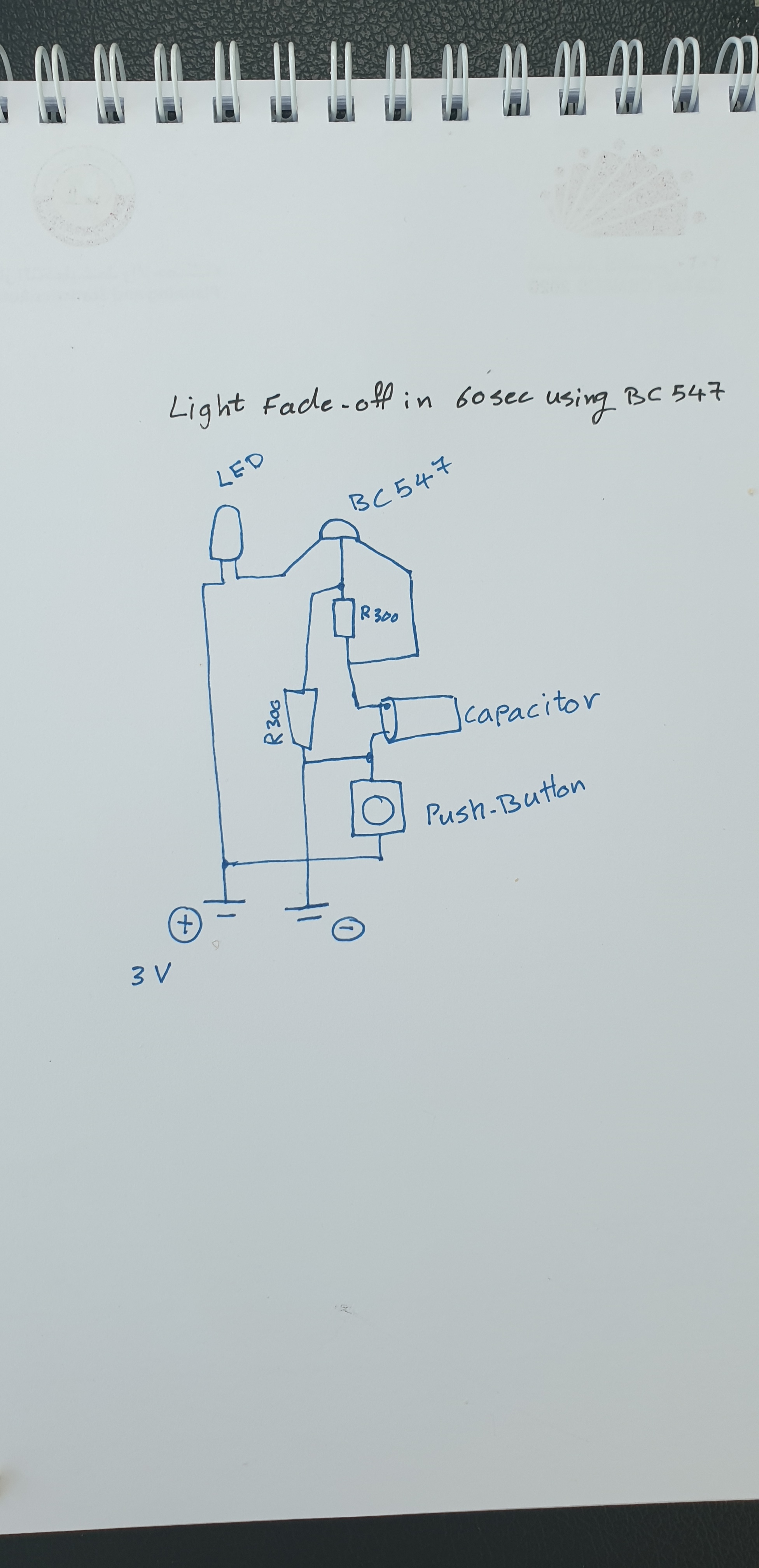
The BC547 has three legs,
Collector
Base
Emitter
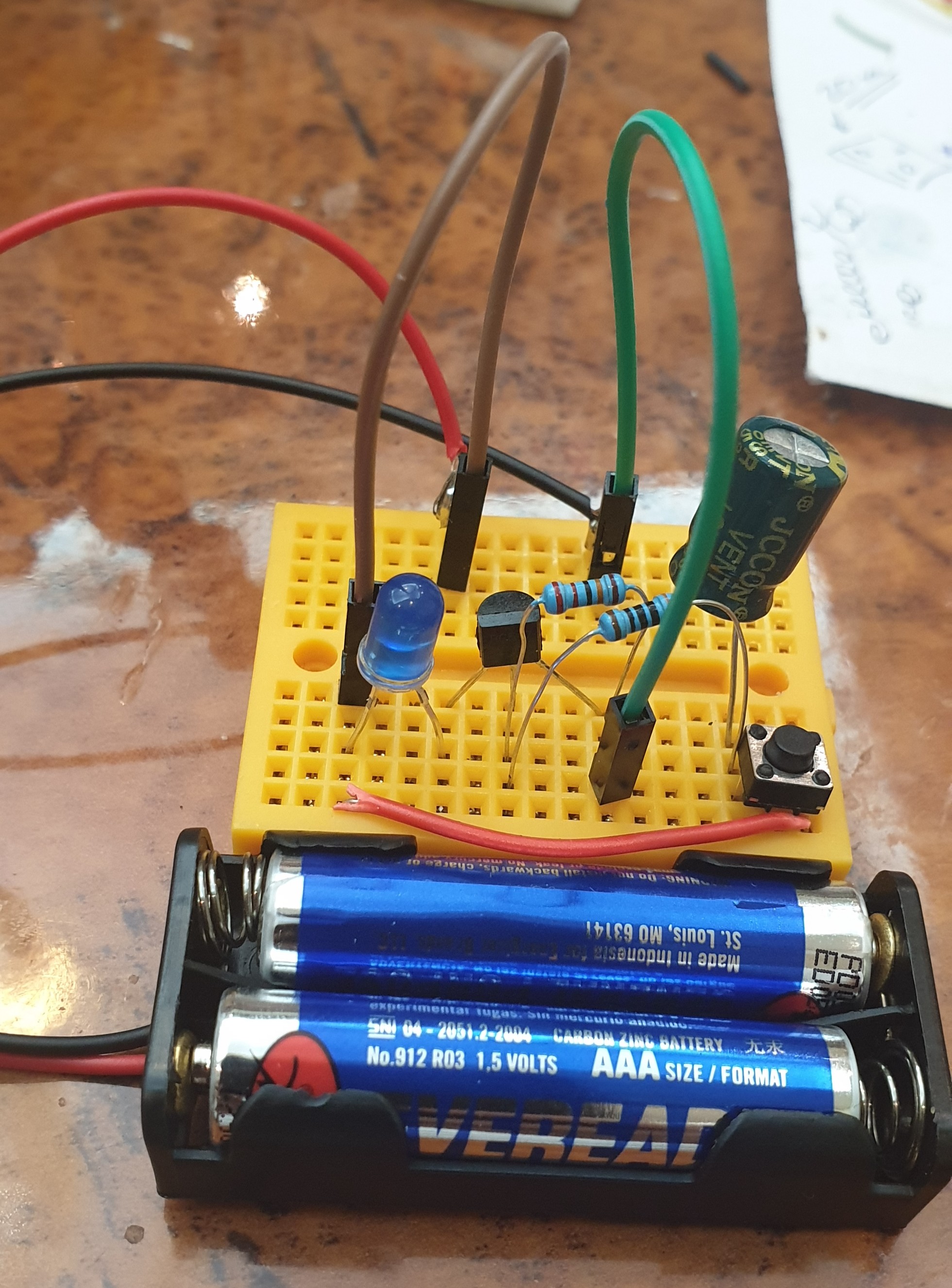
So, Starting From BC547 Base will be connected to Resistor 1, and Resistor 2 [in Parallel], Resistor1 will connect to the Capacitor Anode(+), Capacitor Anode(+) also will be connected to the BC547 Emitter.
Capacitor Cathode(-) will be connected to pin1 Push-Button, also Capacitor Cathode(-) is connected to the Resistor 2.
Resistor 2 will be connected to the Battery (-)
BC547 Collector will be connected to LED Cathode(-), LED Anode(+) will be connected to the Battery(+). And the Push-Button Pin2 will be connected to Battery(+).
Here is the diagram:
 |
 |
Push the Button Now if we Push the Button, the LED will Go NO, and start Fading-out (OFF), I start a stop-watch it count almost 60Sec. Here is a speed-up RUN video.
Speed-up Video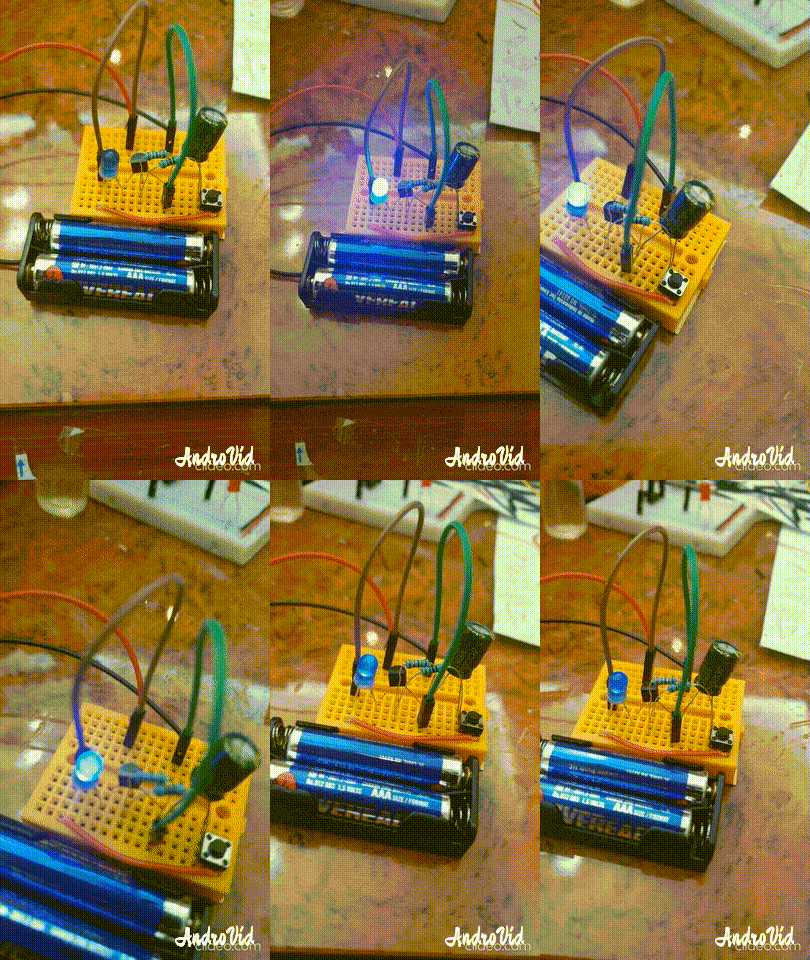 |
:: ARDUINO PROJECTS LIST ::
[ Click Here to See all ARDUINO Projects ]
To Download the ARDUINO Project [Code and Diagram] files {No Code in this Project}
By: Ali Radwani
Python Project: Properties Maintenance System P10
Subject: Writing a Full Application for Properties Maintenance System [Property: Delete a Record]
Learning : Python, Math, SQL, Logeic
[NOTE: To keep the code as simple as we can, We WILL NOT ADD any user input Varevecations. Assuming that our user will Enter the right inputs.]
In this part we will write the Following:
1. Writing the Maintenance Request Menu.
2. Writing the Functions header for Four Functions:
- Add a Maintenance Request.
- Edit a Maintenance Request.
- Delete a Maintenance Request.
- Show Maintenance Requests.
3. Writing the code for the first Function: Add a Maintenance Request.
4. Writing the code to Validate the Date.[The code will be coped in from my Archive]
First: Maintenance Request Menu: We will use our standard template in all application we write it, so here is the code ..

|
And here is the header of each Functions:
def add_maintenance_request() :
pass
def edit_maintenance_request() :
pass
def delete_maintenance_request() :
pass
def show_maintenance_request(inside) :
pass
First Function: def add_maintenance_request() : In this Function we will ask the user to select the ID of the Property that need Maintenance also to select the ID of Maintenance Job requered. If the Maintenance Job is Not Available in the List, then the user MUST go first to add it in the system, then come back and select it. During this Function coding we will use two Functions we have in this application [check_availability and show_lookup_data] also we will use the [Date Validation] Function we have develop some time ago [Click to Read the Post Ver.2019] {Updated Ver. used in this code.}
Here is a sample code for Selecting the Maintenance Job Requiered.
 # Selecting the Maintenance Job Requiered

 print('\n\t Select an Item from the List for the Maintenance Job Requiered:\n')
        show_lookup_data('Yes' ,'main_job_list_t', 'ml_id')
        main_j_id = input ('\n\t Enter the ID of the Maintenance Job. [E to Exit] > ')
        if main_j_id in ['e','E'] :
            input('\n\t You Select to Exit from the Function.. Press any Key .. ')
            return
        if	(check_availability('main_job_list_t', 'ml_id', int(main_j_id)) == None ) :
            input('\n\t The ID is NOT Available. Press any Key .. ')
            return
After collecting all information from the user, we will Insert/Add the data into the database using this SQL Statement..
# Add to the DataBase.
c.execute (“INSERT INTO maint_request_t (p_id , maint_for, date_time, job_s_id, notes) VALUES(:p_id , :maint_for, :date_time, :job_s_id, :notes)”,{“p_id”:mainte_req_id , “maint_for”:main_j_id, “date_time”:main_date, “job_s_id”:job_st_id, “notes”:the_note})
db_conn.commit()
Now we have the ability to add a Maintenance Request to our system.
NOTE: If you Download this Part you MUST Run the Option 82 (82. Delete the Data-Base and Start Again.) from the Main Menu to do the following Updates:
- Updates some attributes in the database level.
## Highly recommended ##
In Part-11 In the Next Part, we will write a function to show all Maintenance Request in the system.
:: PMS Parts ::
| Part 1 | Part 2 | Part 3 | Part 4 |
| Part 5 | Part 6 | Part 7 | Part 8 |
| Part 9 | Part 10 | Part 11 | Part 12 |
..:: Have Fun with Coding ::.. 🙂
To Download my Python code (.py) files Click-Here
By: Ali Radwani
Python Project: Properties Maintenance System P9
Subject: Writing a Full Application for Properties Maintenance System [Property: Delete a Record]
Learning : Python, Math, SQL, Logeic
[NOTE: To keep the code as simple as we can, We WILL NOT ADD any user input Varevecations. Assuming that our user will Enter the right inputs.]
In this part we will write a Function to Edit a record on the database, first we will call the def show_property(inside) to display all the records on the screen and ask the user to Select [enter] the ID of the Property to be Edited. Next we will Display the Record again on the screen and ask the user to Confirm the Editing by entering [Y] and any things else will be as [Don’t Edit]. Here is the code ..

|
Next we will ask the user about each attributes in the system, so the user will enter the new data (update the current one) or just press enter to keep the existed data. Here is a part of the code ..
 |
After That we will check on each user input for the attributes, if the user change/Edit the data [did not press enter] then we run an SQL command to alter the database. Here are part of the code we use ..
 |
Now we have an updated record, so we will show a message to inform the user that the records been updated.
NOTE: If you Download this Part you MUST Run the Option 82 (82. Delete the Data-Base and Start Again.) from the Main Menu to do the following Updates:
- Updates some attributes in the Database Level.
## Highly Recommended ##
In Part-10 the Next Part, we will add the Function to Backup our data .
:: PMS Parts ::
| Part 1 | Part 2 | Part 3 | Part 4 |
| Part 5 | Part 6 | Part 7 | Part 8 |
| Part 9 | Part 10 | Part 11 | Part 12 |
..:: Have Fun with Coding ::.. 🙂
To Download my Python code (.py) files Click-Here
By: Ali Radwani
Python Project: Properties Maintenance System P8
Subject: Writing a Full Application for Properties Maintenance System [Property: Delete a Record]
Learning : Python, Math, SQL, Logeic
[NOTE: To keep the code as simple as we can, We WILL NOT ADD any user input Varevecations. Assuming that our user will Enter the right inputs.]
In this part we will write a Function to Delete a record from the database, first we will call the def show_property(inside) to display all the records on the screen and ask the user to Select [enter] the ID of the Property to be Deleted. Next we will Display the Record again on the screen and ask the user to Confirm the Deleting by entering [Y] and any things else will be as [Don’t Delete]. Here is the code ..
 |
.. End of Part 8 ..
NOTE: If you Download this Part you MUST Run the Option 82 (82. Delete the Data-Base and Start Again.) from the Main Menu to do the following Updates:
- Update the properties_t Table (Adding the number of BathRooms)
- Update on create_tables Function.
- Update on insert_zero_records Function.
If you did this in last part (6) then you don’t need to do it again
In Part-9 In the Next Part, we will write the Function to Edit a record of a selected Property.
:: PMS Parts ::
| Part 1 | Part 2 | Part 3 | Part 4 |
| Part 5 | Part 6 | Part 7 | Part 8 |
..:: Have Fun with Coding ::.. 🙂
To Download my Python code (.py) files Click-Here
By: Ali Radwani
Python Project: Properties Maintenance System P7
Subject: Writing a Full Application for Properties Maintenance System [Property: Showing the Records in Main property Table]
Learning : Python, Math, SQL, Logeic
[NOTE: To keep the code as simple as we can, We WILL NOT ADD any user input Varevecations. Assuming that our user will Enter the right inputs.]
After adding Records to the Main Property Table, we need to display the records on the screen. So now in this part (Part -7) we will write a function to display all the records. The Function name will be def show_property() the function is not taking any attribute and is Not returning any things. First we will print-out the Table-Header then we will run an [SQL: select * from table-name] command to fetch all the records, then will [for loop] and test-format to print all the records on the screen. Here is the Code ..
 |
After i display the records, I notes that the Address-Column needs more than one row (in some cases), and it miss the line formating, so I wrote a function and call it def warp_text(tex,warp_on,nl_space) the function takes three arguments, the test: it the text/string you want to print.warp_on: is a number of character before the new-line.nl_space: is the number of white-character in the new-line.
Here is the Code ..
 # Function to warp

def warp_text(tex,worp_on,nl_space) :
    c = 0

    for t in range (len(tex)) :
        print(tex[t],end="")
        c += 1
        if c == worp_on :
            print('\n', ' '*nl_space, end="")
            c = 0
Check all the codes in the Download Page..
End of Part 7
NOTE: If you Download this Part you MUST Run the Option 82 (82. Delete the Data-Base and Start Again.) from the Main Menu to do the following Updates:
- Update the properties_t Table (Adding the number of BathRooms)
- Update on create_tables Function.
- Update on insert_zero_records Function.
If you did this in last part (6) then you don’t need to do it again
In Part-8 In the Next Part, after adding and showing the records we will write the Function to Delete a record from the Table.
:: PMS Parts ::
| Part 1 | Part 2 | Part 3 | Part 4 |
| Part 5 | Part 6 | Part 7 | Part 8 |
..:: Have Fun with Coding ::.. 🙂
To Download my Python code (.py) files Click-Here
By: Ali Radwani

Taking pictures is not my main daily practices, but when i start playing with my camera, i really enjoy my self.
Thanks for visiting my Space..


 Ali's Photography Space...