Archive
Excel, VBA Codes and Formulas-3
Learn To : In Excel – SUMIF and SUMIFS [ Part-2 SUMIFs ]
In SUMIFS we are talking about more than one conditions to apply on the same range or other range before we calculate the SUM of the target range.Case Assumption: As in Part-1, Assume we have a table, with 5 columns (as in image-1) columns titles are [Date, Item, Quantity, Price and Total] containing our Expendituer and we have another table call it Summaries, we want some totals to be in this table. We can see the main table [Expendituer] and the Summary table as in part-1 but here we will add a year column to the Item-Quantity box, so we want to have the Quantity of an Item in given year. Image-2.
Image-1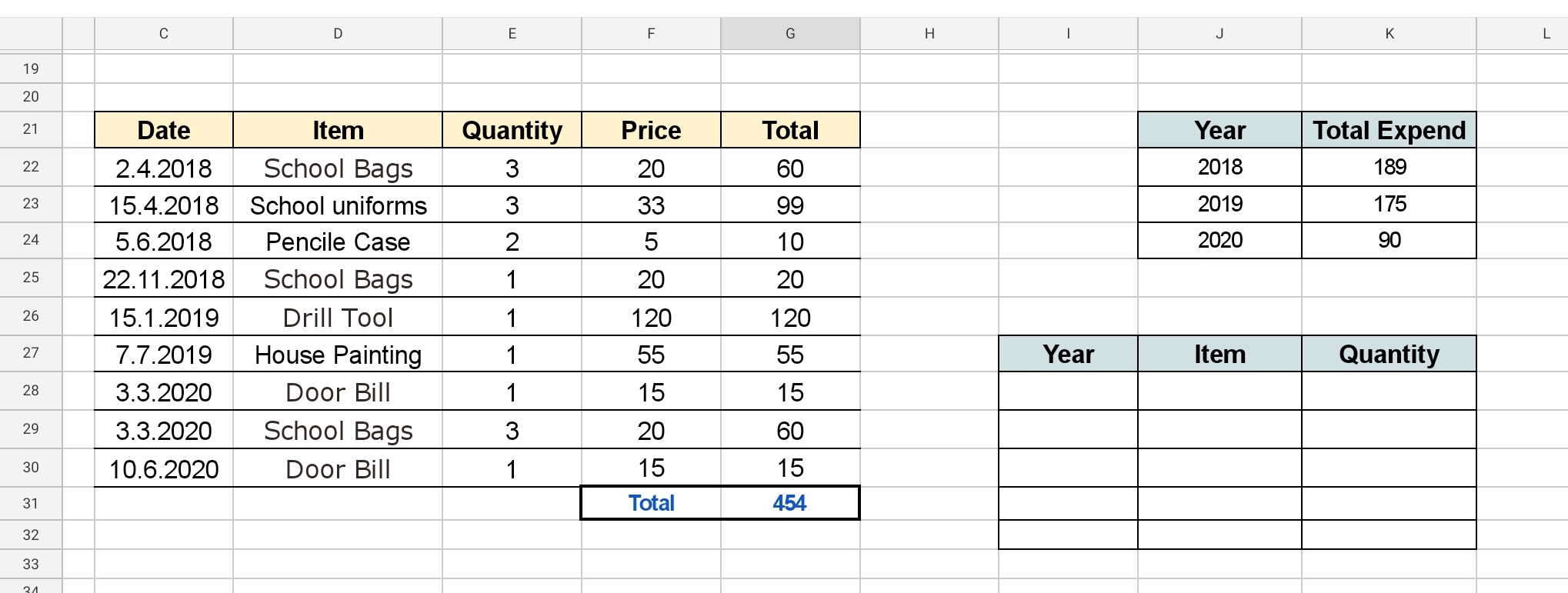 |
Image-2 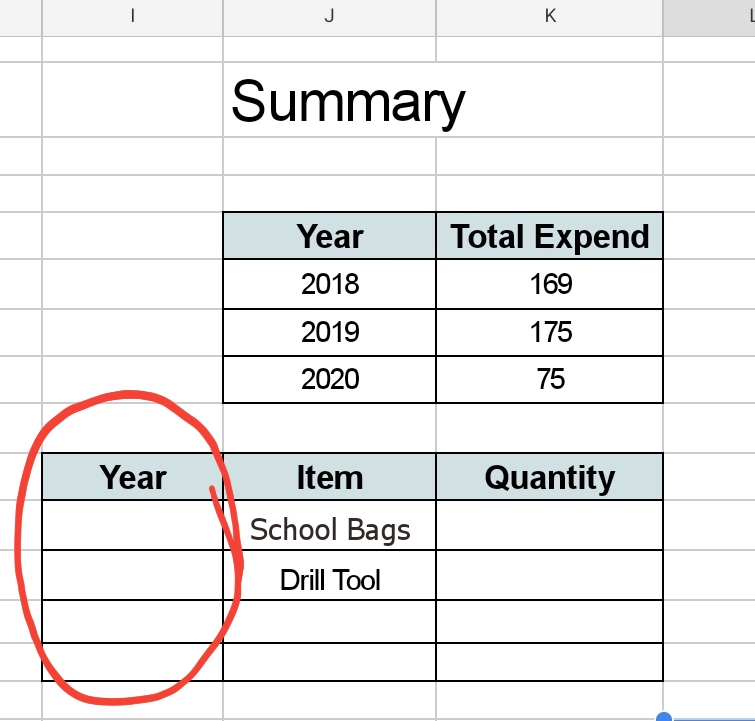
|
So if we write 2018 in Cell I27 we Must get the Quantity of School Bags we bought in 2018. To do this we will write this formula:
SUMIFS ()
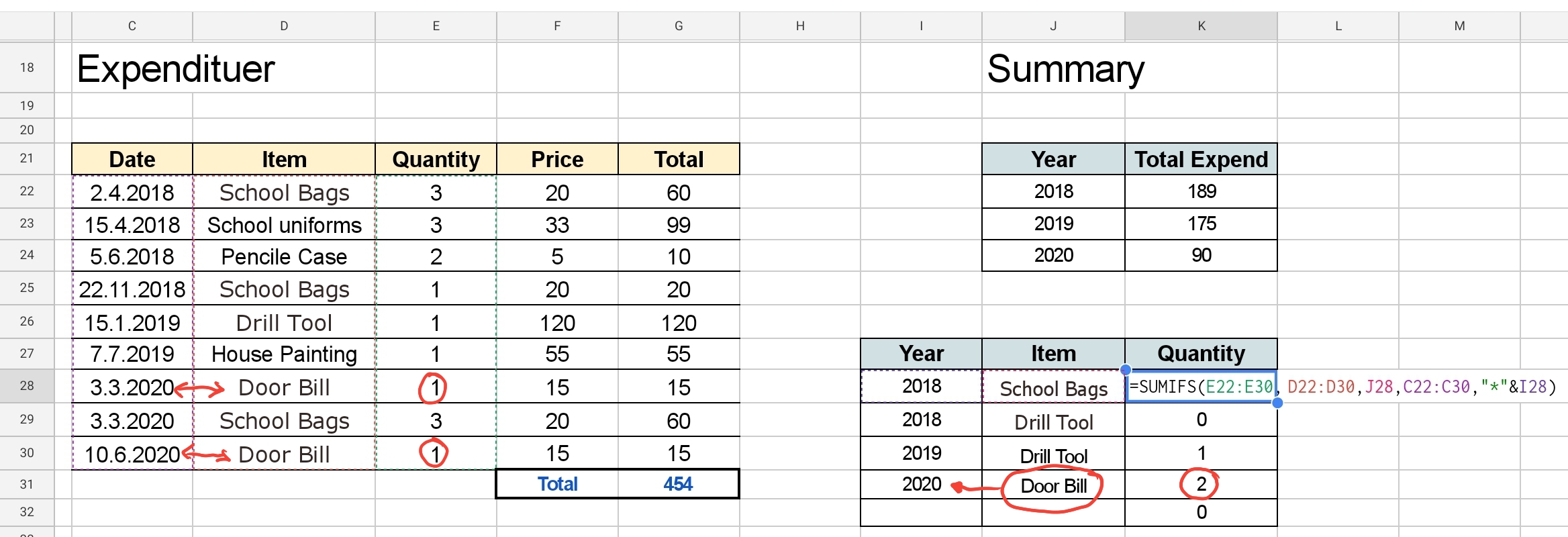
=SUMIFS(E22:E30, D22:D30,J28,C22:C30,”*”&I28)
So in Cell K28 we will write =SUMIFS(E22:E30, D22:D30,J28,C22:C30,”*”&I28)
then we can copy the formula to other cells.
Now we have the formula in all the cells we want, we may need to do a little changes to cells number or columns that may been changed during the copy. And here is a screen shot of what we must have.
|
🙂 Have Fun ..
 Follow me on Twitter..
By: Ali Radwani
Excel, VBA Codes and Formulas-2
Learn To : In Excel – SUMIF and SUMIFS [ Part-1 SUMIF ]
Case Assumption: Assume we have a table, with 5 columns (as in image-1) columns titles are [Date, Item, Quantity, Price and Total] containing our Expendituer and we have another table call it Summaries, we want some totals to be in this table. In Image-1 we can see the main table [Expendituer] and the Summary table.
Image-1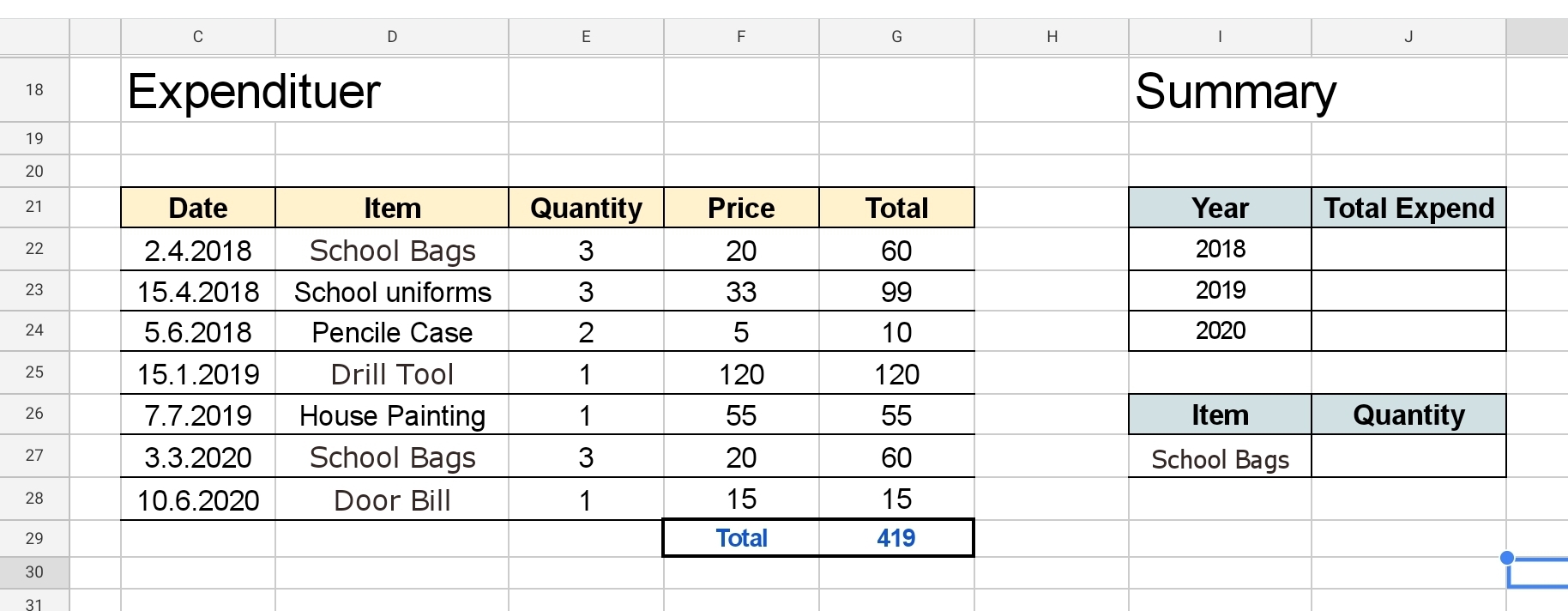 |
In the Above Expendituer Table we have some [Dummy] data, and in our Summary Table we want to calculate the SUM of each year so in the Cell J22 we shall write this formula: =SUMIF()
SUMIF will take 3 parameters First one is the range of applying the condition. Second one is the condition. Third one is the range to calculate to SUM form. So in our case [Image-1]
The range of applying the condition will be C22:C28
The condition is in Cell I22 [23,24,25 … for each row and year.]
The range to calculate to SUM form will be G22:G28
So in Cell J22 we will write =SUMIF(C22:C28,”*”&I22,G22:G28)
then we can copy the formula to other cells [I23 and I24]
So now we have the Sum in each Year. See Image-2
Image-2 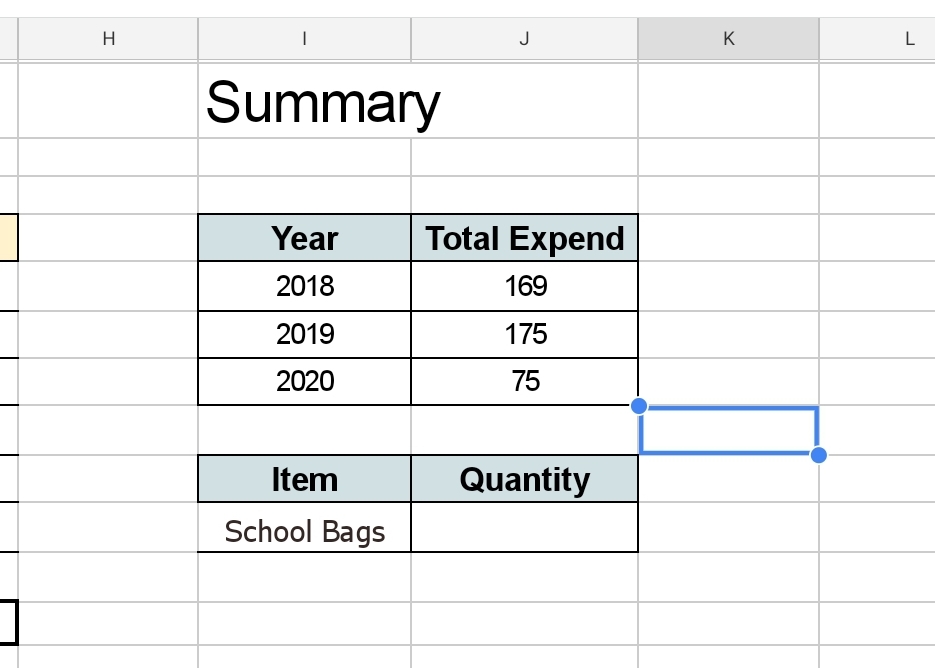 |
Now with same formula SUMIF, we can get the Quantity of each Item we purchase, and we will write the formula in Cell J27 [as in Image-1].
So in Cell J27 we will write =SUMIF(D22:D28,I27,E22:E28) as in Image-3 then we copy the formula to Cells [J28, J29, J30 .. and so]
Image-3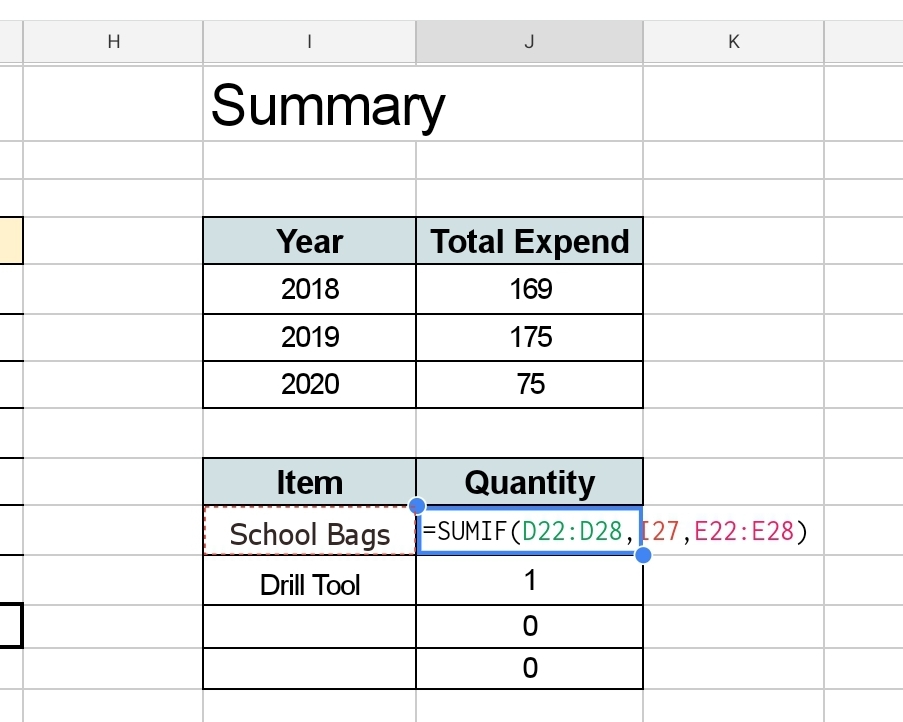 |
Now we have the sum of Quantity.
🙂 Have Fun ..
By: Ali Radwani
Excel, VBA Codes and Formulas-1
Learn To : In Excel – Drop Down List in a cell.
I start working on a project for a friend, he has some requests to be done on a MS-Excel, so I thought why not to write several posts about MS-Excel capabilities.
MS-Excel is a great application to be used, I will not write to praise the program, but will jump to coding. In Excel we can use dozens of built in ready to use tools and Formulas. Also MS-Excel has a very good, easy to use and learn programming language called VBA (Visual Basic for Application) which with simple code we can perform some tasks and create Menus, buttons and functions that runs in background.
Starting from this post we will use some built-in functions and VBA’s one that I am using in my Excel files.
So let’s say we have a table that has a column called “Pay-Method”, the value we save in this column always is one of three: “Cash, Card, Cheque” we don’t want the user to type it every time, but to select it from a list.
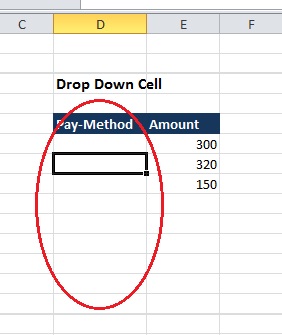 |
To do this we can use an static approach or a Dynamic approach.
Static Approach: if we have a specific answers that can’t be more like (Yes,No) or as our example above (Cash, Card, Cheque) or similar cases then we can use an static approach. So First Select First cell in the Table, from the menu we will select “Data” then “Data Validation” and select Data Validation.
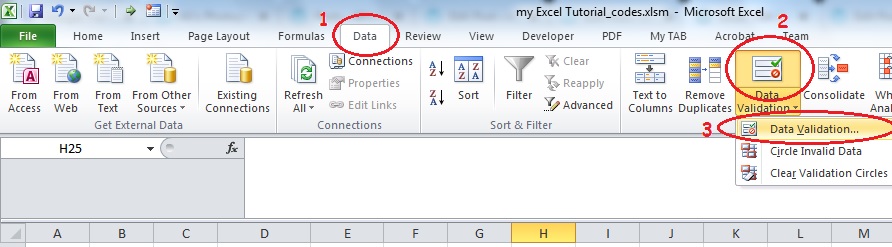 |
Now,
- From the Allow box, we select List.
- Then in Source box, we need to type the items we want to appear in each cell as a drop-down list separated by a comma. Cash, Card, Cheque
- We need to check [Ignore Blank and In-cell Dropdown] Then Click OK.
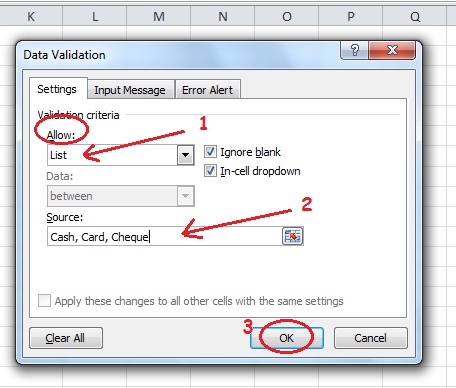 |
Now we will have a small arrow on the first cell in our Table, to copy the List to other Cells (Beneath) hold the small DOT and Drag it down.
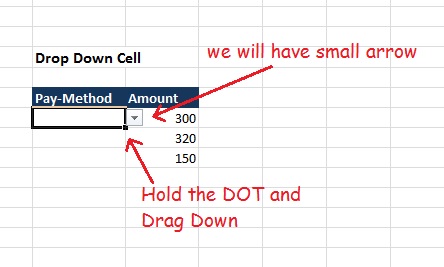 |
And Now we are DONE, we just create a Dropdown List in all “Pay-Method” Column in the table..
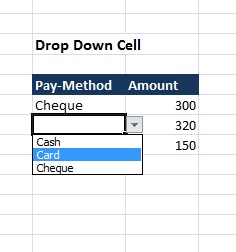 |
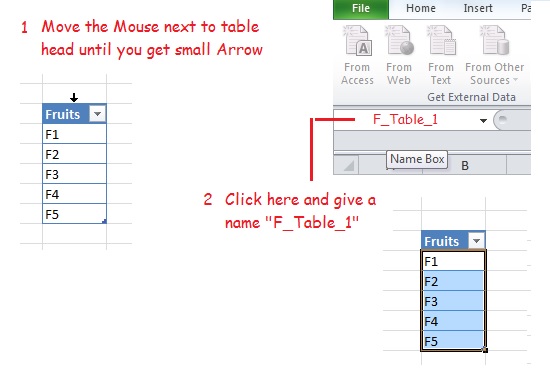
Dynamic Approach: If we have a list of items and this list is growing (We may add more items ti it), such as Fruit list in a grocery, then we will use the Dynamic drop-down list. In this case I prefer to use a new Excel Tab call it “Setting”, so we will create one. On that Tab create a Table call it “Fruit” and list all the fruits you want to be appear in the drop-down cell list (In this example I will list down F1, F2, F3, F4, F5), Select the table and from Menu select “Format as Table” and just chose any format you want. Here is a screen shot.
Here is a screen shot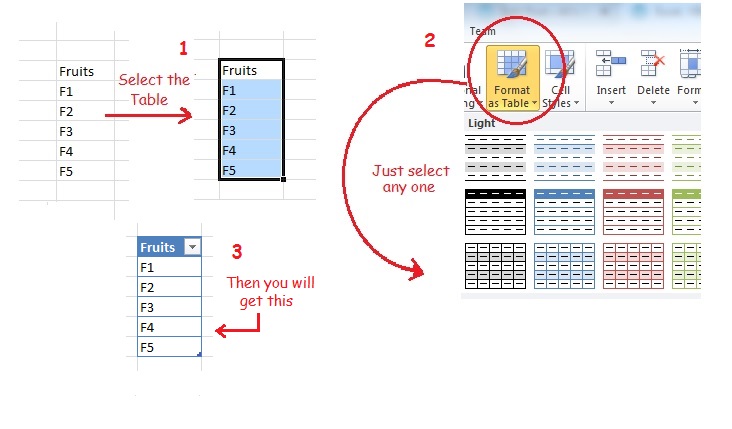 |
Move the Mouse next to table head until you get small Arrow, and give it a name. as in here..
 |
Now go-back to our main Table and using the same way we did in the Static Approach (from the menu we will select “Data” then “Data Validation” and select Data Validation.) AND
- From the Allow box, we select List.
- Then in Source box, we need to type the Name we select for our table “F-Table_1” for the fruit table
- We need to check [Ignore Blank and In-cell Dropdown] Then Click OK.
Done … Now if we add new Fruit to the list “F6” it will appear in our Drop-Down cell list.
🙂 Have Fun ..
By: Ali Radwani
Python: Cooking App P-7
Learning : Python, Data-Base, SQlite
Subject: Writing a Cooking Application
RECIPES MENU: Delete Recipe To Delete a recipe we need to point on it, we will do this by it’s ID. So we can show all recipes by names, then we select the one we want to delete and enter it’s ID, the system will ask to confirm this action by typing (y,Y) then it we will call the delete function. In Delete function “def del_recipe()” we need to delete all the data regarding this ID form three DB Tables, recipes, recipes_steps, rec_ingredient and photo. Although we did not use the photo table and and we just create it for future use, but er will write its code.
Future Plan: In coming weeks we will convert this application “Cooking Application” to GUI “Graphical User Interface” application using tkinter library (Tkinter: is a Python binding to the Tk GUI toolkit) .
Coding: So to Delete a recipe we will show all Recipes and there ID’s sorted by it’s Name and ask the user to enter the ID of the Recipe he/she want to delete.
 # Code to Delete a Recipe

def del_recipe():
    os.system("clear")
    print('\n ====== Delete a Recipe =====')

    # Start to list down all the Recipes Name.
    print("\n\n  List of ALL Recipes we have.")
    c.execute("select r_id,r_name from recipes where r_id > 0")
    for each_r_name in c.fetchall():
        print('   ID:',each_r_name[0], 'Name:',each_r_name[1])

    # Now we ask the user to Enter the Recipe ID.
    rec_del = input('\n\n   Enter an Recipe ID to be Deleted: ')

    # Now we ask the user to Confirm Deleting Recipe.
    sure_remove = input('\n The Recipe will be DELETE and can''t be Rolled-Back. Are you sure you want to Remove it [Y,N] ')

    if sure_remove in ['y','Y']:
        c.execute ("Delete  from recipes_steps where r_id = {}".format(rec_del))
        db_conn.commit()
        c.execute ("Delete  from recipes where r_id = {}".format(rec_del))
        db_conn.commit()
        c.execute ("Delete  from rec_ingredient where r_id = {}".format(rec_del))
        db_conn.commit()
        c.execute ("Delete  from photo where r_id = {}".format(rec_del))
        db_conn.commit()

    elif sure_remove in ['n','N']: # If the user decide not to delete and select N
        print('\n You select NOT to remove the Recipe.')
    else :# If the user enter anything else than Y or N
        print('\n You must select (Y or N).')

    input('\n   .. One Recipe Removed ..   Press any key .. ')
 |
To Download my Python code (.py) files Click-Here
By: Ali Radwani
Python: Cooking App P-6
Learning : Python, Data-Base, SQlite
Subject: Writing a Cooking Application
RECIPES MENU: Adding a Recipe.To Add a recipe we need to work on three tables, the user will not know that, the user dose’t care what happening in the application, he/she want the cooking information to be saved and retrieved whenever required.To do this we First will ask the user to Enter some basic information about the Recipe, such as Name, Date selecting it’s type like is it a Lunch or Dinner and other thing we will see it later while writing the code, then we need to enter the Ingredients of each Recipes, the Ingredients are store in another DB-Table based on our DB-design, so we will list down all the Ingredients and ask the user to select from the list by typing the ID’s of those they want, and if an ingredient does not exist in the list the user will write it.Finally we will ask the user to write the cooking steps.This is not easy way to do it using Terminal-screen or console (Command line application CLIs), we will convert this application to GUI (Graphical User Interface) later after we finish the application.
Now, let’s start with the basic information about the Recipes. In Basic Information we have:
Recipe Name: To give a Name to the Recipe.
Recipe Date: The user can Write a date.
Recipe Type: The user will select one of: [Breakfast, Dinner, Lunch, Snack, Sweet]
Recipe Details: Other Details such as the time needed for cooking, other notes.
Recipe Tags: Tags will not be available in this version, but we will work on it when we start doing the GUI version.
So let’s start writing the code..
 # Adding New Recipe

def add_recipe():

    os.system("clear")
    print('\n ====== Adding New Recipe =====')

    print('\n First let''s Enter some Information about the Recipe..')
    r_name = input('\n\n   Enter The Recipe Name: ').capitalize()
    r_date = input('\n\n   Enter The Date in dd.mm.yyyy format: ')

    # Now to select the Recipe Type.
    print('\n   A Recipe Type can be:\n    1.Breakfast.\n    2.Dinner.\n    3.Lunch.\n    4.Snack.\n    5.Sweet. ')
    r_type = False
    while r_type == False :
        rec_type = input('\n\n   Select a Type [1,2,3,4,5]: ')
        if rec_type =='1' :
            rec_type ='Breakfast'
            r_type = True
        elif rec_type =='2' :
            rec_type ='Dinner'
            r_type = True
        elif rec_type =='3' :
            rec_type ='Lunch'
            r_type = True
        elif rec_type =='4' :
            rec_type ='Snack'
            r_type = True
        elif rec_type =='5' :
            rec_type ='Sweet'
            r_type = True
        else :
            print('\n   You have to select from the List')

    r_details = input ('\n  Enter Short information for the Recipe, like \n   Time for cooking,\n   Country of this Meal,\n   Other short details.\n  [ USE (,) to SEPARATE EACH INFO ]\n\n      Enter here: ')

    c.execute ("INSERT INTO recipes (r_name, r_date, r_type, r_details ) VALUES(:r_name,:r_date,:r_type, :r_details)",{"r_name":r_name,"r_date":r_date,"r_type":rec_type, "r_details":r_details})
    db_conn.commit()
Now, we save the Basic Recipe Information and we have the Recipe ID (PK) and we will use it as a Foreign Key in Recipe-Ingredient and Recipe-Steps. With Recipe-Ingredient we will list down all the recipes and let the user to enter the Id’s of the one’s they will use with there recipe. If the needed Ingredient is not in the list, the user will insert it and it will be added to the Ingredient list. Here is the code for this section. .
 #This part of code continuing the above part.


    os.system("clear")
    # Select the Ingredient for the Recipe.
    print('\n Now, Select the Ingredients of your Recipe:')
    print("\n If the Ingredient is not in the List you will Add it shortly, FIRST select the exist ones\n write it''s ID Separated by ( , ) ")
    print('\n  List of Ingredients:')

    list_of_ing()

   ing_l = input('\n Enter the Ingredients ID Seperated by ( , ) ')

    if input ('\n Is there any more Ingredients you want to add? [Y,N]: ') in ['y','Y'] :

        new_ing = input('\n Enter the Ingredients Seperated by ( , ): ')
        new_ing = new_ing.split(",")

        # To get max ingredients ID.
        c.execute ("select max(i_l_id) from ingredients_list")
        max_ing_id = c.fetchall()[0][0]
        ing_l2 =[]

       # To add the new ingredients to the ingredients_list .
        for each in range(len(new_ing)) :
            c.execute ("INSERT INTO ingredients_list (i_name) VALUES(:i_name)",{"i_name":new_ing[each].capitalize() })#ing_name})
            db_conn.commit()
            ing_l2.append (str(max_ing_id+(each+1)))

        ing_l=ing_l.split(",")
        ing_l2=ing_l + ing_l2

        # To link the ingredients to the recipe.
        for each in range (len(ing_l2)):

            c.execute ("INSERT INTO rec_ingredient (i_l_id, r_id) VALUES(:i_l_id, :r_id)",{"i_l_id":ing_l2[each],"r_id":rec_max })
            db_conn.commit()
Now, we have the all Ingredients of the Recipe, also we have the ID or the Recipe, so we can link the Recipe information to the cooking Steeps. Here the user will write the cooking steps until the user press (Q,q) and Enter.
 #This part of code continuing the above part.

print('\n  Now we can Write the Cooking Steps, Press Enter After each Step. When you finish just enter (q). ')

    stop = False
    while stop == False :
        c_step = input('\n Enter a Cooking Step: [Press Enter After each Step. q to Finish] :\n   Write Here : ')
        if c_step not in ['q','Q'] :
            c.execute("INSERT Into recipes_steps (r_id , rec_steps) values (:r_id, :rec_steps)",{"r_id":rec_max,"rec_steps":c_step})
            db_conn.commit()
        else :
            stop = True


    input('\n   .. One Recipe Added ..   Press any key .. ')
Here are some screen shots of the code and running out-put.
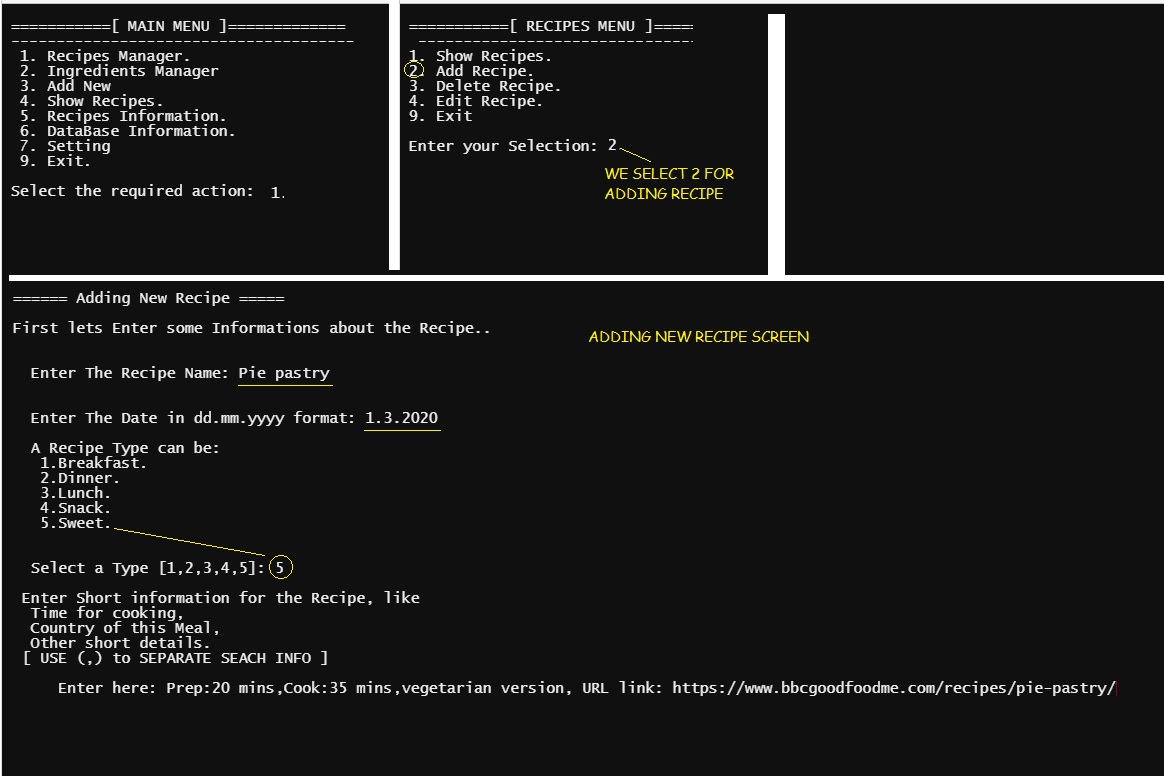 |
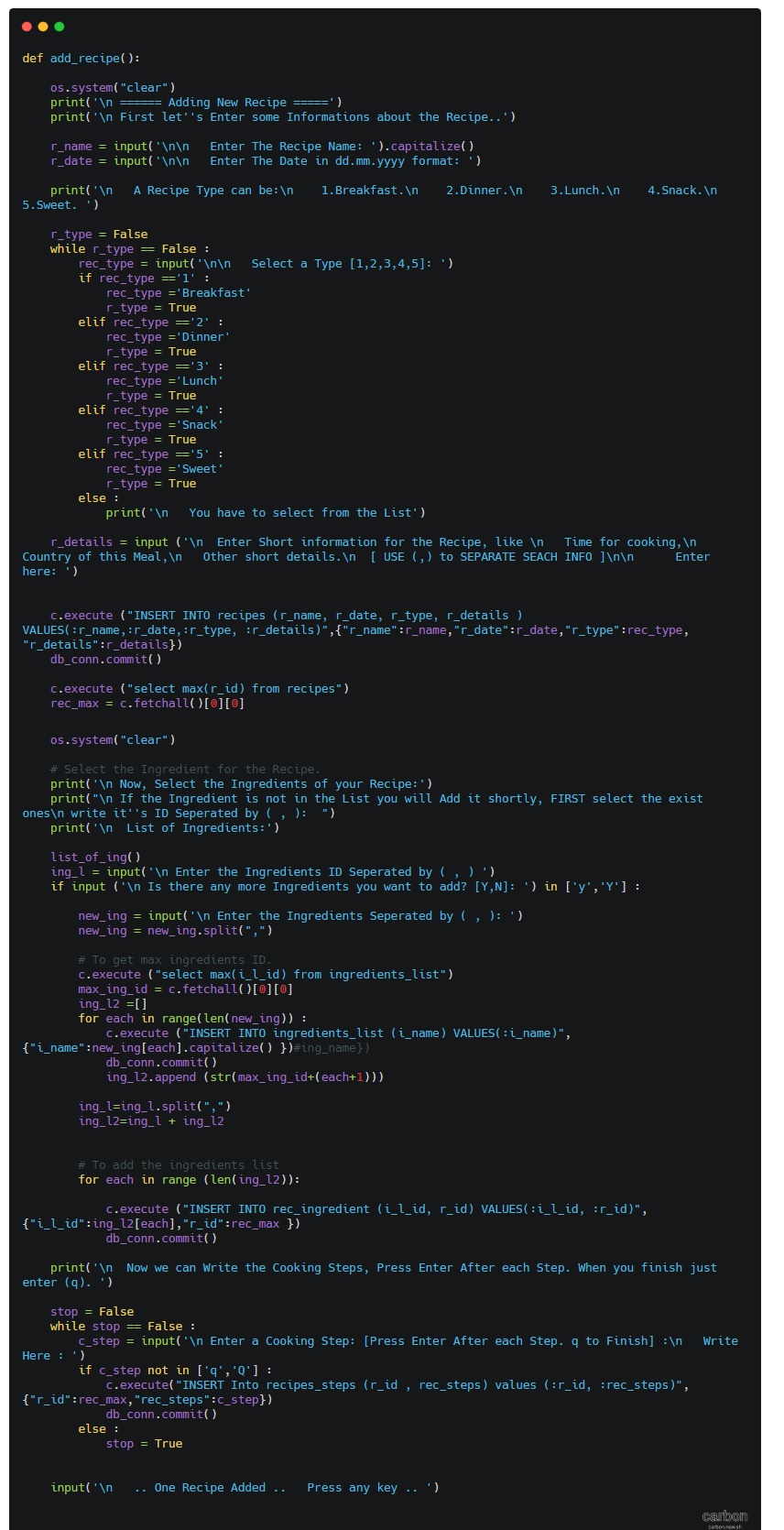
|
In Next Part: In the next coming part we will work on the Deleting Recipe.
To Download my Python code (.py) files Click-Here
By: Ali Radwani
Python: Cooking App P-5
Learning : Python, Data-Base, SQlite
Subject: Writing a Cooking Application
RECIPES MENU: Once I start reading the Net (blogs and Cooking Books) to see how cookers talking about foods-recipes, I realise that I may need to add something to the DataBase, then I start writing the codes for the “Recipe Menu” and immediately I find the we need to add a new Table; I call it “recipes_steps” it will hold several steps of how to cook a recipe.
DataBase Diagram |
Here is the code to create the new Table and adding the record 0 (Zero).
# To create the Table “recipes_steps” .
sql_recipes_steps =”CREATE TABLE if not exists recipes_steps (st_id INTEGER PRIMARY KEY AUTOINCREMENT,r_id integer, rec_steps text )”
c.execute(sql_recipes_steps)
db_conn.commit()
# To add the Record Zero.
c.execute (“INSERT INTO recipes_steps (st_id) VALUES(:st_id)”,{“st_id”:0})
db_conn.commit()
First let’s see the “Recipe Menu” and from there we will write the codes for each item in the menu. As we saw in Ingredients Menu, same functionality should be here to, Listing all Recipes, Adding new one, Editing and Deleting a recipes. We will write the code for each of them, and here is the code for the “Recipes Menu”
 # Recipes Menu - Function

def recipes_menu ():
    while True:
        os.system("clear")
        print('\n ===========[ RECIPES MENU ]=============')
        print('  --------------------------------------')
        print(' 1. Show Recipes.')
        print(' 2. Add Recipe.')
        print(' 3. Delete Recipe. ')
        print(' 4. Edit Recipe.')
        print(' 9. Exit')
        uinp= input('\n Enter your Selection: ')

        if uinp == '1':
            show_recipes()
        elif uinp == '2':
            add_recipe()
        elif uinp == '3':
            del_recipe()
        elif uinp == '4':
            edit_recipe()
        elif uinp =='9':
            return
        else:
            print('\n  Please select from the Menu.')
So first thing we will work on “Show Recipes”, once the user select Show Recipes another Menu will be display to give more option as in the screen shot..
 |
 |
To display the Recipes based on the options we have, we will write a function that take a parameter based on the user selection so the user can search for a recipe based on it’s Name, Date or other details. Let’s see the code ..
 |
 |
NOTE THAT: We did nothing with Tags option, after we finish the application we will assume that the Business owner ask to add a new requirement to the application, and we will see the impact of this and who to solve it.
In Next Post we will work on the Adding New Recipe to our Cooking Application.
To Download my Python code (.py) files Click-Here
By: Ali Radwani
Python: Cooking App P-4
Learning : Python, Data-Base, SQlite
Subject: Writing a Cooking Application
INGREDIENT MENU: In this post we will write the Python code for the Ingredient Menu Functions. We have four main Functions :
1. Show all Ingredient.
2. Add Ingredient.
3. Delete Ingredient.
4. Edit Ingredient.
We need the Ingredient List so the user can select an Ingredient for the Recipes they want to write. First we will list down all the Ingredient in the Table.
show_ingredient is a function to list all the ingredient in “ingredients_list” Table, here is the code ..
 # Show Ingredient Function

def show_ingredient():

    os.system("clear")
    print('\n ====== Show All Ingredient =====')
    show_sql = c.execute('select * from ingredients_list where i_l_id > 0 order by i_name')
    for each in c.fetchall() :
        print ('  ',each[0],'....',each[1])

    input('\n   ..   Press any key .. ')

add_ingredient Function will let the user to add more Ingredients to the list.
 # Add New Ingredients Function

def add_ingredient():

    os.system("clear")
    print('\n ====== Adding New Ingredient =====')
    ing_name = input('\n\n   Enter an Ingredient you want to add: ').capitalize()
    c.execute ("INSERT INTO ingredients_list (i_name) VALUES(:i_name)",{"i_name":ing_name})
    db_conn.commit()

    input('\n   .. One Ingredient Added ..   Press any key .. ')


del_ingredient To Delete an Ingredients we need to enter it’s ID, and If we Delete one and that one was used in any recipes, then once we view the recipe the Ingredients will not show there.
 # To Delete an Ingredient

def del_ingredient():

    os.system("clear")
    print('\n ====== Delete an Ingredient =====\n')
    c.execute('select * from ingredients_list where i_l_id > 0 order by i_name')
    for each in c.fetchall() :
        print ('  ',each[0],'....',each[1])

    ing_del = input('\n\n   Enter an Ingredient ID to Delete: ')

    if ing_del.isnumeric():
        sure_remove = input('\n Please Note that if you Delete this Ingredient it will not show in any recipes that use it.\n   Are you sure you want to Remove it [Y,N] ')

        if sure_remove in ['y','Y']:
            c.execute ("Delete from ingredients_list where i_l_id = {}".format(ing_del))
            db_conn.commit()
        elif sure_remove in ['n','N']:
            print('\n You select NOT to remove the Ingredient.')
        else :
            print('\n You must select (Y or N).')

        input('\n   .. One Ingredient Deleted ..   Press any key .. ')
    else:
        print('\n   You must Enter a Numeric Ingredient ID.')
        input('\n   ..  Press any key .. ')
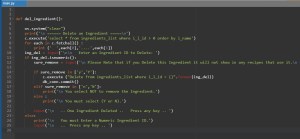

edit_ingredient To Edit an Ingredients we need to enter it’s ID, so first we will list down all Ingredients we have then the user will select the one to be edit. Here is the code to do so..
 # To Edit an Ingredients.

def edit_ingredient():

    os.system("clear")
    print('\n ====== Edit an Ingredient =====')
    print('\n\n :: List of Ingredients.\n')

    c.execute('select * from ingredients_list where i_l_id > 0 order by i_name')
    for each in c.fetchall() :
        print ('  ',each[0],'....',each[1])
    ing_edit = input('\n\n   Enter an Ingredient ID you want to Change: ')

    if ing_edit.isnumeric():
        c.execute('select i_name from ingredients_list where i_l_id  = {}'.format(ing_edit))
        print('  You select to change the: ',c.fetchall())
        new_ing = input('\n  Enter the New Update for it: ')

        c.execute("update ingredients_list set i_name = '{}' where i_l_id  = {}".format(new_ing.capitalize(),int(ing_edit)))
        db_conn.commit()
        input('\n   .. One Ingredient Updated ..   Press any key .. ')

    else:
        print('\n   You must Enter a Numeric Ingredient ID.')
        input('\n   ..  Press any key .. ')
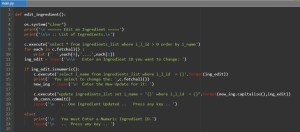

Last thing we will Insert some Ingredients in the “ingredients_list” Table so we can test the functions, for this purpose I will write this piece of code that we can run to Insert some Ingredients.
 # To Insert sample ing_list

ing_list =["Onion","Spinach","Mushroom","Tomatoes","Lime","Turnip","Snake Beans",
"Jalapeno","Baking powder","sugar","Eggs","Vanilla extract","Salt","Flour","Butter",
"Oil","Whole milk","Orange juice","Baking soda","Ground cinnamon","Dark chocolate",
 "Cocoa","Cherry","Cherry jam"]

for item in range (len(ing_list)):
    ing_name = ing_list[item].capitalize()
    c.execute ("INSERT INTO ingredients_list (i_name) VALUES(:i_name)",{"i_name":ing_name})
    db_conn.commit()
Now, we can use the Delete, Edit and Add functions to test the “Ingredients Manager” from the Main Menu, here is some screen shots.
Show Ingredients  |
Add Ingredients |
Delete Ingredients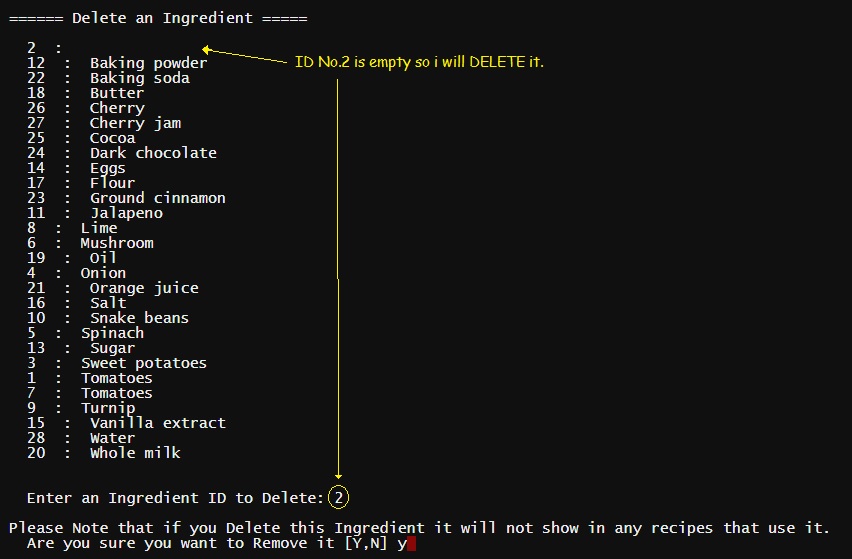 |
Edit Ingredients  |
Note: The Screen-Shots above was before I add Order by clause to the SQL statement.
In Next post we will write the codes for the functions in the ” Recipe Menu”.
To Download my Python code (.py) files Click-Here
By: Ali Radwani
Python: Cooking App P-3
Learning : Python, Data-Base, SQlite
Subject: Writing a Cooking Application
Over View: In last post (Part-2) we wrote the codes for Main-Menu and other sub-Menus, today in this post we will work on “Setting Menu”. Setting Menu has three items:
1. Create the needed Tables. [To create all tables we need in the database]
2. Drop Tables. [If any things goes wrong then we can Drop (Delete) a Table (or more) ]
3. Insert Dummy Data. [To Insert ONE Record in the tables. (Record 0)]
First thing we need to create a database and set a connection to it, also we will import the [sqlite3 and os], to do so we will write this code:
  import sqlite3, os

  # Create the data-base & name it.
  db_conn = sqlite3.connect ("cooking.db")

   # set the connection.
  c = db_conn.cursor()

|
Now we need to write three Functions for the Setting Menu, we will start with Table creation code and here I am posting the Data-Base Tables Diagram ..
Click to Enlarge
|
 # Function to Create the Tables


def create_tables_() :    # to create tables.

    sql_recipes = "CREATE TABLE if not exists recipes (r_id INTEGER PRIMARY KEY AUTOINCREMENT, r_name text, r_date text, r_type text, r_details text, r_tags text )"

    sql_photo = "CREATE TABLE if not exists photo (p_id  PRIMARY KEY AUTOINCREMENT ,r_id integer , p_name text)"

    sql_ingredients_list = "CREATE TABLE if not exists ingredients_list (i_l_id PRIMARY KEY AUTOINCREMENT, i_name text )"

    sql_rec_ingredient ="CREATE TABLE if not exists rec_ingredient (ing_id INTEGER PRIMARY KEY AUTOINCREMENT, i_l_id integer, r_id integer)"

    c.execute(sql_recipes)
    db_conn.commit()

    c.execute(sql_photo)
    db_conn.commit()

    c.execute(sql_ingredients_list)
    db_conn.commit()

    c.execute(sql_rec_ingredient)
    db_conn.commit()

    input('\n   .. Cooking  Tables created..  Press any key .. ')
So now if we call this function “create_tables_() “, Tables will be created. Another function in the Setting Menu is Drop a Table, as we mention above we need this function in case we need to Delete a Table and create it again, in this function first we will list all the tables in the database and ask the user to Enter the Table need to be delete. Here is the code behind this function:
 # Drop a Table.

def drop_table():

    try:
        # First we will print-out the list of Tables.
        c.execute("SELECT name FROM sqlite_master  WHERE type = 'table'")
        db_tables =[]
        for each in c.fetchall() :
            for t in each :
                db_tables.append(t)
        print('\n  Table List .. ')
        for x in range (len(db_tables)) :
            print((x+1),db_tables[x])
        t = int(input('\n  Enter the number next to Table you want to Drop:  '))
        c.execute("DROP TABLE {}".format(db_tables[t-1]))
        db_conn.commit()
        print('\n ... One Table been Dropped')

    except:
        print('\n  No Tables with this name .. ')

    input('\n  . . . Press any key  . . ')

|
Last code to write in this post is to Insert One-Record in the tables, the reason of doing this manually (Hard-Coded) is that we have some “Primary key AUTOINCREMENT” fields in our tables, and to make it AUTOINCREMENT there MUST be a number first so we will enter the ZERO record (0).
 # Function to Insert the Zero Record

def insert_rec_0():

    c.execute ("INSERT INTO recipes (r_id) VALUES(:r_id)",{"r_id":0})

    c.execute ("INSERT INTO ingredients_list (i_l_id) VALUES(:i_l_id)",{"i_l_id":0})

    c.execute ("INSERT INTO rec_ingredient (ing_id) VALUES(:ing_id)",{"ing_id":0})

    c.execute ("INSERT INTO photo (p_id) VALUES(:p_id)",{"p_id":0})

    db_conn.commit()

    input('\n ...Dummy records been Inserted ....  Press any key  .. ')
In Next post we will write the codes for the functions in the “INGREDIENT MENU” to Add, Delete and Edit Ingredient List.
To Download my Python code (.py) files Click-Here
By: Ali Radwani
Python: Cooking App P-2
Learning : Python, Data-Base, SQlite
Subject: Writing a Cooking Application
Over view: In Part-1 (Click to Read) we list down the Main-Menus and sub-menus of some options, here we will start writing the codes of each menu. We will start from the Main-Menu.
Now with each menu from the last post, we will see the code and the run-time screen.
[ MAIN MENU ]
1. Add New Meal.
2. Ingredients Manager [will have a sub menu]
3. Add New.
4. Show Recipes.(Meals) [will have a sub menu]
5. Recipes Information.) [ number or Recipes by date, number on tags, number of Ingredients .. ]
6. Data-Base Information.
7. Setting. [will have a sub menu]
9. Exit.
 # Main Menu Code

def main_menu():
    while True :
        os.system("clear")
        print('\n ===========[ MAIN MENU ]=============')
        print(' --------------------------------------')
        print('  1. Add New Meal.')
        print('  2. Ingredients Manager')
        print('  3. Add New')
        print('  4. Show Recipes.')
        print('  5. Recipes Information.')
        print('  6. DataBase Information.')
        print('  7. Setting')
        print('  9. Exit.')

        uinput = input('\n Select the required action:  ')
        if uinput == '1' :
            pass
        elif uinput =='2' :
            ingredient_menu()
        elif uinput =='3' :
            show_recipes ()
        elif uinput =='4' :
            pass
        elif uinput =='5' :
            pass
        elif uinput == '6' :
            pass
       elif uinput == '7' :
            setting_menu()

        elif uinput == '9' :
            return
        else:
            print('\n  You need to select from the menu..')
 |

|
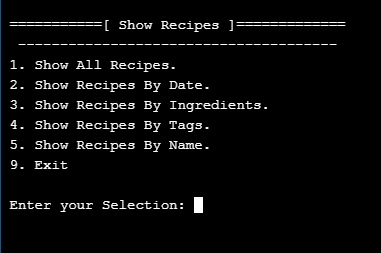
Second menu to write is “Show Recipes”, the user will use this menu to display and read the Recipes.
[ Show Recipes ]
1. Show All Recipes.
2. Show Recipes By Date.
3. Show Recipes By Ingredients.
4. Show Recipes By Tags.
5. Show Recipes By Name.
9. Exit.
 # Show Recipes Menu Code

def show_recipes () :
    while True:
        os.system("clear")
        print('\n ===========[ Show Recipes ]=============')
        print('  --------------------------------------')
        print(' 1. Show All Recipes.')
        print(' 2. Show Recipes By Date. ')
        print(' 3. Show Recipes By Ingredients.')
        print(' 4. Show Recipes By Tags.')
        print(' 5. Show Recipes By Name.')
        print(' 9. Exit')
        uinp= input('\n Enter your Selection: ')

        if uinp == '1':
            pass
        elif uinp == '2':
            pass
        elif uinp == '3':
            pass
        elif uinp == '4':
            pass
        elif uinp == '5':
            pass

        elif uinp =='9':
            return
        else:
            print('\n  Please select from the Menu.')

|
 |
Third menu we have in our application is “Ingredient Menu”, the user will it to manage the Ingredient list.
[ INGREDIENT MENU ]
1. Show all Ingredient.
2. Add Ingredient.
3. Delete Ingredient.
4. Edit Ingredient.
9. Exit.
 # Ingredient Menu Code

def ingredient_menu():
    while True:
        os.system("clear")
        print('\n ===========[ INGREDIENT MENU ]=============')
        print('  --------------------------------------')
        print(' 1. Show all Ingredient.')
        print(' 2. Add Ingredient.')
        print(' 3. Delete Ingredient. ')
        print(' 4. Edit Ingredient')
        print(' 9. Exit')
        uinp= input('\n Enter your Selection: ')

        if uinp == '1':
            pass
        elif uinp == '2':
            pass
        elif uinp == '3':
            pass
        elif uinp == '4':
            pass
        elif uinp =='9':
            return
        else:
            print('\n  Please select from the Menu.')

|
 |
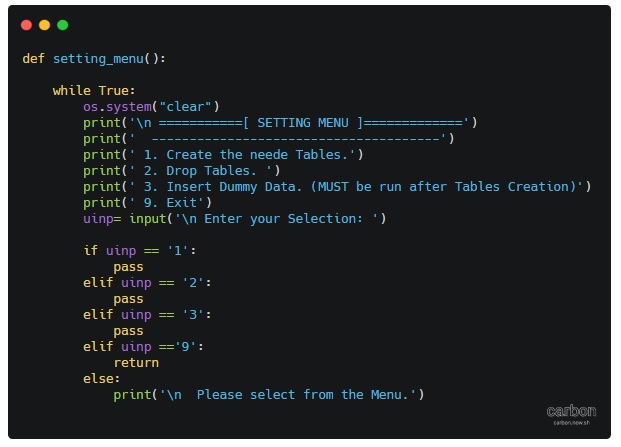
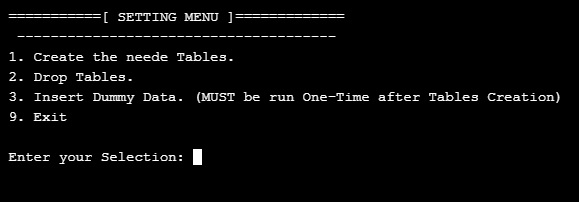
Last menu we have is “Setting Menu”, from here we can create the tables and Insert a Dummy-Data.
[ SETTING MENU ]
1. Create the needed Tables.
2. Drop Tables.
3. Insert Dummy Data. (MUST be run after Tables Creation)
9. Exit.
 # Setting Menu Code

def setting_menu():

    while True:
        os.system("clear")
        print('\n ===========[ SETTING MENU ]=============')
        print('  --------------------------------------')
        print(' 1. Create the needed Tables.')
        print(' 2. Drop Tables. ')
        print(' 3. Insert Dummy Data. (MUST be run One-Time after Tables Creation)')
        print(' 9. Exit')
        uinp= input('\n Enter your Selection: ')

        if uinp == '1':
            pass
        elif uinp == '2':
            pass
        elif uinp == '3':
            pass
        elif uinp =='9':
            return
        else:
            print('\n  Please select from the Menu.')
|
 |
Next Post: In next post we will write the codes for Setting menu so we can run it and from there we can create the Tables and Insert the Dummy Data.
To Download my Python code (.py) files Click-Here
By: Ali Radwani
Python: Cooking App P-1
Learning : Python, Data-Base, SQlite
Subject: Writing a Cooking Application
Over view: We will start new project to work on in coming weeks, and will call it ” Cooking App” I will use Python as a code language and Sqlite3 as a database in a full stack task.
Assumptions: I will assume that we have some basic information about Database such as Tables, fields, records and relationships between tables also Primary key and foreign keys. All this are important just to understand what’s going on, and we will write the code to generate all tables through Python code.
The Concept: The Cooking App will give the user the ability to write a food Recipe with it’s ingredients and how to cook it. (Along with it’s photo.. ) The application will have the ability to store a list for ingredient so the user can select from it instead of re-writing it every time, also to save the photo of your dish if you want.
Data-Base Design: In this application we will need four Tables, we will call them: Recipes, Photo, Rec_ingredients and ingredient_list. Each table will have a Primary Key (id).
Here are the Tables and the Fields
- r_id PRIMARY KEY AUTOINCREMENT
- r_name
- r_type (Breakfast, Lunch, Dinner)
- r_tags (NOT Sure to use static list or DB-Table)
- r_date
- r_details
Recipes
-
Photo
- p_id PRIMARY KEY AUTOINCREMENT
- r_id FOREIGN KEY
- p_name
-
Ingredients_List
- ing_id PRIMARY KEY AUTOINCREMENT
- i_name
-
rec_ingredient
- ing_id PRIMARY KEY AUTOINCREMENT
- i_l_id
- r_id
First thing we will write in the application is the Main-Menu and other sub menus we may have in the application. (After posting this article Menus may change)
[ MAIN MENU ]
1. Add New Meal.
2. Ingredients Manager [will have a sub menu]
3. ??.
4. Show Recipes.(Meals) [will have a sub menu]
5. Recipes Information.) [ number or Recipes by date, number on tags, number of Ingredients .. ]
6. Data-Base Information.
7. Setting. [will have a sub menu]
9. Exit.
[ Show Recipes ]
1. Show All Recipes.
2. Show Recipes By Date.
3. Show Recipes By Ingredients.
4. Show Recipes By Tags.
5. Show Recipes By Name.
9. Exit.
[ SETTING MENU ]
1. Create the needed Tables.
2. Drop Tables.
3. Insert Dummy Data. (MUST be run after Tables Creation)
9. Exit.
[ INGREDIENT MENU ]
1. Show all Ingredient.
2. Add Ingredient.
3. Delete Ingredient.
4. Edit Ingredient.
9. Exit.
We can say that this is a blue-print of the application that we want to work on, everything is subject to change while working, since this is a personal application we will be flexible in changing, but in real life project development cycle we need to take an approval (From the Business Owner) on the project plan and design before we start working also to be very clear that : “Any changes in the scope of work may cost money and time”.
Next Post: In next post we will write the codes for the menu also we will create the Tables.
To Download my Python code (.py) files Click-Here
By: Ali Radwani

Taking pictures is not my main daily practices, but when i start playing with my camera, i really enjoy my self.
Thanks for visiting my Space..


 Ali's Photography Space...