Archive
Python Project: Properties Maintenance System P2
Subject: Writing a Full Application for Properties Maintenance System
Learning : Python, Math, SQL, Logeic
[NOTE: To keep the code as simple as we can, We WILL NOT ADD any user input Varevecations. Assuming that our user will Enter the right inputs.]
In Part-2 we will start writing the Functions in our app, to start I select the Payment Methods, this is a Look-up Table that will help the user to select come values, by defualt when you install the application and select to create the database, [in Part-1] we Insert some data all lookup-tables, So here in payment Method we have [Cash, Card, Cheque]. Our Functions will be Add New Payment Method, Edit a Payment Method and Delete a Payment Method.
Once i start writing the Edit Function, i notes that we need another two Functions to Help-up theyare: get_lookup_values(tname,t_id,key_id) and check_availabilty(dt, d_id, check_id) both not printing any thing on the screen just returning a Value.
get_lookup_values(tname,t_id,key_id) Here we pass the Table-Name, the ID field and key_id we want to return it’s Value.
check_availabilty(dt, d_id, check_id) This function will return True if the ID we send in ‘check_id’ is in the Data-Table dt.
So, let’s start with Add New Payment Method, We will ask the user to write the New Payment Method the will run the SQL command to Insert it into the data-base.. Hear is the Code ..
 # Add Payment Method

def add_pay_method():
    os.system('clear')
    line2 = "Add Payment Method"
    header(line2, 9,14)

    print('\n\n     List of the Payment Methods in the System ..  \n')
    show_lookup_data('Yes' ,'pay_meth_t','pm_id')

    print('\n     Enter a New Payment Method to the System.')
    print("     [E, Space or just Pressing Enter will be as 'Exit'].\n")

    new_pm =  input('     Enter a New Payment Method > ')

    if new_pm in ["e","E", "", " "] :
        input ('\n     You Select to Exit .. Press any key > ')
        return
    else:
        c.execute ("INSERT INTO pay_meth_t (p_method) VALUES(:p_method)",{"p_method":new_pm.capitalize()})
        db_conn.commit()

        input('\n     Done .. One record Added to the Data-Base .. Press any Key .. > ')
        return
Now, we will go to Edit a Payment Method that we have in the DataBase, here we will list all the Data we have on the screen, and will ask the user to Select the one to be edit, we will check the availability of the ID using the def check_availabilty(dt, d_id, check_id) Function and then [if the ID is available] we will use the def get_lookup_values(tname,t_id,key_id): function to fetch the key-value of that ID, then asking the user to Enter the New/Edited one. Here is the code..
 |
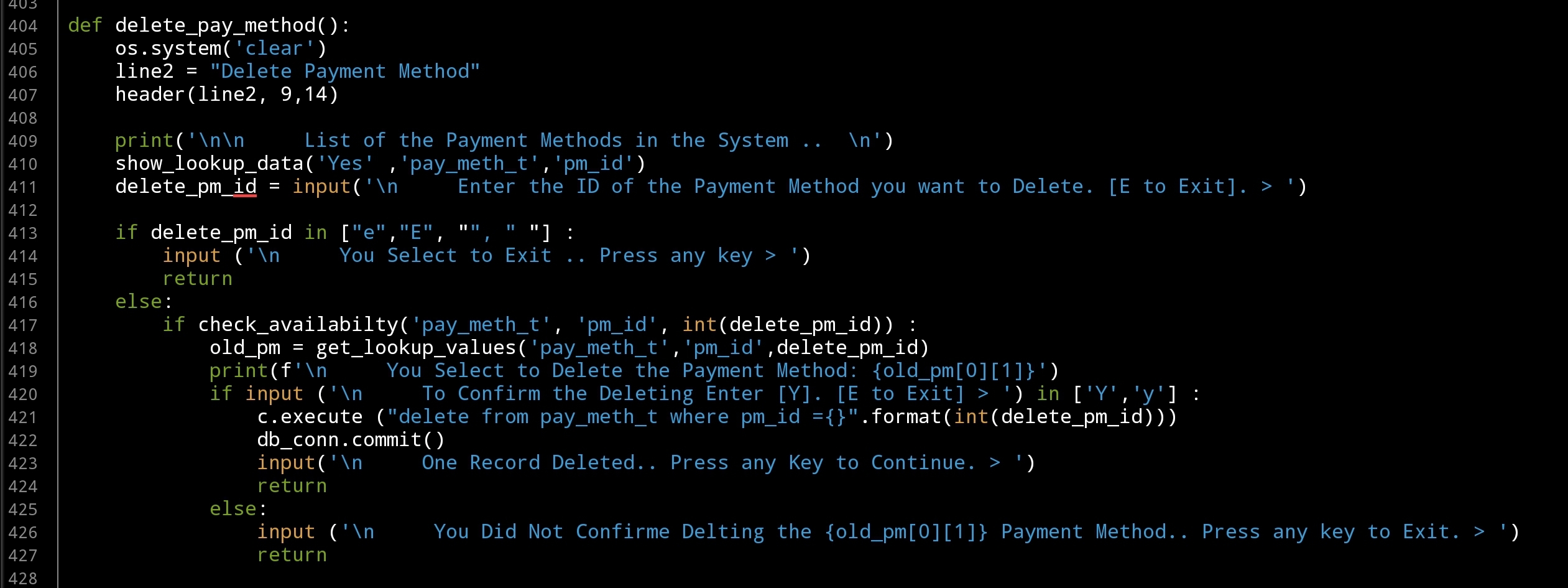
Last Function in this part is to Delete a Payment Method from the Databsae, here also we will display all the contents of the table on the screen, and ask the user to select the one tobe deleted, we will check the availability of the ID and ask the user to confirm the Deleting action, then will call the SQL command to delete the entry. Here is the code..
 |
In Part-3 In coming post we will continue writing Lookup Table Functions to Add, Edit and Delete there data.
:: PMS Parts ::
| Part 1 | Part 2 | Part 3 | Part 4 |
..:: Have Fun with Coding ::.. 🙂
To Download my Python code (.py) files Click-Here
 Follow me on Twitter..
By: Ali Radwani
Python Project: Properties Maintenance System P1
Subject: Writing a Full Application for Properties Maintenance System
Learning : Python, Math, SQL, Logeic
[NOTE: To keep the code as simple as we can, We WILL NOT ADD any user input Varevecations. Assuming that our user will Enter the right inputs.]
In one of last week posts I mentioned that i am working on a New Project, and that we may start doning a “Properties Maintenance System” also I Draft-Down some points and brain-storming session [READ THE ARTICLE HERE]. In this Part -1 of the Properties Maintenance System
In this Post, we will see the Tables and the Fields, and will write the first Function to create the Data-Base and the tables, also Inserting the Zero-Records and the (some) Data in-to lookup tables. Also I will try to list-down all the Functions we may write in our Application. All the codes will be available in the Download Page.
Tables and Fields
- Name: Job Status Table (job_s_t). Type: Lookup.
- Name: Payment Method Table (pay_meth_t). Type: Lookup.
- Name: Property Type Table (prop_type_t). Type: Lookup.
- Name: Maintenance Job List Table (main_job_list_t). Type: Lookup.
- Name: Properties Table (properties_t).
- Name: Maintenance Request Table (maint_request_t)
- Name: Receipt Table (receipt_t)
[Any other Table we may add more tables if we need latre]
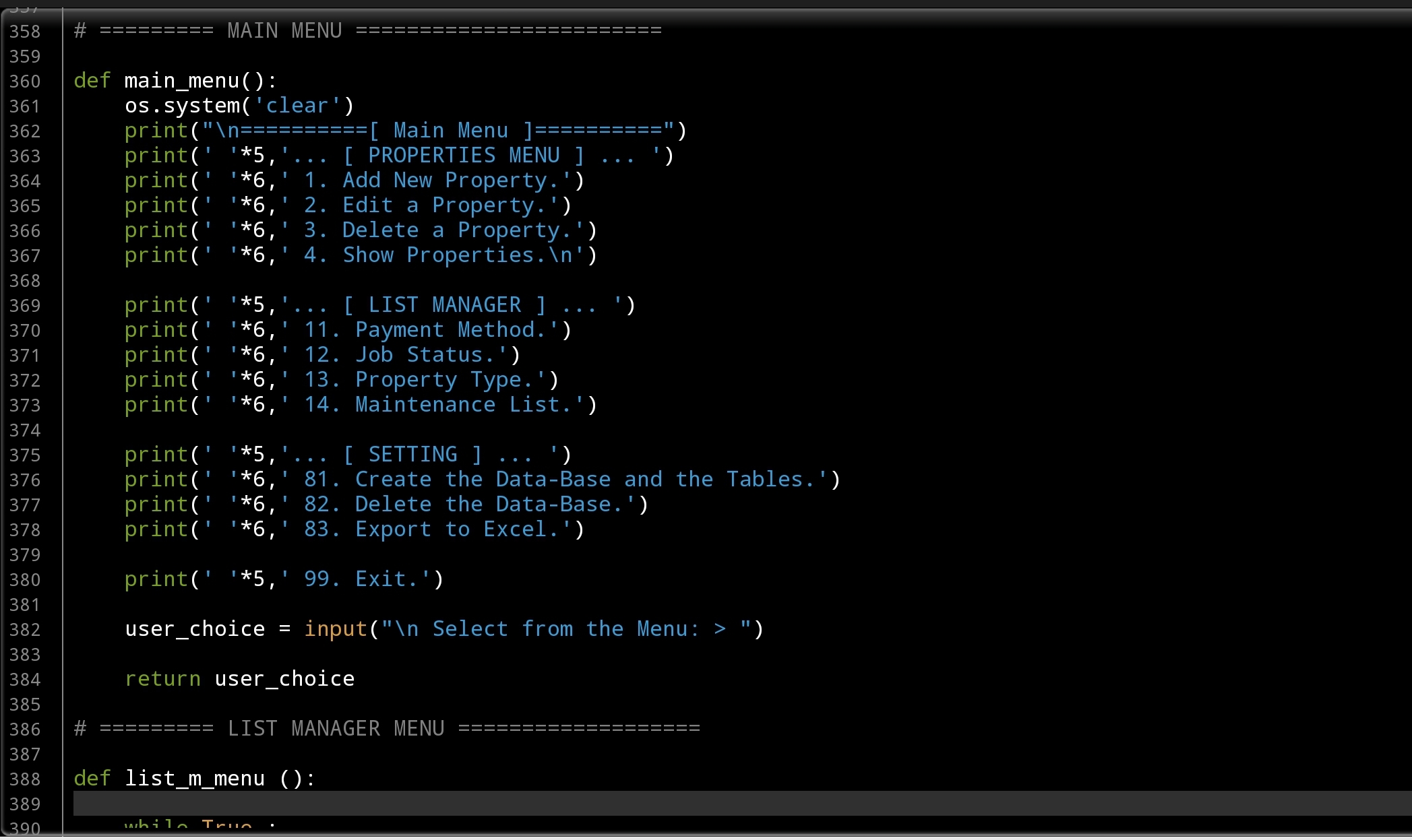
Function: Here i am listing all the Functions we will create, this list will be the Main Menu.
… [ PROPERTIES MENU ] …
- Add New Property.
- Edit a Property.
- Delete a Property.
- Show Properties.
… [ LIST MANAGER ] …
- Payment Method. [Add, Edit, Delete]
- Job Status. [Add, Edit, Delete]
- Property Type. [Add, Edit, Delete]
- Maintenance List. [Add, Edit, Delete]
- … [ SETTING ] …
- Create the Data-Base and the Tables.
- Delete the Data-Base.
- Export to Excel.
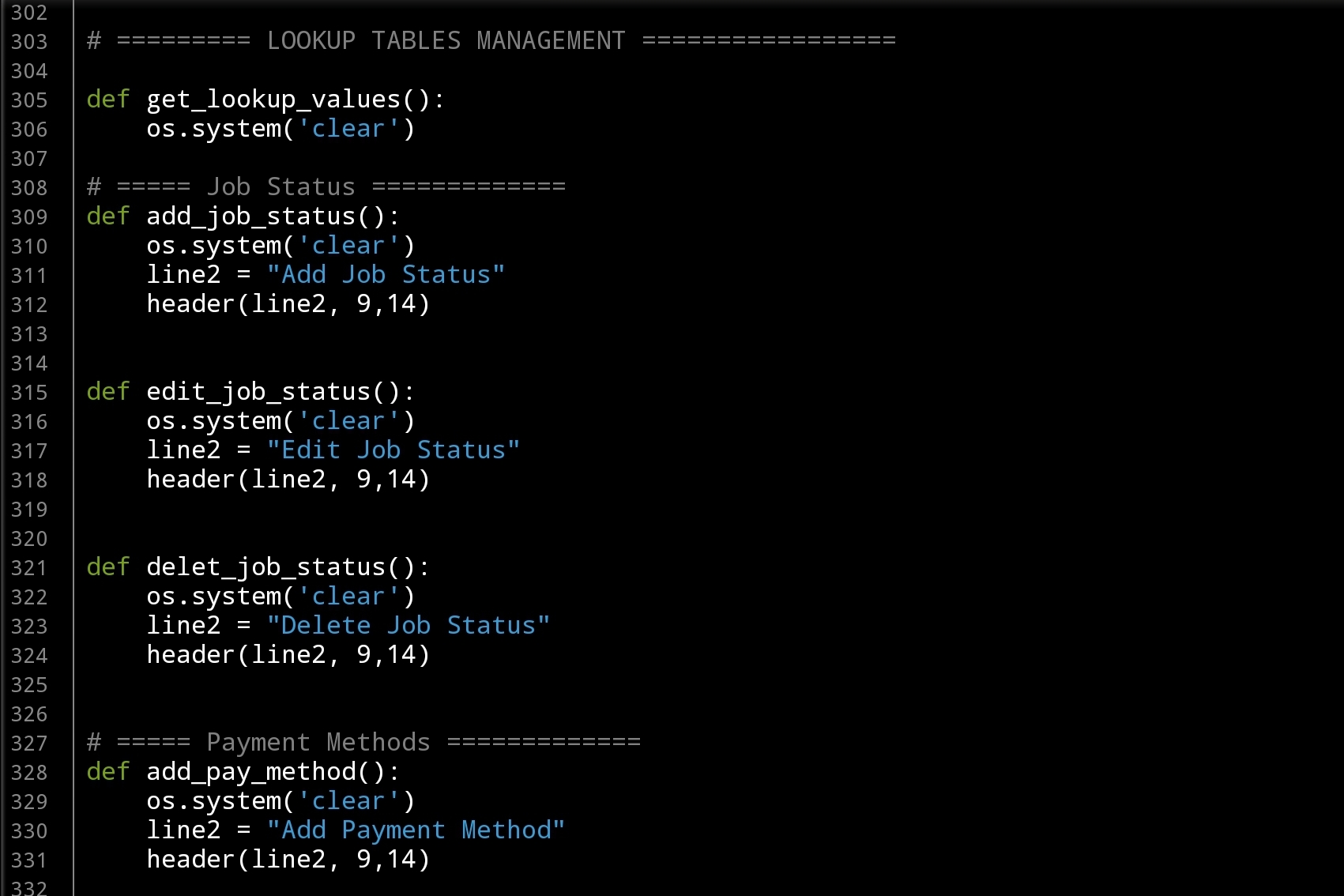
Function Exalmple: For each Function we have, this will be the template of the Function Name and the first three lines
 # Sample of: Add Job Status Function

def add_job_status():
    os.system('clear')
    line2 = "Add Job Status"
    header(line2, 9,14)  # Calling the header Function.
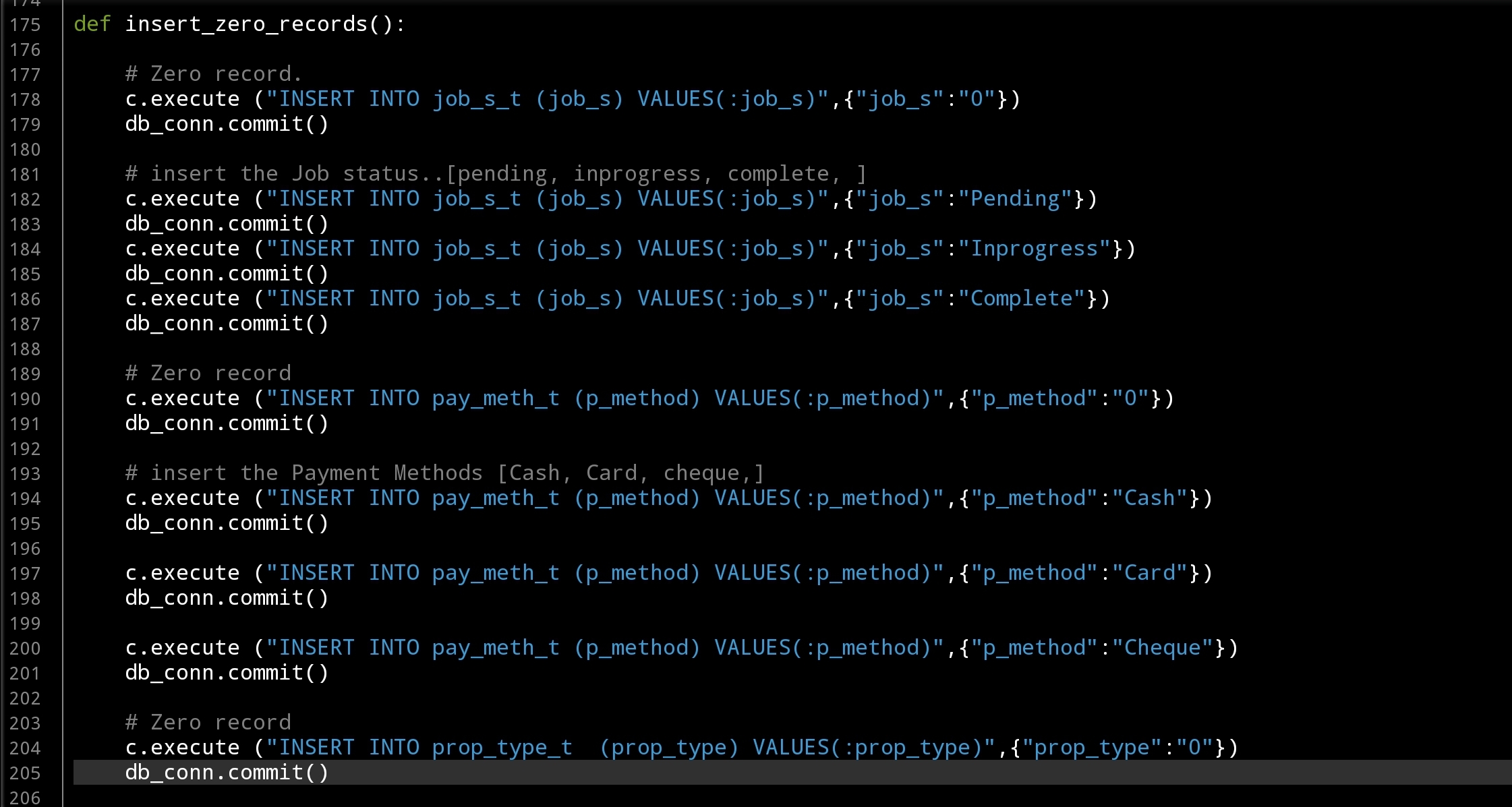
Table Creation and Zero-Records I am always start writing the ideas in the Python Editor as comments, and coding in the same time, so by the time i collect all this article the Part-1 of the project was done with Tow or Three Functions that Creating the Tables and Inserting the data into lookup-Tables. Here I am posting some screen shots of the code..
 |
 |
 |
 |
In Part-2 In Part-1 [This Article] We create the Data-Base and Tables, also Insert some Data into the lookup-tables and we create the Main-Menu Function. In Part-2 we will start writing some Functions to manage the lookup tables.
:: PMS Parts ::
| Part 1 | Part 2 | Part 3 | Part 4 |
..:: Have Fun with Coding ::.. 🙂
To Download my Python code (.py) files Click-Here
By: Ali Radwani
Vestibule: Nikon S9900 Shot 13
Subject: Nikon S9900 in Souq-Waqif Journey
This Shot: In one of most beautifully ‘Old Bazaar’ in Qatar called “Souq-Waqif” you may find lot’s of Vestibules, here is one that will take you to a Mosque, I take the shot using Nikon S9900.
…Click Image to Enlarge… Camera in Hand, F:3.7, ISO:125, Shutter:1/400s, Focal-Point:5mm Camera in Hand, F:3.7, ISO:125, Shutter:1/400s, Focal-Point:5mm
|
::.. To see all my Nikon S9900 Photos Click-Here
::.. To see all my Nikon D7100 Photos Click-Here
::.. To see all my Nikon D90 Photos Click-Here
By: Ali Radwani
Python: Coffee Consumption P10
Learning : Python, SQlite3, Dataset, Pandas,
Subject: Create Coffee Consumption Application.
[NOTE: To keep the code as simple as we can, We WILL NOT ADD any user input Varevecations. Assuming that our user will Enter the right inputs.]
[ IF THE IS FIRST TIME DOWNLOADING THE CODE FILE, SELECT OPTION 7 FROM MAIN-MENU TO CREATE THE DATABASE]
In this Last part (Part-10) of Coffee Consumption App, we will write a Function to Export the Data to an Excel Fiel, So this will be the Last part of this application and any other Enhancement will be added as new version of the application.
Exporting The Data: To Export the data to or say “writing into” Excel file we need to import New library Named: xlsxwriter [if you don’t have the library then you need to install it first, using this command: pip install xlsxwriter]. After installing we will call it into our python file using this command: import xlsxwriter. The Excel file [in this case] will have four Sheets, named as follow:
coffee_con, coffee_name, coffee_type, coffee_size
each sheet will contains the table header and the date.
File Name: The file name will be as: coffee_consumption_[Current Date & Time].xlsx, the date and time will be formated as: yyyymmdd_HM, the python code to generate this is:
now = datetime.now()
date_t = now.strftime(“%Y%m%d_%H%M”)
Also we need to know that the file will be saved in the same directory of the application or (python .py file)
New Function: from our back_up function we will call another Function called: write_data(data_set,col_list,the_sheet): this Function will write the data-set into Excel file sheet, so we need to pass the data_set, column list and the Sheet Name as arguments to the function and it will use the command: write(row,col,data) to write the row to the sheet. Here is the code
# Writing the data into the sheet

def write_data(data_set,col_list,the_sheet):
    """
    Function to write the data-set into Excel file sheet.

    Argument:
        data_set:
        col_list: List of the columns in the data_set.
        the_sheet: the Sheet Name.

    """
    # write the Table Header
    for x in range (0,len(col_list)):
        the_sheet.write(0,x,col_list[x])

    rows = len(data_set)
    for row in range (1,rows) :
        for col in range (0,len(col_list)) :
            the_sheet.write(row,col,data_set[row][col])
In our main back-up function, we prepare the data-set and column list, then we call the new Function write_data passing the variable. Here is two parts of the code, first one is generating the file name, and calling the datetime function, second part is dealing with the data tables in the database, fetching the data, listing the columns and passing this to write_data function.. Here is the code
 |
 |
… Done. We finish the Coffee Consumption Application using Python and Sqlite. Next Week we will start New Application ..
..:: Have Fun with Coding ::.. 🙂
| Part 1 | Part 2 | Part 3 | Part 4 | Part 5 |
| Part 6 | Part 7 | Part 8 | Part 9 | Part 10 |
To Download my Python code (.py) files Click-Here
By: Ali Radwani
Python: Property Mainenance System
Project Name: Property Mainenance System
By: Ali Radwani
First-Draf: 5.10.2021 [Brin Storming]
I start writing the outline for a New Project about Renting System, one of the Functions in the system was Property Maintenance Service, then I notes that this Function can be a Stand-Alone System because of it’s Size and Requerment, so i decide to transfer the Property Maintenance Service into an Application.
Here are some Brain-Storming ideas [Not sorted, Not checked, Need to been Reviewed]
- Submit Maintenance Request (by Tenant) : (For What?: [Bathroom, kitchen, WaterSystem[Colling, Heating], Windoews and Doors, Paints, TV & Aoudio,Insects and Bugs, Roof, Others (If other please write.. )]
- Request Date,time
- Property address.
- Maintenance Suggested Date (by Tenant) [Need Maintenance team appoval]
- Cost Evaluation. [Tenant Approval Requear]
- IF Approved. Do Payment,[Cash, cheque, card] Set the Date and Time for the Maintenance.
- Start the job after payment.()
- After Maintenance Finsh Close the case.
- Print Report if requered.
- —> Tables:
- Properties: ID, Address[Zone, Street, Building],Type[Villa, Appartment], Bedroom(numbers), Bathroom(numbers), Kitchen(numbers),Car_garage(numbers), Intercome, TV_Cable, Internet, contract_period
- Maintenance_request: property ID, maintenance for, date_time status[pending, inprogress, complete],
- Payments: Total Cost, Date, Payed_by, Payment Method[cash,cheuq], Property ID, receipt id.
- completed: data, property ID, maintenance for, cost,
- —> look-up tables:
- job status: [pending, inprogress, complete, ]
- payment methods: [Cash, Card, cheque,]
- Maintenance List: [Bathroom, kitchen, WaterSystem[Colling, Heating], Windoews and Doors, Paints, TV & Aoudio, Insects and Bugs, Roof, Others (If other please write.. )]
- Functions:
- Main Menu.
- Add, Edit, Delete [For each Section/Function in the tables/Application]
- Show Data/Records.
- Reports
- submin_request.
… More to be added .. Needs:[Tables Name, ] .. Tables or functions may Merged or Deleted.
Souq-Waqif: Nikon S9900 Shot # 12
Subject: A Photo from Souq-Waqif with Nikon S9900
This Shot: I was walking in Souq-Waqif one the most famous ‘Bazaar’ in Qatar I fond this Restaurant, and I take the shot using my Nikon S9900, camera In-Hand.
…Click Image to Enlarge… Camera in Hand, F:4 , ISO:125 , Shutter:1/640s Focal-Point:6mm Camera in Hand, F:4 , ISO:125 , Shutter:1/640s Focal-Point:6mm
|
::.. To see all my Nikon S9900 Photos Click-Here
::.. To see all my Nikon D7100 Photos Click-Here
::.. To see all my Nikon D90 Photos Click-Here
::.. Other Photos From Qatar Click-Here
By: Ali Radwani
Python: Tower of Hanoi
Learning : Python
Subject: Write a Function to Solve Tower of Hanoi Problem
Intoduction: Tower Of Hanoi is Puzzle Game that has three Vertical Sticks/Pegs Named A, B, C (3 Towers) and we have n number of disks different in diameter soted on top of each other (Large to Small) in Tower A. The Gall is to move all the disks from (A) to (C).
 # Tower of Hanoi Puzzel

"""
    Project Name: Tower of Hanoi

    By: Ali Radwani
    Date: 13.6.2021

     d  : Number of Desk
     fs : From Stick
     ts : To Stick
     bs : Buffer Stick
"""


import os

def hanoi_t(d, fs, bs, ts):
    if d ==1 :
        print("\n   Move Desk 1 From {} To {}".format(fs,ts))
        return

    else:
        hanoi_t(d-1,fs,ts,bs)
        print("   Move Desk {} From {} To {}".format(d,fs,ts))

        hanoi_t(d-1,bs,fs,ts)
        print("   Move Desk {} From {} To {}".format(d,fs,ts))

os.system('clear')
print('\n\n   This is Tower Of Hanoi Project')
print('   We are Solving a Three Desk Tower Named 1, 2 and 3, with Three Sticks Named A, B and C ')
print('\n   Start Solving ...')
hanoi_t(3,'A','B','C')

|
..:: Have Fun with Coding ::.. 🙂
To Download my Python code (.py) files Click-Here
By: Ali Radwani
Python: Coffee Consumption – P7
Learning : Python, SQlite3, Dataset, Pandas,
Subject: Create Coffee Consumption Application.
[NOTE: To keep the code as simple as we can, We WILL NOT ADD any user input Varevecations. Assuming that our user will Enter the right inputs.]
[ IF THE IS FIRST TIME DOWNLOADING THE CODE FILE, SELECT OPTION 7 FROM MAIN-MENU TO CREATE THE DATABASE]
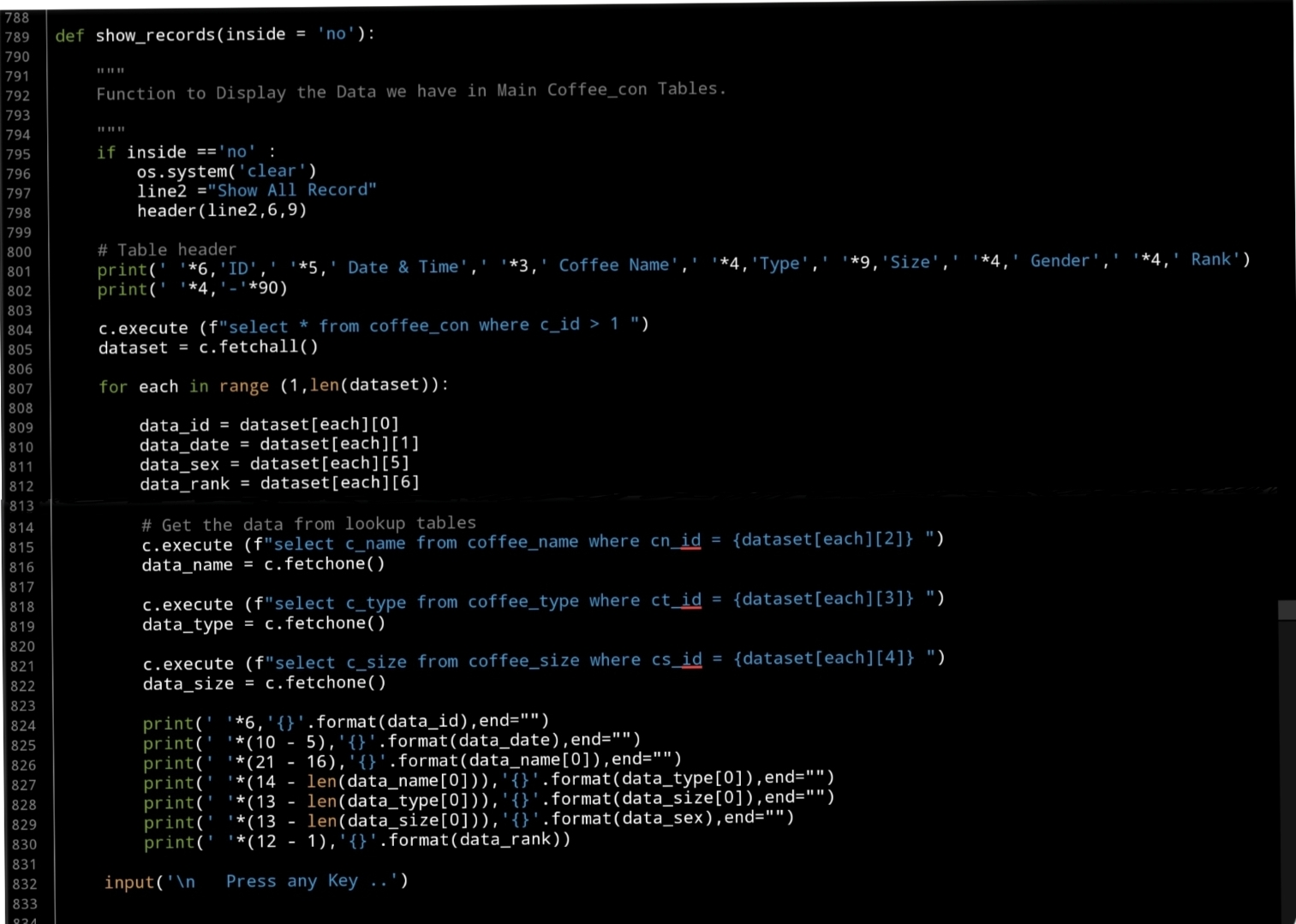
In this part (Part-7) of Coffee Consumption App, we will write a Function to display all Records in the data-base in a table on the screen.
Beginning with formating the table header, we will have the following columns: record Id, Date_time, Coffee_name, Coffee_type, coffee_size, customer_Gender and Rank. Here is the code..
print(‘ ‘*6,’ID’,’ ‘*5,’ Date & Time’,’ ‘*3,’ Coffee Name’,’ ‘*4,’Type’,’ ‘*9,’Size’,’ ‘*4,’ Gender’,’ ‘*4,’ Rank’)
print(‘ ‘*4,’-‘*90)
Next we will execute an SQLITE command to fetch all the records. Here is the commands..
c.execute (f”select * from coffee_con where c_id > 1 “)
dataset = c.fetchall()
Also we will using the lookup tables to get the names using the id keys in the coffee_name, coffee_type, coffee_size columns.
Now, Using the for loop to access all the records and print them on the screen. Here is apart of the code ..
print(‘ ‘*6,'{}’.format(data_id),end=””)
print(‘ ‘*(10 – 5),'{}’.format(data_date),end=””)
print(‘ ‘*(21 – 16),'{}’.format(data_name[0]),end=””)
print(‘ ‘*(14 – len(data_name[0])),'{}’.format(data_type[0]),end=””)
print(‘ ‘*(13 – len(data_type[0])),'{}’.format(data_size[0]),end=””)
print(‘ ‘*(13 – len(data_size[0])),'{}’.format(data_sex),end=””)
print(‘ ‘*(12 – 1),'{}’.format(data_rank))
Here is a screen shot of the code..
 |
OutPut Screen 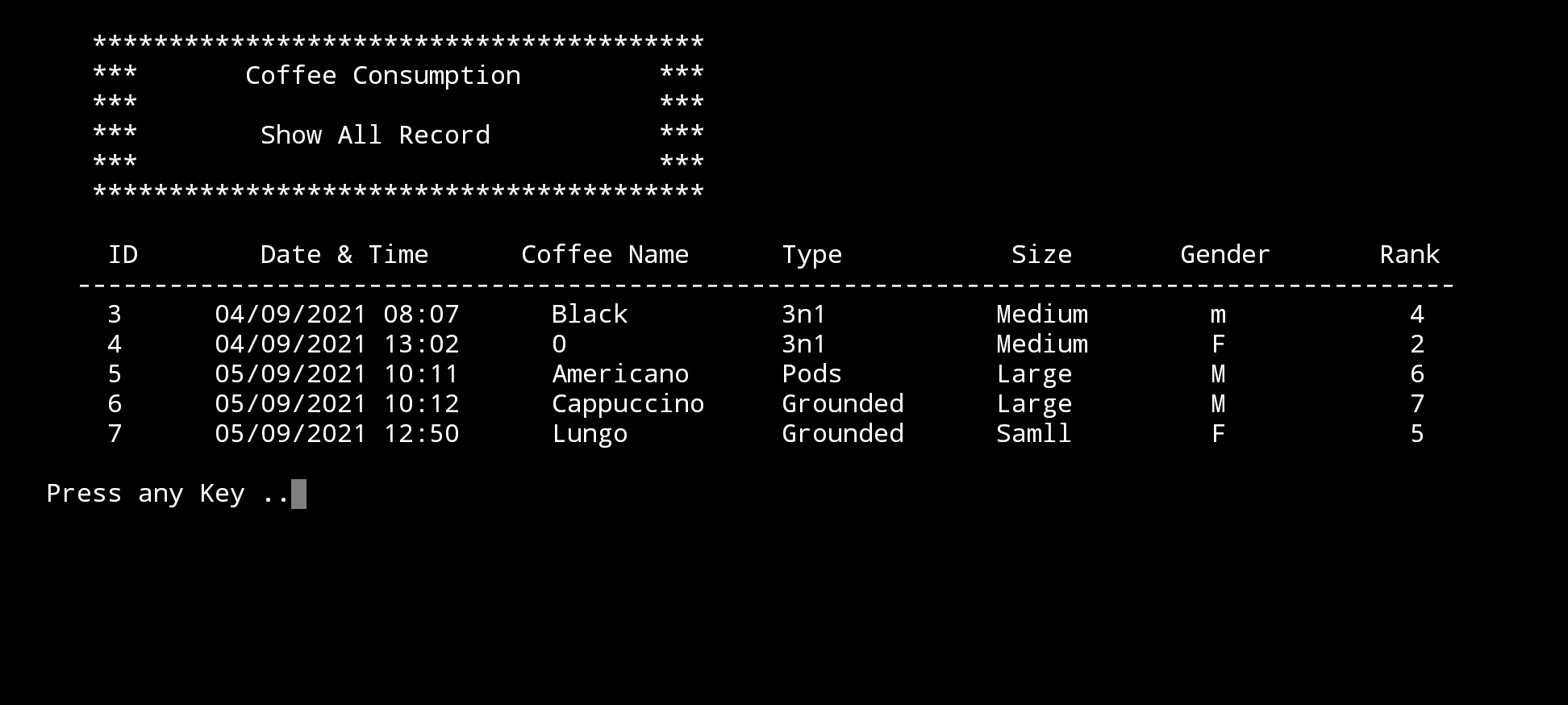 |
What’s Coming: In Part-8 we will write the Function to Edit the records on the Main Data-Base.
..:: Have Fun with Coding ::.. 🙂
| Part 1 | Part 2 | Part 3 | Part 4 | Part 5 |
| Part 6 | Part 7 | Part – | Part – | Part – |
To Download my Python code (.py) files Click-Here
By: Ali Radwani
Python: Coffee Consumption – P6
Learning : Python, SQlite3, Dataset, Pandas,
Subject: Create Coffee Consumption Application.
[NOTE: To keep the code as simple as we can, We WILL NOT ADD any user input Varevecations. Assuming that our user will Enter the right inputs.]
[ IF THE IS FIRST TIME DOWNLOADING THE CODE FILE, SELECT OPTION 7 FROM MAIN-MENU TO CREATE THE DATABASE]
In this part (Part-6) of Coffee Consumption App, we will write First Function of the Main Application to ADD New Record. In this Function we will do the following:
- Get the Current Date and Time.
- The user will Select the Coffee Name, Type and Size from the list in lookup tables.
- Selecting the Gender of the user.
- Entring the Rank for the order [If the customer rank it].
Beginning with adding New Record in the Coffee Consumption System. We will use the datatime.now() function get the current data and time here is the code..
now = datetime.now()
date_t = now.strftime(“%d/%m/%Y %H:%M”)
Then we will show each of the lookup table we have and the user will select the ID of the Coffee Name,Type and Size, the, we will use a simple Validation process to control the user inut. Here is the code for Entering the Coffee Name
   # Select a Coffee Name
    print('\n     List of Coffee Names:\n')
    show_list('coffee_name','cn_id')
     # check the availability of the input
    while True:
        cn_id = input('\n     Enter the ID of a Coffee Name. [E to Exit]. > ')
        if cn_id in ['e','E']:
            input('     You Select [E to Exit].. Press any Key. > ')
            return

        elif (cn_id ==" ") or (cn_id =="") or (check_availabilty('coffee_name','cn_id', int(cn_id)) != None):
            break
The same code will be apply for the Coffee Type and Coffee Size.
[NOTE] All the codes will be in the file to be Download.
Next part of the code will be to select the customer Gender [M,F] here also we will use a simple Validation that will accept M or F Not anything else. Here is the code..
# Select Customer Gender [Only M,F]
    while True:
        sex = input('\n     Enter the Gender of the customer. [M / F] [E to Exit]. > ')

        if sex in ['e','E']:
            input('     You Select [E to Exit].. Press any Key. > ')
            return
        elif sex in ['m','M','f','F']:
            break
        else:
            print('     You Must input [M,F]')
Last variable we will collect will be the Rank, the Customer will ask the user to Rank this Order, the range will be from 1 to 10, 0 will be for Not Available.. Here is the code…
# Enter the user Rank
    print('     If the User can Rank the Coffee.. 1 to 10 [1 is Bad, 10 is Great]')
    while True :
        rank = input('\n     Enter User Rank.[1 is Bad, 10 is Great] [0 is NOT Available] [E to Exit]. > ')
        if int(rank) in range (0,11):
            break
        else:
            print('\n     Rank Should be in Range of 0-10.'
After that we will display all the Entries on the screen and ask the customer to press [S] to save the Record, and then we will use IINSERT SQL command to Insert the record. Here is the code for all the function….
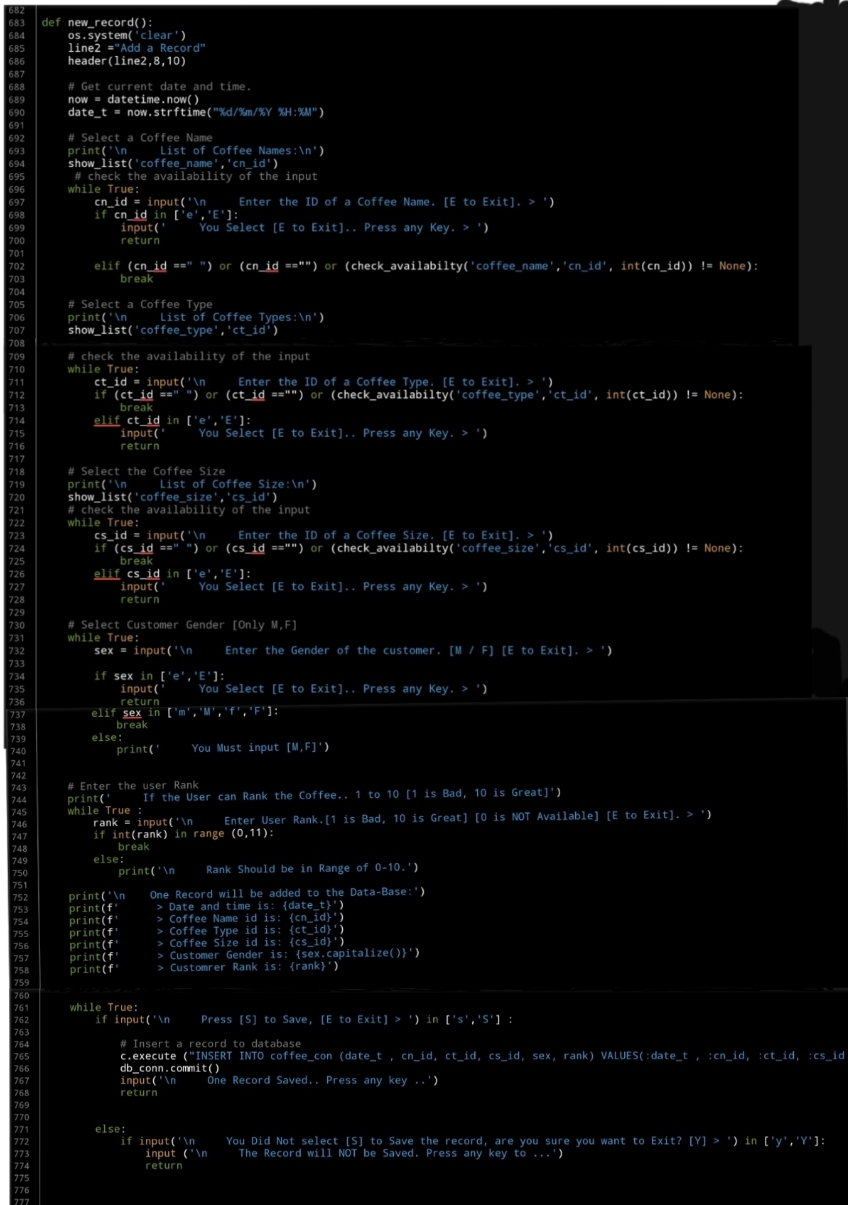 |
What’s Coming: In Part-7 we will do the Follwing:
Writing three Function to Show / Display the Records in the main Table of the Coffee Consumption Application.
..:: Have Fun with Coding ::.. 🙂
| Part 1 | Part 2 | Part 3 | Part 4 | Part 5 |
| Part 6 | Part – | Part – | Part – | Part – |
To Download my Python code (.py) files Click-Here
By: Ali Radwani
Python: Coffee Consumption – P3
Learning : Python, SQlite3, Dataset, Pandas,
Subject: Create Coffee Consumption Application.
[NOTE: To keep the code as simple as we can, We WILL NOT ADD any user input Varevecations. Assuming that our user will Enter the right inputs.]
[ IF THE IS FIRST TIME DOWNLOADING THE CODE FILE, SELECT OPTION 7 FROM MAIN-MENU TO CREATE THE DATABASE. ]
In this part (Part-3) of Coffee Consumption App, we will fill in some code into selected Functions. We will do the following:
- Create Function: Show list.
- Create Function: is_available.
- Create Function: Manager Menu.
- Create Manager Coffee Name Functions: Add, Edit, Delete
So, let’s start with writing the Manager Menu Function and a while loop to take the user selection and trigger the corresponding Function… Here is the Code ..
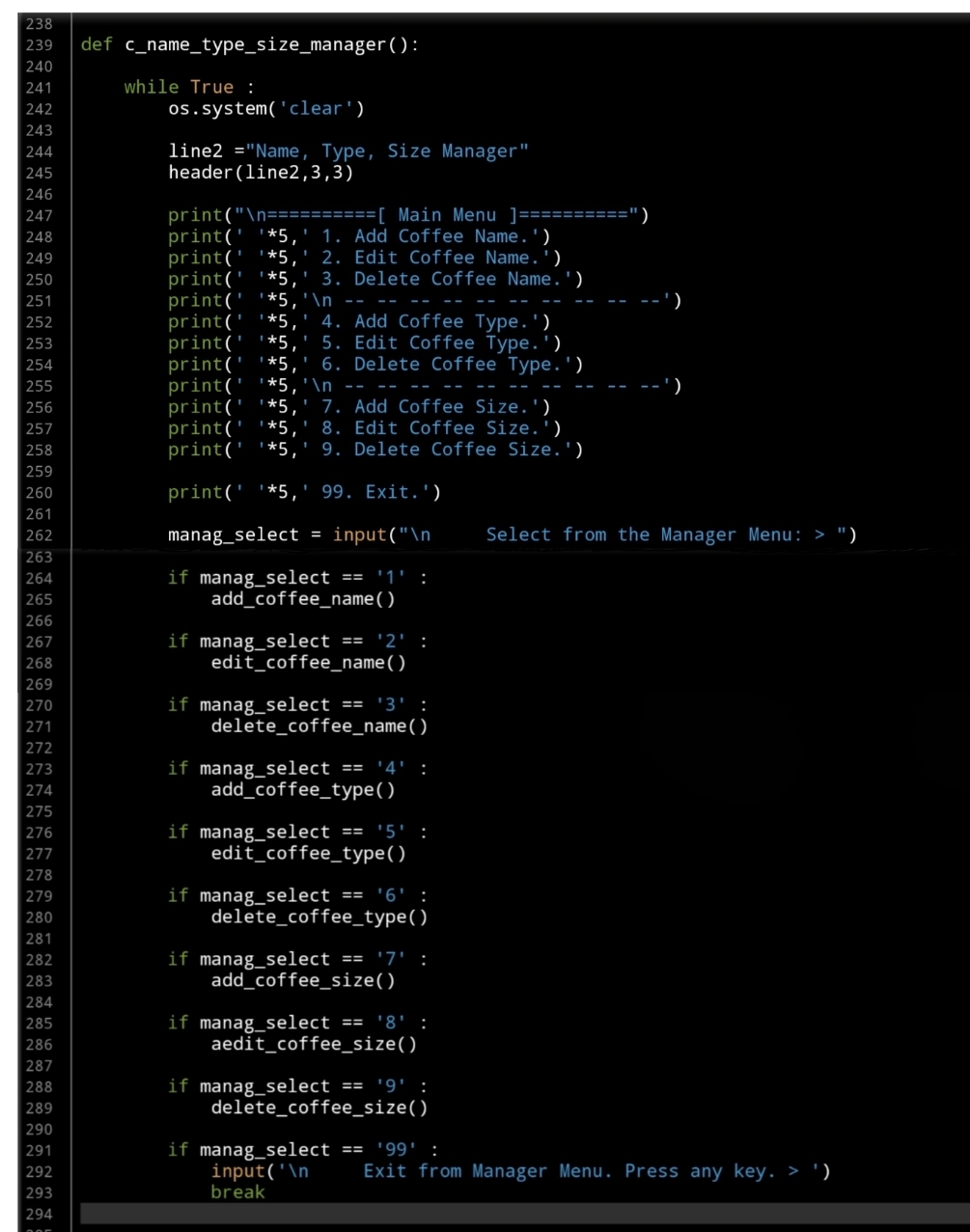 |
We have two functions to help us in this application, one of them called def show_list(dt,d_id) is to Display the Data we have in the Lookup Tables based on the user selection function. The Function will take two arguments:
dt: data-table (Coffee Name, Coffee Type, Coffee Size)
d_id: id column name, and returning nothing.
Fisrt, let’s look at this Function:
 |
The second Function will be used to check if the user selection is available in the database, we will call it def is_available (dt, d_id, check_id) this Function is to check if the passed ID available in the data-set or not. The Function will take three Arguments as:
dt: Data-Table, d_id : Name of id column, check_id : The id we want to search for, and it will Return the data-set. After return, if dataset is empty that’s mean selected id is not available.
Now let’s see the function code..
 |
Now we will start writing first three functions to manage the Coffee Name, and will start with Adding New Coffee Name to the lookup Table.
In coming code first we will call the header then show_list(‘coffee_name’,’cn_id’) passing Table Name:’coffee_name’ and id column:’cn_id’ to display the Coffee Names we have on the sccreen. Then we will ask the user to enter the New Name to be added to the database. Here is the Full code..
 |
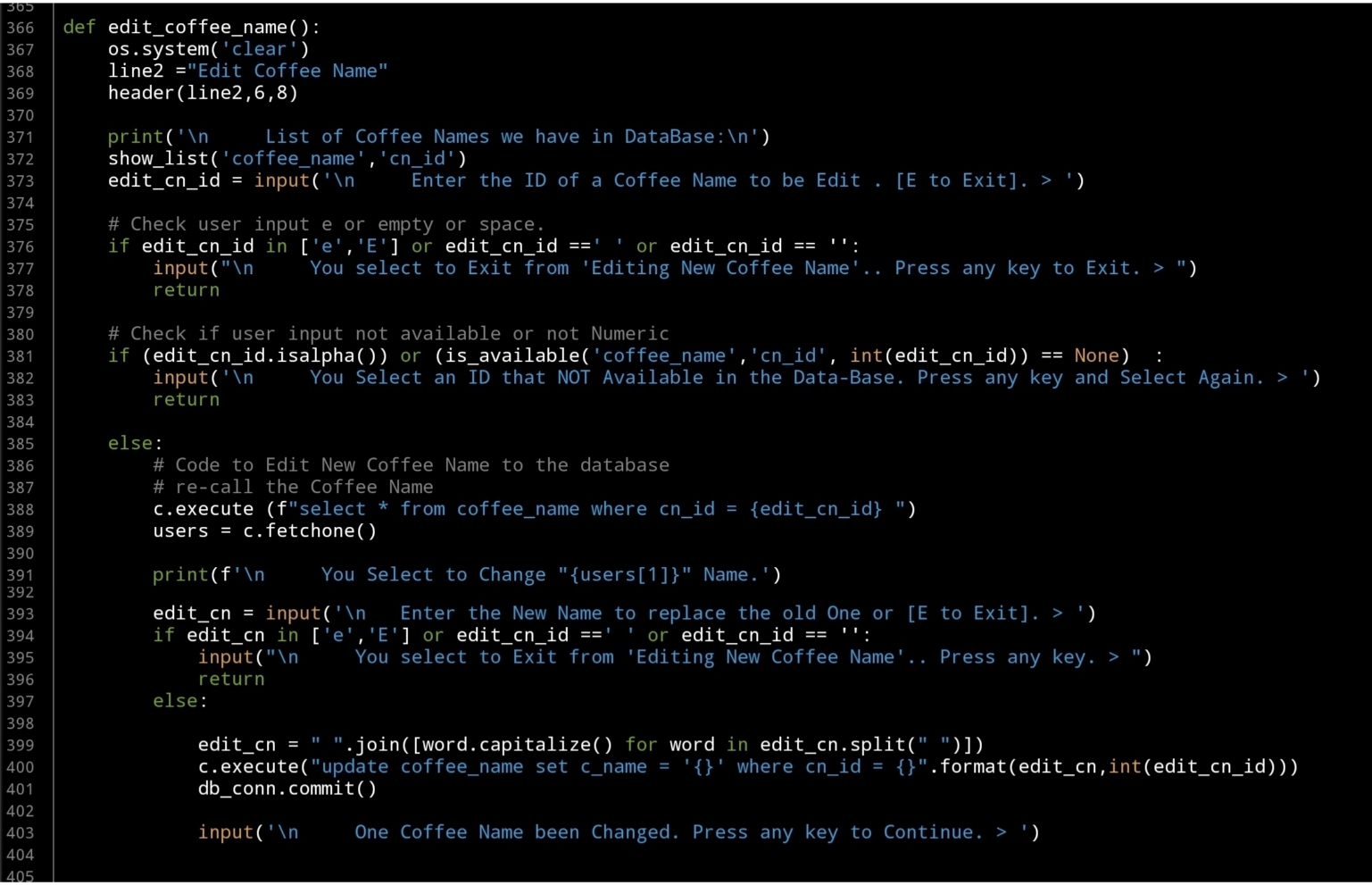
Next we will write the Edit Function, and again after the header and show_list(‘coffee_name’,’cn_id’) we will ask the user to enter the ID of the Coffee Name to be change, here we will do a simple validation on user input. After that we will update the record that the user select. Here is the code..
 |
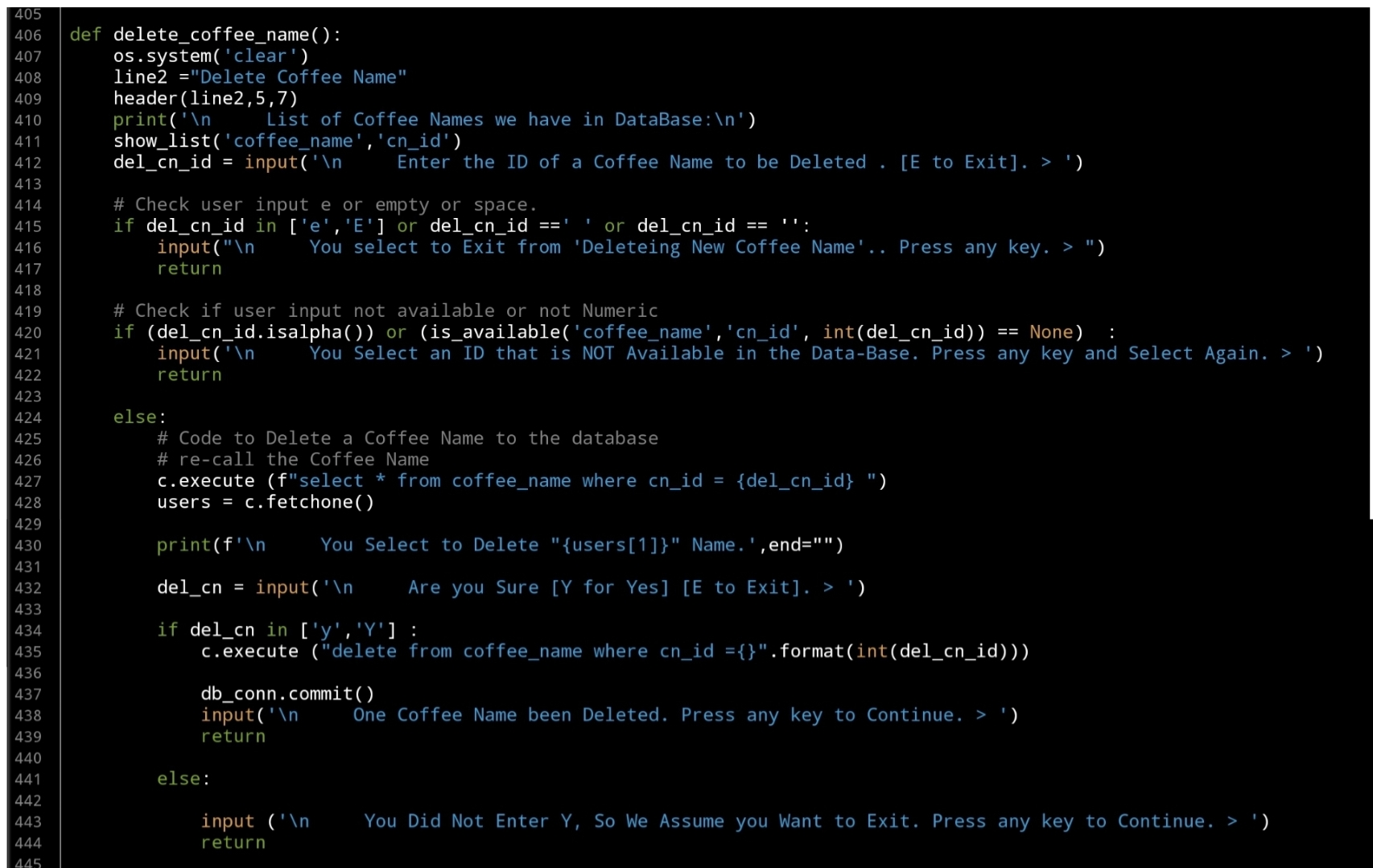
Last Function in this part is to Delete a selected Coffee Name by selection it’s ID, as in the Edit Fnction, the user will select an Id, we will check the availability the will execute the Delete command. Here is the code..
 |
What’s Coming: In Part-4 we will do the Follwing:
Writing three Function to Manage the Coffee Type, Functions are: Add New Coffee Type, Edit Coffee Type and Delete a Coffee Type.
..:: Have Fun with Coding ::.. 🙂
| Part 1 | Part 2 | Part 3 | Part 4 | Part 5 |
| Part 6 | Part – | Part – | Part – | Part – |
To Download my Python code (.py) files Click-Here
By: Ali Radwani

Taking pictures is not my main daily practices, but when i start playing with my camera, i really enjoy my self.
Thanks for visiting my Space..


 Ali's Photography Space...