Archive
Python: My Fake Data Generator P-4
Learning : Python: Functions, Procedures and documentation
Subject: About fake data P-4: (Fake Dates)
The fourth function of our Fake Data Generator will be the date function, from it’s name this one will generate a FAKE Date in yyyy/mm/dd format. The function will have one argument (go_back) for range, the max-limit is current date (today) and mini-limit will be (1/1/1900), if the user did’t pass any thing for (go_back) then the range is (from current to 1/1/1900) and if the user pass (X) then the range will be ((current date) to current – X_YEARS). Also in dates we need to take care of Leap Years, In leap year, the month of February has 29 days instead of 28. To solve this in our function we can use two ways, first one (the easy way) we know that we are generating a random numbers for months and days; so we can say if the month is February, then days can’t be more than 28. But if we want this thing to be more realistic we need to add more conditions such as :
1. The year can be evenly divided by 4.
2. If the year can be evenly divided by 100, it is NOT a leap year, unless the year is also evenly divisible by 400. Then it is a leap year (February has 29 days).
'''
10/12/2019
By: Ali Radwani
To get Fake Date.

'''

import random, datetime

def fdate(go_back = 0):
    """
        ###   Fake Date Generator V.01  ###
        Date: 10.12.2019, By: Ali Radwani

        This function will generate and return a fake date in string format.
        The function accept one int argument go_pback.
        If go_past = X, and current year - X is less than 1900 then
        the range of FAKE time will be (current year to current year - X).

        If NO argument passed to the function, then default limit set to 1900.

        Default limits:  Date are from current (today) and back to 1900.

        Import: random, datetime

        Argument: int : go_back to set the upper limit of the date

        Return: str: dd/mm/yyyy

    """

    # Get current year.
    c_year = datetime.datetime.today().year

    # set the maximum year limit.
    if go_back > 0 :
        max_y_limit = c_year - go_back
    else :
        max_y_limit = 1900

    if max_y_limit < 1900 :
        max_y_limit = 1900

    yy = random.randint(max_y_limit, c_year)

    mm = random.randint(1,12)

    if mm in [1,3,5,7,8,10,12] :
        dd = random.randint(1,31)
    elif mm in [4,6,9,11]:
        dd = random.randint(4,30)

    else :
        # IF the month is February (2)
        if (yy % 4 == 0 ) or ((yy % 100 == 0)and (yy % 400 == 0)):
            # It is a leap year February has 29 days.
            dd = random.randint(1,29)

        else : # it is NOT a leap year February has 28 days.
            dd = random.randint(1,28)

    d = (str(dd) +'/'+ str(mm)+'/' + str(yy))

    return (str(dd) +'/'+ str(mm)+'/' + str(yy))


# To check the output.
for x in range (30):
    print(fdate())
<
Here is a screenshot of the code, also available on the Download Page . . .

|
:: Fake Function List ::
| Function Name | Description |
| Color | To return a random color code in RGB or Hex. |
| Date | To return a random date. |
| Mobile | To return a mobile number. |
| Country | To return a random country name. |
| City | To return a random City name. |
| ID | To return X random dig as ID. |
| Time | To return random time. |
| Car’s Brand | |
| file_name | |
| Done |
 Follow me on Twitter..
By: Ali Radwani
Python: My Fake Data Generator P-3
Learning : Python: Functions, Procedures and documentation
Subject: About fake data P-3: (Fake Time)
The third function of our Fake Data Generator will be the Time function, Fake Time is very easy to implement, all we need is call random function two times, one for minutes (0,60) and another for hours (0,12 or 0,23) based on the argument s (style).
Let’s start: First we need to Import random, the function def ftime() will take one integer argument (s) represent the time style.
If the s = 12 then the time format will be regular start from 1 and end at 12, the number will be generated randomly using random.randint, also we will select random.choice([‘ AM’,’ PM’]) to be added to the time and return it back.
If the s = 24 or nothing been passed then the time format will start from 0 to 23 (Military Time Format). Another random integer (0,60) to be generated as minutes.
'''
  Fake Data Generator
  Function for:  Fake Time
  Ali Radwani
  11/12/2019
'''

import random

def ftime(s = 24):

    """
        ###   Fake Time Generator   ###
        Date: 11.12.2019, By: Ali Radwani

        This function will generate a fake time, the
        function accept one int argument s.

        If s = 12 function return Regular time format,
        If s = 24 function return military time format
        (the 24 format system).

        If No argument passes then default time system
        format will be 24 system (military time)

        Argument: int : s, if No argument then default is 24.

        Return: str : ftimes
    """

    m = str(random.randint(0,60))
    if (len(m)) == 1 :
            m = '0' + str (m)

    if s == 12 :
        h = str(random.randint(1,12))
        if (len(h)) == 1:
            h = '0' + h
    else :
        h = str(random.randint(0,23))
        if (len(h)) == 1:
            h = '0' + h

    ftimes = str(h) + ':' + str(m)
    if s == 12 :
        ftimes = ftimes + random.choice([' AM',' PM'])

    return ftimes

# Testing the function.
for x in range (10):
    print (ftime(12))
:: Fake Function List ::
| Function Name | Description |
| Color | To return a random color code in RGB or Hex. |
| Date | To return a random date. |
| Mobile | To return a mobile number. |
| Country | To return a random country name. |
| City | To return a random City name. |
| ID | To return X random dig as ID. |
| Time | To return random time. |
| Car’s Brand | |
| Foods | |
| Done |
By: Ali Radwani
Python: My Fake Data Generator P-2
Learning : Python: Functions, Procedures and documentation
Subject: About fake data P-2: (Fake ID)
Before we start i’d like to mention that with our last fcolor() function we write some comments in the first part of the function between three double quote(“””), and if we load the function and call help() as help(fcolor()) we will get that information on the python console as a help as in screen shot.

|
In this post we will write a function to generate a fake ID number, for ID’s there could be several styles, sometime we just want a random number without any meaning; just X number of random digits. Most of the time we need this number to be mean-full based on certain rules. For example, in Banks they may use some digits that indicate the branch. In sport club, they may include the date … and so-on.
Here we will write a function called key_generator(), the function will take two arguments (dig, s) dig is your key digits number, s is the style, if s = d then the first 6 digits of the key will be the date as ddmmyy + random digits, and if s = anything else or s not passed then the key will be as default (just x-digits). Let’s see the code.
First the summary or say information about the function:
def key_generator(dig, s = 'n'):
    """
       ### Date: 8/12/2019, By: Ali Radwani ###
       Summary:
            This function will generate x-digit key randomly.
            If the argument s = 'd' or 'D' then the key is two part, first (6) digits
            are date as ddmmyy then x-digit random numbers.

            If the argument s anything else than ['d','D'] or no argument passes, then the key
            is random numbers without any meaning.

            The numbers will randomly be selected in range of (10 to 99).

            import: random, datetime

            Argument: int: dig: The number of digits for the key.
                 str: s  : The key style (with date or just random numbers)

            return: int: the_key
    """
Now, if the user pass s=’d’ then part of the key will be the current date, to do this we will call the datetime function in python and split it into dd,mm,yy. Here is the key_generator() function.
def key_generator(dig, s = 'n'):
    """
       ### Date: 8/12/2019, By: Ali Radwani ###
       Summary:
            This function will generate x-digit key randomly.
            If the argument s = 'd' or 'D' then the key is two part, first (6) digits
            are date as ddmmyy then x-digit random numbers.

            If the argument s anything else than ['d','D'] or no argument passes, then the key
            is random numbers without any meaning.

            The numbers will randomly be selected in range of (10 to 99).

            import: random, datetime

            Argument: int: dig: The number of digits for the key.
                 str: s  : The key style (with date or just random numbers)

            return: int: the_key
    """
    the_key=''
    if s in ['d','D'] :
        d = str(datetime.date.today())
        dd = d[8:10]
        mm = d[5:7]
        yy = d[2:4]
        the_key = dd + mm + yy
        for x in range (dig):
            the_key = the_key + str( random.randint(10,99))
        return int(the_key[:(dig + 6)])

    else :
        for x in range (dig):
            the_key = the_key + str( random.randint(10,99))

        return int(the_key[:dig])
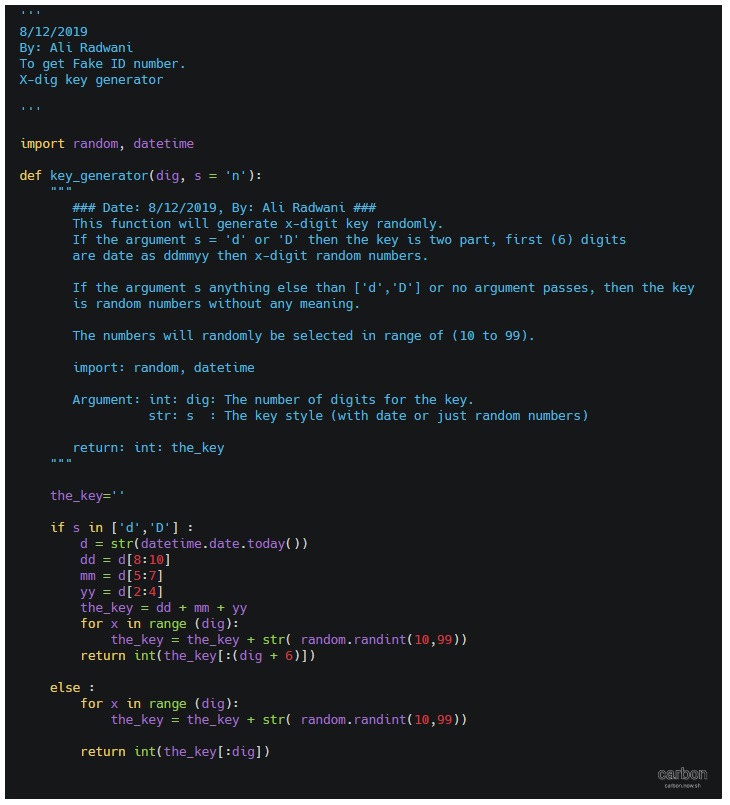
|
In next Fake Data function we will try to write one to generate the date. It will be published on next Sunday.
:: Fake Function List ::
| Function Name | Description |
| Color | To return a random color code in RGB or Hex. |
| Date | To return a random date. |
| Mobile | To return a mobile number. |
| Country | To return a random country name. |
| City | To return a random City name. |
| ID | To return X random dig as ID. |
| Time | To return random time. |
| Done |
By: Ali Radwani
Python: Machine Learning – Part 1
Learning :Python and Machine Learning
Subject: Requirements, Sample and Implementation
Machine Learning: I will not go through definitions and uses of ML, I think there is a lot of other posts that may be more informative than whatever i will write. In this post I will write about my experience and learning carve to learn and implement ML model and test my own data.
The Story: Two, three days ago I start to read and watch videos about Machine Learning, I fond the “scklearn” site, from there I create the first ML to test an Iris data-set and then I wrote a function to generate data (my own random data) and test it with sklearn ML model.
Let’s start ..
Requirements:
1. Library to Import: To work with sklearn models and other functions that we will use, we need to import coming libraries:
import os # I will use it to clear the terminal.
import random # I will use it to generate my data-set.
import numpy as np
import bunch # To create data-set as object
from sklearn import datasets
from sklearn import svm
from sklearn import tree
from sklearn.model_selection import train_test_split as tts
2. Data-set: In my learning steps I use one of sklearn data-set named ” Iris” it store information about a flower called ‘Iris’. To use sklear ML Model on other data-sets, I create several functions to generate random data that can be passed into the ML, I will cover this part later in another post.
First we will see what is the Iris dataset, this part of information is copied from sklearn site.
::Iris dataset description ::
dataset type: Classification
contain: 3 classes, 50 Samples per class (Total of 150 sample)
4 Dimensionality
Features: real, positive
The data is Dictionary-like object, the interesting attributes are:
‘data’: the data to learn.
‘target’: the classification labels.
‘target_names’: the meaning of the labels.
‘feature_names’: the meaning of the features.
‘DESCR’: the full description of the dataset.
‘filename’: the physical location of iris csv.
Note: This part helps me to write me data-set generating function, that’s why we import the Bunch library to add lists to a data-set so it will appear as an object data-set, so the same code we use for Iris data-set will work fine with our data-set. In another post I will cover I will load the data from csv file and discover how to create a such file..
Start Writing the code parts: After I wrote the code and toned it, I create several functions to be called with other data-set and not hard-code any names in iris data-set. This way we can load other data-set in easy way.
The Code
 # import libraries

import numpy as np
from sklearn import datasets
#from sklearn import svm
from sklearn import tree
from sklearn.model_selection import train_test_split as tts
import random, bunch
Next step we will load the iris dataset into a variable called “the_data”
 # loading the iris dataset.

the_data = datasets.load_iris()
From the above section “Iris dataset description” we fond that the data is stored in data, and the classification labels stored in target, so now we will store the data and the target in another two variables.
 # load the data into all_data, and target in all_labels.
all_data= the_data.data
all_labels = the_data.target
We will create an object called ‘clf’ and will use the Decision Tree Classifier from sklearn.
 #  create Decision Tree Classifier

clf = tree.DecisionTreeClassifier()
In Machine Learning programs, we need some data for training and another set of data for testing before we pass the original data or before we deploy our code for real data. The sklearn providing a way or say function to split a given data into two parts test and train. To do this part and to split the dataset into training and test I create a function that we will call and pass data and label set to it and it will return the following : train_data, test_data, train_labels, test_labels.
 #  Function to split a data-set into training and testing data.

def get_test_train_data(data,labels):

  train_data, test_data, train_labels, test_labels = tts(data,labels,test_size = 0.1)
  return train_feats, test_feats, train_labels, test_labels
After splitting the data we will have four list or say data-sets, we will pass the train_data and the train_labels to the train_me() function, I create this function so we can pass the train_data, train_labels and it will call the (clf.fit) from sklearn. By finishing this part we have trained our ML Model and is ready to test a sample data. But first let’s see the train_me() function.
 #  Function train_me() will pass the train_data to sklearn Model.

def train_me(train_data1,train_labels1):
  clf.fit(train_data1,train_labels1)
  print('\n The Model been trained. ')
As we just say, now we have a trained Model and ready for testing. To test the data set we will use the clf.predict function in sklearn, this should return a prediction labels list as the ML Model think that is right. To check if the predictions of the Model is correct or not also to have the percentage of correct answers we will count and compare the prediction labels with the actual labels in the test_data that we have. Here is the code for get_prediction()
 #  get_prediction() to predict the data labels.

def get_prediction(new_data_set,test_labels2,accu):

  print('\n This is the prediction labels of the data.\n')

  # calling prediction function clf.predict
  prediction = clf.predict(new_data_set)
  print('\n prediction labels are : ',prediction,len(prediction))

  # print the Accuracy
  if accu == 't' :
    cot = 0
    for i in range (len(prediction)) :
      print(prediction[i] , new_data_set[i],test_labels2[i])
      if [prediction[i]] == test_labels2[i]:
        cot = cot + 1
    print('\ncount :',cot)
    print('\n The Accuracy:',(cot/len(prediction))*100,'%')
The accuracy value determine if we can use the model in a real life or tray to use other model. In the real data scenario, we need to pass ‘False’ flag for accu, because we can’t cross check the predicted result with any data, we can try to check manually for some result.
End of part 1: by now, we have all functions that we can use with our data-set, in coming images of the code and run-time screen we can see that we have a very high accuracy level so we can use our own data-set, and this will be in the coming post.

|
Result screen shot after running the Iris dataset showing high accuracy level.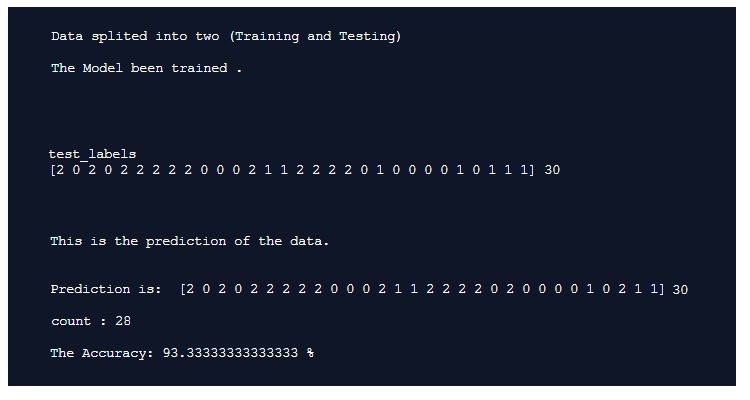
|
To Download my Python code (.py) files Click-Here
Python: Circle Packing
Circle Packing Project
Subject: Draw, circles, Turtle
Definition: In geometry, circle packing is the study of the arrangement of circles on a given surface such that no overlapping occurs and so that all circles touch one another. Wikipedia
So, we have a canvas size (w,h) and we want to write a code to draw X number of circles in this area without any overlapping or intersecting between circles. We will write some functions to do this task, thous functions are:
1. c_draw (x1,y1,di): This function will take three arguments x1,y1 for circle position and di as circle diameter.
2. draw_fram(): This function will draw the frame on the screen, we set the frame_w and frame_h as variables in the setup area in the code.
3. c_generator (max_di): c_generator is the circles generating function, and takes one argument max_di presenting the maximum circles diameter. To generate a circle we will generate three random numbers for x position, y position and for circle diameter (max_di is the upper limit),also with each generating a while loop will make sure that the circle is inside the frame, if not regenerate another one.
4. can_we_draw_it (q1,di1): This is very important, to make sure that the circle is not overlapping with any other we need to use a function call (hypot) from math library hypot return the distance between two points, then if the distance between two circles is less than the total of there diameters then the two circles are not overlaps.

|
So, lets start coding …
First: the import and setup variables:
from turtle import *
import random
import math

# Create a turtle named t:
t =Turtle()
t.speed(0)
t.hideturtle()
t.setheading(0)
t.pensize(0.5)
t.penup()

# frame size
frame_w = 500
frame_h = 600

di_list = [] # To hold the circles x,y and diameters
 |
Now, Drawing the frame function:
def draw_fram () :t.penup()
t.setheading(0)
t.goto(-frame_w/2,frame_h/2)
t.pendown()
t.forward(frame_w)
t.right(90)
t.forward(frame_h)
t.right(90)
t.forward(frame_w)
t.right(90)
t.forward(frame_h)
t.penup()
t.goto(0,0)
Now, Draw circle function:
def c_draw (x1,y1,di):t.goto(x1,y1)
t.setheading(-90)
t.pendown()
t.circle(di)
t.penup()
This is Circles generator, we randomly select x,y and diameter then checks if it is in or out the canvas.
def c_generator (max_di):falls_out_frame = True
while falls_out_frame :
x1 = random.randint(-(frame_w/2),(frame_w/2))
y1 = random.randint(-(frame_h/2),(frame_h/2))
di = random.randint(3,max_di)
# if true circle is in canvas
if (x1-di > ((frame_w/2)*-1)) and (x1-di < ((frame_w/2)-(di*2))) :
if (y1 ((frame_h/2)-(di))*-1) :
falls_out_frame = False
di_list.append([x1-di,y1,di])

|
With each new circle we need to check the distances and the diameter between new circle and all circles we have in the list, if there is an overlap then we delete the new circle data (using di_list.pop()) and generate a new circle. So to get the distances and sum of diameters we use this code ..
 # get circles distance

    cs_dis = math.hypot(((last_cx + last_cdi) - (c_n_list_x + c_n_list_di)) , (last_cy - c_n_list_y))
    di_total = last_cdi + c_n_list_di
To speed up the generation of right size of circles I use a method of counting the trying times of wrong sizes, that’s mean if the circles is not fit, and we pop it’s details from the circles list we count pops, if we reach certain number then we reduce the upper limits of random diameter of the new circles we generate. Say we start with max_di = 200, then if we pop for a number that divide by 30 (pop%30) then we reduce the max_di with (-1) and if we reach max_di less then 10 then max_di = 60. and we keep doing this until we draw 700 circles.
# if di_list pops x time then we reduce the randomization upper limits
  if (total_pop % 30) == 0:
    max_di = max_di - 1
    if max_di < 10 :
      max_di = 60
Here are some output circles packing ..
 |
 |
With current output we reach the goal we are looking for, although there is some empty spaces, but if we increase the number of circles then there will be more time finding those area with random (x,y,di) generator, I am thinking in another version of this code that’s will cover:
1. Coloring the circles based on the diameter size.
2. A method to fill the spaces.
To Download my Python code (.py) files Click-Here
Python: Numpay – P3
Learning : Python Numpy – P3
Subject: numpy array and some basic commands
The numpy lessons and basic commands will take us to plotting the data and presenting the numbers using the numpy and plot packages, but first we need to do more practices on arrays and functions in the numpy.
To get a row or a column from the array we use:
# Generate a 5x5 random array:
ar = np.random.randint(10,60, size=(5,5))
print('\n A random generated array 5x5 is: \n',ar)

# get the rows from 1 to 3 (rows 1 and 2):
print('\n  The rows from 1 to 3 is: \n',ar[1:3])

# get row 1 and row 3:
print('\n  The row 1 and row 2 is: \n',ar[1],ar[3])

# get the column 1 and column 3:
print('\n  The column 1 and column 3: \n',ar[:,[1,3]])

[Output]:
A random generated array 5x5 is:
 [[59 43 46 44 39]
 [16 15 14 19 22]
 [59 16 33 59 19]
 [21 15 51 41 28]
 [48 46 58 33 19]]

The rows from 1 to 3 is:
[[16 15 14 19 22]
 [59 16 33 59 19]]

The row 1 and row 2 is:
[16 15 14 19 22]
[21 15 51 41 28]

The column 1 and column 3:
 [[43 44]
 [15 19]
 [16 59]
 [15 41]
 [46 33]]
To change a value in the array we give the position and new value as:
# Generate a 5x5 random array:
ar = np.random.randint(10,60, size=(5,5))
print('\n A random generated array 5x5 is: \n',ar)
print('\n Value in position (1,1):',ar[1][1])
# Re-set the value in position (1,1) to 55
ar[1][1] = 55
print('\n The array ar\n',ar)

code
[Output]:

A random generated array 5x5 is:
 [[39 53 34 59 30]
 [33 10 42 20 36]
 [10 37 20 35 28]
 [26 18 14 41 24]
 [48 22 19 18 44]]

 Value in position (1,1): 10

 The array ar
 [[39 53 34 59 30]
 [33 55 42 20 36]
 [10 37 20 35 28]
 [26 18 14 41 24]
 [48 22 19 18 44]]
If we have a one dimension array with values, and we want to create another array with values after applying a certain conditions, such as all values grater than 7.
# Create 1D array of range 10
ar = np.arange(10)
print(ar)

# ar_g7 is a sub array from ar of values grater then 7
ar_g7= np.where(ar >7)
print('ar_g7:'ar_g7)


[Output]:
[0 1 2 3 4 5 6 7 8 9]
ar_g7:(array([8, 9]),)
If we want to pass a 3×3 array and then we want the values to be changed to (1) if it is grater than 7 and to be (0) if it is less than 7.
# Generate a 3x3 array of random numbers.
ar2 = np.random.randint(1,10, size =(3,3))
print(ar2)

# Change any value grater than 7 to 1 and if less than 7 to 0.
ar_g7= np.where(ar2 >7, 1 ,0)
print('ar_g7:',ar_g7)

[Output]:
[[6 4 2]
 [8 5 1]
 [5 2 8]]

ar_g7:
[[0 0 0]
 [1 0 0]
 [0 0 1]]
Also we can say if, the value in the array is equal to 6 or 8 then change it to -1.
# Generate array of 3x3
ar2 = np.random.randint(1,10, size =(3,3))
print(ar2)


# If the = 6 or 8 change it to (-1)
ar_get_6_8_value= np.where((ar2 == 6) |( ar2==8), -1 ,ar2)
print('ar_get_6_8_value:',ar_get_6_8_value)

[Output]:
[[3 4 8]
 [1 9 3]
 [5 6 6]]

ar_get_6_8_value:
[[ 3  4 -1]
[ 1  9  3]
[ 5 -1 -1]]
We can get the index location of the certain conditions values, and then we can print it out.
# # Generate array of 3x3

ar_less_6= np.where((ar2 < 6) )
print('ar_less_6 locations:',ar_less_6)

# print out the values on those locations.
print('ar_less_6 values: ',ar2[ar_less_6])
[Output]:
[[6 1 9]
 [1 8 6]
 [6 9 2]]

ar_less_6 locations: (array([0, 1, 2]), array([1, 0, 2]))
ar_less_6 values :[1 1 2]
:: numpy Sessions ::
| Sessions 1 | Sessions 2 | Sessions 3 | Sessions 4 |
To Download my Python code (.py) files Click-Here
Python: Numpay – P1
Learning : Python Numpy – P1
Subject: Numpay and some basic commands
In coming several posts I will talk about the numpay library and how to use some of its functions. So first what is numpy? Definition: NumPy is a library for the Python programming language, adding support for large, multi-dimensional arrays and matrices, along with a large collection of high-level mathematical functions to operate on these arrays. Also known as powerful package for scientific computing and data manipulation in python. As any library or package in python we need to install it on our device (we will not go through this process)
Basic commands in numpy: First of all we need to import it in our code. so we will use
import numpy as np
To create a 1 dimensional array we can use verey easy way as:
  # create an array using numpy array function.
my_array = np.array([1, 2, 3,4,5])
Later we will create a random array of numbers in a range.
Now, to get the length of the array we can use len command as
len(my_array)
Output: 5
To get the sum of all elements in the array we use..
np.sum(my_array)
And to get the maximum and minimum numbers in the array we use ..
 # Get the maximum and minimum numbers in the array
my_array = np.array([1, 2, 3,4,5])
np.max(my_array)
[Output]: 5

np.min(my_array)
[Output]: 1
Some time we may need to create an array with certain Number of elements only one’s, to do this we can use this commands:
#create array of 1s (of length 5)
np.ones(5)
Output: [ 1.,  1.,  1.,  1.,  1.]
The default data type will be float, if we want to change it we need to pass the the ‘dtype’ to the command like this :
#create array of 1s (of length 5) as integer:
np.ones(5, dtype = np.int)
Output: [ 1,  1,  1,  1,  1]
Code output:

|
So far we work on a one dimensional array, in the next post we will cover some commands that will help us in the arrays with multiple dimensions.
:: numpy Commands::
| Command | comment |
| my_array = np.array([1,2,3,4,5]) | Create an array with 1 to 5 integer |
| len(my_array) | Get the array length |
| np.sum(my_array) | get the sum of the elements in the array my_array = np.array([1,2,3,4,5]) print(np.sum(my_array)) [Output]: 15 |
| np.max(my_array) | # Get the maximum number in the array my_array = np.array([1, 2, 3,4,5]) max_num = np.max(my_array) [Output]: 5 |
| np.min(my_array) | # Get the minimum number in the array my_array = np.array([1, 2, 3,4,5]) min_num = np.min(my_array) [Output]: 1 |
|
my_array = np.ones(5) Output: [ 1., 1., 1., 1., 1.] |
create array of 1s (of length 5) np.ones(5) Output: [ 1., 1., 1., 1., 1.] |
:: numpy Sessions ::
| Sessions 1 | Sessions 2 | Sessions 3 | Sessions 4 |
To Download my Python code (.py) files Click-Here
Python and Lindenmayer System – P1
Learning : Lindenmayer System P1
Subject: Drawing with python using L-System
First What is Lindenmayer System or L-System? L-System is a system consists of an alphabet of symbols (A, B, C ..) that can be used to make strings, and a collection of rules that expand each symbol into larger string of symbols.
L-system structure: We can put it as Variables, Constants, Axiom, Rules
Variables (V): A, B, C …
constants : We define a symbols that present some movements, such as ‘+’ mean rotate right x degree, ‘F’ mean move forward and so on ..
Axiom : Axiom or Initiator is a string of symbols from Variable (V ) defining the initial state of the system.
Rules : Defining the way variables can be replaced with combinations of constants and other variables.
Sample:
Variables : A, B {we have two variables A and B}
Constants : none
Axiom : A {Start from A}
Rules : (A → AB), (B → A) {convert A to AB, and convert B to A}
So if we start running the Nx is the number the time we run the rules (Iteration).
N0 : A
N1 : AB
N2 : AB A
N3 : AB A AB
N4 : AB A AB AB A
N5 : AB A AB A AB A AB .. an so-on
So in this example after 5 Iteration we will have this pattern (AB A AB A AB A AB)
In this post we will write two functions, one to generate the pattern based on the Variables and Rules we have. Another function to draw the pattern using Python Turtle and based on the Constants we have within the patterns.
The constants that we may use and they are often used as standard are:
F means “Move forward and draw line”.
f means “Move forward Don’t draw line”.
+ means “turn left by ang_L°”.
− means “turn right ang_R°”.
[ means “save position and angle”.
] means “pop position and angle”.
X means “Do nothing”
and sometime you may add your own symbols and and rules.
First Function: Generate the Pattern will take the Axiom (Start symbol) and apply the rules that we have (as our AB sample above). The tricky point here is that the function is changing with each example, so nothing fixed here. In the coming code i am using only one variable F mean (move forward) and + – to left and right rotations. Other patterns may include more variables. once we finished the function will return the new string list.
Generate the Pattern
|
# Generate the patern def l_system(s) : new_s = [] for each in s : if each == ‘F’: new_s.append(‘F+F+FF-F’) else : new_s.append(each) return new_s |

|
The second function: Draw the Pattern will take the string we have and draw it based on the commands and rules we have such as if it read ‘F’ then it will move forward and draw line, and if it reads ‘-‘ then it “turn right ang_R°”.
here is the code ..
Draw the Pattern
def draw_l_system(x,y,s,b,ang_L,ang_R):
cp = [] # Current position
t.goto(x,y)
t.setheading(90)
t.pendown()
for each in s:
if each == ‘F’ :
t.forward(b)
if each == ‘f’ :
t.penup()
t.forward(b)
t.pendown()
elif each == ‘+’:
t.left(ang_L)
elif each == ‘-‘:
t.right(ang_R)
elif each == ‘[‘:
cp.append((t.heading(),t.pos()))
elif each == ‘]’:
heading, position = cp.pop()
t.penup()
t.goto(position)
t.setheading(heading)
t.pendown()
t.penup()
Now we will just see a one example of what we may get out from all this, and in the next post P2, we will do more sample of drawing using L-System.
In the image bellow, left side showing the Rules, angles and iterations and on the right side the output after drawing the patters.

|
To Download my Python code (.py) files Click-Here
Python: Date Validation Function
Learning : Date Validation Function
Subject: Dll’s and Function
In late of 90’s, I start writing DLL files, Dll file or Dynamic Link Library is a file that contain instructions or function that can be used and reused with/by other applications. So if we have a function that we keep using it in most of our programs then we write it in a dll file and re-call it any time we want to.
Writing a function that can be added to a Dll file and will be used by all the team is not a simple as it appeared to be, Dll files often contains more than one functions so we may find ten or twenty functions in there most are related so a DLL file need to be a very well documented and each function has it’s own comments, variables, version number and summary of its task and what it will return back.
In this post we will write Python code for a date validation function, the function will take one argument and will return values as :
1. Function will return False and error message if the passed argument is not a valid date.
2. Function will return True and the date if the date is valid.
Date Validation Function:
# Date validation function
# Variables: This function will take one argument as a user input date.
# Returns: This dunction will return Fals and error_message each itme the user enter a not valid date.
# The functin will return True and the date in case it was correnct.
# The function will returns value as a list.
def valid_date(my_date):
# get the separator
the_separator = []
for each in my_date :
if not each.isdigit():
the_separator.append(each)
# If the user inter other that two separators then the date is invalid.
if len (the_separator) != 2 or (the_separator[0] != the_separator[1]):
error_message = “Date is not valid.”
return False, error_message
d,m,y = (my_date.split(the_separator[0]))
if not d.isdigit() or (int(d) > 31 or int(d) < 1 ):
error_message = ‘Day must be number and between (1-31).’
return False, error_message
if not m.isdigit() or (int(m) > 12 or int(m) < 1 ) :
error_message= ‘Mounth must be number and between (1-12).’
return False, error_message
if not y.isdigit() or len(y) != 4 or int(y) < 1:
error_message = ‘Year must be a 4-digit positive number. ‘
return False, error_message
# convert the days and month to two digits numbers
if len(d) == 1: d =’0′ + d
if len(m) == 1: m =’0′ + m
my_date = d + ‘/’ + m + ‘/’ + y
return True, my_date
So now if we want to call the function and pass the user input to it then examine the returns, we may use the While loop as here..
vd=[False,0]
while vd[0] == False :
my_date = input(‘\n Enter the date as dd/mm/yyyy :’)
vd = valid_date(my_date)
if not vd[0] : print(‘ ‘,vd[1])
print(“\n we have a valid date, it is .. “, vd[1])
… Have fun …
To Download my Python code (.py) files Click-Here
Python: Drawing Shapes
Learning : Drawing Shapes
Subject: New shapes function
To Draw a Square shape, we need to know the width ( W ) of the square side, and then we draw a line and moving in 90 degree and drawing another line and so on until we finished the 4 side of the square. In the same principle if we want to draw a triangle (equilateral one), we need to know length of its sides and in mathematics we know that in equilateral triangles the angles (corners) are 120 degree, so we draw a line and move in 120 degree and drawing another two sides.
In coming code, we will write a general function in Python to pass the number on sides we want to draw (triangle =3, Square=4,Pentagon = 5, Hexagon =6 .. and so on), the width (size) of the shape and the position (x,y) of the first angle or point.
The Codes:
def d_shape(s_heads,w,x1,y1):
t.goto(x1,y1)
# To get t.right angle
rang = 360 / s_heads
t.pendown()
for x in range (s_heads +1) :
t.forward(w)
t.right(-rang)
t.penup()

|
Results after using the new function we can pass any number of sides and the function will draw the shape, here are a sample execution of it. .. .. Click to enlarge ..
 |
 |

|

|
Now if we call the function number of times equal to it’s heads what we will get ? let’s see . .. Click to enlarge ..
 |
 |
 |
 |
And take a look when we set the numbers to 20. .. Click to enlarge ..

|
To Download my Python code (.py) files Click-Here

Taking pictures is not my main daily practices, but when i start playing with my camera, i really enjoy my self.
Thanks for visiting my Space..


 Ali's Photography Space...