Archive
Python: Library Managment System -P5
Learning : Python, DataBase, SQlite
Subject: Create Simple Library Managment System
In this Part we will work on Books Managment Functions, New Book, Edit, Delete and Show Books. First, I want to mention that I did some modifications on:
- Authors Functions:
Update on show_Author, Edit_author, Delete_author and new_authors. - Classifications Functions:
Update on Show_classification, Edit Classification, Delete Classification.
When I start writing the code for Adding New Book after that the code for Editing a Book, I notes that both are complex and going back or calling other functions such as show_authors, show_classification, I fond that we need to do some modifications on those functions, for all that I will not cover all codes in New and Edit functions. All the code IS available in the Download Page.
So lets start here with the easy functions, First we will see the show_book, in calling this function we will pass two parameters alone, list_type as def show_books(alone=’Yes’, list_type = “D”) both has default values.
alone: alone will be ‘No’ if we call the function within another function.
list_type: will have ‘D’ for Detail list of Book, list with Author data and Classifications. ‘T’ for Books list ID and Title only.
Here is the code ..
 # show books with two parameters


def show_books(alone='Yes', list_type = "D") :

    c.execute ("select * from books where b_id > 0  order by b_name")
    books_list = c.fetchall()
    if list_type =="D":
        os.system('clear')
        print('\n   ====== Show Books ======')
        print('\n   The List of Books We Have, Sorted by Book Title\n')

        for book in range (0,(len(books_list))):
           try:
               print('\n             ID: {}'.format(books_list[book][0]))
               print('     Name/Title: {}'.format(books_list[book][1]))
               print('      Book ISBN: {}'.format(books_list[book][3]))
               print('   Publish Date: {}'.format(books_list[book][4]))
               print('   Book Edition: {}'.format(books_list[book][5]))

               # To get the Book Classification.
               c.execute ("select class_name from classifi_list INNER JOIN b_class ON (classifi_list.class_l_id = b_class.class_id) AND (b_class.b_id ={})".format(books_list[book][0]))
               b_class_list = c.fetchall()
               print('\n   Book Classification:')
               try:
                   for i in range(0,len(b_class_list),5) :
                       print(' '*15,b_class_list[i][0], end ="")
                       print(' | ',b_class_list[i+1][0], end ="")
                       print(' | ',b_class_list[i+2][0], end ="")
                       print(' | ',b_class_list[i+3][0])
               except:
                   pass

               auth_id = books_list[book][2]
               # To get the Author Data.
               c.execute ("select * from authors where a_id = {}".format(int(auth_id)))
               auth_list = c.fetchone()

               # To get the Author's Social Media Accounts.
               c.execute ("select * from sma where a_id = {}".format(auth_id))
               sma_list = c.fetchall()

               # To print-out Author Data.
               print('\n\n   The Book Author:')
               print('           Name: {}'.format(auth_list[1]))
               print('          Email: {}'.format(auth_list[2]))
               print('          Social Media:')

               # Here we list the SMA for the Author.
               for each in sma_list :
                  print('{:<14}{:<13} [ {} ]'.format('',each[2],each[3]))
               print('-'*50)
           except:
               pass

        input('\n\n         ... Press any Key ..')
        return

    if list_type == "T" :
        print('\n')
        for book in range (0,(len(books_list)),4):
            try:
                print('    {:<3}{:<27}'.format(books_list[book][0],books_list[book][1]),end="")
                print('{:<3}{:<27}'.format(books_list[book+1][0],books_list[book+1][1]),end="")
                print('{:<3}{:<27}'.format(books_list[book+2][0],books_list[book+2][1]),end="")
                print('{:<3}{:<27}'.format(books_list[book+3][0],books_list[book+3][1]))

            #Exception for index out of range error.
            except:
                pass
        if alone =='Yes' :
            input('\n\n         ... Press any Key ..')
            return
        else : return
Now the Delete Function, this is easy one, we just print print-out all the Book and the user will Select the one to be delete by Entaring it’s ID. To list the Books we will call the show_book function as here: show_books(‘No’,’T’) so parameter alone=’No’ and parameter list_type =’T’. Here is the code ..
 # Function to Delete a Book

def delete_book () :

    os.system('clear')
    print('\n   ====== Delete a Book ======')
    print('\n   The List of Books We Have, Sorted by Book Title\n')

    # First we show all Bookd so the user can select the One to be Deleted.
    # we Call show_books function and pass 'T'.
    show_books('No','T')

    del_book = input('\n\n   Entert the Book ID that you want to Delete: [Q to Exit]  >  ')
    if del_book not in ['q','Q'] :
        try:
            c.execute ("select b_name from books where b_id = {}".format(int(del_book)))
            d_b_name = c.fetchone()

            if input('\n   Are you Sure you want to Delete Book "{}"? [Y,N].  >   '.format(d_b_name[0])) in ['Y','y'] :
                c.execute ("delete from books where b_id = {} ".format(int(del_book)))
                db_conn.commit()
                input('\n   One Book has been Deleted... Press any Key > ')

            else:
                print('\n   You Select NOT To Delete The Book "{}" . '.format(d_b_name[0]))
                input('\n   To Exit ... Press any key ..')
        except:
            input('\n   Not valid .. ')
Now lit’s start with Adding New Book to the Library System. In this process we will Enter New Book Name/Title, Book ISBN, Book Publish Date, Book Edition, and select an Author from the Authors List and if the Author is not exist we can Enter New Author, also to select a Classification and if we want we can Enter a new Classification.[If the one we want is not in the list]. As we can see in the Adding New Book we will call other functions to Show Authors then to Add new Author [If the one we have not on the list] also we will call the Show Classifications to select from and we may need to Add New classification.
The Editing the Books was really challenging, Showing all the the Books on the screen so the user will select the one to be edited, then once finished editing the Book attributes we will ask if the user want to edit the Author information if (YES) again will go through all Author attribute and ask if each one need to be Edit, IF the Author is not in the Authors list we will take the user to Add new Author to the system (if want to), after that we will ask if the user want to edit the classifications of the Book and if the classificatio is not in the list we will call the new_classification function.
Here are screen shot of the functions. ..
Part of Add New Book.. 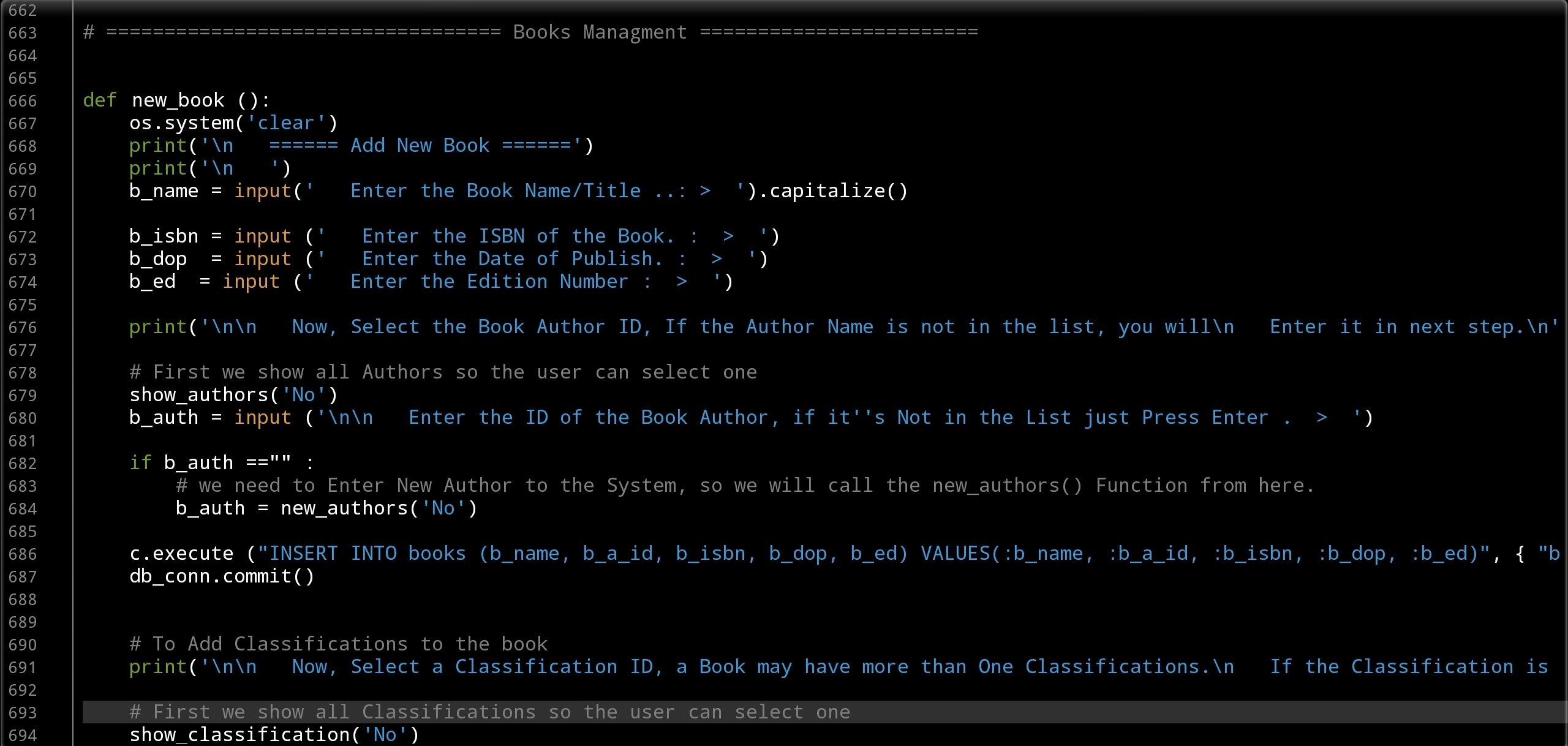 |
Part of Editing the Book. |
What’s Next:
1. I will go through the code Run-Time tring to fix any errors.
2. I will write function for simple statistics on the Library.
[ NOTE ]
1. I am using Galaxy Tab and QPython3 App.
2. All the above codes are available in the Download Section/Page under the project name.
3. The application codes, Functions, Menus and other parts of the Application are subject of changes. In case of changes I will mention that.
4. This is a simple personal Library application, so i did not use any validations on Data Entry.
:: Library Managment System ::
| Part 1 | Part 2 | Part 3 | Part 4 |
| Part 5 |
To Download my Python code (.py) files Click-Here

By: Ali Radwani
Python: Cooking App P-7
Learning : Python, Data-Base, SQlite
Subject: Writing a Cooking Application
RECIPES MENU: Delete Recipe To Delete a recipe we need to point on it, we will do this by it’s ID. So we can show all recipes by names, then we select the one we want to delete and enter it’s ID, the system will ask to confirm this action by typing (y,Y) then it we will call the delete function. In Delete function “def del_recipe()” we need to delete all the data regarding this ID form three DB Tables, recipes, recipes_steps, rec_ingredient and photo. Although we did not use the photo table and and we just create it for future use, but er will write its code.
Future Plan: In coming weeks we will convert this application “Cooking Application” to GUI “Graphical User Interface” application using tkinter library (Tkinter: is a Python binding to the Tk GUI toolkit) .
Coding: So to Delete a recipe we will show all Recipes and there ID’s sorted by it’s Name and ask the user to enter the ID of the Recipe he/she want to delete.
 # Code to Delete a Recipe

def del_recipe():
    os.system("clear")
    print('\n ====== Delete a Recipe =====')

    # Start to list down all the Recipes Name.
    print("\n\n  List of ALL Recipes we have.")
    c.execute("select r_id,r_name from recipes where r_id > 0")
    for each_r_name in c.fetchall():
        print('   ID:',each_r_name[0], 'Name:',each_r_name[1])

    # Now we ask the user to Enter the Recipe ID.
    rec_del = input('\n\n   Enter an Recipe ID to be Deleted: ')

    # Now we ask the user to Confirm Deleting Recipe.
    sure_remove = input('\n The Recipe will be DELETE and can''t be Rolled-Back. Are you sure you want to Remove it [Y,N] ')

    if sure_remove in ['y','Y']:
        c.execute ("Delete  from recipes_steps where r_id = {}".format(rec_del))
        db_conn.commit()
        c.execute ("Delete  from recipes where r_id = {}".format(rec_del))
        db_conn.commit()
        c.execute ("Delete  from rec_ingredient where r_id = {}".format(rec_del))
        db_conn.commit()
        c.execute ("Delete  from photo where r_id = {}".format(rec_del))
        db_conn.commit()

    elif sure_remove in ['n','N']: # If the user decide not to delete and select N
        print('\n You select NOT to remove the Recipe.')
    else :# If the user enter anything else than Y or N
        print('\n You must select (Y or N).')

    input('\n   .. One Recipe Removed ..   Press any key .. ')
 |
To Download my Python code (.py) files Click-Here
By: Ali Radwani
Python: Machine Learning – Part 3
Learning :Python and Machine Learning Part 3
Subject: Implementation and saving ML-Model
After creating a data-set and use it to train a ML model and make sure that it works fine and give a height accuracy predictions (Click here to read: Python and Machine Learning Part 2 ), we may or say we need to keep this model trained and re-use it on any actual data. In many real-life ML to training the model may take time with huge train data in image recognition or voice recognition models, so we need to keep the model trained even if we exit the application. To do this in sklearn we will use the “Model persistence” document page and use the joblib serialization.
First we need to import joblib , also import so to print out the file name and the path, we will use two functions in joblib (dump and load) in save_trained_model we will use the dump. Her is the code.
 # Function to save a trained ML-Model

  import joblib, os  # To Import  joblib and os

  def save_trained_model(model_name):

      print('\n  You select to save the trained ML model.')
      ml_name = input('  Enter a file name: ')
      joblib.dump(model_name, ml_name)
      print('\n  --> ML Model been saved.\n')
      print('   File Name is :',ml_name)  # To print-out the file name
      print('   File Path is :',os.path.abspath(ml_name))  # To print-out the file path
      print('\n\n Do you want to save the ML trained Model? (Y,N): ' )
      if input('') in ['y','Y'] :
        save_trained_model(ML_trained_model)
Now after we save our trained ML-Model we want to load it and use it in our ML program without training our machine. I will use the function new_test_data() from part 2 and pass the ML trained model to it. And to do this, first we need to load the trained ML-Mode. So let’s do it.
 # Function to load trained ML-Model

def load_ML_Model(ML_filename):
    the_trained_model= joblib.load(ML_filename)

    return the_trained_model

# we call the function in the main application code.
ML_model = load_ML_Model(ML_t_model_filename)
And now we will call our new_test_data() function and pass ML_model to see the prediction.
 # Function to load trained ML-Model


def new_test_data(ML_model):
    print('\n\n====================================================')
    print('---------  START PREDICTION  for New Data Set ---------')
    print('\n   In this function a new data set will be generated, ')
    print('  and a trained ML-Model for "mouse on the coordinate plane" ')
    print('  will be loaded from the disk. So we will not train the Model.')
    #print('  So we will not train the Model. ')
    #print('  will use the IF loops.')

    new_data_size = 1000
    new_data_range = 100
    print('\n\n  The new data range is {}, and the new data size is {}.'.format(new_data_range,new_data_size))

    # generate new data
    new_test_data1= []
    for x in range (new_data_size):
        new_test_data1.append([round(random.uniform(-new_data_range,new_data_range),2),round(random.uniform(-new_data_range,new_data_range),2)])

    print('\n  This is the prediction for the New Data set..\n')
    # Do prediction using ML_model.
    prediction = ML_model.predict(new_test_data1)
    cot = 0
    # check the predictions accuracy .
    for i in range (len(prediction)) :
        if prediction[i] =='Up_r':
          if ((new_test_data1[i][0]) > 0 and (new_test_data1[i][1]) > 0) :
            cot = cot + 1
        elif  prediction[i] =='Up_l':
          if ((new_test_data1[i][0])  0) :
            cot = cot + 1
        elif  prediction[i] =='D_r':
          if ((new_test_data1[i][0]) > 0 and (new_test_data1[i][1]) < 0) :
            cot = cot + 1
        elif  prediction[i] =='D_l':
          if ((new_test_data1[i][0]) < 0 and (new_test_data1[i][1]) < 0) :
            cot = cot + 1

    print('\n  We count {} correct prediction out of {} Instances.'.format(cot,(new_data_size)))
    print('\n  The Accuracy is:',round((cot/len(prediction))*100,3),'%')

|
To Download my Python code (.py) files Click-Here

Taking pictures is not my main daily practices, but when i start playing with my camera, i really enjoy my self.
Thanks for visiting my Space..


 Ali's Photography Space...