Archive
Python: Cooking App P-5
Learning : Python, Data-Base, SQlite
Subject: Writing a Cooking Application
RECIPES MENU: Once I start reading the Net (blogs and Cooking Books) to see how cookers talking about foods-recipes, I realise that I may need to add something to the DataBase, then I start writing the codes for the “Recipe Menu” and immediately I find the we need to add a new Table; I call it “recipes_steps” it will hold several steps of how to cook a recipe.
DataBase Diagram |
Here is the code to create the new Table and adding the record 0 (Zero).
# To create the Table “recipes_steps” .
sql_recipes_steps =”CREATE TABLE if not exists recipes_steps (st_id INTEGER PRIMARY KEY AUTOINCREMENT,r_id integer, rec_steps text )”
c.execute(sql_recipes_steps)
db_conn.commit()
# To add the Record Zero.
c.execute (“INSERT INTO recipes_steps (st_id) VALUES(:st_id)”,{“st_id”:0})
db_conn.commit()
First let’s see the “Recipe Menu” and from there we will write the codes for each item in the menu. As we saw in Ingredients Menu, same functionality should be here to, Listing all Recipes, Adding new one, Editing and Deleting a recipes. We will write the code for each of them, and here is the code for the “Recipes Menu”
 # Recipes Menu - Function

def recipes_menu ():
    while True:
        os.system("clear")
        print('\n ===========[ RECIPES MENU ]=============')
        print('  --------------------------------------')
        print(' 1. Show Recipes.')
        print(' 2. Add Recipe.')
        print(' 3. Delete Recipe. ')
        print(' 4. Edit Recipe.')
        print(' 9. Exit')
        uinp= input('\n Enter your Selection: ')

        if uinp == '1':
            show_recipes()
        elif uinp == '2':
            add_recipe()
        elif uinp == '3':
            del_recipe()
        elif uinp == '4':
            edit_recipe()
        elif uinp =='9':
            return
        else:
            print('\n  Please select from the Menu.')
So first thing we will work on “Show Recipes”, once the user select Show Recipes another Menu will be display to give more option as in the screen shot..
 |
 |
To display the Recipes based on the options we have, we will write a function that take a parameter based on the user selection so the user can search for a recipe based on it’s Name, Date or other details. Let’s see the code ..
 |
 |
NOTE THAT: We did nothing with Tags option, after we finish the application we will assume that the Business owner ask to add a new requirement to the application, and we will see the impact of this and who to solve it.
In Next Post we will work on the Adding New Recipe to our Cooking Application.
To Download my Python code (.py) files Click-Here
 Follow me on Twitter..
By: Ali Radwani
Python: Cooking App P-4
Learning : Python, Data-Base, SQlite
Subject: Writing a Cooking Application
INGREDIENT MENU: In this post we will write the Python code for the Ingredient Menu Functions. We have four main Functions :
1. Show all Ingredient.
2. Add Ingredient.
3. Delete Ingredient.
4. Edit Ingredient.
We need the Ingredient List so the user can select an Ingredient for the Recipes they want to write. First we will list down all the Ingredient in the Table.
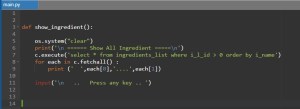
show_ingredient is a function to list all the ingredient in “ingredients_list” Table, here is the code ..
 # Show Ingredient Function

def show_ingredient():

    os.system("clear")
    print('\n ====== Show All Ingredient =====')
    show_sql = c.execute('select * from ingredients_list where i_l_id > 0 order by i_name')
    for each in c.fetchall() :
        print ('  ',each[0],'....',each[1])

    input('\n   ..   Press any key .. ')

add_ingredient Function will let the user to add more Ingredients to the list.
 # Add New Ingredients Function

def add_ingredient():

    os.system("clear")
    print('\n ====== Adding New Ingredient =====')
    ing_name = input('\n\n   Enter an Ingredient you want to add: ').capitalize()
    c.execute ("INSERT INTO ingredients_list (i_name) VALUES(:i_name)",{"i_name":ing_name})
    db_conn.commit()

    input('\n   .. One Ingredient Added ..   Press any key .. ')


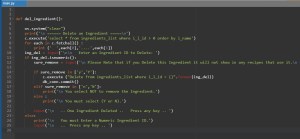
del_ingredient To Delete an Ingredients we need to enter it’s ID, and If we Delete one and that one was used in any recipes, then once we view the recipe the Ingredients will not show there.
 # To Delete an Ingredient

def del_ingredient():

    os.system("clear")
    print('\n ====== Delete an Ingredient =====\n')
    c.execute('select * from ingredients_list where i_l_id > 0 order by i_name')
    for each in c.fetchall() :
        print ('  ',each[0],'....',each[1])

    ing_del = input('\n\n   Enter an Ingredient ID to Delete: ')

    if ing_del.isnumeric():
        sure_remove = input('\n Please Note that if you Delete this Ingredient it will not show in any recipes that use it.\n   Are you sure you want to Remove it [Y,N] ')

        if sure_remove in ['y','Y']:
            c.execute ("Delete from ingredients_list where i_l_id = {}".format(ing_del))
            db_conn.commit()
        elif sure_remove in ['n','N']:
            print('\n You select NOT to remove the Ingredient.')
        else :
            print('\n You must select (Y or N).')

        input('\n   .. One Ingredient Deleted ..   Press any key .. ')
    else:
        print('\n   You must Enter a Numeric Ingredient ID.')
        input('\n   ..  Press any key .. ')

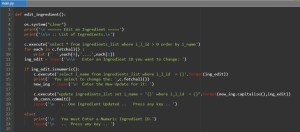
edit_ingredient To Edit an Ingredients we need to enter it’s ID, so first we will list down all Ingredients we have then the user will select the one to be edit. Here is the code to do so..
 # To Edit an Ingredients.

def edit_ingredient():

    os.system("clear")
    print('\n ====== Edit an Ingredient =====')
    print('\n\n :: List of Ingredients.\n')

    c.execute('select * from ingredients_list where i_l_id > 0 order by i_name')
    for each in c.fetchall() :
        print ('  ',each[0],'....',each[1])
    ing_edit = input('\n\n   Enter an Ingredient ID you want to Change: ')

    if ing_edit.isnumeric():
        c.execute('select i_name from ingredients_list where i_l_id  = {}'.format(ing_edit))
        print('  You select to change the: ',c.fetchall())
        new_ing = input('\n  Enter the New Update for it: ')

        c.execute("update ingredients_list set i_name = '{}' where i_l_id  = {}".format(new_ing.capitalize(),int(ing_edit)))
        db_conn.commit()
        input('\n   .. One Ingredient Updated ..   Press any key .. ')

    else:
        print('\n   You must Enter a Numeric Ingredient ID.')
        input('\n   ..  Press any key .. ')

Last thing we will Insert some Ingredients in the “ingredients_list” Table so we can test the functions, for this purpose I will write this piece of code that we can run to Insert some Ingredients.
 # To Insert sample ing_list

ing_list =["Onion","Spinach","Mushroom","Tomatoes","Lime","Turnip","Snake Beans",
"Jalapeno","Baking powder","sugar","Eggs","Vanilla extract","Salt","Flour","Butter",
"Oil","Whole milk","Orange juice","Baking soda","Ground cinnamon","Dark chocolate",
 "Cocoa","Cherry","Cherry jam"]

for item in range (len(ing_list)):
    ing_name = ing_list[item].capitalize()
    c.execute ("INSERT INTO ingredients_list (i_name) VALUES(:i_name)",{"i_name":ing_name})
    db_conn.commit()
Now, we can use the Delete, Edit and Add functions to test the “Ingredients Manager” from the Main Menu, here is some screen shots.
Show Ingredients  |
Add Ingredients |
Delete Ingredients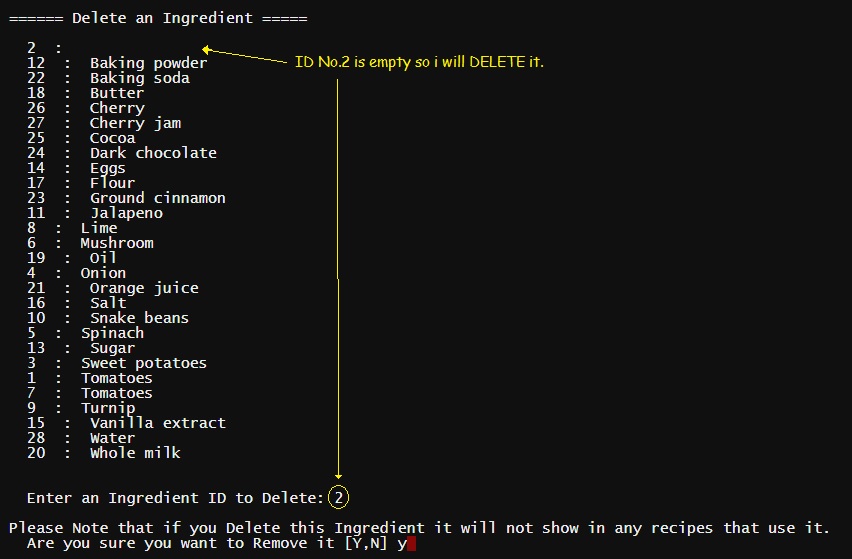 |
Edit Ingredients  |
Note: The Screen-Shots above was before I add Order by clause to the SQL statement.
In Next post we will write the codes for the functions in the ” Recipe Menu”.
To Download my Python code (.py) files Click-Here
By: Ali Radwani
Python: Cooking App P-3
Learning : Python, Data-Base, SQlite
Subject: Writing a Cooking Application
Over View: In last post (Part-2) we wrote the codes for Main-Menu and other sub-Menus, today in this post we will work on “Setting Menu”. Setting Menu has three items:
1. Create the needed Tables. [To create all tables we need in the database]
2. Drop Tables. [If any things goes wrong then we can Drop (Delete) a Table (or more) ]
3. Insert Dummy Data. [To Insert ONE Record in the tables. (Record 0)]
First thing we need to create a database and set a connection to it, also we will import the [sqlite3 and os], to do so we will write this code:
  import sqlite3, os

  # Create the data-base & name it.
  db_conn = sqlite3.connect ("cooking.db")

   # set the connection.
  c = db_conn.cursor()

|
Now we need to write three Functions for the Setting Menu, we will start with Table creation code and here I am posting the Data-Base Tables Diagram ..
Click to Enlarge
|
 # Function to Create the Tables


def create_tables_() :    # to create tables.

    sql_recipes = "CREATE TABLE if not exists recipes (r_id INTEGER PRIMARY KEY AUTOINCREMENT, r_name text, r_date text, r_type text, r_details text, r_tags text )"

    sql_photo = "CREATE TABLE if not exists photo (p_id  PRIMARY KEY AUTOINCREMENT ,r_id integer , p_name text)"

    sql_ingredients_list = "CREATE TABLE if not exists ingredients_list (i_l_id PRIMARY KEY AUTOINCREMENT, i_name text )"

    sql_rec_ingredient ="CREATE TABLE if not exists rec_ingredient (ing_id INTEGER PRIMARY KEY AUTOINCREMENT, i_l_id integer, r_id integer)"

    c.execute(sql_recipes)
    db_conn.commit()

    c.execute(sql_photo)
    db_conn.commit()

    c.execute(sql_ingredients_list)
    db_conn.commit()

    c.execute(sql_rec_ingredient)
    db_conn.commit()

    input('\n   .. Cooking  Tables created..  Press any key .. ')
So now if we call this function “create_tables_() “, Tables will be created. Another function in the Setting Menu is Drop a Table, as we mention above we need this function in case we need to Delete a Table and create it again, in this function first we will list all the tables in the database and ask the user to Enter the Table need to be delete. Here is the code behind this function:
 # Drop a Table.

def drop_table():

    try:
        # First we will print-out the list of Tables.
        c.execute("SELECT name FROM sqlite_master  WHERE type = 'table'")
        db_tables =[]
        for each in c.fetchall() :
            for t in each :
                db_tables.append(t)
        print('\n  Table List .. ')
        for x in range (len(db_tables)) :
            print((x+1),db_tables[x])
        t = int(input('\n  Enter the number next to Table you want to Drop:  '))
        c.execute("DROP TABLE {}".format(db_tables[t-1]))
        db_conn.commit()
        print('\n ... One Table been Dropped')

    except:
        print('\n  No Tables with this name .. ')

    input('\n  . . . Press any key  . . ')

|
Last code to write in this post is to Insert One-Record in the tables, the reason of doing this manually (Hard-Coded) is that we have some “Primary key AUTOINCREMENT” fields in our tables, and to make it AUTOINCREMENT there MUST be a number first so we will enter the ZERO record (0).
 # Function to Insert the Zero Record

def insert_rec_0():

    c.execute ("INSERT INTO recipes (r_id) VALUES(:r_id)",{"r_id":0})

    c.execute ("INSERT INTO ingredients_list (i_l_id) VALUES(:i_l_id)",{"i_l_id":0})

    c.execute ("INSERT INTO rec_ingredient (ing_id) VALUES(:ing_id)",{"ing_id":0})

    c.execute ("INSERT INTO photo (p_id) VALUES(:p_id)",{"p_id":0})

    db_conn.commit()

    input('\n ...Dummy records been Inserted ....  Press any key  .. ')
In Next post we will write the codes for the functions in the “INGREDIENT MENU” to Add, Delete and Edit Ingredient List.
To Download my Python code (.py) files Click-Here
By: Ali Radwani
Python: Cooking App P-2
Learning : Python, Data-Base, SQlite
Subject: Writing a Cooking Application
Over view: In Part-1 (Click to Read) we list down the Main-Menus and sub-menus of some options, here we will start writing the codes of each menu. We will start from the Main-Menu.
Now with each menu from the last post, we will see the code and the run-time screen.
[ MAIN MENU ]
1. Add New Meal.
2. Ingredients Manager [will have a sub menu]
3. Add New.
4. Show Recipes.(Meals) [will have a sub menu]
5. Recipes Information.) [ number or Recipes by date, number on tags, number of Ingredients .. ]
6. Data-Base Information.
7. Setting. [will have a sub menu]
9. Exit.
 # Main Menu Code

def main_menu():
    while True :
        os.system("clear")
        print('\n ===========[ MAIN MENU ]=============')
        print(' --------------------------------------')
        print('  1. Add New Meal.')
        print('  2. Ingredients Manager')
        print('  3. Add New')
        print('  4. Show Recipes.')
        print('  5. Recipes Information.')
        print('  6. DataBase Information.')
        print('  7. Setting')
        print('  9. Exit.')

        uinput = input('\n Select the required action:  ')
        if uinput == '1' :
            pass
        elif uinput =='2' :
            ingredient_menu()
        elif uinput =='3' :
            show_recipes ()
        elif uinput =='4' :
            pass
        elif uinput =='5' :
            pass
        elif uinput == '6' :
            pass
       elif uinput == '7' :
            setting_menu()

        elif uinput == '9' :
            return
        else:
            print('\n  You need to select from the menu..')
 |

|
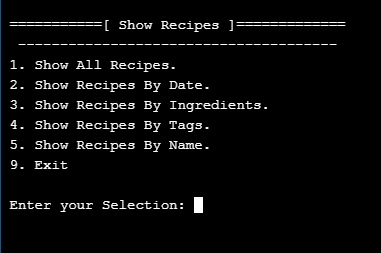
Second menu to write is “Show Recipes”, the user will use this menu to display and read the Recipes.
[ Show Recipes ]
1. Show All Recipes.
2. Show Recipes By Date.
3. Show Recipes By Ingredients.
4. Show Recipes By Tags.
5. Show Recipes By Name.
9. Exit.
 # Show Recipes Menu Code

def show_recipes () :
    while True:
        os.system("clear")
        print('\n ===========[ Show Recipes ]=============')
        print('  --------------------------------------')
        print(' 1. Show All Recipes.')
        print(' 2. Show Recipes By Date. ')
        print(' 3. Show Recipes By Ingredients.')
        print(' 4. Show Recipes By Tags.')
        print(' 5. Show Recipes By Name.')
        print(' 9. Exit')
        uinp= input('\n Enter your Selection: ')

        if uinp == '1':
            pass
        elif uinp == '2':
            pass
        elif uinp == '3':
            pass
        elif uinp == '4':
            pass
        elif uinp == '5':
            pass

        elif uinp =='9':
            return
        else:
            print('\n  Please select from the Menu.')

|
 |
Third menu we have in our application is “Ingredient Menu”, the user will it to manage the Ingredient list.
[ INGREDIENT MENU ]
1. Show all Ingredient.
2. Add Ingredient.
3. Delete Ingredient.
4. Edit Ingredient.
9. Exit.
 # Ingredient Menu Code

def ingredient_menu():
    while True:
        os.system("clear")
        print('\n ===========[ INGREDIENT MENU ]=============')
        print('  --------------------------------------')
        print(' 1. Show all Ingredient.')
        print(' 2. Add Ingredient.')
        print(' 3. Delete Ingredient. ')
        print(' 4. Edit Ingredient')
        print(' 9. Exit')
        uinp= input('\n Enter your Selection: ')

        if uinp == '1':
            pass
        elif uinp == '2':
            pass
        elif uinp == '3':
            pass
        elif uinp == '4':
            pass
        elif uinp =='9':
            return
        else:
            print('\n  Please select from the Menu.')

|
 |
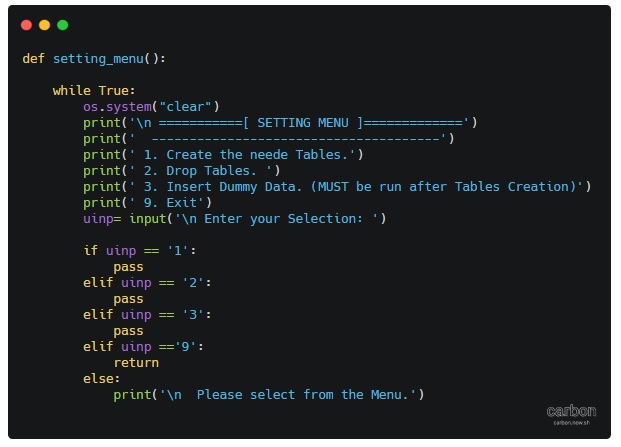
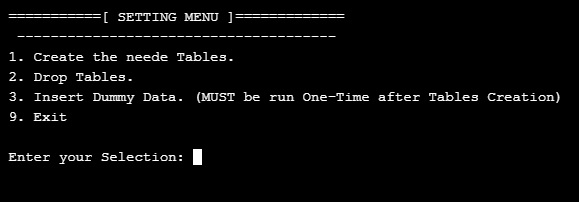
Last menu we have is “Setting Menu”, from here we can create the tables and Insert a Dummy-Data.
[ SETTING MENU ]
1. Create the needed Tables.
2. Drop Tables.
3. Insert Dummy Data. (MUST be run after Tables Creation)
9. Exit.
 # Setting Menu Code

def setting_menu():

    while True:
        os.system("clear")
        print('\n ===========[ SETTING MENU ]=============')
        print('  --------------------------------------')
        print(' 1. Create the needed Tables.')
        print(' 2. Drop Tables. ')
        print(' 3. Insert Dummy Data. (MUST be run One-Time after Tables Creation)')
        print(' 9. Exit')
        uinp= input('\n Enter your Selection: ')

        if uinp == '1':
            pass
        elif uinp == '2':
            pass
        elif uinp == '3':
            pass
        elif uinp =='9':
            return
        else:
            print('\n  Please select from the Menu.')
|
 |
Next Post: In next post we will write the codes for Setting menu so we can run it and from there we can create the Tables and Insert the Dummy Data.
To Download my Python code (.py) files Click-Here
By: Ali Radwani
Python: Cooking App P-1
Learning : Python, Data-Base, SQlite
Subject: Writing a Cooking Application
Over view: We will start new project to work on in coming weeks, and will call it ” Cooking App” I will use Python as a code language and Sqlite3 as a database in a full stack task.
Assumptions: I will assume that we have some basic information about Database such as Tables, fields, records and relationships between tables also Primary key and foreign keys. All this are important just to understand what’s going on, and we will write the code to generate all tables through Python code.
The Concept: The Cooking App will give the user the ability to write a food Recipe with it’s ingredients and how to cook it. (Along with it’s photo.. ) The application will have the ability to store a list for ingredient so the user can select from it instead of re-writing it every time, also to save the photo of your dish if you want.
Data-Base Design: In this application we will need four Tables, we will call them: Recipes, Photo, Rec_ingredients and ingredient_list. Each table will have a Primary Key (id).
Here are the Tables and the Fields
- r_id PRIMARY KEY AUTOINCREMENT
- r_name
- r_type (Breakfast, Lunch, Dinner)
- r_tags (NOT Sure to use static list or DB-Table)
- r_date
- r_details
Recipes
-
Photo
- p_id PRIMARY KEY AUTOINCREMENT
- r_id FOREIGN KEY
- p_name
-
Ingredients_List
- ing_id PRIMARY KEY AUTOINCREMENT
- i_name
-
rec_ingredient
- ing_id PRIMARY KEY AUTOINCREMENT
- i_l_id
- r_id
First thing we will write in the application is the Main-Menu and other sub menus we may have in the application. (After posting this article Menus may change)
[ MAIN MENU ]
1. Add New Meal.
2. Ingredients Manager [will have a sub menu]
3. ??.
4. Show Recipes.(Meals) [will have a sub menu]
5. Recipes Information.) [ number or Recipes by date, number on tags, number of Ingredients .. ]
6. Data-Base Information.
7. Setting. [will have a sub menu]
9. Exit.
[ Show Recipes ]
1. Show All Recipes.
2. Show Recipes By Date.
3. Show Recipes By Ingredients.
4. Show Recipes By Tags.
5. Show Recipes By Name.
9. Exit.
[ SETTING MENU ]
1. Create the needed Tables.
2. Drop Tables.
3. Insert Dummy Data. (MUST be run after Tables Creation)
9. Exit.
[ INGREDIENT MENU ]
1. Show all Ingredient.
2. Add Ingredient.
3. Delete Ingredient.
4. Edit Ingredient.
9. Exit.
We can say that this is a blue-print of the application that we want to work on, everything is subject to change while working, since this is a personal application we will be flexible in changing, but in real life project development cycle we need to take an approval (From the Business Owner) on the project plan and design before we start working also to be very clear that : “Any changes in the scope of work may cost money and time”.
Next Post: In next post we will write the codes for the menu also we will create the Tables.
To Download my Python code (.py) files Click-Here
By: Ali Radwani
Python: Applications Main Menu
Learning : Application Main Menu
Subject: Main Menu Template
In some of my applications often I start writing codes to create a Menu for some parts in the app. Now in this post we will write a simple general Main Menu Template, to keep the screen prompt waiting for the user we use while True, and to exit we just use return . Here is the code ..

|
'''
Date: 10.1.2020
By: Ali Radwani.  www.ahradwani.com

Main_Menu Function
'''
import os

def main_menu():

    """
    Template Function to help in creating a Menu for the application.

    You can change the names and functions must be defined.
    """
    while True:
        os.system("clear")
        print('\n ===========[ MENU NAME]=============')
        print('  --------------------------------------')
        print(' 1. Function-1 Name.')
        print(' 2. Function-2 Name. ')
        print(' 3. Function-3 Name')
        print(' 9. Exit')
        uinp= input('\n Enter your Selection: ')

        if uinp == '1':
            Function_1_Name()
        elif uinp == '2':
            Function_2_Name()
        elif uinp == '3':
            Function_3_Name()
        elif uinp =='9':
            return
        else:
            print('\n  Please select from the Menu.'
To Download my Python code (.py) files Click-Here
By: Ali Radwani
Python: SQlite Project – P2
Learning : Python and Sqlite3
Subject: Sqlite3, Database functions ” Employee App” P2
In Part1 of this project (Click to Read) we create the database and set the connection, also we create an Employee table with very basic fields and also we wrote a dummy_data() function to Insert some records into the table. And to make the application usable we wrote the Main-Men function and we test it with selecting to display the records that we have.
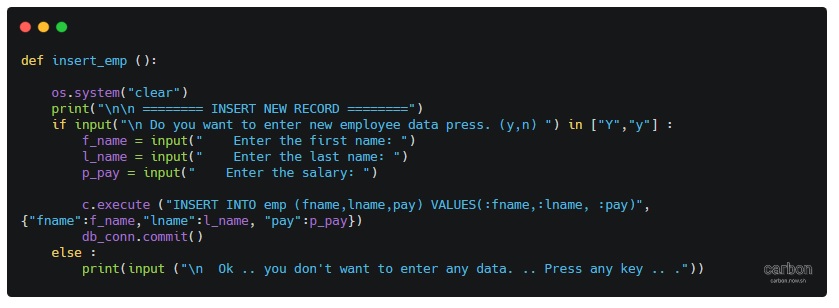
Today we will write other functions from our Menu. INSERT NEW EMPLOYEE: To Insert new employee we will ask the user to input or to fill the fields we have in our table such as First Name, Last Name and the Salary. .Let’s see the code ..
 # Insert Function

def insert_emp ():

    os.system("clear")
    print("\n\n ======== INSERT NEW RECORD ========")
    if input("\n Do you want to enter new employee data press. (y,n) ") in ["Y","y"] :
        f_name = input("    Enter the first name: ")
        l_name = input("    Enter the last name: ")
        p_pay = input("    Enter the salary: ")

        c.execute ("INSERT INTO emp (fname,lname,pay) VALUES(:fname,:lname, :pay)",{"fname":f_name,"lname":l_name, "pay":p_pay})
        db_conn.commit()
        print(input ("\n  One record has been Inserted. .. Press any key .. ."))
    else :
        print(input ("\n  Ok .. you don't want to enter any data. .. Press any key .. ."))

So, if we select to Insert a new Employee and we Enter First name as : Jacob Last Name as: Noha also we we set the salary to 3200 and press Enter, as in this page ..
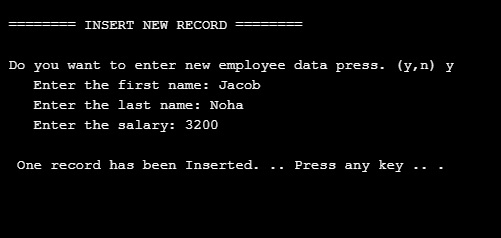
|
Then if we select to show all data we have in the database, we can see the new record added..
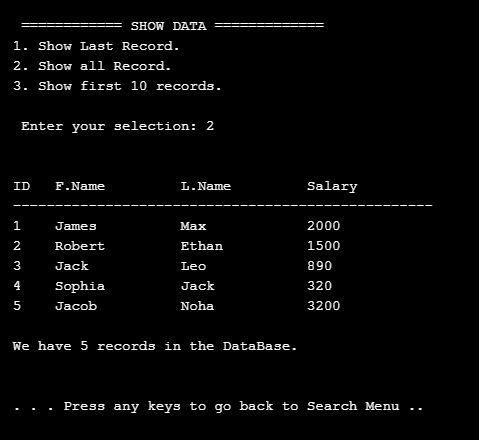
|
DELETE AN EMPLOYEE: To Delete or remove an employee from the database, First we will print-out all the records on the screen and ask the user to enter the ID_ number of the employee he want to delete. As shown here ..
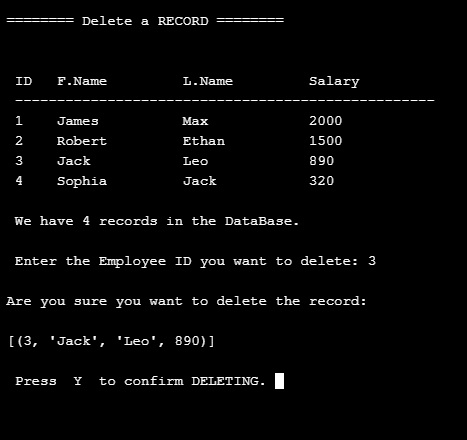
|
In the above example we select ID number 3 to be deleted and press enter, the system will show the record and ask to confirm the deletion and wait for ‘Y’ to be pressed, then the record will be deleted.
..Here is the code..

|
In this post we cover the INSERT AND DELETE of the records from the database, in the next post we will cover the SEARCH AND EDIT Functions also some search conditions like salary range and group-by command.
To Download my Python code (.py) files Click-Here
By: Ali Radwani
Python: SQlite Project – P1
Learning : Python and Sqlite3
Subject: Sqlite3, Database functions ” Employee App” P1
One of the most important thing about writing applications is to save or store some Data for later use. This data could be simple as setting information or basic user information or can be a full records about something you need to keep, such as health data, or employee contacts or other projects data. To store a huge data we use a Data-Base, some databases are free and open to be downloaded from the internet, one of them is SQLITE3, in Python we can use the Sqlite for small and personal projects. In this post We will use the Sqlite to write a simple project for Employees.
As that our goal is to learn how to use Sqlite and python code to track our employees, and to keep every thing as simple as we can, we will collect only three piece of information that’s will be First Name, Last Name and the Salary.
Functions: In any application there must be several functions to complete our works and tasks that we need to perform, in our Employee System we need to perform these tasks:
1. Show the Data we have.
2. Insert New Employee.
3. Delete an Employee.
4. Editing Employee information.
5. Search for Employee.
This is the most important functions in any application, we will start working on the system and see how things goes on.
First we MUST Creating the data base and set the connection, here is the code to do this and we will call our database as test.db.
 # Create the database.

import sqlite3, os

db_conn = sqlite3.connect ("test.db")    # set the data-base name

c = db_conn.cursor()  # set the connection
To create the Employee table we will write this code and run it only ONE Time.
 # Create the Employee Table.

def create_tabels_() :    # to create tables.

    # employee table
    sql_s= "CREATE TABLE if not exists emp (emp_id INTEGER PRIMARY KEY AUTOINCREMENT, fname text,lname text, pay integer)"

    c.execute(sql_s)
    db_conn.commit()
    print(input('\n   .. Employee TABLE created..  Press any key .. '))
Since we are learning and playing with our code, we may need to drop the table for some reasons, so here is the code to Drop the table we will re-call the function if we need-so.
 # Function to DROP a Table.

def drop_table(tname):

    c.execute("DROP TABLE {}".format(tname))
    db_conn.commit()
Now after the creating of the Table we need to feed it with some data so we can see the records. To do so we will run a function called dummy_data.
 # Function to INSERT Dummy data into the Employee Table.


def dummy_data():
    """
        This Function will Insert 4 Dummy rows in the temp table, first record will set the emp_id to 1, the other
        record the emp_id will be AUTOINCREMENT.

        This Function to be run one time only.

    """
# First record will have the emp_id set as 1, other records will be AUTOINCREMENT.
    c.execute ("INSERT INTO emp (emp_id, fname,lname,pay) VALUES(:emp_id, :fname,:lname, :pay)",{"emp_id":1,"fname":"James","lname":"Max", "pay":"2000"})
    c.execute ("INSERT INTO emp (fname,lname,pay) VALUES(:fname,:lname, :pay)",{"fname":"Robert","lname":"Ethan", "pay":"1500"})
    c.execute ("INSERT INTO emp (fname,lname,pay) VALUES(:fname,:lname, :pay)",{"fname":"Jack","lname":"Leo", "pay":"890"})
    c.execute ("INSERT INTO emp (fname,lname,pay) VALUES(:fname,:lname, :pay)",{"fname":"Sophia","lname":"Jack", "pay":"320"})
    db_conn.commit()

    print(input('\n  Dummy Data has been INSERTED\n\n  .. Press any key .. '))
Main Menu To use the application we need a Menu to jump between the tasks in the app. Here is the Main-Menu, it will return the user selection.
 # The Main Menu.

def menu():
    os.system("clear")
    print("\n\n      ::: The Menu :::")

    print("   1. Show the Data.")
    print("   2. Insert a New  Employee.")
    print("   3. Delete an Employee.")
    print("   4. Edit/Change employee data. ")
    print("   5. Search.")
    print("   6. Setting.")
    print("   7. Data-Base Information.")
    print("   9. Exit. ")

    uinput = input("\n     Enter a selection: ")

    return uinput
Here is the loop for the Menu and the user selection until (9. Exit) will be selected.
 # The Main Menu.

while True :

    uinput = menu()

    if uinput == '1' :
        show_data()

    elif uinput =='2' :
        insert_emp ()

    elif uinput =='3' :
        delete_record()

    elif uinput =='4' :
        print("Edit")

    elif uinput =='5' :
        search_emp()

    elif uinput =='6' :
        setting_menu()

    elif uinput =='7' :
        #print("DataBase Information.")
        get_db_info()

    elif uinput =='9' :
        break

    else: # If the user select something out of the menu (Numbers or Character)
        print("  You need to select from the list")

|
Now we remember that we run the dummy_data() function (above) so we have four records in our Employee Table, so if we want to see the records we will select first option in the Main Menu: 1. Show the data. this will call a function called show_data() as in this screen shot.
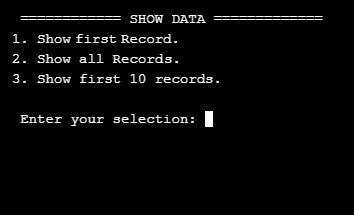
|
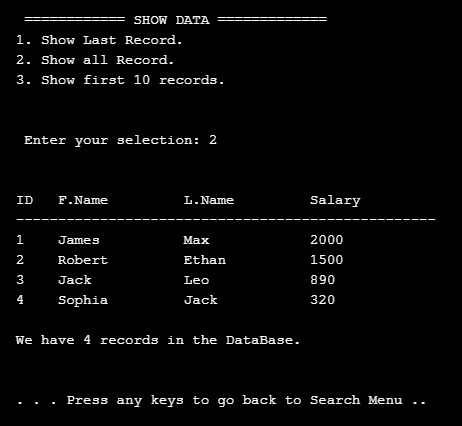
The screen prompt will wait for an input of the number that present the task we want. So if we select No. 2 then we will get all the records in the table as this .. .
|
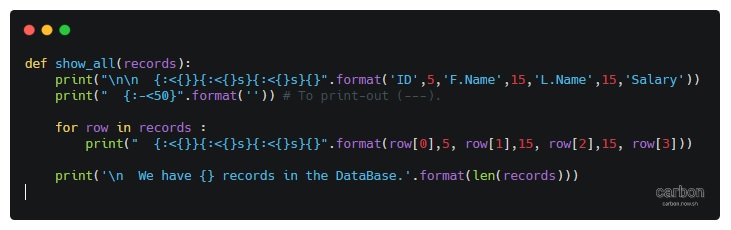
And here is the code behind this function..
|
Done with Part 1, in part 2 we will cover more functions to Search and Add records to the Table.
To Download my Python code (.py) files Click-Here
By: Ali Radwani
Python: My Fake Data Generator P-7
Learning : Python: Functions, Procedures and documentation
Subject: About fake data P-7: (Fake File Name)
In this post we will write a function to generate a file name. Each file name consist of two part, first one is the name which present (or should present) a meaning part, then there is a dot (.) then mostly three characters showing the file type or extension.
Scope of work: Our files names will have 4 syllables all to gather will be one file name. Each syllables will be loaded in a variable as shown ..
1. fext: for Files extensions such as: (doc, jpeg, pdf, bmp …. and so on)
2. name_p1: Is a noun such as (customers, visitors, players .. . and so on )
3. name_p2: will be an nouns, adjective or characteristics such as (name, index, table .. .. and so on)
4. Then we will add a random integer number between (1,30) to give the file a version, or a number.
All parts or syllables will be as one file name.
Let’s Work: First we need to load the File name syllables from the json file called : file_dict.json
 # Loading the json from a url

import json , requests, random

fname = "https://raw.githubusercontent.com/Ali-QT/Ideas-and-Plan/master/file_dict.json"

def call_json_url(fname):
    """
    Function to load the json file from URL.
    Argument: str :fname

    Return : dict: data
    """
    req = requests.get(fname)
    cont = req.content
    data = json.loads(cont)
    return data

fdict = call_json_url(fname)

# Save each syllables into variable.
f_ext = fdict["fext"]
f_p1_name = fdict["name_p1"]
f_p2_name = fdict["name_p2"]
Now we will write the function that will generate the file name:
 # Function to generate the file name

def generate_fname():
    """
    Function to generate a Fake files name.

    File Name consist of four syllables, Two names, a random number and an extension.
    First two syllables of the file name will be selected randomly from a dictuenary stored in a json       file.

    Return : str : f_file_name

    To read the information key in the json file use this code.
    ------ CODE TO READ DATA-SET INFORMATION --------------
     	for each in fdict["information"]:
          print(each,":",fdict["information"])

    ---END OF CODE ------------------------------------------
    """
    fp1 = (random.choice (f_p1_name)["n_p1"])
    fp2 = (random.choice (f_p2_name)["n_p2"])
    fp3 = (random.choice (f_ext)["ext"])

    f_file_name = (fp1 + "_" + fp2 + "_" + str(random.randint(1,30)) + "." + fp3)

    return f_file_name

|
Last thing we just will call the function for X numbers of files Name we want.
 # Generate 15 file Name.

for x in range (15):
    generate_fname()

[Output]:


kids_name_15.ico
speakers_list_1.asp
cars_photos_27.csv
students_database_26.xml
kids_details_27.html
animals_index_10.mov
speakers_parameters_17.csv
drivers_name_8.doc
males_attributes_16.mov
players_sketches_11.py
animals_sketches_3.wav
cars_details_12.css
animals_list_17.txt
flowers_parameters_4.doc
players_database_28.log
:: Fake Function List ::
| Function Name | Description |
| Color | To return a random color code in RGB or Hex. |
| Date | To return a random date. |
| Mobile | To return a mobile number. |
| Country | To return a random country name. |
| City | To return a random City name. |
| ID | To return X random dig as ID. |
| Time | To return random time. |
| Car’s Brand | |
| file_name | file name: list for fake file names. |
| Creatures | Random animal names of a certain type: Mammals, Birds, Insect, Reptiles |
| Foods | To return a random list of foods |
By: Ali Radwani
Python: My Fake Data Generator P-6
Learning : Python: Functions, Procedures and documentation
Subject: About fake data P-6: (Fake Food List)
In the last post the function we create def get_animal_name() get it’s data or let’s say select a random animal names from a dictionary data-set after loading the data from json file through URL, and I upload the Python functions on my Download Page so you can use it. Also I am working on standardizing my data-sets json file and adding information key for each file.
In this post we will write the code to print-out a random selected Food. The function will ask the user if he/she wants random list of Fruit, Vegetables or Meals. The Food data-set is growing up and i am adding more items to it, from the last update, the Meals contains: breakfast from UK, France and USA and Planning to add Dinners and Lunches recipes from more countries.
Let’s Start .. First we will load the json file, here is the code..
 #Calling and loading the json data-set file

 #Importing libraries
import json , requests, random


fname = "https://raw.githubusercontent.com/Ali-QT/Ideas-and-Plan/master/foods.json"

def call_json_url(fname):
 #    """
    Function to load the json file from URL.
    Argument : str  : fname
    return   : dict : data
    """
    req = requests.get(fname)
    cont = req.content
    data = json.loads(cont)
    return data  # retuning the data-set

data = call_json_url(fname)
Now, we have several other functions in this application, first we will list them and then we will see the code in each one.
So here is the list:
- get_type_index (adata,akey,subkey,aval)
Function to return a list with index numbre of akey (atype).
Argument: dic : adata, str : atype
Return : list : ind_list - get_f_or_v(adata,atype)
Function to print-out the Fruits or Vegetables as the user ask for.
Argument: dict : adata, str : atype - get_meals (adata)
Function to print-out the Meal as user will select. The user can select the Type of Meal: Breakfast, Dinner and Lunch. Also the user can select the countries of the Meals.Argument: dict: adata
- def mmenu()
This is the main menu to help the user to select whatever he/she want to be ptint-out.
Main Menu: Very short easy menu of four selection number as following:
 #The menu function


def mmenu() :
    """
        This is the main menu to help the user to select whatever want to be ptint-out.


    """
    print('\n\n  In the Food data-set we have several keys, here they are:')
    print('  Fruits, Vegetables and Meals. This application will select a random items\n  of your selection to print it on the screen.')
    print('  also you can select the number of items you want.\n ')
    print('  First, What type of Food do you want? ')
    print('   1. Fruits.')
    print('   2. Vegetables.')
    print('   3. Meals')
    print('   4. To exsit enter Q or q')

    ft = input('  Select one item:')
    if ft =='1' :
        get_f_or_v(data,'1')

    elif ft =='2' :
        get_f_or_v(data,'2')
    elif ft == '3' :
        get_meals (data)
    elif ft in ['q','Q']:
        print('Close')
        return 'q'
    else :
        print('\n   We only have three items')
If the user select (1 or 2 ), then we will call the get_f_or_v(data,the user selection), the first argument is the data-set, the second one is the user selection between Fruit, Vegetables or Meal. Here is the function ..
 #Calling and Menu

def get_f_or_v(adata,atype):
"""
       Function to print-out the Fruits or Vegetables as the user ask for.
       Argument:   dict   :  adata
                     str  :  atype
    """
    if atype == '1': ft = 'fruits'
    else: ft = 'vegetables'
    fts = len(adata[ft])
    while True :
        s = input('\n  You select {}, we have list of {} {}, So how many\n  {} you want to print: '.format(ft,fts,ft,ft))

        if int(s) < fts :
            break
        else :
            print('  Enter a number in range 0 to {}.'.format(fts))
    print('Random {} names are:'.format(ft))
    for x in range (int(s)) :
        ind = random.randint(1,fts)
        print('   ',adata[ft][ind]['name'])

    input('\n    ... Press any key ... ')
Last function we will see here is to get random Meals, I am loading the data from a json file that i create, for-now we have a breakfast only from UK, USA and France. If the user select the Meals from first menu, then another short menu will pop-up here it is ..
 #Calling get Meals

def get_meals (adata) :
	    """
	        Function to print-out the Meal as user will select. The user can select the Type of Meal: Breakfast, Dinner and Lunch.
	        Also the user can select the countries of the Meals.

	        Argument:    dict: adata
	    """

    ft = 'meals'
    fts = len(adata[ft])

    while True :
        s = input('\n  You select {}, we have list of {} {}, So how many\n  {} you want to print: '.format(ft,fts,ft,ft))

        if int(s) < fts :
            break
        else :
            print('  Enter a number in range 0 to {}.'.format(fts))

    print('\n  For Meals we have Breakfast from three counties:')
    print(' 1. UK.')
    print(' 2. USA.')
    print(' 3. France.')
    co = input(' Select a country:')
    if co == '1' : co ='UK'
    elif co == '2' : co ='USA';
    else : co ='FR'

    ind_list = get_type_index(adata,ft,'country',co)

    for x in range (0,int(s)):
        ind = random.choice(ind_list)
        print(adata[ft][ind]['name'],'is a ', adata[ft][ind]['time'],'from ',adata[ft][ind]['country'])

    input('\n    ... Press any key ... ')
Notes that in def get_meals() I use a hard-coded keys for the menu. I am working on a function to read any json file and get a list of all keys and sub-keys in any level, then giving the user the ability to walk-through all the data. This will be in coming post.
:: Fake Function List ::
| Function Name | Description |
| Color | To return a random color code in RGB or Hex. |
| Date | To return a random date. |
| Mobile | To return a mobile number. |
| Country | To return a random country name. |
| City | To return a random City name. |
| ID | To return X random dig as ID. |
| Time | To return random time. |
| Car’s Brand | |
| file_name | file name: list for fake file names. |
| Creatures | Random animal names of a certain type: Mammals, Birds, Insect, Reptiles |
| Foods | To return a random list of foods |
| Done |
By: Ali Radwani

Taking pictures is not my main daily practices, but when i start playing with my camera, i really enjoy my self.
Thanks for visiting my Space..


 Ali's Photography Space...