Archive
Python: Pandas Lesson
Learning : DataFrame and some commands
Subject: Pandas printing selected rows
First thing we will do today, we will add another coloumn to our CSV data_file_zoo.csv, we will add ‘years’ this will be hwo old each animal in the zoo is.
File_Name: data_file_zoo.csv
animal,id,water_need,supervisor,cage_no,years
elephant,1001,500,Peter,5,5
elephant,1002,600,John,5,4
elephant,1003,550,Peter,5,4
tiger,1004,300,mark,4,8
tiger,1005,320,mark,4,9
tiger,1006,330,peter,3,5
tiger,1007,290,mark,3,3
tiger,1008,310,D.J,4,4
zebra,1009,200,D.J,8,
zebra,1010,220,D.J,9,8
zebra,1011,240,D.J,9,7
zebra,1012,230,mark,8,6
zebra,1013,220,D.J,8,3
zebra,1014,100,D.J,9,4
zebra,1015,80,peter,9,4
lion,1016,420,,1,9
lion,1017,600,D.J,1,8
lion,1018,500,,2,4
lion,1019,390,,2,5
kangaroo,1020,410,peter,7,8
kangaroo,1021,430,D.J,7,6
kangaroo,1022,410,mark,7,1
As we just update out file, we need to load it to the memory by calling the df (dataframe), this will happen once we run our code.
Here is a screen shot of the new data using print(df)
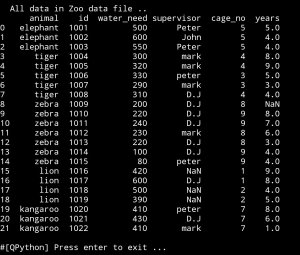
Lets say we want to know how many animals are numder 6 years. Here we will use df.loc to locate what we are looking for.
age_less_6 = df.loc[(dfyears<6)]
# To print we may use this:
print(‘ we have {} animals less than 6 years’.format(len(age_less_6)))
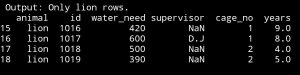
Now, we want to print only lion rows:
lino_rows = df.loc[(df.animal==’lion’)]
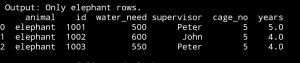
 Here is only rows with animal name ‘elephants’:
elephant_rows=df.loc[(df.animal==’elephant’)]
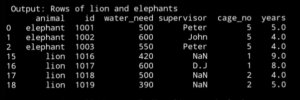
Now let’s print only the rows with lion and elephants:lion_and_elephant = df.loc[(df.animal==’lion’) | (df.animal == ‘elephant’)]
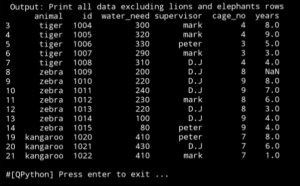
What if we want all the data but not the rows with lino or elephant.
all_exclude_lion_elephant=df.loc[(df.animal !=’lion’) & (df.animal !=’elephant’)]

:: Pandas Lessons Post ::
| Lesson 1 | Lesson 2 | Lesson 3 | Lesson 4 |
| Lesson 5 |
Python: Pandas Lessons
Learning : DataFrame and some commands
Subject:
This is my first hours in Pandas, until now thing are going smooth. I am using pythonanywhere on my PC, and jupyterlab on my galaxy tab S4.
In this post and coming once under name Pandas Lesson I will write some commands and what-ever I think I may need.
So, first thing we need a csv file with data to play with, so I search for some thing simple, i found one with zoo data!, I add two new column to it. so lets see it.
File_Name: data_file_zoo.csv
animal,id,water_need,supervisor,cage_no
elephant,1001,500,Peter,5
elephant,1002,600,John,5
elephant,1003,550,Peter,5
tiger,1004,300,mark,4
tiger,1005,320,mark,4
tiger,1006,330,peter,3
tiger,1007,290,mark,3
tiger,1008,310,D.J,4
zebra,1009,200,D.J,8
zebra,1010,220,D.J,9
zebra,1011,240,D.J,9
zebra,1012,230,mark,8
zebra,1013,220,D.J,8
zebra,1014,100,D.J,9
zebra,1015,80,peter,9
lion,1016,420,,1
lion,1017,600,D.J,1
lion,1018,500,,2
lion,1019,390,,2
kangaroo,1020,410,peter,7
kangaroo,1021,430,D.J,7
kangaroo,1022,410,mark,7
I add the ” supervisor and cage_no ” to the original file so we will have more room to manipulate.
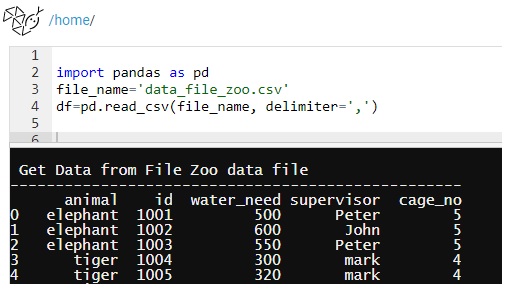
First Command: first thing we need to call pandas library using import, and set the file name and dataframe.
import pandas as pd
file_name=’data_file_zoo.csv’
df=pd.read_csv(file_name, delimiter=’,’)
We will use this part for all our initialization part
|
Other Command: Here are other commands that works with dataframe df.
| print(df) | Will print out all the data from the file. |
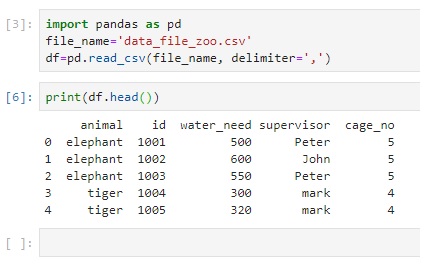
| print (df.head()) | Will print first 5 rows |
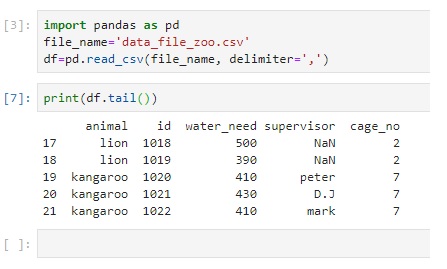
| print (df.tail()) | Will print last 5 rows |
| print (df.sample(3)) | Will print random 3 rows from the dataframe. |
| print(df.columns) | Will print the columns in the file |
| print (df[[‘id’,’animal’,’cage_no’]]) | Print only the data from column you want |
| print (df[[‘id’,’animal’,’cage_no’]].sample(3)) | Print random 3 rows of only ‘id’,’animal’,’cage_no’ columns |
| print (df[df.animal==’lion’]) | Get all the rows with animal name = lion . case sensitive |
| print(df.head()[[‘animal’,’id’]]) | Print first five rows of only animal and id |
 |
 |
 |
 |
 |
Wrapped up: This is a step one, pandas has many to read about and to learn, I start this initiative just for my self, and i select the hard way to do this, this is not important to my current job, this is nothing that any body will ask me about, but i want to learn and I think i will go further in this self-taught learning sessions..
———————————
Update on: 29/7/2019
:: Pandas Lessons Post ::
| Lesson 1 | Lesson 2 | Lesson 3 | Lesson 4 |
| Lesson 5 |
Python: Triangle, Pentagonal, and Hexagonal
Python: Triangle, Pentagonal, and Hexagonal
Problem No.45 @ Projecteuler
Completed on: Thu, 11 Jul 2019, 21:31
Another straight-forward problem, in this task I create three functions each for Triangle, Pentagonal, and Hexagonal and we return the value of the formulas as been stated in the problem.
Using a for loop and a number range, I store the results in a list tn, pn, hn. then comparing the values in the three lists searching for same value.

|
The Code:
# P45
# Solved
# Completed on Thu, 11 Jul 2019, 21:31
def tn (n) :
return int(n*(n+1)/2)
def pn(n):
return int(n*(3*n-1)/2)
def hn (n):
return int(n*(2*n-1))
tn_list =[]
pn_list=[]
hn_list=[]
n = 0
# Notes: I run the code for large range, but to save more time after 5000 i select +10,000 each time.
for n in range (5000,60000):
tn_list.append(tn(n))
pn_list.append(pn(n))
hn_list.append(hn(n))
print ([x for x in tn_list if x in pn_list and x in hn_list])

|
Python: Smallest Multiple
Python: Smallest multiple
Problem 5 @ projecteuler
Completed on: Thu, 4 Jul 2019, 22:30
Here I am quoting form ProjectEuler site:”
2520 is the smallest number that can be divided by each of the numbers from 1 to 10 without any remainder. What is the smallest positive number that is evenly divisible by all of the numbers from 1 to 20?”
So to solve this simple task all we need to loop through numbers and divide it by a list of (1,20) if yes return True otherwise return False and got to another number.
and so we done..

|
The Code:
codes here

|
Python: Powerful Digit Counts
Python: Powerful Digit Counts
Problem No.63 @ ProjectEuler
Completed on: Completed on Thu, 11 Jul 2019, 17:21
Just to make my post simple, i am quoting from ProjectEuler page
The 5-digit number, 16807=75, is also a fifth power. Similarly, the 9-digit number, 134217728=89, is a ninth power.
How many n-digit positive integers exist which are also an nth power?
Then, we need to find the loop that will solve this, and we did..
|
|

The Code:
# P63
# Power digit count
# Solved
# Completed on Thu, 11 Jul 2019, 17:21
c = 0
for x in range (1,50):
for p in range (1,50) :
if (len(str(x**p)) == p ):
c += 1
print(‘\n We have {} n-digit integers exist which are also an nth power.’.format(c))
Python: Pentagon Numbers
Python: Pentagon Numbers
Problem No.44 on ProjectEuler
Completed on: Thu, 11 Jul 2019, 18:37
This problem talking about the Pentagonal numbers and gives us a formula. Using that formula for a certain range of numbers, the generated sequence showing that P4 + P7 = 22 + 70 = 92, 92 is the P8, but if we subtracting (P7 – P4) = 70 – 22 = 48, 48 is not in the generated sequence of pentagonal numbers, so 48 is not pentagonal.
The task here is to find the pair of pentagonal Pj,Pk which their sum and difference are Pentagonal D = Pk – Pj is minimised.(we need to get the D).

|
The Code:
# P44
# Pentagon Numbers
# Solved
#Completed on Thu, 11 Jul 2019, 18:37
def pn(n):
return int(n*(3*n-1)/2)
pn_list=[]
for n in range (1000,3000) : # I start increasing the range step by step.
pn_list.append(pn(n))
we_found_it = False
for x in range (0,len(pn_list)-1) :
px= pn_list[x]
for y in range (x+1,len(pn_list)-1) :
py= pn_list[y]
if (px+py) in pn_list:
if (py-px) in pn_list:
print(‘\n We found one ‘,px,py,’D = ‘,py-px )
we_found_it = True
if we_found_it : break
print(‘Done’)
|
|

Python is_prime and time consuming
Python: is_prime and time consuming
Function enhancement
Once i start solving projectEuler problems i notes that i need the prime numbers in most of cases, so I wrote a function called ‘is_prime’ and it works fine. Some time just to get all the primes in a given range takes some seconds, seconds in computer time means waiting a lot. With some other problems that we need to get the prime in large numbers my function looks slow, since I am not deep in math I search the net for a better way to get the primes or to check if a given number is prime or not.
Definition A prime number (or a prime) is a natural number greater than 1 that cannot be formed by multiplying two smaller natural numbers. wikipedia.org. So as I understand a prime number is not dividable by any other numbers, so my is_prime function is taking a number let’s say n= 13, and start a loop from 2 to n=13 if we fond a number that divide 13 then 13 is not a prime.
Here is the code:
def is_prime1(num):
for t in range (2, num):
if num % t == 0 :
return False
return True
The function is working fine and we can get the prime numbers, but as I mention above, if we have a large number or a wide range, this will take some time. After searching the web, I found some facts regarding the Prime Numbers:
1. The only even prime number is 2. (So any other even numbers are not prime)
2. If the sum of a number digits is a multiple of 3, that number can be divided by 3.
3. No prime number greater than 5 ends in/with 5.
OK, now I can first cut any range to half by not going through even numbers (if even false). Then, I will see if the number end with 5 or not (if end with 5 false),last I will do a summation of the digits in the number if the sum divide by 3 (if yes false), and if the number pass then i will take it in the loop from 5 to n, and if any number divide it we will return false.
Here is the code after the enhancement:def is_prime2(num):
if num %2==0 : # pass the even numbers.
return False
num_d= str(num) # if last digits is 5, then not prime
t= len(num_d)
if (num_d[t-1]) == 5 :
return False
tot = 0
for each in str(num):
tot = tot + int(each)
if tot % 3 == 0 : # if digits sum divide by 3, then not prime
return False
for t in range (3, num, 2):
if num % t == 0 :
return False
return True
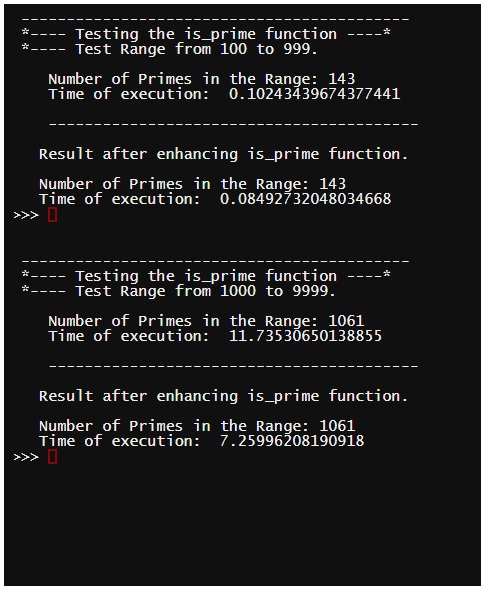
I test both function on my laptop, for different number ranges, and use the time function to see the time delays with each one. Here is the results. If any one know better way to do this please drop it here. Or on My Twitter.
|
Python: Largest Palindrome Product
Python: Largest Palindrome Product
Problem No.4 @ Projecteuler
Complete on: on Fri, 5 Jul 2019, 08:53
The task was to find the largest palindromic number that been generated from multiplying two of 3 digits number.
Definition: Palindromic numbers are numbers that remains the same when its digits are reversed. Like 16461, we may say they are “symmetrical”.wikipedia.org
To solve this I first wrote a function to check if we can read a number from both side or not, Then using while and for loop through numbers 100 to 999, and store largest palindromic, we select the range (100,999) because the task is about tow number each with 3 digits.

|
The Code:
# Problem 4
# Largest palindrome product
# SOLVED
# Completed on Fri, 5 Jul 2019, 08:53
palin =0
def palindromic(n) :
n_list=[]
for each in str(n) :
n_list.append(each)
n_last = len(n_list)-1
n_first =0
x=0
while (n_first+x != n_last-x) :
if n_list[n_first+x] != n_list[n_last-x] :
return False
else :
x +=1
if (n_first +x > n_last -x):
return True
return True
for set1 in range (1,999):
for set2 in range (set1,999):
if palindromic(set1 * set2) :
if (set1 * set2) > palin :
palin =(set1*set2)
print(‘\n We found it:’,palin, ‘coming from {} * {}’.format(set1,set2))

|
Python: Champernowne’s constant
Python: Champernowne’s constant
Problem No.40 @ ProjectEuler
Completed on: Mon, 1 Jul 2019, 18:01
In This task No.40, basically we need to get some digits from a large decimal fraction, then finding the multiplication of those digits.
ProjectEuler assume that the fraction is: 0.123456789101112131415161718192021222324 …. until 1000000, then we should fined the digits in positions 1, and 10, 100, 1000, 10000, 100000 and 1000000. Here is a copy of the problem screen

|
So to solve this I create a string variable n_list then using for loop i store the numbers from 1 to 1000000 in it as [12345678910111213141516 … 1000000], and simply get the digits I want using the list index, and Finally I calculate the needed multiplication as required. .. And we solve it. ..
|
Python: Combinatoric Selections
Python: Combinatoric Selections
Problem 53 @ projecteuler
Completed on: Mon, 1 Jul 2019, 11:32
This is one of the tasks that based on equations. To solve this, first let me Simplify it.
Simplifying the task:
if 1<= n <= 100 , and r <= n
using the equation of C(n,r) is
c(n,r) = n! / (r! *(n-r)!
How many values of c(n,r) greater than one-million
Since we need the factorial of n (n!) and (r!) then I will re-use our function get_factorial(num), and I will write another function to calculate the C(n,r) as in the equation above, I will call it combi(n,r), also I will use a while loop, and we need to set some variables to help us in the execution. In this part, I will use a list called values_over_1m to store all the values in it, although this is Not required in the Problem 53, but i will keep it so later we can print them all to the screen or just get the total values of it. And so we did .. and we get the right answer.
|
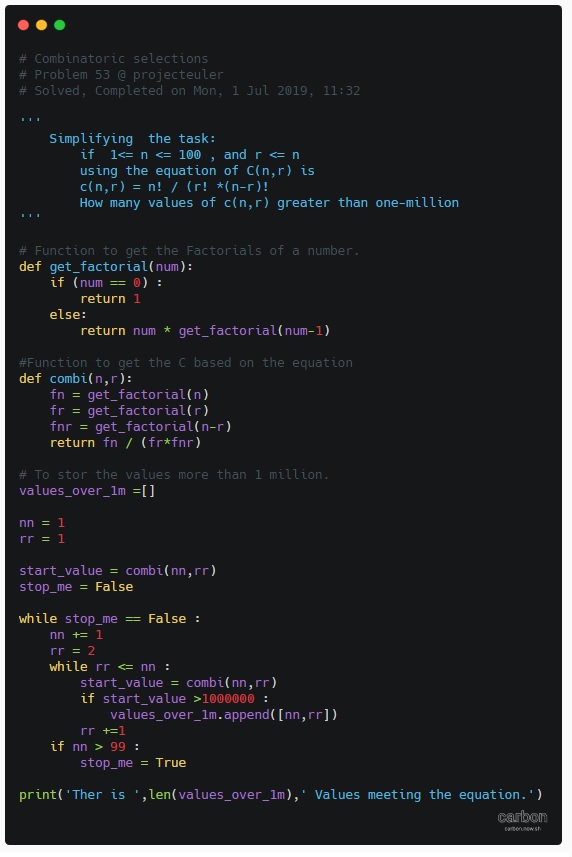
The Code:
# Combinatoric selections
# Problem 53 @ projecteuler
# Completed on Mon, 1 Jul 2019, 11:32
”’
if 1<= n <= 100 , and r <= n
using the equation of C(n,r) is
c(n,r) = n! / (r! *(n-r)!
How many values of c(n,r) greater than one-million
'''
# Function to get the Factorials of a number.
def get_factorial(num):
if (num == 0) :
return 1
else:
return num * get_factorial(num-1)
def combi(n,r):
fn = get_factorial(n)
fr = get_factorial(r)
fnr = get_factorial(n-r)
return fn / (fr*fnr)
# To store the values more than 1 million.
values_over_1m =[]
nn = 1
rr = 1
start_value= combi(nn,rr)
stop_me = False
while stop_me == False :
nn +=1
rr =2
while rr < = nn :
start_value = combi(nn,rr)
if start_value >1000000 :
values_over_1m.append([nn,rr])
rr +=1
if nn > 99 :
stop_me = True
print(‘Ther is ‘,len(values_over_1m),’ Values meeting the equation.’)
|

Taking pictures is not my main daily practices, but when i start playing with my camera, i really enjoy my self.
Thanks for visiting my Space..


 Ali's Photography Space...