Archive
Coloring Some Sketches
Again I just pecked one of my sketches and color it using my galaxy Note9 mobile... Usually I use pencil then ink-ed the sketch, some time I color it with Watercolor or Promarker. Just to kill the time, I load one of them to the “Autodesk Sketchbook” App on my Galax Note9 and color it. The sketche is from my SKB 39 ..and here it is . .
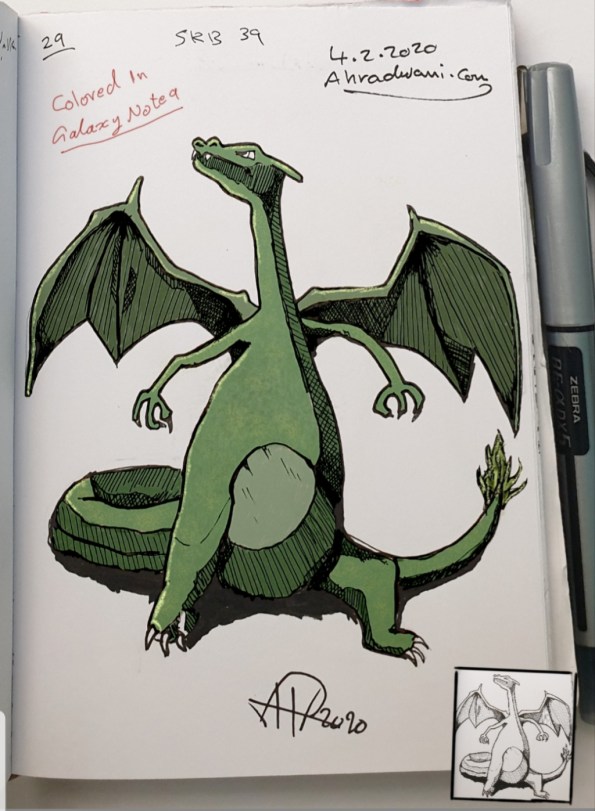
More sketches on my-Sketch page.
Sketching and Coloring a Shark
Some time ago I stope publishing my Sketches on my blog or my Twitter account, but this doesn’t mean I stop sketching, I am sketching to improve my skills and clear my mind. Usually I use pencil then ink-ed, some time I color it with Watercolor or Promarker. Today I load one of them to the “Autodesk Sketchbook” App on my Galax Note9 and color it. The sketche is from my SKB 39 ..and here it is . .
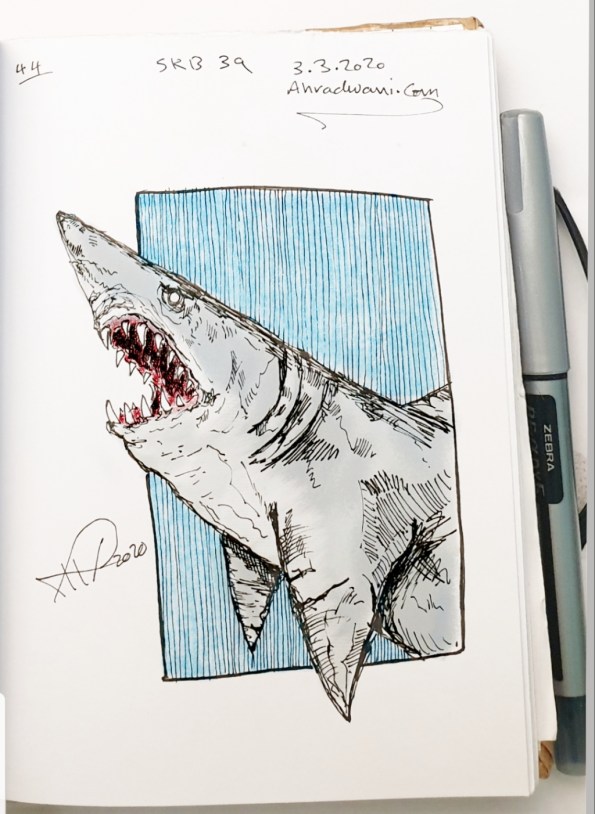
More sketches here .. My Sketches Page.
Ali Radwani,
Python: Circle Packing
Circle Packing Project
Subject: Draw, circles, Turtle
Definition: In geometry, circle packing is the study of the arrangement of circles on a given surface such that no overlapping occurs and so that all circles touch one another. Wikipedia
So, we have a canvas size (w,h) and we want to write a code to draw X number of circles in this area without any overlapping or intersecting between circles. We will write some functions to do this task, thous functions are:
1. c_draw (x1,y1,di): This function will take three arguments x1,y1 for circle position and di as circle diameter.
2. draw_fram(): This function will draw the frame on the screen, we set the frame_w and frame_h as variables in the setup area in the code.
3. c_generator (max_di): c_generator is the circles generating function, and takes one argument max_di presenting the maximum circles diameter. To generate a circle we will generate three random numbers for x position, y position and for circle diameter (max_di is the upper limit),also with each generating a while loop will make sure that the circle is inside the frame, if not regenerate another one.
4. can_we_draw_it (q1,di1): This is very important, to make sure that the circle is not overlapping with any other we need to use a function call (hypot) from math library hypot return the distance between two points, then if the distance between two circles is less than the total of there diameters then the two circles are not overlaps.

|
So, lets start coding …
First: the import and setup variables:
from turtle import *
import random
import math

# Create a turtle named t:
t =Turtle()
t.speed(0)
t.hideturtle()
t.setheading(0)
t.pensize(0.5)
t.penup()

# frame size
frame_w = 500
frame_h = 600

di_list = [] # To hold the circles x,y and diameters
 |
Now, Drawing the frame function:
def draw_fram () :t.penup()
t.setheading(0)
t.goto(-frame_w/2,frame_h/2)
t.pendown()
t.forward(frame_w)
t.right(90)
t.forward(frame_h)
t.right(90)
t.forward(frame_w)
t.right(90)
t.forward(frame_h)
t.penup()
t.goto(0,0)
Now, Draw circle function:
def c_draw (x1,y1,di):t.goto(x1,y1)
t.setheading(-90)
t.pendown()
t.circle(di)
t.penup()
This is Circles generator, we randomly select x,y and diameter then checks if it is in or out the canvas.
def c_generator (max_di):falls_out_frame = True
while falls_out_frame :
x1 = random.randint(-(frame_w/2),(frame_w/2))
y1 = random.randint(-(frame_h/2),(frame_h/2))
di = random.randint(3,max_di)
# if true circle is in canvas
if (x1-di > ((frame_w/2)*-1)) and (x1-di < ((frame_w/2)-(di*2))) :
if (y1 ((frame_h/2)-(di))*-1) :
falls_out_frame = False
di_list.append([x1-di,y1,di])

|
With each new circle we need to check the distances and the diameter between new circle and all circles we have in the list, if there is an overlap then we delete the new circle data (using di_list.pop()) and generate a new circle. So to get the distances and sum of diameters we use this code ..
 # get circles distance

    cs_dis = math.hypot(((last_cx + last_cdi) - (c_n_list_x + c_n_list_di)) , (last_cy - c_n_list_y))
    di_total = last_cdi + c_n_list_di
To speed up the generation of right size of circles I use a method of counting the trying times of wrong sizes, that’s mean if the circles is not fit, and we pop it’s details from the circles list we count pops, if we reach certain number then we reduce the upper limits of random diameter of the new circles we generate. Say we start with max_di = 200, then if we pop for a number that divide by 30 (pop%30) then we reduce the max_di with (-1) and if we reach max_di less then 10 then max_di = 60. and we keep doing this until we draw 700 circles.
# if di_list pops x time then we reduce the randomization upper limits
  if (total_pop % 30) == 0:
    max_di = max_di - 1
    if max_di < 10 :
      max_di = 60
Here are some output circles packing ..
 |
 |
With current output we reach the goal we are looking for, although there is some empty spaces, but if we increase the number of circles then there will be more time finding those area with random (x,y,di) generator, I am thinking in another version of this code that’s will cover:
1. Coloring the circles based on the diameter size.
2. A method to fill the spaces.
To Download my Python code (.py) files Click-Here
 Follow me on Twitter..
Python and Lindenmayer System – P3
Learning : Lindenmayer System P3
Subject: Drawing Fractal Tree using Python L-System
In the first two parts of the L-System posts (Read Here: P1, P2) we talk and draw some geometric shapes and patterns. Here in this part 3 we will cover only the Fractal Tree and looking for other functions that we may write to add leaves and flowers on the tree.
Assuming that we have the Pattern generating function and l-system drawing function from part one, I will write the rules and attributes to draw the tree and see what we may get.
So, first tree will have:
# L-System Rule to draw ‘Fractal Tree’
# Rule: F: F[+F]F[-F]F
# Angle: 25
# Start With: F
# Iteration : 4
and the output will be this:

|
If we need to add some flowers on the tree, then we need to do two things, first one is to write a function to draw a flower, then we need to add a variable to our rule that will generate a flower position in the pattern. First let’s write a flower function. We will assume that we may want just to draw a small circles on the tree, or we may want to draw a full open flower, a simple flower will consist of 4 Petals and a Stamen, so our flower drawing function will draw 4 circles to present the Petals and one middle circle as the Stamen. We will give the function a variable to determine if we want to draw a full flower or just a circle, also the size and color of the flowers.
Here is the code ..
font = 516E92
commint = #8C8C8C
Header here
# Functin to draw Flower
def d_flower () :
if random.randint (1,1) == 1 :
# if full_flower = ‘y’ the function will draw a full flower,
# if full_flower = ‘n’ the function will draw only a circle
full_flower = ‘y’
t.penup()
x1 = t.xcor()
y1 = t.ycor()
f_size = 2
offset = 3
deg = 90
if full_flower == ‘y’ :
t.color(‘#FAB0F4’)
t.fillcolor(‘#FAB0F4’)
t.goto(x1,y1)
t.setheading(15)
for x in range (0,4) : # To draw a 4-Petals
t.pendown()
t.begin_fill()
t.circle(f_size)
t.end_fill()
t.penup()
t.right(deg)
t.forward(offset)
t.setheading(15)
t.goto(x1,y1 – offset * 2 + 2)
t.pendown() # To draw a white Stamen
t.color(‘#FFFFF’)
t.fillcolor(‘#FFFFFF’)
t.begin_fill()
t.circle(f_size)
t.end_fill()
t.penup()
else: # To draw a circle as close flower
t.pendown()
t.color(‘#FB392C’)
t.end_fill()
t.circle(f_size)
t.end_fill()
t.penup()
t.color(‘black’)
Then we need to add some code to our rule and we will use variable ‘o’ to draw the flowers, also I will add a random number selecting to generate the flowers density. Here is the code for it ..
In the code the random function will pick a number between (1-5) if it is a 3 then the flower will be drawn. More density make it (1-2), less density (1-20)
|
And here is the output if we run the l-System using this rule: Rule: F: F[+F]F[-F]Fo

|
Using the concepts, here is some samples with another Fractal Tree and flowers.
Another Fractal Tree without any Flowers.
|
Fractal Tree with closed Pink Flowers.
|
Fractal Tree with closed Red Flowers.
|
Fractal Tree with open pink Flowers.
|
To Download my Python code (.py) files Click-Here
Python and Lindenmayer System – P2
Learning : Lindenmayer System P2
Subject: Drawing with python using L-System
In the first part of Lindenmayer System L-System post (Click to Read) we had wrote two functions: one to generate the pattern based on the variables and roles, and one to draw lines and rotate based on the pattern we have.
In this part I will post images of what Art we can generate from L-System
the codes will be the L-system that generate the patterns, so the code will include: the Rules, Angle (Right, Left) Iteration and Starting Variable.
 |
L-System: Koch Curve  |
L-System: Minkowski Sausage |
L-System: … but here the Iteration is: 3 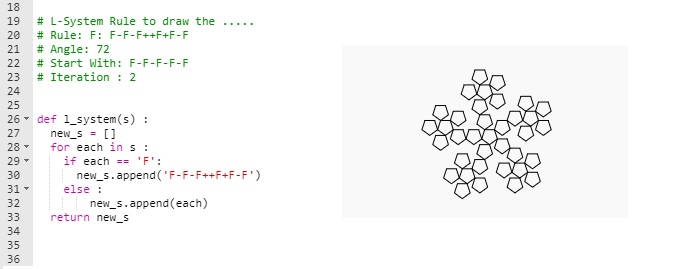 |
L-System: Again … but here the Iteration is: 3  |
L-System: Square Sierpinski  |
L-System: Sierpinski Arrowhead.  |
L-system: Dragon Curve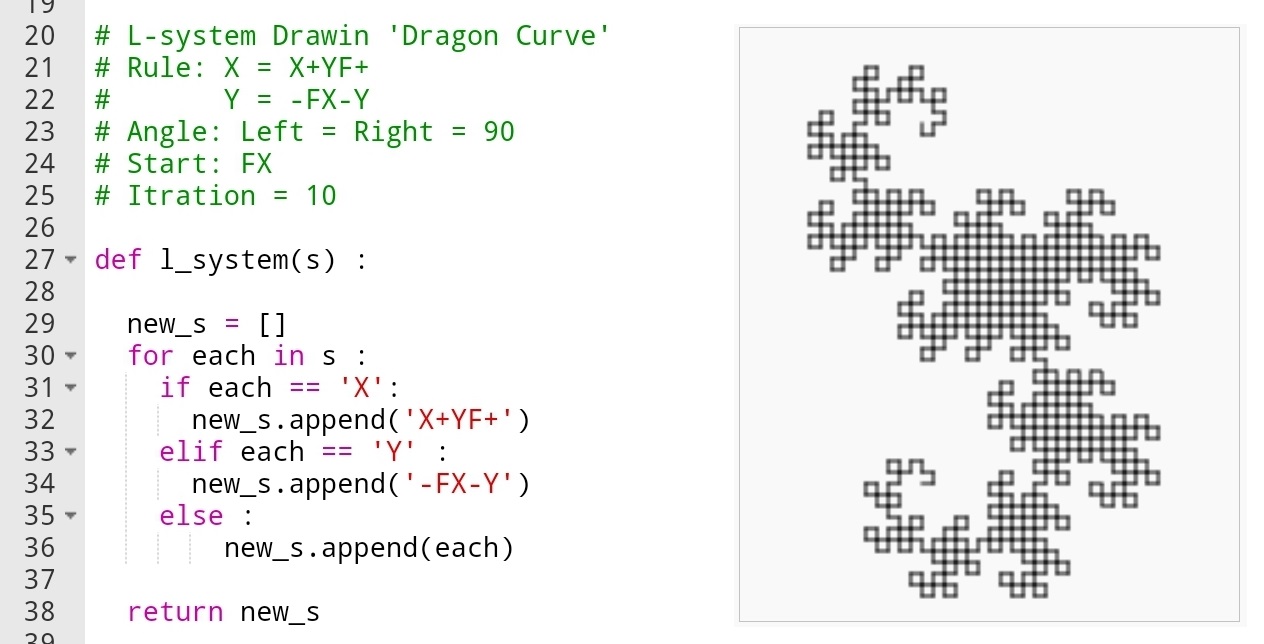 |
L-System: Koch Snowflake 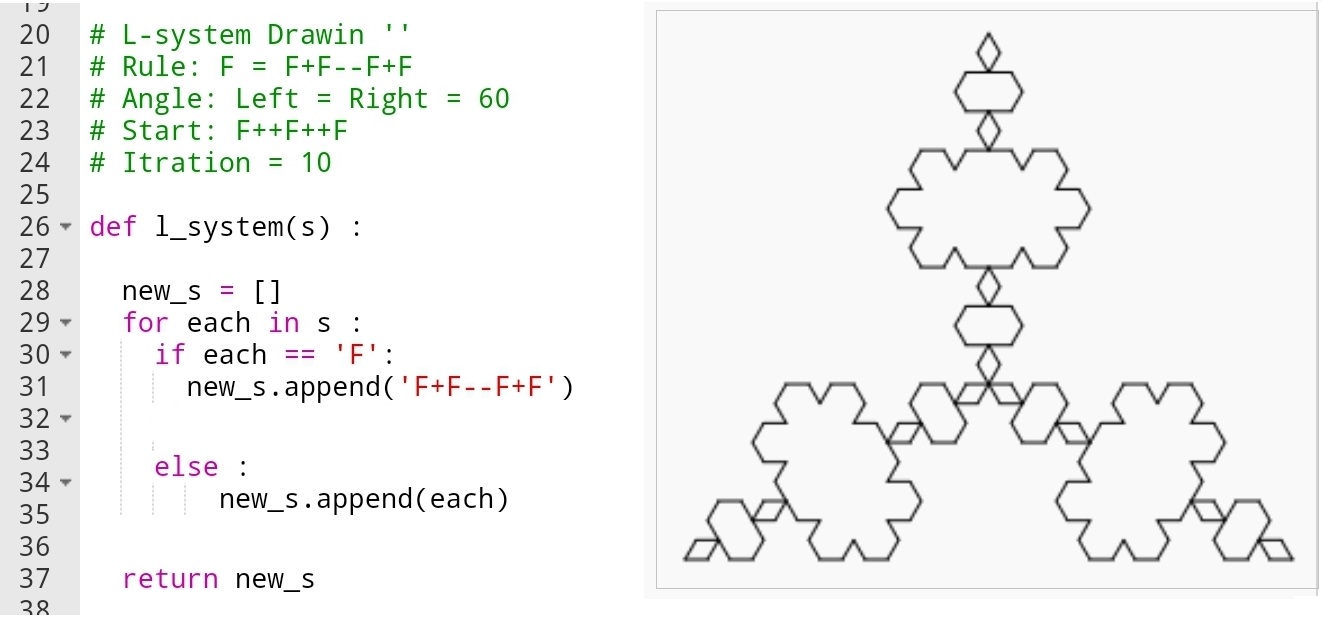 |
L-System: 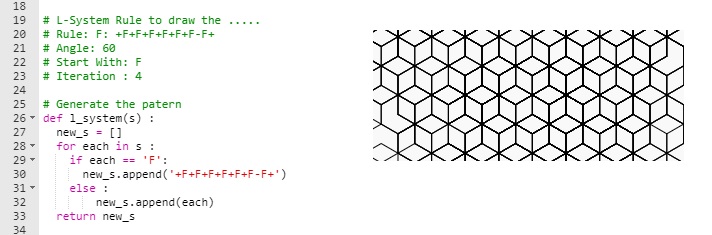 |
L-System:  |
The possibilities to generate the putters and therefore drawing the output is endless, any slightly changes in the iterations or rotation (+ -) angles will take all output to a new levels. In the coming post, I will use the L-system to generate fractal tree and see what we can get from there.
To Download my Python code (.py) files Click-Here
Python and Lindenmayer System – P1
Learning : Lindenmayer System P1
Subject: Drawing with python using L-System
First What is Lindenmayer System or L-System? L-System is a system consists of an alphabet of symbols (A, B, C ..) that can be used to make strings, and a collection of rules that expand each symbol into larger string of symbols.
L-system structure: We can put it as Variables, Constants, Axiom, Rules
Variables (V): A, B, C …
constants : We define a symbols that present some movements, such as ‘+’ mean rotate right x degree, ‘F’ mean move forward and so on ..
Axiom : Axiom or Initiator is a string of symbols from Variable (V ) defining the initial state of the system.
Rules : Defining the way variables can be replaced with combinations of constants and other variables.
Sample:
Variables : A, B {we have two variables A and B}
Constants : none
Axiom : A {Start from A}
Rules : (A → AB), (B → A) {convert A to AB, and convert B to A}
So if we start running the Nx is the number the time we run the rules (Iteration).
N0 : A
N1 : AB
N2 : AB A
N3 : AB A AB
N4 : AB A AB AB A
N5 : AB A AB A AB A AB .. an so-on
So in this example after 5 Iteration we will have this pattern (AB A AB A AB A AB)
In this post we will write two functions, one to generate the pattern based on the Variables and Rules we have. Another function to draw the pattern using Python Turtle and based on the Constants we have within the patterns.
The constants that we may use and they are often used as standard are:
F means “Move forward and draw line”.
f means “Move forward Don’t draw line”.
+ means “turn left by ang_L°”.
− means “turn right ang_R°”.
[ means “save position and angle”.
] means “pop position and angle”.
X means “Do nothing”
and sometime you may add your own symbols and and rules.
First Function: Generate the Pattern will take the Axiom (Start symbol) and apply the rules that we have (as our AB sample above). The tricky point here is that the function is changing with each example, so nothing fixed here. In the coming code i am using only one variable F mean (move forward) and + – to left and right rotations. Other patterns may include more variables. once we finished the function will return the new string list.
Generate the Pattern
|
# Generate the patern def l_system(s) : new_s = [] for each in s : if each == ‘F’: new_s.append(‘F+F+FF-F’) else : new_s.append(each) return new_s |

|
The second function: Draw the Pattern will take the string we have and draw it based on the commands and rules we have such as if it read ‘F’ then it will move forward and draw line, and if it reads ‘-‘ then it “turn right ang_R°”.
here is the code ..
Draw the Pattern
def draw_l_system(x,y,s,b,ang_L,ang_R):
cp = [] # Current position
t.goto(x,y)
t.setheading(90)
t.pendown()
for each in s:
if each == ‘F’ :
t.forward(b)
if each == ‘f’ :
t.penup()
t.forward(b)
t.pendown()
elif each == ‘+’:
t.left(ang_L)
elif each == ‘-‘:
t.right(ang_R)
elif each == ‘[‘:
cp.append((t.heading(),t.pos()))
elif each == ‘]’:
heading, position = cp.pop()
t.penup()
t.goto(position)
t.setheading(heading)
t.pendown()
t.penup()
Now we will just see a one example of what we may get out from all this, and in the next post P2, we will do more sample of drawing using L-System.
In the image bellow, left side showing the Rules, angles and iterations and on the right side the output after drawing the patters.
|
|
To Download my Python code (.py) files Click-Here
Python: Drawing Shapes
Learning : Drawing Shapes
Subject: New shapes function
To Draw a Square shape, we need to know the width ( W ) of the square side, and then we draw a line and moving in 90 degree and drawing another line and so on until we finished the 4 side of the square. In the same principle if we want to draw a triangle (equilateral one), we need to know length of its sides and in mathematics we know that in equilateral triangles the angles (corners) are 120 degree, so we draw a line and move in 120 degree and drawing another two sides.
In coming code, we will write a general function in Python to pass the number on sides we want to draw (triangle =3, Square=4,Pentagon = 5, Hexagon =6 .. and so on), the width (size) of the shape and the position (x,y) of the first angle or point.
The Codes:
def d_shape(s_heads,w,x1,y1):
t.goto(x1,y1)
# To get t.right angle
rang = 360 / s_heads
t.pendown()
for x in range (s_heads +1) :
t.forward(w)
t.right(-rang)
t.penup()

|
Results after using the new function we can pass any number of sides and the function will draw the shape, here are a sample execution of it. .. .. Click to enlarge ..
 |
 |

|

|
Now if we call the function number of times equal to it’s heads what we will get ? let’s see . .. Click to enlarge ..
 |
 |
 |
 |
And take a look when we set the numbers to 20. .. Click to enlarge ..

|
To Download my Python code (.py) files Click-Here
Python: Random Squares
Random Squares Art
Subject: Python, Graphics and simulation
In This project say we have a Square (10 x 10 cm) the square has four corners labeled as (a, b, c, d) as in figure i.

|
then we select a random corner (c or d) [assume it is c] then we select an angle (ang) of rotation between (10, 45), and we draw another square positioning (a) on the (c) and rotating it with (ang) anticlockwise as figure ii.

|
Now if we repeat this two steps .. S1. Selecting a random corner (c or d). S2. Selecting a random rotation angle between (10, 45). and draw the square. let’s see what we may have as a random art generator.
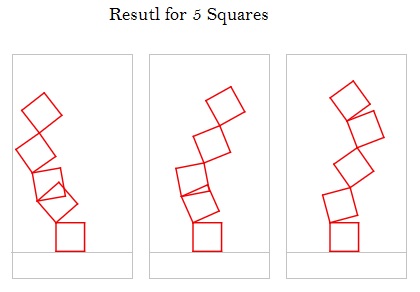 |

|
 |
Python Code for Random Squares Art
Codes to select corner (c or d)
def select_c_or_d():
if random.randrange(0,2) == 0 :
x = cdpos[0][0]
y = cdpos[0][1]
else:
x = cdpos[1][0]
y = cdpos[1][1]
t.setheading(0)
t.right(random.randrange(rotmin,rotmax)*f)
Codes to draw the Square (c or d)
def d_square(w,x1,y1):
t.goto(x1,y1)
t.pendown()
t.forward(w)
t.right(-90)
t.forward(w)
# save corner c position
cdpos.append([t.xcor(),t.ycor()])
t.right(-90)
t.forward(w)
# save corner d position
cdpos.append([t.xcor(),t.ycor()])
t.right(-90)
t.forward(w)
t.penup()
I notes that if we increase the number of Squares, we start to have some interesting results.
.. Have Fun ..
To Download my Python code (.py) files Click-Here
Python Drawing flower
Python: Draw Flower
Drawing with Python
In this post I am using some codes to draw mathematical shapes that looks like flower.
To do this we need to import turtle library, then using circle function to complete our work. You may play around with the numbers and figure out what will happen.
#python #code
import turtle
t = turtle.Turtle()
t.hideturtle()
t.pendown()
for x in range (30):
t.circle(60,70)
if x % 2 == 0:
t.circle(10,70)

From my Sketch Book
Bird From my Sketch Book
I am sketching to enhance my skill, here is one of sketches from my sketchbook using pencil as a guide-line and ink-pen to finish the drawing.

Click to Enlarge
::My SketchBook::
Sketch of: Bird
Using: Ink-Pen
Date: 5/12/2017
SketchBook: SketchBook # 22
More Sketches: Click Here

Ali,

Taking pictures is not my main daily practices, but when i start playing with my camera, i really enjoy my self.
Thanks for visiting my Space..


 Ali's Photography Space...