Archive
Python: Generate your Data-Set
Learning : Python, pandas, function
Subject: Generate your CSV dataset using python
[NOTE: To keep the code as simple as we can, We WILL NOT ADD any user input Varevecations. Assuming that our user will Enter the right inputs.]
The Story: last week i was reading about Data Cleaning, Deep Learning and Machine Learning, and for all we need some data to play with and testing our code. There are several sites providing a free (to certain limits) Data-set. But while i was working, it just come to my mind Why not to write a code to generate some Fake data-set.
Before I start: The main question was “What is the subject of the data” or Data about What? This is the main question that will guide us to write our code, and tha answer was very..very fast 🙂 .. at that moment I was holding my Coffee Mug, and just jump to my mind, Data about Coffee … Coffee Consumption. So we are taking the data of Coffee Consumption from a Coffee-Shop, the coffee-shop is collecting the following data: Date-Time (of the order), Coffee-Name, Coffee-Type, Coffee-size, Sex, Rank. Here is in more details..
Dat-Time: Date and Time of Order, Date format: dd-mm-yyyy, the Time format: hh:mm (24h)
Coffee-Name: Such as: [black, latte, espresso, americano, cappuccino, mocha, lungo, flat white, irish, macchiato,ristretto, iced coffee]
Coffee-Type: 3n1 , pods, grounded
Coffee Size: samll, medium, large, venti
Sex: The person how order it male, female
Rank: if the customer drink the coffee in the shop, will ask for a ranks (1,10) 1:bad, 10:Grate
Scope of Work: We will write several functions to generate random data for each attribute we have, saving the data into a list, then combining all the lists in a pandas dataframe df and save the data_set df to a csv file. Later on we can re-call the file using pandas command df.read_csv(file_name) and manipulate the data.
.::.. Coding ..::.
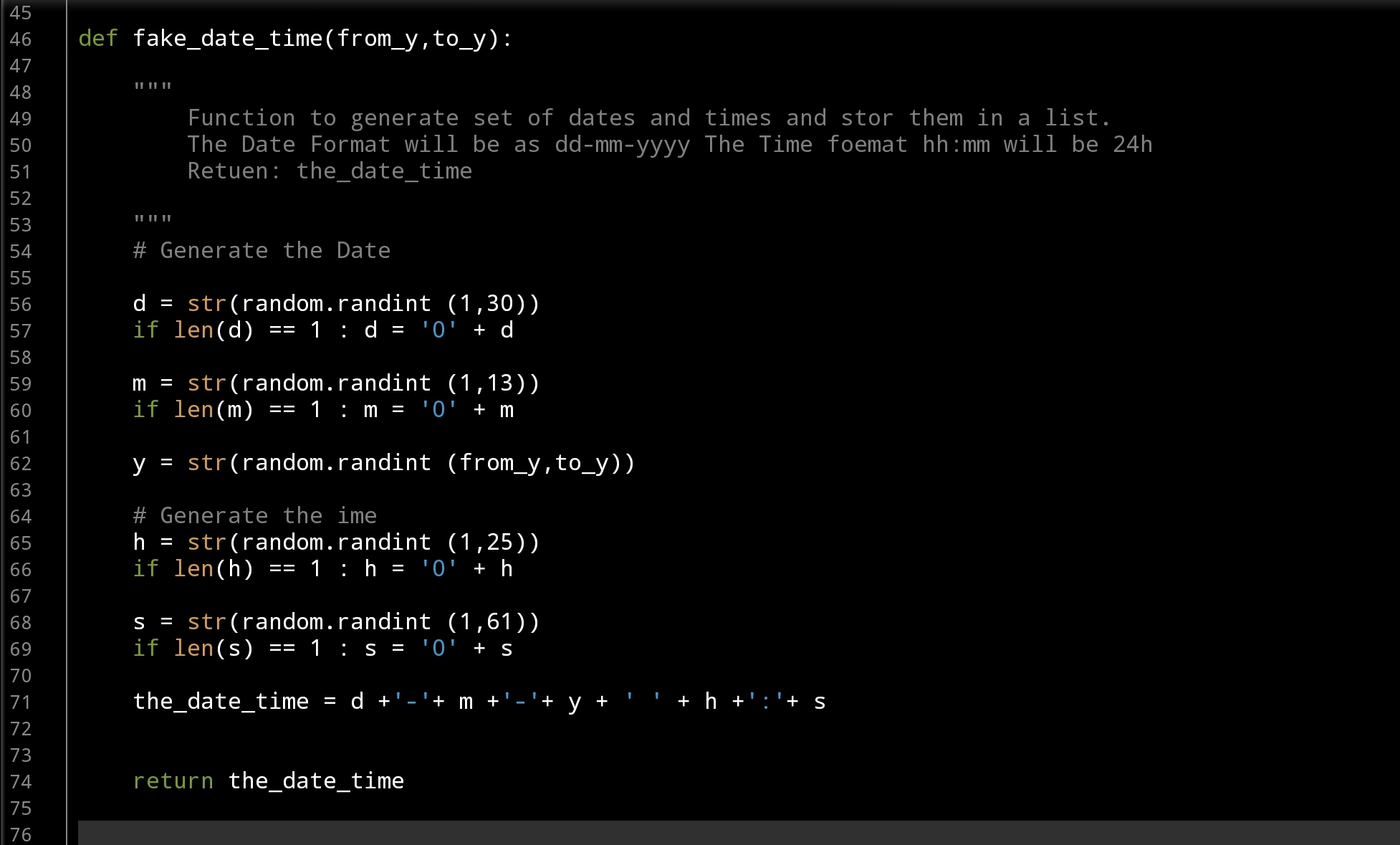
Let’s start with Date-Time Function: def fake_date_time(from_y,to_y): In this function we will use a random.randint() to generate numbers for day’s, months and years, also for hours and minites. The function will take two arguments from_y, to_y and will return a string like this: dd-mm-yyyy hh:mm … here is the code ..
 |
Now,Coffee Name: def fake_coffee_name() : for Coffee Name I create a list of Coffee Names (from the net) and use random.choice(coffee_name_list) to select one from the list. this function is a one-line code .. here it is ..
 # fake_coffee_name() function

def fake_coffee_name() :
    """
        Function to randomly select one from the list.

        Return coffee_name

     """

    coffee_name_list = ['black', 'latte', 'espresso', 'americano', 'cappuccino',
                         'mocha', 'lungo', 'flat white', 'irish', 'macchiato', 'ristretto',
                         'iced coffee'
                         ]
    return random.choice(coffee_name_list)
Here are another two Functions def fake_coffee_type(): and def fake_coffee_size(): Both are using the random.choice to select from a list.. here is the code ..
] |
More over, in out dataset we need another two variables sex and rank, both are simple and we don’t need to put them in separate function, we will call the random.choice(‘f’,’m’) to select between Male and Female, and random.randint (1,11) to select a Rank between (1 and 10). Here is the main part of the application, we will use a for loop and append all the returns from the function’s in a list (a list for each attribute) after that we will combine all the list in a dataset using pandas command. Here is the code..
 # Main body of the application

# empty lists of the columns
d_d =[]
cn_d =[]
ct_d =[]
cs_d =[]
s_d =[]
r_d = []

number_of_rows = 1000

for x in range(1,number_of_rows):
    d_d.append(fake_date_time(2000,2022))
    cn_d.append(fake_coffee_name())
    ct_d.append(fake_coffee_type())
    cs_d.append(fake_coffee_size())
    s_d.append(random.choice(['f','m']))
    r_d.append(random.randint (1,11))


the_data ={'date_time':d_d, 'c_name':cn_d, 'c_type':ct_d, 'c_size':cs_d, 'sex':s_d, 'rank':r_d }

df = pd.DataFrame (the_data)

# to create a CSV file and save the data in it.
file_name = 'coffee_consumption_v1.csv'
df.to_csv(file_name, index=False)

print(f'\n\n    The data been generated, a file named: {file_name} saved')
Now we have a file called: coffee_consumption_v1.csv saved in the same directory of the .py code file. Here is a sample of the data.
 |
We will stop here, and we will do another post to apply pandas commands over the dataset.
..:: Have Fun with Coding ::.. 🙂
To Download my Python code (.py) files Click-HereAlso the Date-Set coffee_consumption_v1 file (.csv) files is available in the same page.
 Follow me on Twitter..
By: Ali Radwani
30 day of ML with Kaggle
Last week during some search on YouTube, I fond a Two Minutes video talking about a new course on Kaggle that will start on 2nd of August, the Course is about Machine Learning ML with Python in a 30 Day’s. I was not sure if it is Free or Not, later on I fond that it is FREE, so I register to it.
And as a part of the program, we will complete three courses: Python, Intro to Machine Learning, and Intermediate Machine Learning.
My time is very tight, and I don’t know if I can continue to complete the required stages/assignments on time for each stage of the program.. Sure I will Try my best.
Now, I am writing this post in 3rd of August 2021, 6:00pm (GMT+3) .. First want to say they did not start on time, delay 1 day! so today was Day 1 , we start with introduction on Kaggle, the participate in first competition and submitting our solution.
I will try to summarize and drop a post every two-three days .. or so ..
:: Have Fun .. Code with Python ..::
Ali,
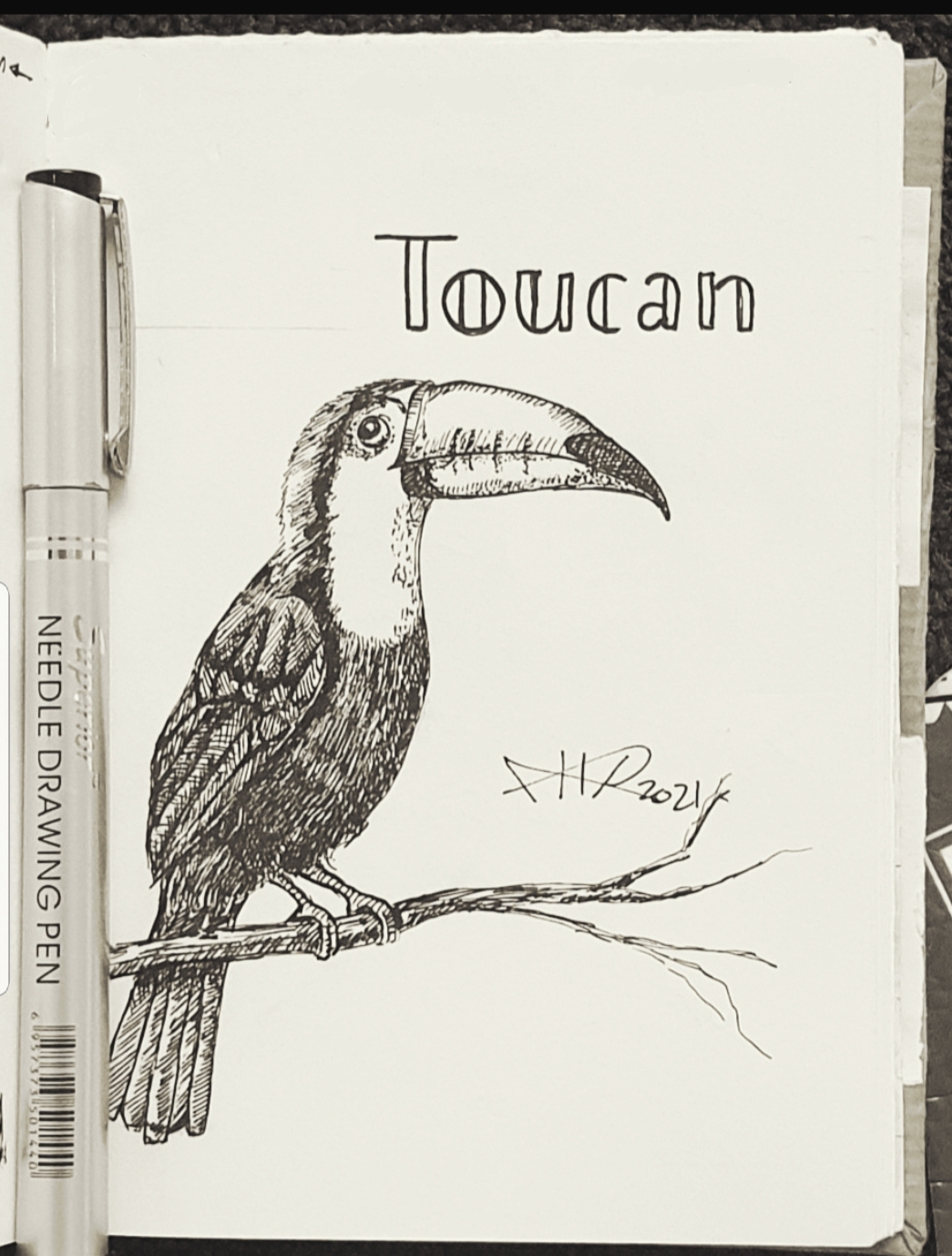
Another Sketch Challenge: T for Toucan
There is a lot of sketching challeng in the twitter asking the readers to draw/sketch something inspired by it.
I fond the @AnimalAlphabets there challenge this week is Toucan Bird.
So here is my sketch using pencil then black Pen and shading using black fine pin, it takes around 55min. More Sketches on my Sketch page ..
you may Follow me on Twitter @h_ta3kees
Here is my sketch..

Taking pictures is not my main daily practices, but when i start playing with my camera, i really enjoy my self.
Thanks for visiting my Space..


 Ali's Photography Space...