Archive
Python: SQlite Project – P1
Learning : Python and Sqlite3
Subject: Sqlite3, Database functions ” Employee App” P1
One of the most important thing about writing applications is to save or store some Data for later use. This data could be simple as setting information or basic user information or can be a full records about something you need to keep, such as health data, or employee contacts or other projects data. To store a huge data we use a Data-Base, some databases are free and open to be downloaded from the internet, one of them is SQLITE3, in Python we can use the Sqlite for small and personal projects. In this post We will use the Sqlite to write a simple project for Employees.
As that our goal is to learn how to use Sqlite and python code to track our employees, and to keep every thing as simple as we can, we will collect only three piece of information that’s will be First Name, Last Name and the Salary.
Functions: In any application there must be several functions to complete our works and tasks that we need to perform, in our Employee System we need to perform these tasks:
1. Show the Data we have.
2. Insert New Employee.
3. Delete an Employee.
4. Editing Employee information.
5. Search for Employee.
This is the most important functions in any application, we will start working on the system and see how things goes on.
First we MUST Creating the data base and set the connection, here is the code to do this and we will call our database as test.db.
 # Create the database.

import sqlite3, os

db_conn = sqlite3.connect ("test.db")    # set the data-base name

c = db_conn.cursor()  # set the connection
To create the Employee table we will write this code and run it only ONE Time.
 # Create the Employee Table.

def create_tabels_() :    # to create tables.

    # employee table
    sql_s= "CREATE TABLE if not exists emp (emp_id INTEGER PRIMARY KEY AUTOINCREMENT, fname text,lname text, pay integer)"

    c.execute(sql_s)
    db_conn.commit()
    print(input('\n   .. Employee TABLE created..  Press any key .. '))
Since we are learning and playing with our code, we may need to drop the table for some reasons, so here is the code to Drop the table we will re-call the function if we need-so.
 # Function to DROP a Table.

def drop_table(tname):

    c.execute("DROP TABLE {}".format(tname))
    db_conn.commit()
Now after the creating of the Table we need to feed it with some data so we can see the records. To do so we will run a function called dummy_data.
 # Function to INSERT Dummy data into the Employee Table.


def dummy_data():
    """
        This Function will Insert 4 Dummy rows in the temp table, first record will set the emp_id to 1, the other
        record the emp_id will be AUTOINCREMENT.

        This Function to be run one time only.

    """
# First record will have the emp_id set as 1, other records will be AUTOINCREMENT.
    c.execute ("INSERT INTO emp (emp_id, fname,lname,pay) VALUES(:emp_id, :fname,:lname, :pay)",{"emp_id":1,"fname":"James","lname":"Max", "pay":"2000"})
    c.execute ("INSERT INTO emp (fname,lname,pay) VALUES(:fname,:lname, :pay)",{"fname":"Robert","lname":"Ethan", "pay":"1500"})
    c.execute ("INSERT INTO emp (fname,lname,pay) VALUES(:fname,:lname, :pay)",{"fname":"Jack","lname":"Leo", "pay":"890"})
    c.execute ("INSERT INTO emp (fname,lname,pay) VALUES(:fname,:lname, :pay)",{"fname":"Sophia","lname":"Jack", "pay":"320"})
    db_conn.commit()

    print(input('\n  Dummy Data has been INSERTED\n\n  .. Press any key .. '))
Main Menu To use the application we need a Menu to jump between the tasks in the app. Here is the Main-Menu, it will return the user selection.
 # The Main Menu.

def menu():
    os.system("clear")
    print("\n\n      ::: The Menu :::")

    print("   1. Show the Data.")
    print("   2. Insert a New  Employee.")
    print("   3. Delete an Employee.")
    print("   4. Edit/Change employee data. ")
    print("   5. Search.")
    print("   6. Setting.")
    print("   7. Data-Base Information.")
    print("   9. Exit. ")

    uinput = input("\n     Enter a selection: ")

    return uinput
Here is the loop for the Menu and the user selection until (9. Exit) will be selected.
 # The Main Menu.

while True :

    uinput = menu()

    if uinput == '1' :
        show_data()

    elif uinput =='2' :
        insert_emp ()

    elif uinput =='3' :
        delete_record()

    elif uinput =='4' :
        print("Edit")

    elif uinput =='5' :
        search_emp()

    elif uinput =='6' :
        setting_menu()

    elif uinput =='7' :
        #print("DataBase Information.")
        get_db_info()

    elif uinput =='9' :
        break

    else: # If the user select something out of the menu (Numbers or Character)
        print("  You need to select from the list")

|
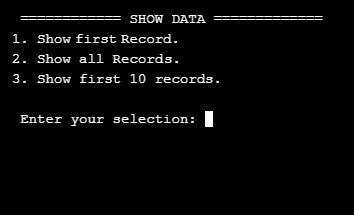
Now we remember that we run the dummy_data() function (above) so we have four records in our Employee Table, so if we want to see the records we will select first option in the Main Menu: 1. Show the data. this will call a function called show_data() as in this screen shot.
|
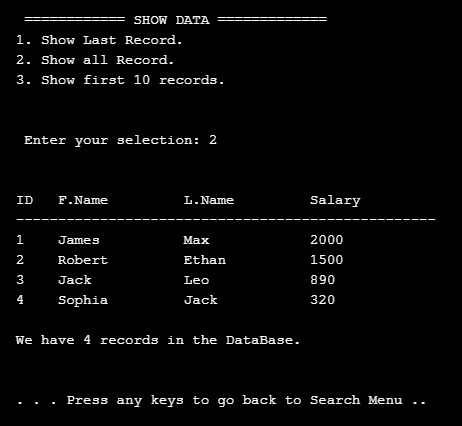
The screen prompt will wait for an input of the number that present the task we want. So if we select No. 2 then we will get all the records in the table as this .. .
|
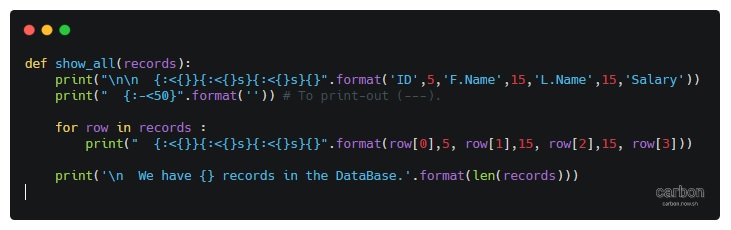
And here is the code behind this function..
|
Done with Part 1, in part 2 we will cover more functions to Search and Add records to the Table.
To Download my Python code (.py) files Click-Here
 Follow me on Twitter..
By: Ali Radwani
Python: My Fake Data Generator P-7
Learning : Python: Functions, Procedures and documentation
Subject: About fake data P-7: (Fake File Name)
In this post we will write a function to generate a file name. Each file name consist of two part, first one is the name which present (or should present) a meaning part, then there is a dot (.) then mostly three characters showing the file type or extension.
Scope of work: Our files names will have 4 syllables all to gather will be one file name. Each syllables will be loaded in a variable as shown ..
1. fext: for Files extensions such as: (doc, jpeg, pdf, bmp …. and so on)
2. name_p1: Is a noun such as (customers, visitors, players .. . and so on )
3. name_p2: will be an nouns, adjective or characteristics such as (name, index, table .. .. and so on)
4. Then we will add a random integer number between (1,30) to give the file a version, or a number.
All parts or syllables will be as one file name.
Let’s Work: First we need to load the File name syllables from the json file called : file_dict.json
 # Loading the json from a url

import json , requests, random

fname = "https://raw.githubusercontent.com/Ali-QT/Ideas-and-Plan/master/file_dict.json"

def call_json_url(fname):
    """
    Function to load the json file from URL.
    Argument: str :fname

    Return : dict: data
    """
    req = requests.get(fname)
    cont = req.content
    data = json.loads(cont)
    return data

fdict = call_json_url(fname)

# Save each syllables into variable.
f_ext = fdict["fext"]
f_p1_name = fdict["name_p1"]
f_p2_name = fdict["name_p2"]
Now we will write the function that will generate the file name:
 # Function to generate the file name

def generate_fname():
    """
    Function to generate a Fake files name.

    File Name consist of four syllables, Two names, a random number and an extension.
    First two syllables of the file name will be selected randomly from a dictuenary stored in a json       file.

    Return : str : f_file_name

    To read the information key in the json file use this code.
    ------ CODE TO READ DATA-SET INFORMATION --------------
     	for each in fdict["information"]:
          print(each,":",fdict["information"])

    ---END OF CODE ------------------------------------------
    """
    fp1 = (random.choice (f_p1_name)["n_p1"])
    fp2 = (random.choice (f_p2_name)["n_p2"])
    fp3 = (random.choice (f_ext)["ext"])

    f_file_name = (fp1 + "_" + fp2 + "_" + str(random.randint(1,30)) + "." + fp3)

    return f_file_name

|
Last thing we just will call the function for X numbers of files Name we want.
 # Generate 15 file Name.

for x in range (15):
    generate_fname()

[Output]:


kids_name_15.ico
speakers_list_1.asp
cars_photos_27.csv
students_database_26.xml
kids_details_27.html
animals_index_10.mov
speakers_parameters_17.csv
drivers_name_8.doc
males_attributes_16.mov
players_sketches_11.py
animals_sketches_3.wav
cars_details_12.css
animals_list_17.txt
flowers_parameters_4.doc
players_database_28.log
:: Fake Function List ::
| Function Name | Description |
| Color | To return a random color code in RGB or Hex. |
| Date | To return a random date. |
| Mobile | To return a mobile number. |
| Country | To return a random country name. |
| City | To return a random City name. |
| ID | To return X random dig as ID. |
| Time | To return random time. |
| Car’s Brand | |
| file_name | file name: list for fake file names. |
| Creatures | Random animal names of a certain type: Mammals, Birds, Insect, Reptiles |
| Foods | To return a random list of foods |
By: Ali Radwani

Taking pictures is not my main daily practices, but when i start playing with my camera, i really enjoy my self.
Thanks for visiting my Space..


 Ali's Photography Space...