Archive
Python: Coffee Consumption Part-1
Learning : Python, SQlite3, Dataset, Pandas,
Subject: Create Coffee Consumption Application.
[NOTE: To keep the code as simple as we can, We WILL NOT ADD any user input Varevecations. Assuming that our user will Enter the right inputs.]
Last week I post an articale about generating Fake Data-Set about Coffee Consumption, and using that dataset in ML and DeepLearning. [Read the Story]. I’ve got a request from someone asking to build a reall Full Application that can be used in a Coffee Shop and collect/track his Coffee orders (consumption). So here is the application.
Road Map
Brain Storming
In this python project will collent some informatin based on a friend requerment. Our Task is:
- Data Gathering.
- Designing the Database and Tables.
- Writing python Functions to do the Following:
- Create the Main-Menu. [Add, Edit, Delete for main Table]
- Create the Manager Menu. [Add, Edit, Delete for each lookup Tables]
- Create the database and the tables:
- Main: coffee_con.
- Lookup: coffee_name.
- Lookup: coffee_type.
- Lookup: coffee_size.
- Inserting Zero record.
- Inserting Basic Data in all Lookup tables.
- Creating all Functions we need such as:
- Add, Edit, Delete Coffee Names.
- Add, Edit, Delete Coffee Types.
- Add, Edit, Delete Coffee Sizes.
..:: In Part -1 ::..
In this part, we will create a python file, and will write all the functions header [we think we may need] so late we can add the codes inside, of course we may add other functions later [if we miss it here].
So, starting from the Main-Menu, we will have
– Add New Order.
– Edit an Order.
– Delete an Order.
– Show Orders.
[… SETTING …]
– Coffee Names, Type and Size Manager.
– Create the database.
– Back-up Data. (as CSV)
– Exit.Here is just a sample of the code, in this part no much coding of the Functoins, as we said only Functions Names, the full code is available in the Download Page.[ Click Here ]
# Sample of Functions Names in our Application

import os
import sqlite3


def header():
    pass

def create_data_base () :
    pass

def main_menu():
    pass

def new_record():
    pass

def edit_record():
    pass

def delete_record():
    pass

def backup_dataset():
    pass
… The above are just a sample of Functions that we may have in the application, you can download and read the Project file.
What’s Coming: In Part-2 we will do the Follwing:
- Writing the Main Menu Function.
- Creating the DataBase.
- Writing the Function to Create the Tables.
- Inserting the Zero Records.
..:: Have Fun with Coding ::.. 🙂
Part 1 Part 2 Part 3 Part 4 To Download my Python code (.py) files Click-Here
By: Ali Radwani
 Follow me on Twitter..
Python: Sorting Algorithm (1.Quick Sort)
Learning : SQL, Python, sqlite, DataBase
Subject: Testing the SQL Join commands using Python.
Sorting Algorithm is a way to sort a given list of numbers, there are several sorting Algorithm as follow:
Type of Sorting Algorithm
Quick Sort.
Bubble Sort.
Merge Sort.
Insertion Sort.
Selection Sort.
Heap Sort.
Radix Sort.
Bucket Sort.
Here in this post we will write a function to take a given list and sort it then pass it back. We assume the user will enter a serial of numbers, that he want to sort, our function will sort it and print out the original numbers and the sorted one.
Quick Sort Steps of Quick Sorting Algorithm are:
1 – Save the first element of the list as pivot. We will call it as pv .
2 – Define Two variables i and j. We will call them as fc, lc fc will be 0 (first element position in the list) and lc will be the length of the list.(last element position in the list) .
3 – Increment fc until the number in the list in fc position is smaller or equal to pv (the first element).
4 – Decrement lc until the number in the list in lc position smaller than pv.
until list[j] < pivot then stop.
5 – If fc less than lc then we swap the two elements in the location of fc and lc. (SWAP list[fc] and list[lc]).
7 – Exchange the pivot element with list[j] element.
Coding First we will write a sort Menu for the project, we will have tree items to select from, Quick Sort Algorithm – Fast Run and Quick Sort Algorithm – Step By Step This will show sorting details.
 # Main Menu

def main_menu ():
    os.system('clear')

    print('\n\n',' '*5,'******************************')
    print(' '*5,' ***','  Sorting Algorithm ',' '*1,'***')
    print(' '*5,' ***','     Quick Sort     ',' '*1,'***')
    print(' '*5,' ***',' '*22,'***')
    print(' '*5,' ******************************\n\n')

    print(' '*7,'1. Quick Sort Algorithm - Fast Run.')
    print(' '*7,'2. Quick Sort Algorithm - Step By Step.')
    print(' '*7,'9. Exit.')

    user_choice = input('\n   Select your choice.  > ')
    return user_choice
And this is the main code body that will call the menu and check the user selection ..
 # The Main application Body

while True:

    user_select = main_menu()

    if user_select == '1' :
        user_list = create_list()

        fpos = 0  # first position index
        lpos = len(user_list)-1  # last position index

        original_list = user_list
        print('\n   The original List is: ',original_list)

        user_sorted_list = quick_sort(user_list,fpos,lpos)

        print('\n   DONE .. We Finish Sorting .. ')
        print('   The Sorted List is: > ',user_sorted_list)
        input('\n   ...Press any key to continue.  ')

    if user_select == '2' :
        user_list = create_list()

        print('\n   We will show the Quick Sorting Step By Step... \n')
        fpos = 0  # first position index
        lpos = len(user_list)-1  # last position index
        original_list = user_list

        print('\n   The Original List is: ',original_list)
        user_list = quick_sort_details(user_list,fpos,lpos)

        print('\n   DONE .. We Finish Sorting .. ')
        print('   The Sorted List is: > ',user_list)
        input('\n   ...Press any key to continue.  ')

    if user_select == '9' :
        break
Also we will have a Function to take the List of Elements from the user, the user input will be as a string, we will convert it to an integer List and will return it back.. Here is the code ..
 # Create the List

def create_list():
    print('\n   Enter the List Elements separated by SPACE, when Finish just Press Enter.')
    the_list = input('\n   Start Entering the Numbers in the List. >  ')

    # Convert user input to List
    the_list = the_list.split()

    # Convert str list to int list
    the_list = [int(each) for each in the_list]

    return the_list
Now let’s write the Quick_sort function, then we will duplicaet it and add some print statements to show sorting steps. So first the code for Quick Sort Algorithm – Fast Run. Here is the code ..
Screen shot of the Quick Sort Algorithm – Fast Run. |
Running this Function will return the sorted list and display it on the screen, I thought it will be nice if we show the sorting process Step by Step, so I copy the same Function with adding some print-statement in-between .. here is the code and the run-output..
Screen shot of the Quick Sort Algorithm – Detail Run.
|
 |
End of Sorting Algorithm (1.Quick Sort)
To Download my Python code (.py) files Click-Here
By: Ali Radwani
Python: Testing the SQL joines Commands
Learning : SQL Commands, DataBase, Python
Subject: Testing the SQL Join Commands
Introduction In this post we will apply several SQL Join Commands to test them, here are them:
| Left Join: All the Data in the Category | 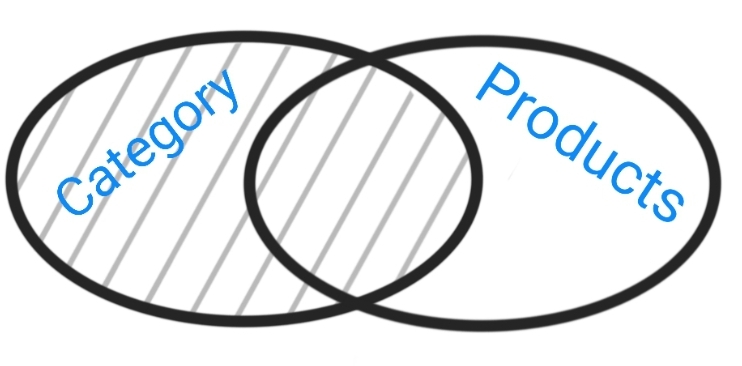 |
| Right Join: All the Data in the Products |  |
| Inner Join: All the Data that in Both Tables. |  |
| Left Join Only Data in Category Table and NOT in Product Table. |  |
| Right Join:Only data in Product Table and NOT in Category Table. | 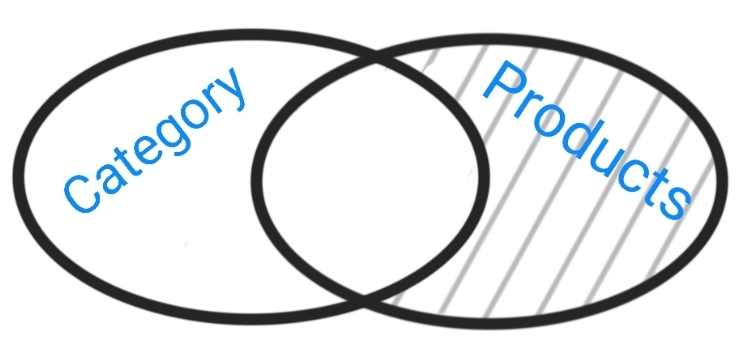 |
| Full Outre:All the Records in both Tables |  |
| Full Outre:All the data from the Category Table that are NOT linked to any Product, AND all the data in Product Table that has NO Category. |  |
First: let’s talk about the Tables,we will create two Tables (Category and Products) each will be very simple, the Category will have two fields [c_id, and cat_name],
the Products will have [p_id, pro_name, cat_id]. (cat_id is the foreign key that connicting the two tables). Some test data will be inserted in both Tables so we can demonstrate the SQL Commands. I create a Dictionary storing information/summary about the project named about_the_project the user can read it in run time.
Coding: We will do the fowlloing:
1. Set a Database for the Project.
2. Writing the codes to Create the Tables.
3. Writing the codes to insert some test Data in the Tables.
4. Creating a Menu for the Project.
5. Writing the Functions to Apply the SQL Join commmands.
NOTE: All the code will be avilable in the DOWNLOAD page.
Let’s import some lybraries, we will need this code:
import sqlite3, os
And here is the code to set the data base and create the connection.
# Create the data-base and name it as Share_S_System.
db_conn = sqlite3.connect (“sql_join_test.db”)
# set the connection.
c = db_conn.cursor()
First function is to create the Tables:
 # Function to create the Tables.

def create_tables ():

    # CREATE TABLE:
    category_t = "CREATE TABLE if not exists category_t (c_id INTEGER PRIMARY KEY AUTOINCREMENT, cat_name text)"
    c.execute(category_t)
    db_conn.commit()

    product_t = "CREATE TABLE if not exists product_t (p_id INTEGER PRIMARY KEY AUTOINCREMENT, p_name text, cat_id integer)"
    c.execute(product_t)
    db_conn.commit()
Now we will insert some Test data.
 # Function to insert some Data into the Tables

def insert_sample_data():

    #First we will call the Function to Crete the Table.
    create_tables ()
    print('\n   Category Table has been Created. ')
    print('\n   Product Table has been Created. ')

    # Insert into Category Table
    c.execute ("INSERT INTO category_t (cat_name) VALUES(:cat_name )",{"cat_name":"Mobile Phone"})
    c.execute ("INSERT INTO category_t (cat_name) VALUES(:cat_name )",{"cat_name":"Labtop"})
    c.execute ("INSERT INTO category_t (cat_name) VALUES(:cat_name )",{"cat_name":"Ext. HD"})
    c.execute ("INSERT INTO category_t (cat_name) VALUES(:cat_name )",{"cat_name":"CCTV Camera"})
    db_conn.commit()

    # Insert into Product Table.
    c.execute ("INSERT INTO product_t (p_name, cat_id) VALUES(:p_name, :cat_id )",{"p_name":"Note 9","cat_id":"1"})
    c.execute ("INSERT INTO product_t (p_name, cat_id) VALUES(:p_name, :cat_id )",{"p_name":"iPhone 12 pro","cat_id":"1"})
    c.execute ("INSERT INTO product_t (p_name, cat_id) VALUES(:p_name, :cat_id )",{"p_name":"HP","cat_id":"2"})
    c.execute ("INSERT INTO product_t (p_name, cat_id) VALUES(:p_name, :cat_id )",{"p_name":"Toshiba 1T HD","cat_id":"3"})
    c.execute ("INSERT INTO product_t (p_name, cat_id) VALUES(:p_name, :cat_id )",{"p_name":"iMac","cat_id":None})
    db_conn.commit()

    print('\n   Sample Date Inserted in both tables.\n   Select 9 from the Main Menu to see the Data')

    input('\n      ... Press any key to continue.  > ')
Now, let’s write the function for the Main Menu, it will return the user_choice.. here is the code..
 # Main Menu Function.

def main_menu():
    os.system('clear')
    print("\n==========[ Main Menu ]==========")
    print(' 1. About this Project.')
    print(' 2. All Categories. (Left Join: All in Category Only).')
    print(' 3. All Products. (Right Join: All in Product Only).')
    print(' 4. Only Categories that linked to a Products. (Inner Join: Only if in Ta AND Tb).')
    print(' 5. All Catigories that are NOT linked to a Product. (Left Join: Only in Category AND NOT in Product .')
    print(' 6. All Products that has NO Category. (Right Join: Only in Product AND NOT in Category.')
    print(' 7. All Categories and Products. (Full Outer Join in Both Table)' )
    print(' 8. All Categories that are NOT linked to any Product, and All Products that has NO Categotry. (Full Outer Join NOT in Both Table)')
    print(' 9. Show the Data')
    print(' 11. Setting: Create the Tables and Insert Some Sample Data. Run Only One Time.')
    print(' 99. Exit.')

    user_choice = input("\n Select from the Menu: > ")
    return user_choice
 |
The coming part of the code is calling the functions and running the SQL commands based on the user choice. Here is the Main-code-body..
 # The Main section of the Application..

while True :
    user_select = main_menu()

    if user_select == '1' :
        show_data('cat')

    if user_select == '2' :
        show_data('prod')

    if user_select == '3' :
        os.system('clear')
        print('\n   First: All the Data in Category and Product ')
        show_data('both','inside')
        print("\n==========[ Show Date: INNER JOIN ]==========\n")
        print('   Inner Join: Only the Data that exist in Category AND Product).')
        print('\n   The SQL Statment:\n    select category_t.c_id, product_t.p_name from category_t inner join product_t on category_t.c_id == product_t.cat_id\n\n ')
        c.execute ("select category_t.c_id, category_t.cat_name, product_t.p_name from category_t inner join product_t on category_t.c_id == product_t.cat_id  ")
        innerJ_list = c.fetchall()

        print('   [OUTPUT]:\n       Categories Name      |',' '*2,'Products Name    ')
        for innerJ_data in (innerJ_list):
            print('       ',innerJ_data[1],'.'*(25 - len(str(innerJ_data[1]))),innerJ_data[2])

        print('\n   We can see that the INNER JOIN Command fetched the records of Products that has a Category.\n   iMac Not listed Because it has No Category Data.')
        input('\n\n      ...Press any key to continue.  > ')

   if user_select == '4' :
        os.system('clear')
        print('\n   List of All the Data in Category and Product ')
        show_data('both','inside')
        print("\n==========[ Show Date: LEFT JOIN, Only Data in Categoty Table ]==========\n")
        print('   The SQL Statment:\n     select category_t.c_id, category_t.cat_name, product_t.p_name from category_t\n     left join product_t on category_t.c_id == product_t.cat_id\n     where product_t.cat_id is null\n')
        c.execute ("select category_t.c_id, category_t.cat_name, product_t.p_name from category_t left join product_t on category_t.c_id == product_t.cat_id where product_t.cat_id is null")
        leftJ_list = c.fetchall()
        print('   [OUTPUT]:\n       Categories Name      |',' '*2,'Products Name    ')
        for leftJ_data in (leftJ_list):
            print('         ',leftJ_data[1],'.'*(25 - len(str(leftJ_data[1]))),leftJ_data[2])

        print('\n   We can see that the LEFT JOIN Command fetched all Categories that are not used/linked to/with any Product.\n   CCTV Camera is Not linked. So We can Say: We Do Not have any CCTV Camera Products.')
        input('\n\n      ...Press any key to continue.  > ')

    if user_select == '5' :
    ....
# Just to save the time, i will not post all the code here, you can see all the code and download
# the .py source code from the download page.
Here are some screen shot of the output ..
| The Main Menu
|
| Output Screen for Option 3: Only Categories that linked to a Products. (Inner Join: Only if Data in Category AND Product) 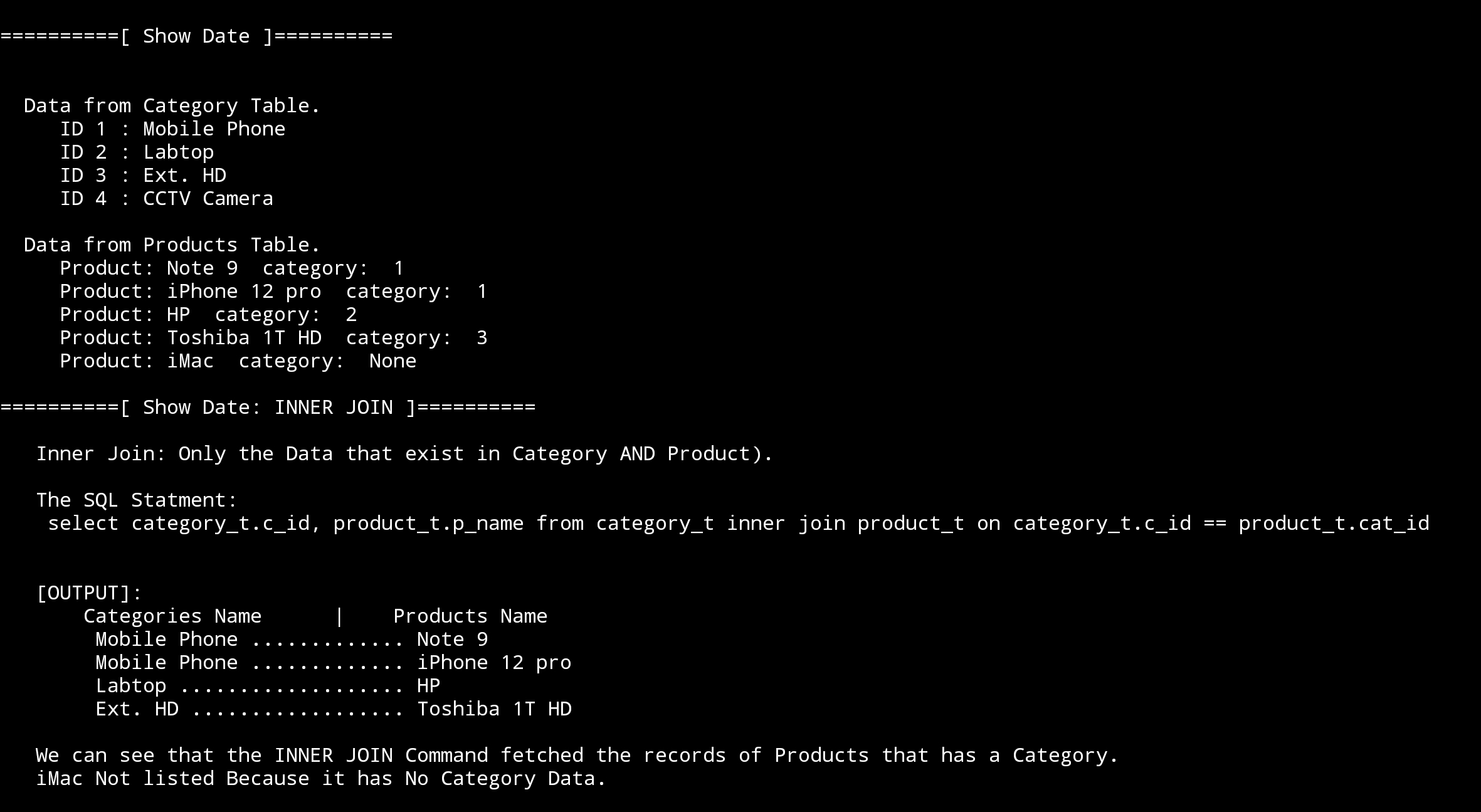 |

End of the Post, and all the code is available to download from the Download page.
To Download my Python code (.py) files Click-Here
By: Ali Radwani

Taking pictures is not my main daily practices, but when i start playing with my camera, i really enjoy my self.
Thanks for visiting my Space..


 Ali's Photography Space...