Archive
Drafting New System
Start to write down some notes and ideas for a new system/application using a self-brainstorming session.
I am always using the MindJet Maps app to draw the basic outlines of the application I want to work on.
Here is the first Draft of a Payroll System that I want to do in coming weeks. Not sure if I will use Python or MS-Excel to do this project.

Python: Tower of Hanoi
Learning : Python
Subject: Write a Function to Solve Tower of Hanoi Problem
Intoduction: Tower Of Hanoi is Puzzle Game that has three Vertical Sticks/Pegs Named A, B, C (3 Towers) and we have n number of disks different in diameter soted on top of each other (Large to Small) in Tower A. The Gall is to move all the disks from (A) to (C).
 # Tower of Hanoi Puzzel

"""
    Project Name: Tower of Hanoi

    By: Ali Radwani
    Date: 13.6.2021

     d  : Number of Desk
     fs : From Stick
     ts : To Stick
     bs : Buffer Stick
"""


import os

def hanoi_t(d, fs, bs, ts):
    if d ==1 :
        print("\n   Move Desk 1 From {} To {}".format(fs,ts))
        return

    else:
        hanoi_t(d-1,fs,ts,bs)
        print("   Move Desk {} From {} To {}".format(d,fs,ts))

        hanoi_t(d-1,bs,fs,ts)
        print("   Move Desk {} From {} To {}".format(d,fs,ts))

os.system('clear')
print('\n\n   This is Tower Of Hanoi Project')
print('   We are Solving a Three Desk Tower Named 1, 2 and 3, with Three Sticks Named A, B and C ')
print('\n   Start Solving ...')
hanoi_t(3,'A','B','C')

|
..:: Have Fun with Coding ::.. 🙂
To Download my Python code (.py) files Click-Here
 Follow me on Twitter..
By: Ali Radwani
Python: Coffee Consumption – P7
Learning : Python, SQlite3, Dataset, Pandas,
Subject: Create Coffee Consumption Application.
[NOTE: To keep the code as simple as we can, We WILL NOT ADD any user input Varevecations. Assuming that our user will Enter the right inputs.]
[ IF THE IS FIRST TIME DOWNLOADING THE CODE FILE, SELECT OPTION 7 FROM MAIN-MENU TO CREATE THE DATABASE]
In this part (Part-7) of Coffee Consumption App, we will write a Function to display all Records in the data-base in a table on the screen.
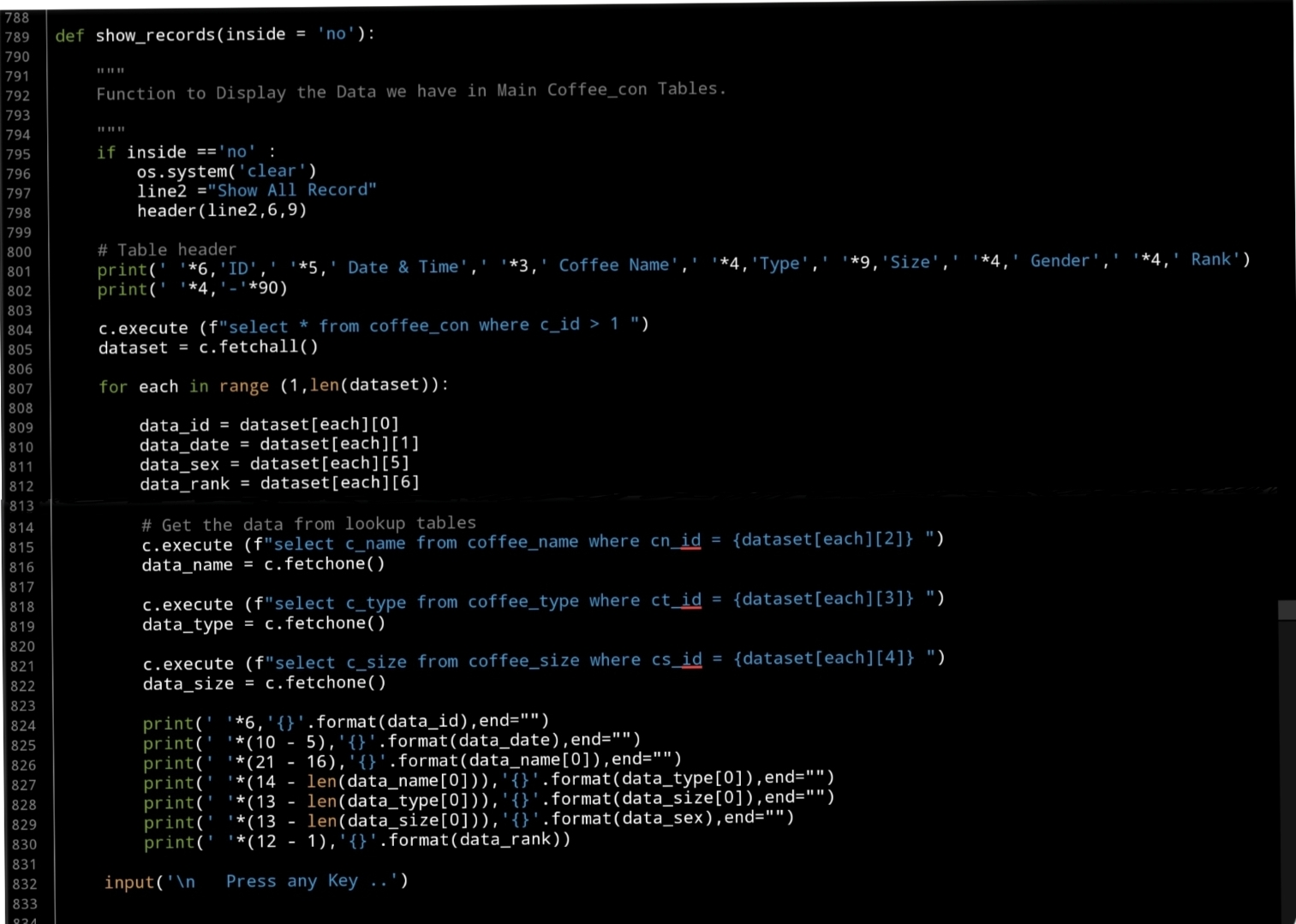
Beginning with formating the table header, we will have the following columns: record Id, Date_time, Coffee_name, Coffee_type, coffee_size, customer_Gender and Rank. Here is the code..
print(‘ ‘*6,’ID’,’ ‘*5,’ Date & Time’,’ ‘*3,’ Coffee Name’,’ ‘*4,’Type’,’ ‘*9,’Size’,’ ‘*4,’ Gender’,’ ‘*4,’ Rank’)
print(‘ ‘*4,’-‘*90)
Next we will execute an SQLITE command to fetch all the records. Here is the commands..
c.execute (f”select * from coffee_con where c_id > 1 “)
dataset = c.fetchall()
Also we will using the lookup tables to get the names using the id keys in the coffee_name, coffee_type, coffee_size columns.
Now, Using the for loop to access all the records and print them on the screen. Here is apart of the code ..
print(‘ ‘*6,'{}’.format(data_id),end=””)
print(‘ ‘*(10 – 5),'{}’.format(data_date),end=””)
print(‘ ‘*(21 – 16),'{}’.format(data_name[0]),end=””)
print(‘ ‘*(14 – len(data_name[0])),'{}’.format(data_type[0]),end=””)
print(‘ ‘*(13 – len(data_type[0])),'{}’.format(data_size[0]),end=””)
print(‘ ‘*(13 – len(data_size[0])),'{}’.format(data_sex),end=””)
print(‘ ‘*(12 – 1),'{}’.format(data_rank))
Here is a screen shot of the code..
 |
OutPut Screen 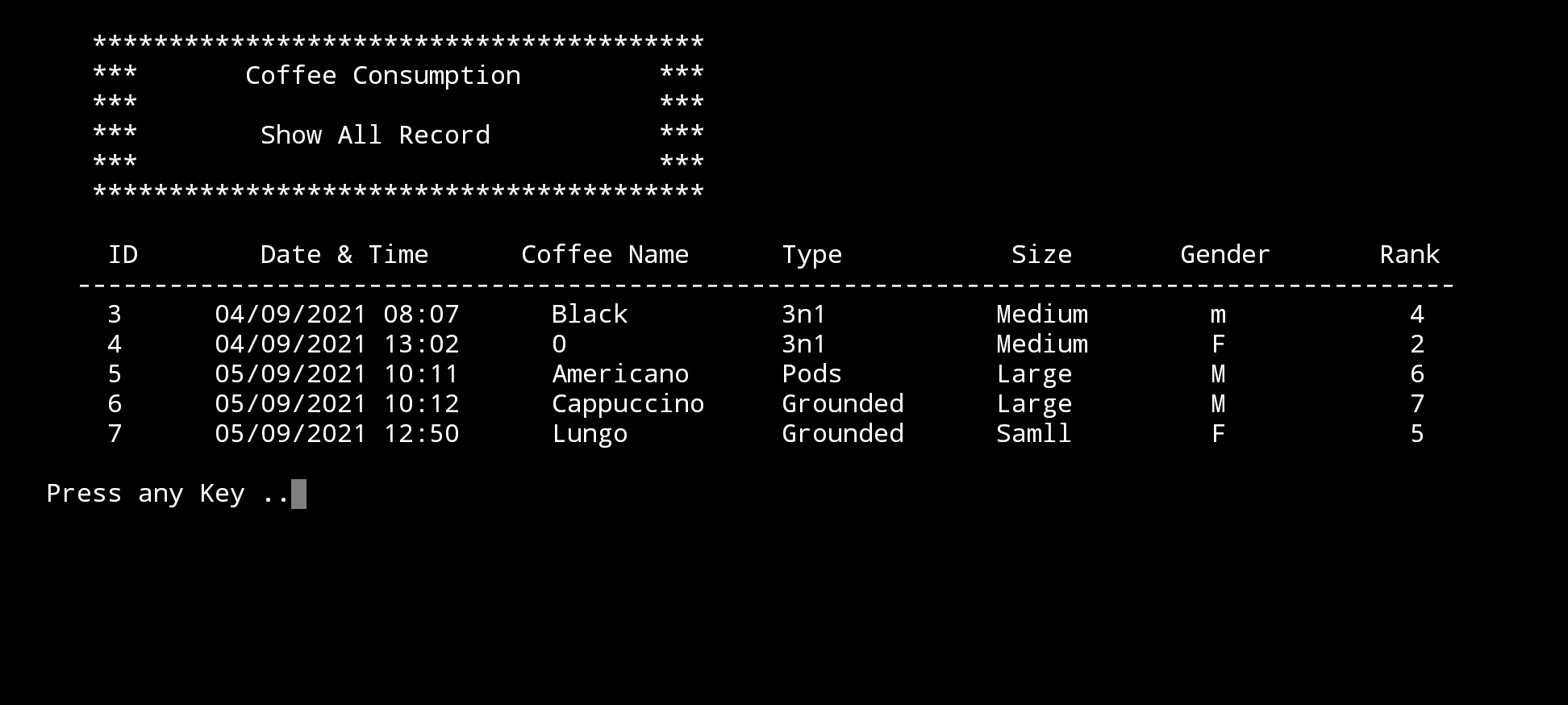 |
What’s Coming: In Part-8 we will write the Function to Edit the records on the Main Data-Base.
..:: Have Fun with Coding ::.. 🙂
| Part 1 | Part 2 | Part 3 | Part 4 | Part 5 |
| Part 6 | Part 7 | Part – | Part – | Part – |
To Download my Python code (.py) files Click-Here
By: Ali Radwani
Python: Coffee Consumption – P6
Learning : Python, SQlite3, Dataset, Pandas,
Subject: Create Coffee Consumption Application.
[NOTE: To keep the code as simple as we can, We WILL NOT ADD any user input Varevecations. Assuming that our user will Enter the right inputs.]
[ IF THE IS FIRST TIME DOWNLOADING THE CODE FILE, SELECT OPTION 7 FROM MAIN-MENU TO CREATE THE DATABASE]
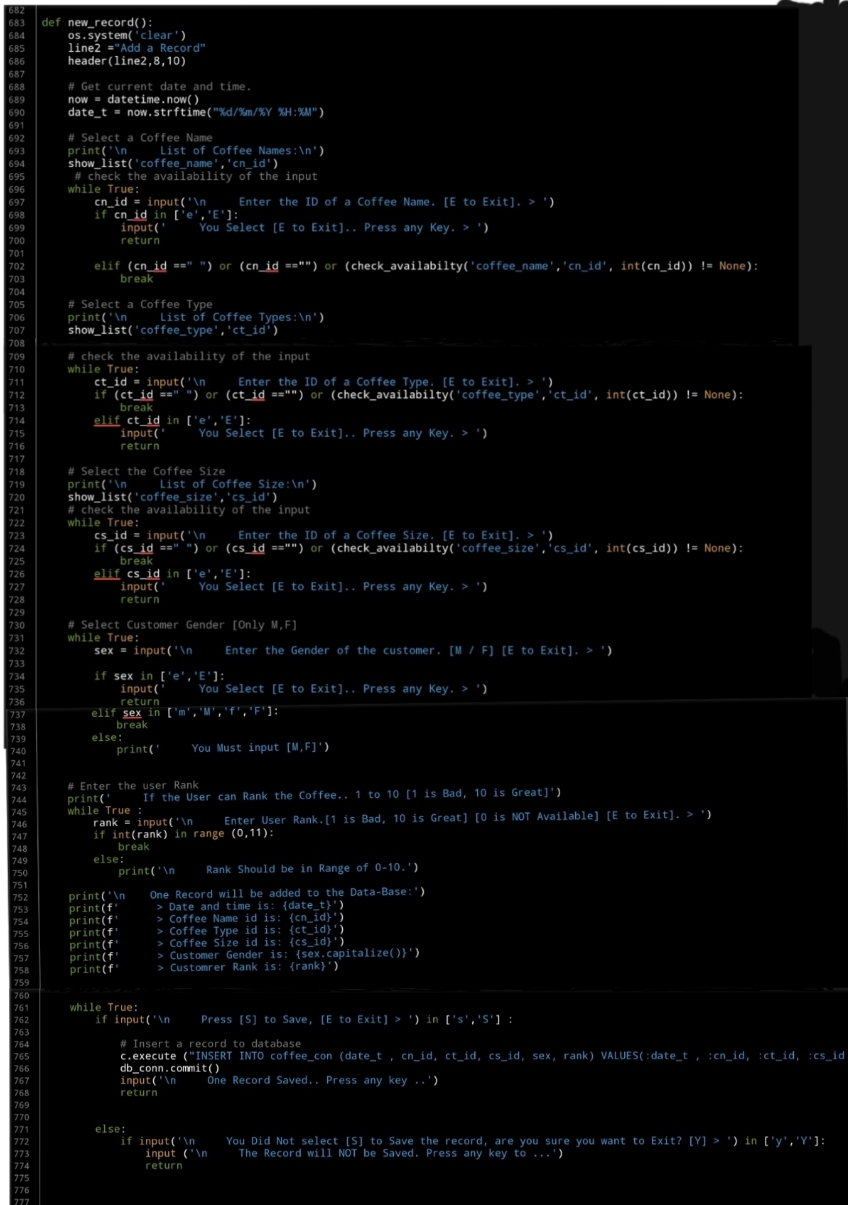
In this part (Part-6) of Coffee Consumption App, we will write First Function of the Main Application to ADD New Record. In this Function we will do the following:
- Get the Current Date and Time.
- The user will Select the Coffee Name, Type and Size from the list in lookup tables.
- Selecting the Gender of the user.
- Entring the Rank for the order [If the customer rank it].
Beginning with adding New Record in the Coffee Consumption System. We will use the datatime.now() function get the current data and time here is the code..
now = datetime.now()
date_t = now.strftime(“%d/%m/%Y %H:%M”)
Then we will show each of the lookup table we have and the user will select the ID of the Coffee Name,Type and Size, the, we will use a simple Validation process to control the user inut. Here is the code for Entering the Coffee Name
   # Select a Coffee Name
    print('\n     List of Coffee Names:\n')
    show_list('coffee_name','cn_id')
     # check the availability of the input
    while True:
        cn_id = input('\n     Enter the ID of a Coffee Name. [E to Exit]. > ')
        if cn_id in ['e','E']:
            input('     You Select [E to Exit].. Press any Key. > ')
            return

        elif (cn_id ==" ") or (cn_id =="") or (check_availabilty('coffee_name','cn_id', int(cn_id)) != None):
            break
The same code will be apply for the Coffee Type and Coffee Size.
[NOTE] All the codes will be in the file to be Download.
Next part of the code will be to select the customer Gender [M,F] here also we will use a simple Validation that will accept M or F Not anything else. Here is the code..
# Select Customer Gender [Only M,F]
    while True:
        sex = input('\n     Enter the Gender of the customer. [M / F] [E to Exit]. > ')

        if sex in ['e','E']:
            input('     You Select [E to Exit].. Press any Key. > ')
            return
        elif sex in ['m','M','f','F']:
            break
        else:
            print('     You Must input [M,F]')
Last variable we will collect will be the Rank, the Customer will ask the user to Rank this Order, the range will be from 1 to 10, 0 will be for Not Available.. Here is the code…
# Enter the user Rank
    print('     If the User can Rank the Coffee.. 1 to 10 [1 is Bad, 10 is Great]')
    while True :
        rank = input('\n     Enter User Rank.[1 is Bad, 10 is Great] [0 is NOT Available] [E to Exit]. > ')
        if int(rank) in range (0,11):
            break
        else:
            print('\n     Rank Should be in Range of 0-10.'
After that we will display all the Entries on the screen and ask the customer to press [S] to save the Record, and then we will use IINSERT SQL command to Insert the record. Here is the code for all the function….
 |
What’s Coming: In Part-7 we will do the Follwing:
Writing three Function to Show / Display the Records in the main Table of the Coffee Consumption Application.
..:: Have Fun with Coding ::.. 🙂
| Part 1 | Part 2 | Part 3 | Part 4 | Part 5 |
| Part 6 | Part – | Part – | Part – | Part – |
To Download my Python code (.py) files Click-Here
By: Ali Radwani
Python: Coffee Consumption – P5
Learning : Python, SQlite3, Dataset, Pandas,
Subject: Create Coffee Consumption Application.
[NOTE: To keep the code as simple as we can, We WILL NOT ADD any user input Varevecations. Assuming that our user will Enter the right inputs.]
[ IF THE IS FIRST TIME DOWNLOADING THE CODE FILE, SELECT OPTION 7 FROM MAIN-MENU TO CREATE THE DATABASE]
In this part (Part-5) of Coffee Consumption App, we will write all three Function to manage the Coffee Size (Mug Size).
- Create Function: Add New Coffee Size.
- Create Function: Edit a Coffee Size.
- Create Function: Delete a Coffee Size.
Beginning with adding new Coffee Size, we will ask the user to enter a New Coffee Size, then we simply added to the databasde using SQL Insert command. … Here is the Code ..
 |
The second Function in this part is to Edit a selected Coffee Size, so we will list-down all Sizes we have in the database, the user will select one (ID) then we will ask to enter the new one and update the database. Here is the code..
 |
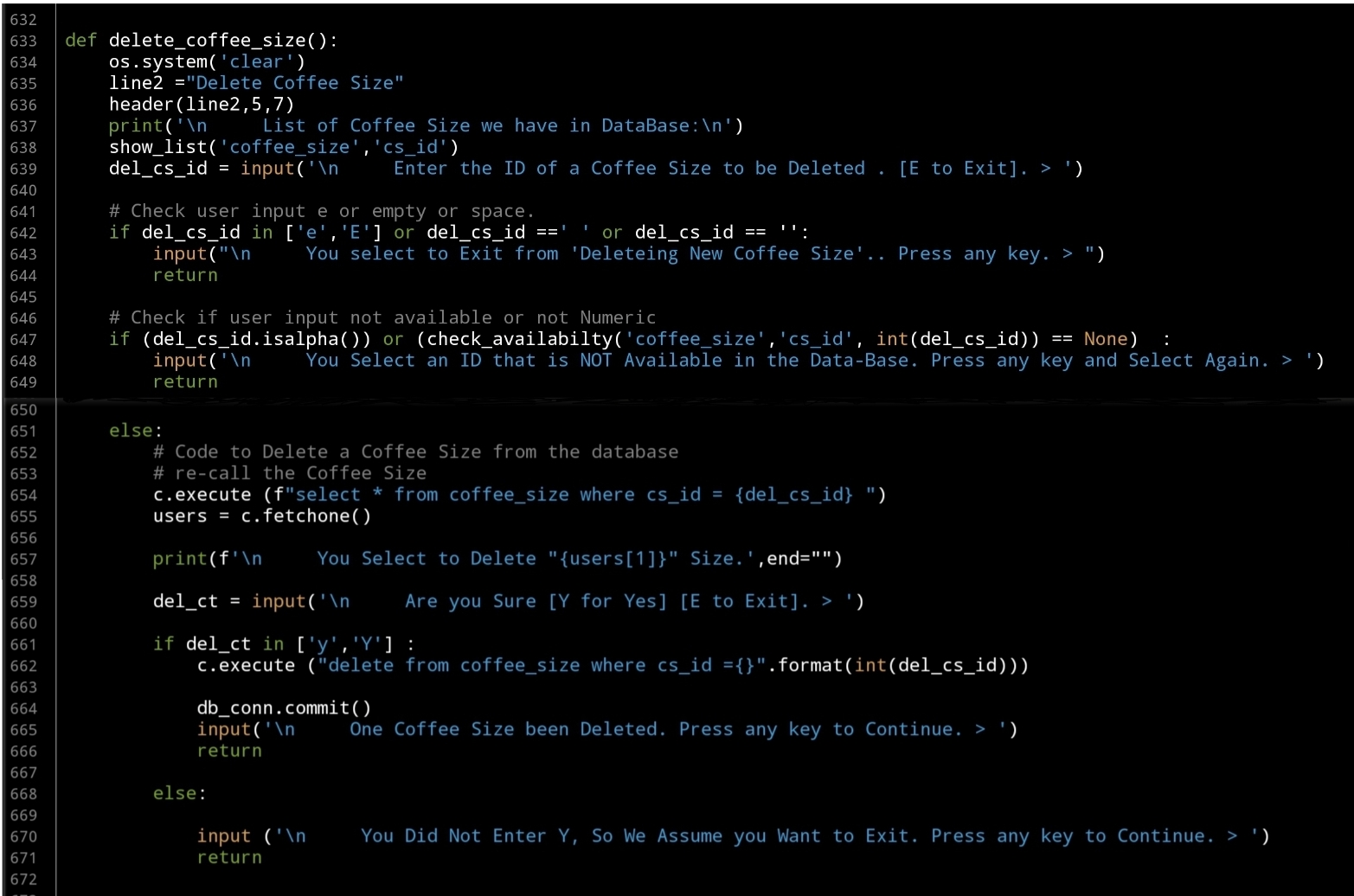
Last Function in this part will be to Delete a selected Coffee Size, so again we will list all Coffee Sizes we have and will ask the user to select the one to be Deleted, then we execute the SQL command to Delete the record from the database… here is the code..
 |
What’s Coming: In Part-6 we will Start writing the Main Function to Add a Record of Coffee Consumption using the lookup tables data.
..:: Have Fun with Coding ::.. 🙂
| Part 1 | Part 2 | Part 3 | Part 4 | Part 5 |
| Part 6 | Part – | Part – | Part – | Part – |
To Download my Python code (.py) files Click-Here
By: Ali Radwani
Python: Coffee Consumption – P4
Learning : Python, SQlite3, Dataset, Pandas,
Subject: Create Coffee Consumption Application.
[NOTE: To keep the code as simple as we can, We WILL NOT ADD any user input Varevecations. Assuming that our user will Enter the right inputs.]
[ IF THE IS FIRST TIME DOWNLOADING THE CODE FILE, SELECT OPTION 7 FROM MAIN-MENU TO CREATE THE DATABASE]
In this part (Part-4) of Coffee Consumption App, we will write all three Function to manage the Coffee types.
- Create Function: Add New Coffee Type.
- Create Function: Edit a Coffee Type.
- Create Function: Delete a Coffee Type.
Beginning with adding new Coffee Type, we will ask the user to enter a new Coffee Type, then we simply added to the databasde. … Here is the Code ..
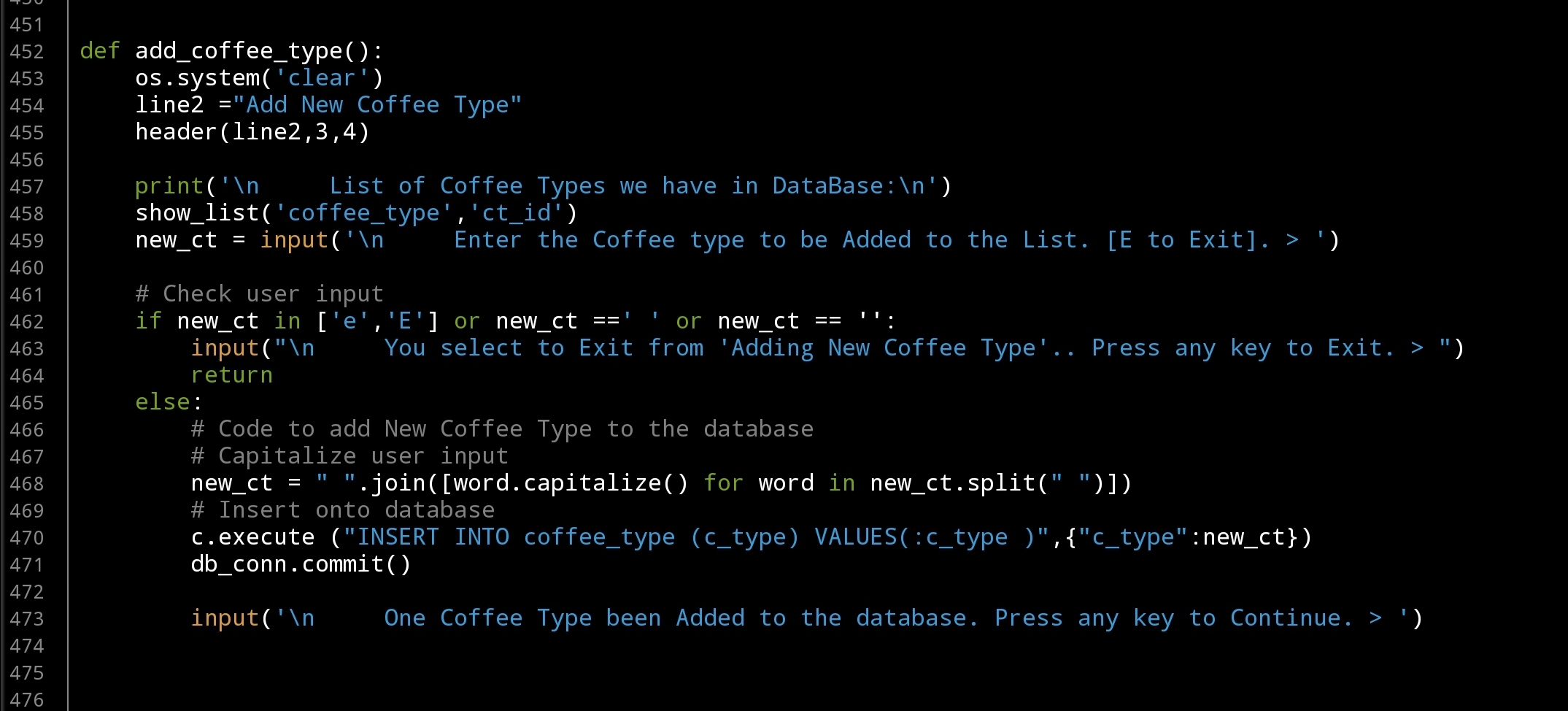 |
Tip: To Capitalize user input we are using one line code
# Capitalize user input
user_input = ” “.join([word.capitalize() for word in user_input.split(” “)])
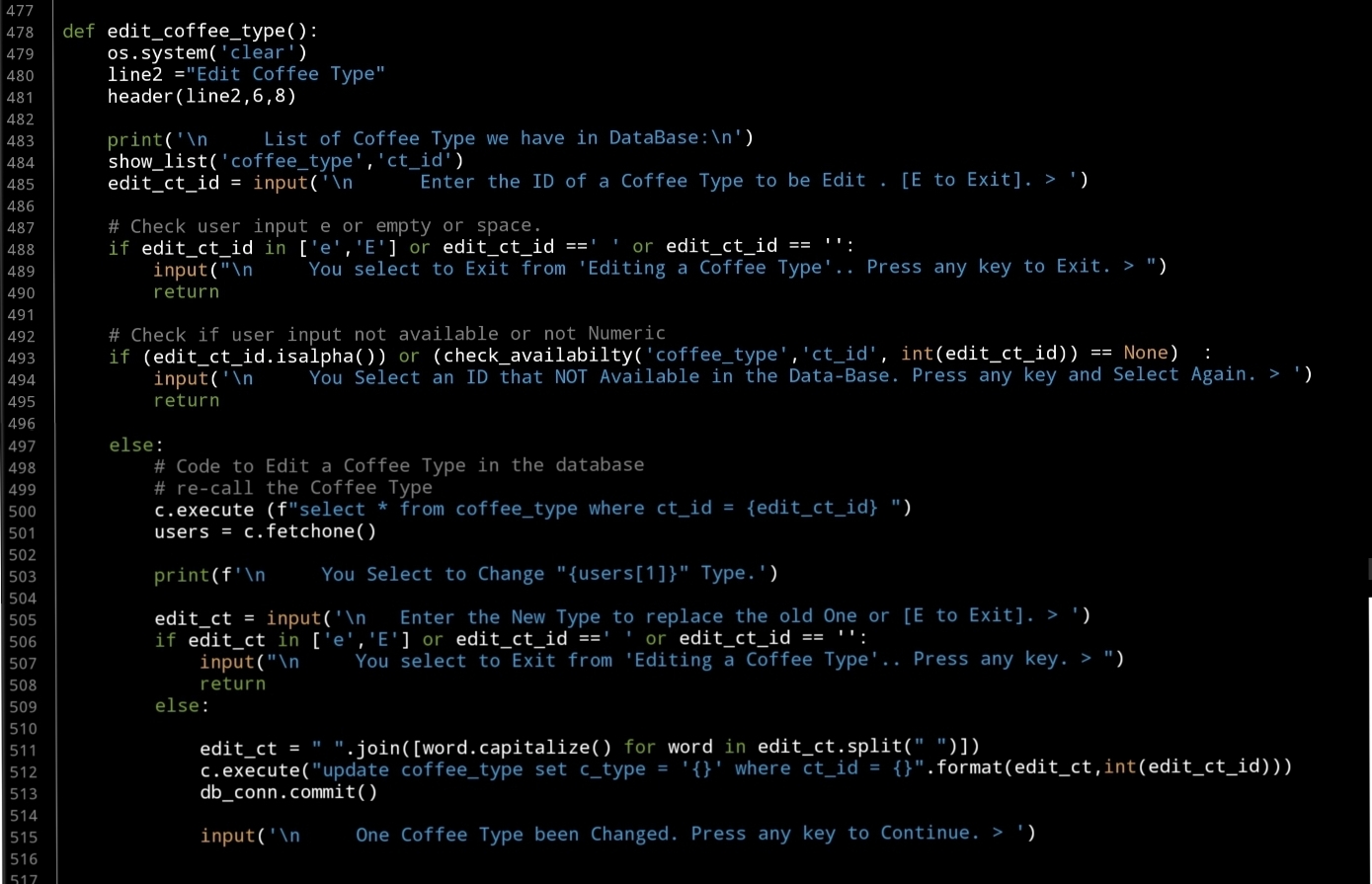
The second Function in this part is to Edit a selected Coffee Type, so we will list-down all Types we have in the database, the user will select one (ID) then we will ask to enter the new one and update the database. Here is the code..
 |
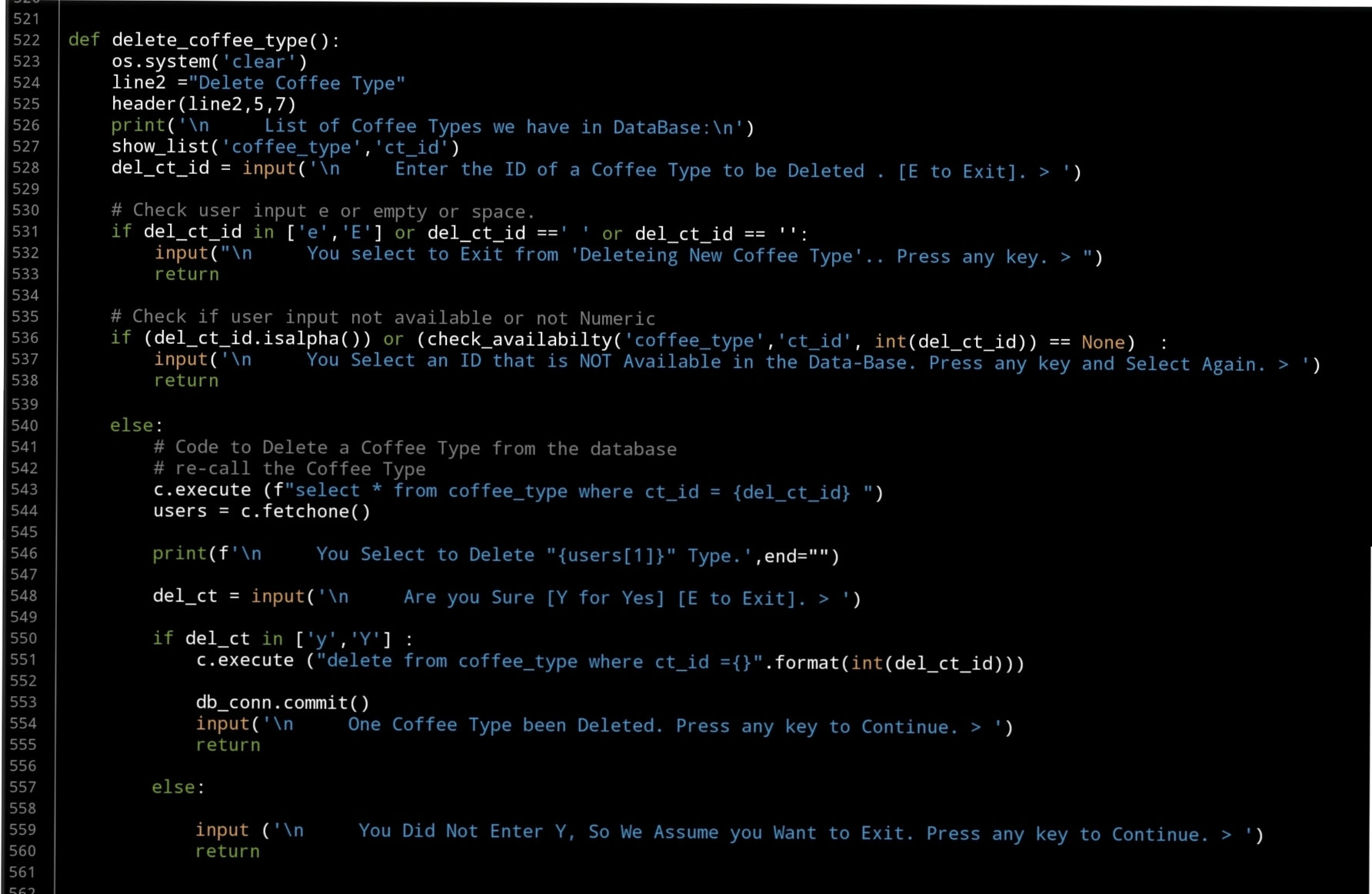
Last Function in this part will be to Delete a selected Coffee Type, so again we will list all Coffee Types we have and will ask the user to select the one to be Deleted, then we execute the SQL command to Delete the record from the database… Here is the code..
 |
What’s Coming: In Part-5 we will do the Follwing:
Writing three Function to Manage the Coffee Size, Functions are: Add New Coffee Size, Edit Coffee Size and Delete a Coffee Size.
..:: Have Fun with Coding ::.. 🙂
::.Coffee Consumption Parts.::
| Part 1 | Part 2 | Part 3 | Part 4 | Part 5 |
| Part 6 | Part – | Part – | Part – | Part – |
To Download my Python code (.py) files Click-Here
By: Ali Radwani
Python: Coffee Consumption – P3
Learning : Python, SQlite3, Dataset, Pandas,
Subject: Create Coffee Consumption Application.
[NOTE: To keep the code as simple as we can, We WILL NOT ADD any user input Varevecations. Assuming that our user will Enter the right inputs.]
[ IF THE IS FIRST TIME DOWNLOADING THE CODE FILE, SELECT OPTION 7 FROM MAIN-MENU TO CREATE THE DATABASE. ]
In this part (Part-3) of Coffee Consumption App, we will fill in some code into selected Functions. We will do the following:
- Create Function: Show list.
- Create Function: is_available.
- Create Function: Manager Menu.
- Create Manager Coffee Name Functions: Add, Edit, Delete
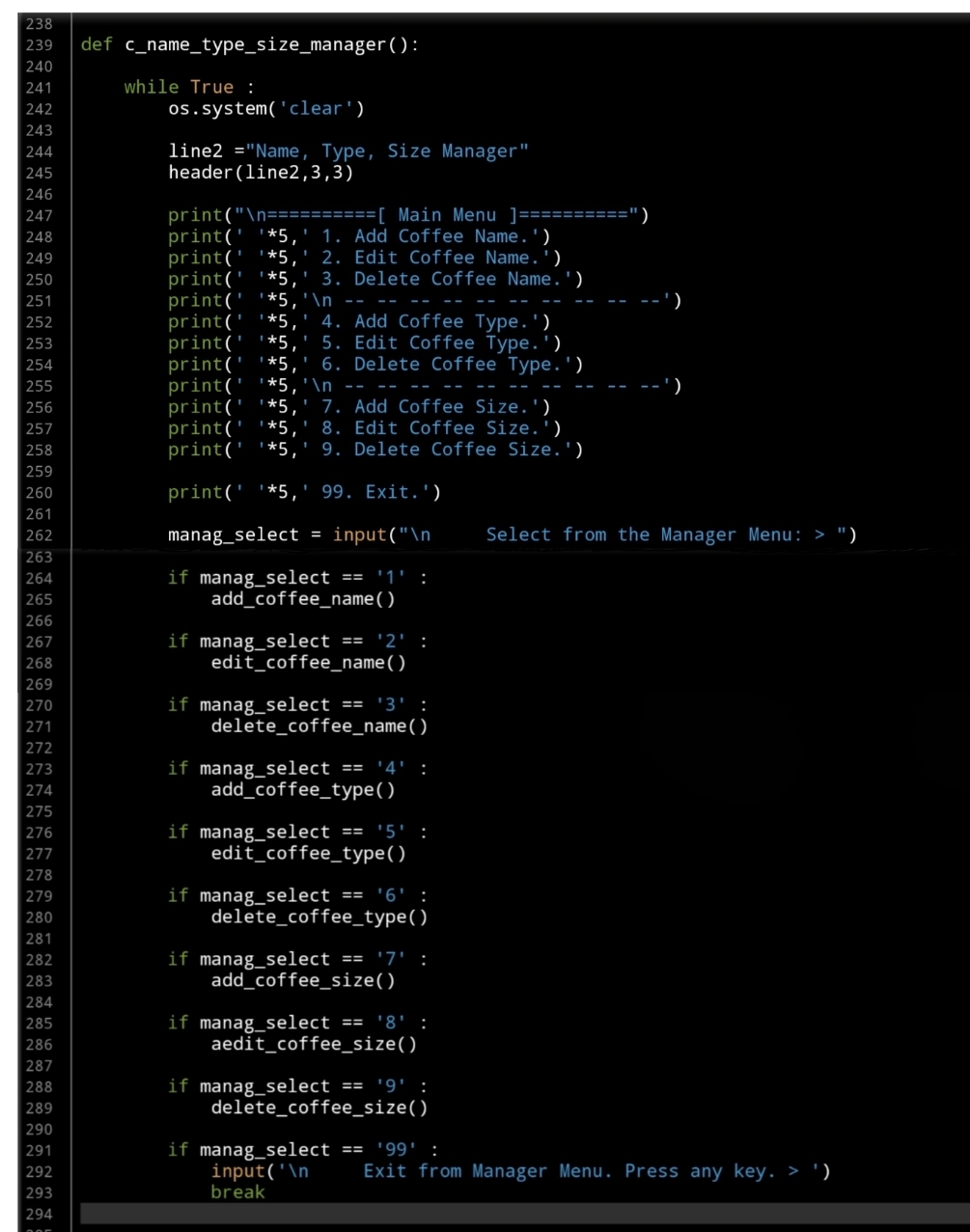
So, let’s start with writing the Manager Menu Function and a while loop to take the user selection and trigger the corresponding Function… Here is the Code ..
 |
We have two functions to help us in this application, one of them called def show_list(dt,d_id) is to Display the Data we have in the Lookup Tables based on the user selection function. The Function will take two arguments:
dt: data-table (Coffee Name, Coffee Type, Coffee Size)
d_id: id column name, and returning nothing.
Fisrt, let’s look at this Function:
 |
The second Function will be used to check if the user selection is available in the database, we will call it def is_available (dt, d_id, check_id) this Function is to check if the passed ID available in the data-set or not. The Function will take three Arguments as:
dt: Data-Table, d_id : Name of id column, check_id : The id we want to search for, and it will Return the data-set. After return, if dataset is empty that’s mean selected id is not available.
Now let’s see the function code..
 |
Now we will start writing first three functions to manage the Coffee Name, and will start with Adding New Coffee Name to the lookup Table.
In coming code first we will call the header then show_list(‘coffee_name’,’cn_id’) passing Table Name:’coffee_name’ and id column:’cn_id’ to display the Coffee Names we have on the sccreen. Then we will ask the user to enter the New Name to be added to the database. Here is the Full code..
 |
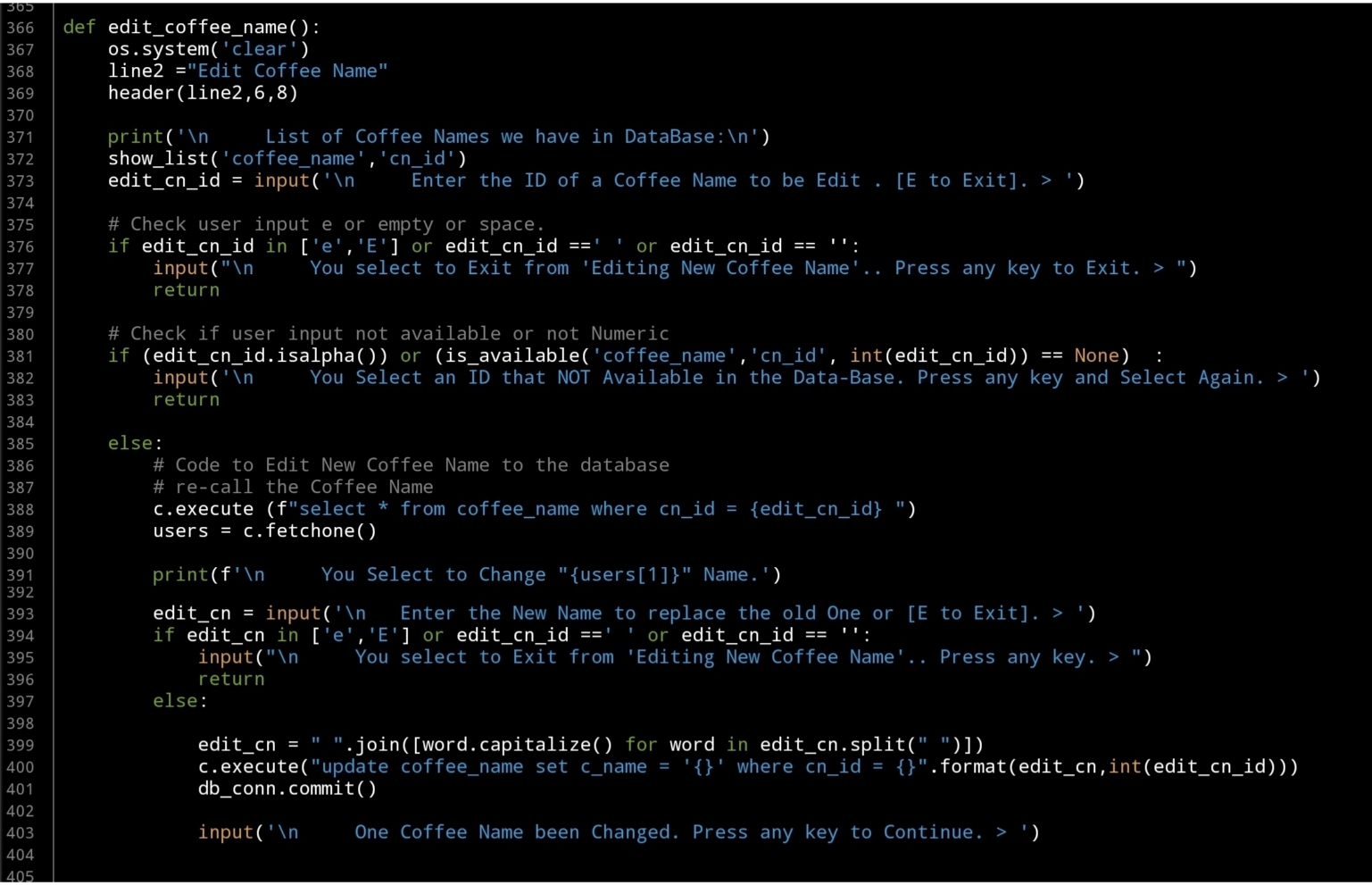
Next we will write the Edit Function, and again after the header and show_list(‘coffee_name’,’cn_id’) we will ask the user to enter the ID of the Coffee Name to be change, here we will do a simple validation on user input. After that we will update the record that the user select. Here is the code..
 |
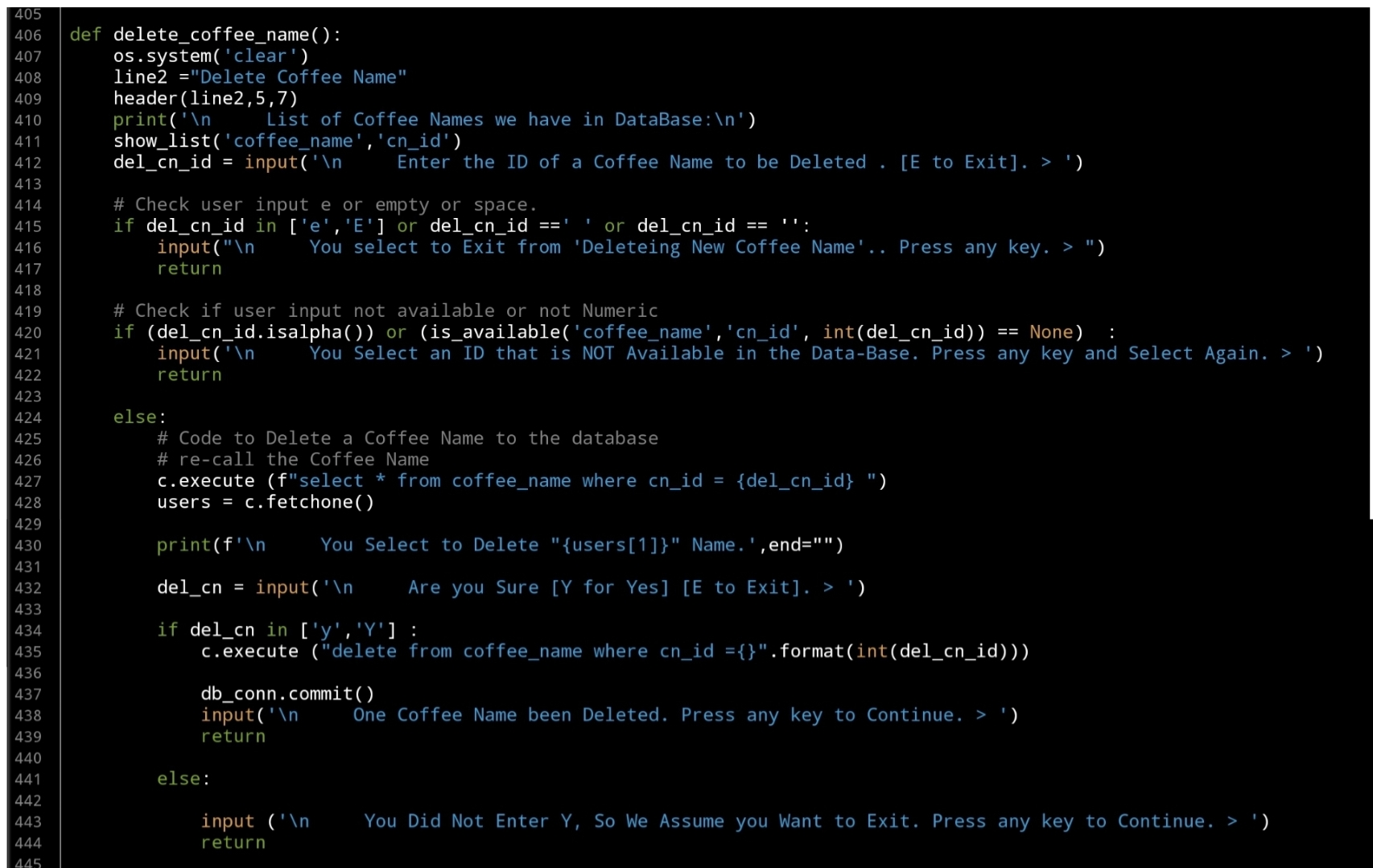
Last Function in this part is to Delete a selected Coffee Name by selection it’s ID, as in the Edit Fnction, the user will select an Id, we will check the availability the will execute the Delete command. Here is the code..
 |
What’s Coming: In Part-4 we will do the Follwing:
Writing three Function to Manage the Coffee Type, Functions are: Add New Coffee Type, Edit Coffee Type and Delete a Coffee Type.
..:: Have Fun with Coding ::.. 🙂
| Part 1 | Part 2 | Part 3 | Part 4 | Part 5 |
| Part 6 | Part – | Part – | Part – | Part – |
To Download my Python code (.py) files Click-Here
By: Ali Radwani
Python: Coffee Consumption – P2
Learning : Python, SQlite3, Dataset, Pandas,
Subject: Create Coffee Consumption Application.
[NOTE: To keep the code as simple as we can, We WILL NOT ADD any user input Varevecations. Assuming that our user will Enter the right inputs.]
In this part (Part-2) of Coffee Consumption App, we will fill in some code into selected Functions. We will do the following:
- Calling the Main-Menu Function.
- Create header function.
- Create the DataBase.
- Create the Tables.
- Insert the Zero records.
- Insert data into Lookups Table.
So, let’s start with writing the main application body and calling the Main-Menu to trigger a Function based on the user selection. This section will be a calling the main_menu() in a while loop .. here is the code ..
# Main application body

while True :
    user_select = main_menu()

    if user_select == '1' :
        new_data()

    if user_select == '2' :
        edit_record()

    if user_select == '3' :
        delete_record()

    if user_select == '4' :
        #delete_record()
        pass

    if user_select == '6' :
        c_name_type_size_manager()

    if user_select == '7' :
        create_data_base()

    if user_select == '99' :
        input('\n\n   Thank you for using this Appliation. Press Enter.. > ')
        break
If we run the application now, we will see the main-menu but nothing will work because we still did not write any real Functions in the application.
Tables and Zero records:
Now we will write tha function to create the Tables and inserting the Zero record in each of them. All the codes will be in a function called: def create_data_base () : here are the name of the tables we will create:
coffee_con
coffee_name
coffee_type
coffee_size
and here is the full code in the function, in first part we will create the tables, second part will insert the zero record, last we will insert data in the lookup tables (coffee_name, coffee_type and coffee_size)
# def create_data_base ()

def create_data_base () :
    os.system('clear')

    line2 ="Create Data Base"
    header(line2,3,11)

    print('\n     All the data in the Data-Base will be removed, and can''t be retrieved. ')

    if input('\n     Press [Y] to Continue, anything else will Stop and Exite.  > ') not in ['y','Y'] :
        input('\n     You Select to stop and Exit. Press any Key .. >  ')
        return

    # Part 1: CREATE TABLE:
    sql_coffee_con_t = "CREATE TABLE if not exists coffee_con (c_id INTEGER PRIMARY KEY AUTOINCREMENT, date_t,cn_id int, ct_id int, cs_id int, sex text, rank int )"
    sql_coffee_name_t = "CREATE TABLE if not exists coffee_name (cn_id INTEGER PRIMARY KEY AUTOINCREMENT, c_name text )"
    sql_coffee_type_t = "CREATE TABLE if not exists coffee_type (ct_id INTEGER PRIMARY KEY AUTOINCREMENT, c_type text )"
    sql_coffee_size_t = "CREATE TABLE if not exists coffee_size (cs_id INTEGER PRIMARY KEY AUTOINCREMENT, c_size text )"


    # Execute the commands
    c.execute(sql_coffee_con_t)
    db_conn.commit()
    c.execute(sql_coffee_name_t)
    db_conn.commit()
    c.execute(sql_coffee_type_t)
    db_conn.commit()
    c.execute(sql_coffee_size_t)
    db_conn.commit()


    # Part 2: Inserting ZERO records.
    c.execute ("INSERT INTO coffee_con (date_t , cn_id, ct_id, cs_id, sex, rank) VALUES(:date_t , :cn_id, :ct_id, :cs_id, :sex, :rank)",{'date_t':'0' ,'cn_id' :0,'ct_id' :0,'cs_id' :0,'sex' :'0','rank' :0})
    db_conn.commit()
    c.execute ("INSERT INTO coffee_name (c_name) VALUES(:c_name )",{"c_name":'0'})
    db_conn.commit()
    c.execute ("INSERT INTO coffee_type (c_type) VALUES(:c_type )",{"c_type":'0'})
    db_conn.commit()
    c.execute ("INSERT INTO coffee_size (c_size) VALUES(:c_size )",{"c_size":'0'})
    db_conn.commit()


    # Part 3: Inserting Basic Information
    coffee_Name_list = ['Black','Latte','Espresso','Americano','Cappuccino','Mocha',
                     'Lungo', 'Flat white', 'Irish', 'Macchiato','Ristretto','Iced coffee']

    coffeeType_list = ['3n1' ,'Pods','Grounded']

    coffeeSize_list = ['Samll', 'Medium', 'Large', 'Venti']

    for each in coffeeName_list:
        c.execute ("INSERT INTO coffee_name (c_name) VALUES(:c_name )",{"c_name":each})
        db_conn.commit()

    for each in coffeeType_list:
        c.execute ("INSERT INTO coffee_type (c_type) VALUES(:c_type )",{"c_type":each})
        db_conn.commit()

    for each in coffeeSize_list:
        c.execute ("INSERT INTO coffee_size (c_size) VALUES(:c_size )",{"c_size":each})
        db_conn.commit()

    input('\n\n     Data-Base Created, Basic Information Inserted. press any key to continue. > ')
[ The Full Code is Available in Download Page. ]
Last Function in this part is the header, it’s just a Title that will bee displayed in a box at the top of each page. Here is the code ..
# Header of the Application

def header(line2,b_l2,a_l2):
    os.system('clear')
    # The Project Name.
    line_1 = "Coffee Consumption"
    stars = 40
    print('\n',' '*4,'*'*stars)
    print(' '*5,'***',' '*5,line_1,' '*7,'***')
    print(' '*5,'***',' '*(stars - 8),'***')
    print(' '*5,'***',' '*b_l2,line2,' '*a_l2,'***')
    print(' '*5,'***',' '*(stars - 8),'***')
    print(' '*5,'*'* stars,'\n')
What’s Coming: In Part-3 we will do the Follwing:
- Writing a function show_list.
- Writing the function to Add New Coffee Name.
- Writing the function to Edit a Coffee Name.
- Writing the function to Delete a Coffee Name.
..:: Have Fun with Coding ::.. 🙂
| Part 1 | Part 2 | Part 3 | Part 4 | Part 5 |
| Part 6 | Part – | Part – | Part – | Part – |
To Download my Python code (.py) files Click-Here
By: Ali Radwani
Python: Coffee Consumption Part-1
Learning : Python, SQlite3, Dataset, Pandas,
Subject: Create Coffee Consumption Application.
[NOTE: To keep the code as simple as we can, We WILL NOT ADD any user input Varevecations. Assuming that our user will Enter the right inputs.]
Last week I post an articale about generating Fake Data-Set about Coffee Consumption, and using that dataset in ML and DeepLearning. [Read the Story]. I’ve got a request from someone asking to build a reall Full Application that can be used in a Coffee Shop and collect/track his Coffee orders (consumption). So here is the application.
Road Map
Brain Storming
In this python project will collent some informatin based on a friend requerment. Our Task is:
- Data Gathering.
- Designing the Database and Tables.
- Writing python Functions to do the Following:
- Create the Main-Menu. [Add, Edit, Delete for main Table]
- Create the Manager Menu. [Add, Edit, Delete for each lookup Tables]
- Create the database and the tables:
- Main: coffee_con.
- Lookup: coffee_name.
- Lookup: coffee_type.
- Lookup: coffee_size.
- Inserting Zero record.
- Inserting Basic Data in all Lookup tables.
- Creating all Functions we need such as:
- Add, Edit, Delete Coffee Names.
- Add, Edit, Delete Coffee Types.
- Add, Edit, Delete Coffee Sizes.
..:: In Part -1 ::..
In this part, we will create a python file, and will write all the functions header [we think we may need] so late we can add the codes inside, of course we may add other functions later [if we miss it here].
So, starting from the Main-Menu, we will have
– Add New Order.
– Edit an Order.
– Delete an Order.
– Show Orders.
[… SETTING …]
– Coffee Names, Type and Size Manager.
– Create the database.
– Back-up Data. (as CSV)
– Exit.Here is just a sample of the code, in this part no much coding of the Functoins, as we said only Functions Names, the full code is available in the Download Page.[ Click Here ]
# Sample of Functions Names in our Application

import os
import sqlite3


def header():
    pass

def create_data_base () :
    pass

def main_menu():
    pass

def new_record():
    pass

def edit_record():
    pass

def delete_record():
    pass

def backup_dataset():
    pass
… The above are just a sample of Functions that we may have in the application, you can download and read the Project file.
What’s Coming: In Part-2 we will do the Follwing:
- Writing the Main Menu Function.
- Creating the DataBase.
- Writing the Function to Create the Tables.
- Inserting the Zero Records.
..:: Have Fun with Coding ::.. 🙂
Part 1 Part 2 Part 3 Part 4 To Download my Python code (.py) files Click-Here
By: Ali Radwani
Python: Generate your Data-Set
Learning : Python, pandas, function
Subject: Generate your CSV dataset using python
[NOTE: To keep the code as simple as we can, We WILL NOT ADD any user input Varevecations. Assuming that our user will Enter the right inputs.]
The Story: last week i was reading about Data Cleaning, Deep Learning and Machine Learning, and for all we need some data to play with and testing our code. There are several sites providing a free (to certain limits) Data-set. But while i was working, it just come to my mind Why not to write a code to generate some Fake data-set.
Before I start: The main question was “What is the subject of the data” or Data about What? This is the main question that will guide us to write our code, and tha answer was very..very fast 🙂 .. at that moment I was holding my Coffee Mug, and just jump to my mind, Data about Coffee … Coffee Consumption. So we are taking the data of Coffee Consumption from a Coffee-Shop, the coffee-shop is collecting the following data: Date-Time (of the order), Coffee-Name, Coffee-Type, Coffee-size, Sex, Rank. Here is in more details..
Dat-Time: Date and Time of Order, Date format: dd-mm-yyyy, the Time format: hh:mm (24h)
Coffee-Name: Such as: [black, latte, espresso, americano, cappuccino, mocha, lungo, flat white, irish, macchiato,ristretto, iced coffee]
Coffee-Type: 3n1 , pods, grounded
Coffee Size: samll, medium, large, venti
Sex: The person how order it male, female
Rank: if the customer drink the coffee in the shop, will ask for a ranks (1,10) 1:bad, 10:Grate
Scope of Work: We will write several functions to generate random data for each attribute we have, saving the data into a list, then combining all the lists in a pandas dataframe df and save the data_set df to a csv file. Later on we can re-call the file using pandas command df.read_csv(file_name) and manipulate the data.
.::.. Coding ..::.
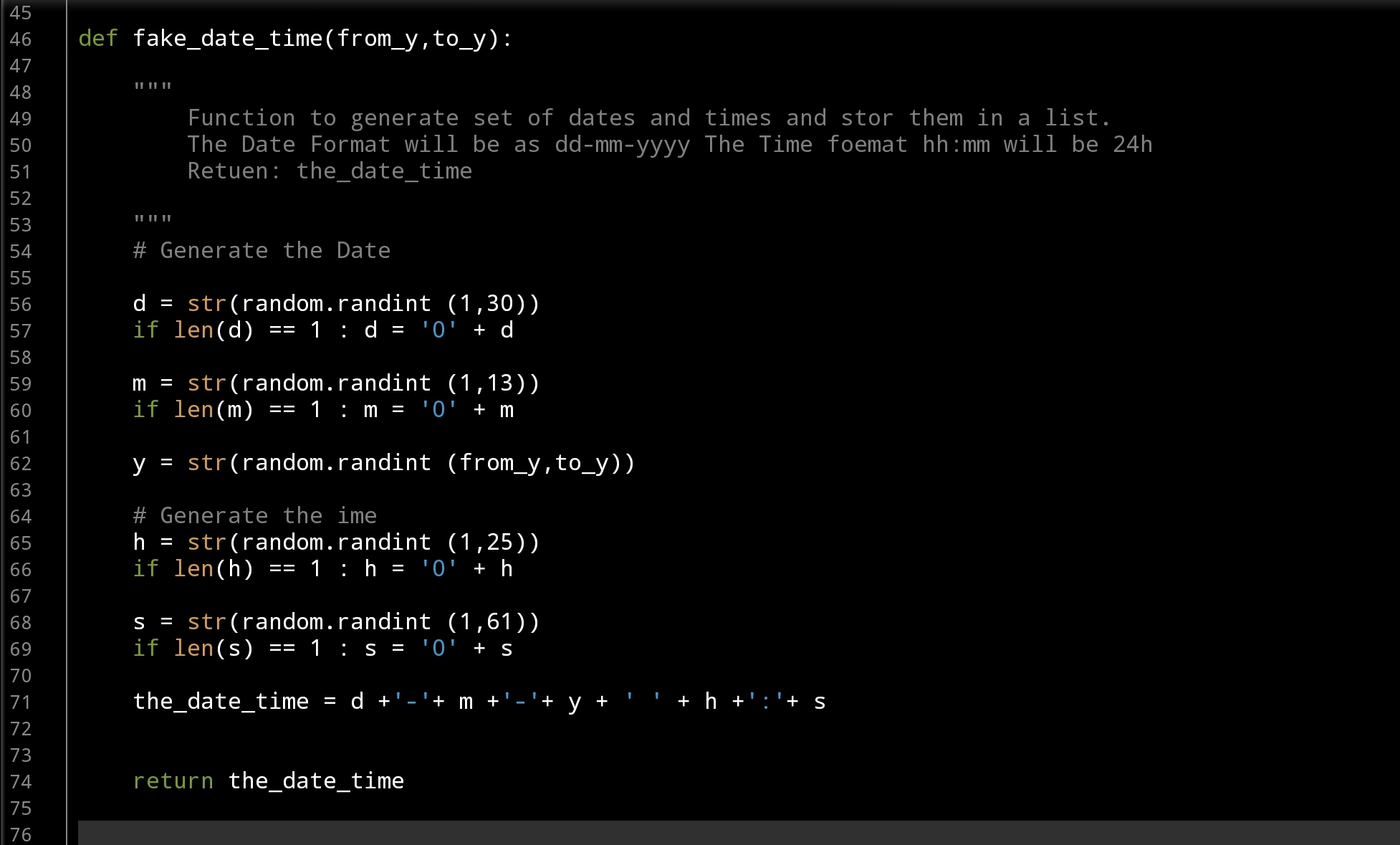
Let’s start with Date-Time Function: def fake_date_time(from_y,to_y): In this function we will use a random.randint() to generate numbers for day’s, months and years, also for hours and minites. The function will take two arguments from_y, to_y and will return a string like this: dd-mm-yyyy hh:mm … here is the code ..
 |
Now,Coffee Name: def fake_coffee_name() : for Coffee Name I create a list of Coffee Names (from the net) and use random.choice(coffee_name_list) to select one from the list. this function is a one-line code .. here it is ..
 # fake_coffee_name() function

def fake_coffee_name() :
    """
        Function to randomly select one from the list.

        Return coffee_name

     """

    coffee_name_list = ['black', 'latte', 'espresso', 'americano', 'cappuccino',
                         'mocha', 'lungo', 'flat white', 'irish', 'macchiato', 'ristretto',
                         'iced coffee'
                         ]
    return random.choice(coffee_name_list)
Here are another two Functions def fake_coffee_type(): and def fake_coffee_size(): Both are using the random.choice to select from a list.. here is the code ..
] |
More over, in out dataset we need another two variables sex and rank, both are simple and we don’t need to put them in separate function, we will call the random.choice(‘f’,’m’) to select between Male and Female, and random.randint (1,11) to select a Rank between (1 and 10). Here is the main part of the application, we will use a for loop and append all the returns from the function’s in a list (a list for each attribute) after that we will combine all the list in a dataset using pandas command. Here is the code..
 # Main body of the application

# empty lists of the columns
d_d =[]
cn_d =[]
ct_d =[]
cs_d =[]
s_d =[]
r_d = []

number_of_rows = 1000

for x in range(1,number_of_rows):
    d_d.append(fake_date_time(2000,2022))
    cn_d.append(fake_coffee_name())
    ct_d.append(fake_coffee_type())
    cs_d.append(fake_coffee_size())
    s_d.append(random.choice(['f','m']))
    r_d.append(random.randint (1,11))


the_data ={'date_time':d_d, 'c_name':cn_d, 'c_type':ct_d, 'c_size':cs_d, 'sex':s_d, 'rank':r_d }

df = pd.DataFrame (the_data)

# to create a CSV file and save the data in it.
file_name = 'coffee_consumption_v1.csv'
df.to_csv(file_name, index=False)

print(f'\n\n    The data been generated, a file named: {file_name} saved')
Now we have a file called: coffee_consumption_v1.csv saved in the same directory of the .py code file. Here is a sample of the data.
 |
We will stop here, and we will do another post to apply pandas commands over the dataset.
..:: Have Fun with Coding ::.. 🙂
To Download my Python code (.py) files Click-HereAlso the Date-Set coffee_consumption_v1 file (.csv) files is available in the same page.
By: Ali Radwani

Taking pictures is not my main daily practices, but when i start playing with my camera, i really enjoy my self.
Thanks for visiting my Space..


 Ali's Photography Space...