Archive
Another sketch challenge: Black Cheetah
This week sketch challenge @1hour1sketch on Twitter is to Draw a Black Cheetah so here is my sketch using pencil then black Pen, it takes around 50min [off and on]. More Sketches on my Sketch page ..
you may Follow me on Twitter @h_ta3kees
Here is my sketch..

Python: Sorting Algorithm.- 4-Selection
Learning : Python coding, Math, Algorithm,
Subject: Writing Selection Sorting Algorithm in Python
[NOTE: To keep the code as simple as we can, We WILL NOT ADD any user input Varevecations. Assuming that our user will Enter the right inputs.]
Sorting Algorithm is a way to sort a given list/Array of numbers, there are several sorting Algorithm as follow:
Type of Sorting Algorithm
1. Quick Sort. [Click to Read the Post.]
2. Bubble Sort. [Click to Read the Post.]
3. Merge Sort. [Click to Read the Post.]
4. Insertion Sort. [Click to Read the Post.]
5. Selection Sort. [Click to Read the Post.]
6. Heap Sort. [Click to Read the Post.]
7. Radix Sort. [Click to Read the Post.]
8. Bucket Sort. [Click to Read the Post.]
Here in this post we will write a function to take a given list and sort it then pass it back. We assume the user will enter a serial of numbers, that he want to sort, our function will sort it using Selection Sorting Algorithm and print out the original numbers and the sorted one.
Selection Sort Algorithm: In Selection Sort, we will apply coming Steps:
1. Select the Element (e) in Index i = 0.
2. Find the Smallest Element in the Array from Index i Until index = length of Array.
3. SWAP the Smallest number in the Array with the Element (e) in index i=0.
4. Select the Element (e) in index i = i+1.
5. Repeat the Algorithm from step 2, until i+1 > length of the Array.
In our Application we will have three Functions, one to collect the Array numbers from the user. [This is the main function in all our sort applications] here is the code
 |
We are calling this Function within the Main Selection Sort Function.
Now we will write the Selection Sort Function .
 # Selection Sorting Function

def selection_sort(arr):

    for i in range (0,len(arr)):
        e = arr[i]
        s_ind = i
        for j in range (i,len(arr)):
            if arr[j] < e :
                e = arr[j]
                s_ind = j

        arr[i], arr[s_ind] = arr[s_ind], arr[i]

    return arr
We will have a copy of same Function with some print-statement to show the iterations and elements in each steps. Here is the code ..

|
Here is screen shot of only three iteration of the Algorithm run-time..
|
We Done !! .. Another coding for Sorting Algorithms, New one will be published in coming days..
… Have fun with Coding … 🙂
To Download my Python code (.py) files Click-Here
 Follow me on Twitter..
By: Ali Radwani
Python: Sort Algorithm – 3 – Insertion Sort
Learning : Python coding, Math, Algorithm,
Subject: Writing Merge Sorting Algorithm in Python
[NOTE: To keep the code as simple as we can, We WILL NOT ADD any user input Varevecations. Assuming that our user will Enter the right inputs.]
Sorting Algorithm is a way to sort a given list/Array of numbers, there are several sorting Algorithm as follow:
Type of Sorting Algorithm
1. Quick Sort. [Click Here]
2. Bubble Sort. [Click Here]
3. Merge Sort. [Click Here]
4. Insertion Sort. [Click Here]
5. Selection Sort. [Click Here]
6. Heap Sort. [Click Here]
7. Radix Sort. [Click Here]
8. Bucket Sort. [Click Here]
Here in this post we will write a function to take a given list and sort it then pass it back. We assume the user will enter a serial of numbers, that he want to sort, our function will sort it and print out the original numbers and the sorted one.
Insertion Sort: Steps of Insertion Sorting Algorithm are:
1. Start with index (x = 1), Compare the Element (k) in index [x] with the Element in index [x-1].
1.1 If Element in [x-1] SMALLER than Element in [x] we swap the two elements.
1.2 Once we Swap we will have new index for k , and again we will compare the (k) in (new index) with element before it (new index -1), and keep moving it to left until we stop at index [0] or we face an Element GRATER than k.
2. If the Element k GRATER than the element before it, we left k and take the Next Element (to be k) and start comparing K [in x index] with Element in [x-1] index.
3. We do this until k will be in index (length on the list)
Now starting with the codes, as our standard we follow in Sorting Algorithm Applications we will have a Main-Menu and three Items the user will chose among them, and Function to let the user to enter the Numbers [The List or the Array] to be sorted. The Options in the Main-Menu are :
1. Insertion Sort Algorithm – Fast Run.
2. Insertion Sort Algorithm – Step By Step.
9. Exit.
The Fasr-Run we call the create_list(): Function first so the user will Enter the Numbers in the Array, then the Fast-Run will show the sorted Array on the screen.
In the Step-By-Step (Option 2 in the Menu) again calling create_list(): Function first, after the user Enters the Array, we will print-out on the screen each steps of selecting the index, and index-1, the k values and when/if we will SWAP or not.
The last option in the Menu is to Exit the Application (option 9).
Now we start coding.. Here is the Main-Menu.
 # Main-Menu

def main_menu ():
    os.system('clear')
    print('\n\n',' '*5,'******************************')
    print(' '*5,' ***','  Sorting Algorithm ',' '*1,'***')
    print(' '*5,' ***','     Insertion Sort     ',' '*1,'***')
    print(' '*5,' ***',' '*22,'***')
    print(' '*5,' ******************************\n\n')
    print(' '*7,'1. Insertion Sort Algorithm - Fast Run.')
    print(' '*7,'2. Insertion Sort Algorithm - Step By Step.')
    print(' '*7,'9. Exit.')

    user_choice = input('\n   Select your choice.  > ')
    return user_choice
Here is the codes for create_list(): to collect the Array from the user..
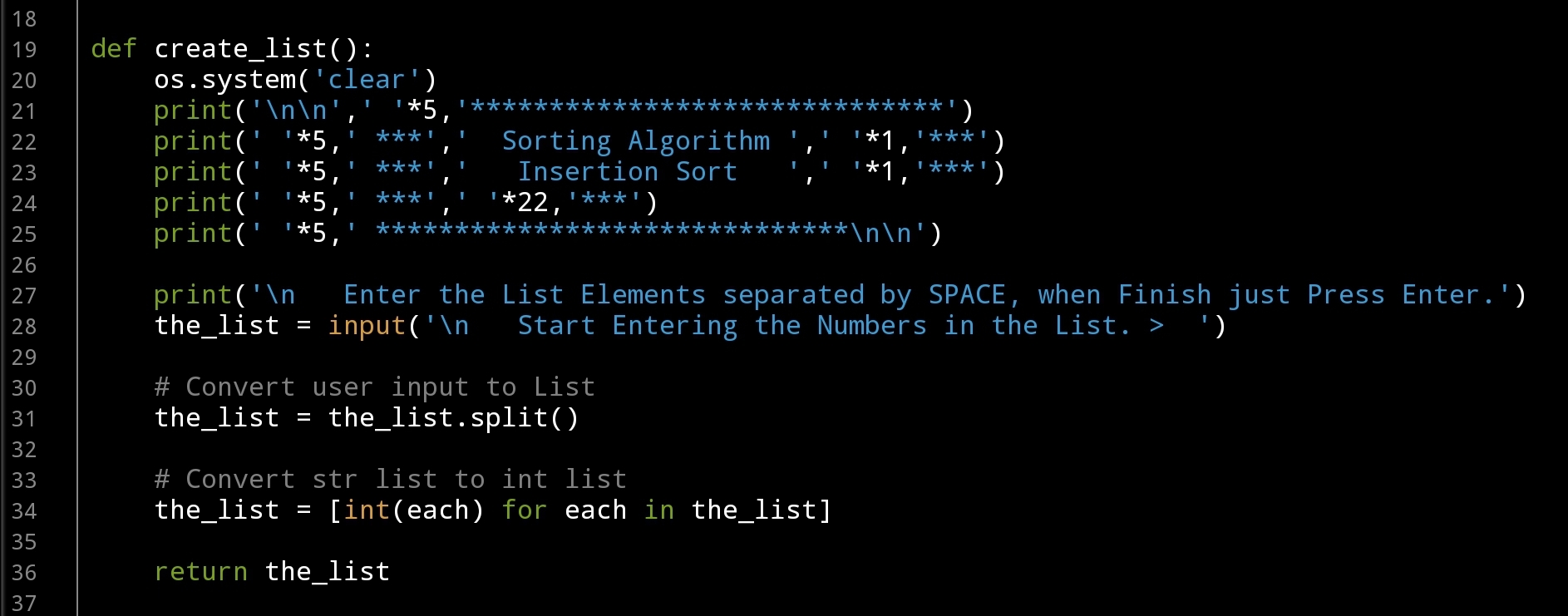
|

|
Finaly, here is the code for the Step-by-Step running for the Insetion Sort Algorithm. It is the same copy of the Fast-Run but with some print statements to show what is happening.

|
We Done another coding for Sorting Algorithms, another one will be published in coming days..
… Have fun with Coding … 🙂
To Download my Python code (.py) files Click-Here
By: Ali Radwani
Project: Knapsack Problem
Learning : Python, Math, Algorithm
Subject: Solving Knapsack Problem using Python
[NOTE: To keep the code as simple as we can, We WILL NOT ADD any user input Varevecations. Assuming that our user will Enter the right inputs.]
Definition: The knapsack problem is a Problem in Combinatorial Optimization: Given a set of Items, Each with a Weight and a Value or Profit, We need to Determine the Number of Each Item to Include in a Collection so that the Total Weight is Less than or Equal to a Given Limit and the Total Value is as Large as Possible. Source: Wikipedia
In this post we will write three Functions, The Main Menu, one to Collect the data and another to solve the problem. So first, let’s see the Main-Menu ..
# Main Menu of the Project
def main_menu ():
    os.system('clear')
    print('\n',' '*5,'******************************')
    print(' '*5,' ***','   Knapsack Problem','   '*1,'***')
    print(' '*5,' ***',' '*22,'***')
    print(' '*5,' ******************************')
    print('\n',' '*5,"==========[ Main Menu ]==========")
    print(' '*5,' 1. About Knapsack Problem.')
    print(' '*5,' 2. Collect the Items.')
    print(' '*5,' 3. Solve the Problem.')
    print(' '*5,' 9. Exit.')

    user_choice = input("\n   Select from the Menu: > ")

    return user_choice
Above Menu will display three option that the user can select from:
1. About Knapsack Problem. [To give simple information about what is Knapsack Problem]
2. Collect the Items. [Will ask the user to Enter the Items and their coresponding Weights and Profits.]
3. Solve the Problem. [The user will Enter the Weight limit we have then we will Solve the problem]
Now we will write the Function to collect the Data from the user we will call it def collect_items(): the user will Enter the Item Name, the Weight and the Value or Profit and will save it in a list, then will return it as item_list. Here is the code and run-time screen.
 |
 |
After Collecting the Items, the user can select Number (3) from the Menu to Solve the Knapsack Problem. First we will ask user to Enter the Weights Limit we have, then calculating the Profit over Weight for each Items. In Knapsack we select the Items based on the Max w/p for each and store the indexs in a list, and with each selection we must not exceed the weight limits. Here is the code.. ..
 |
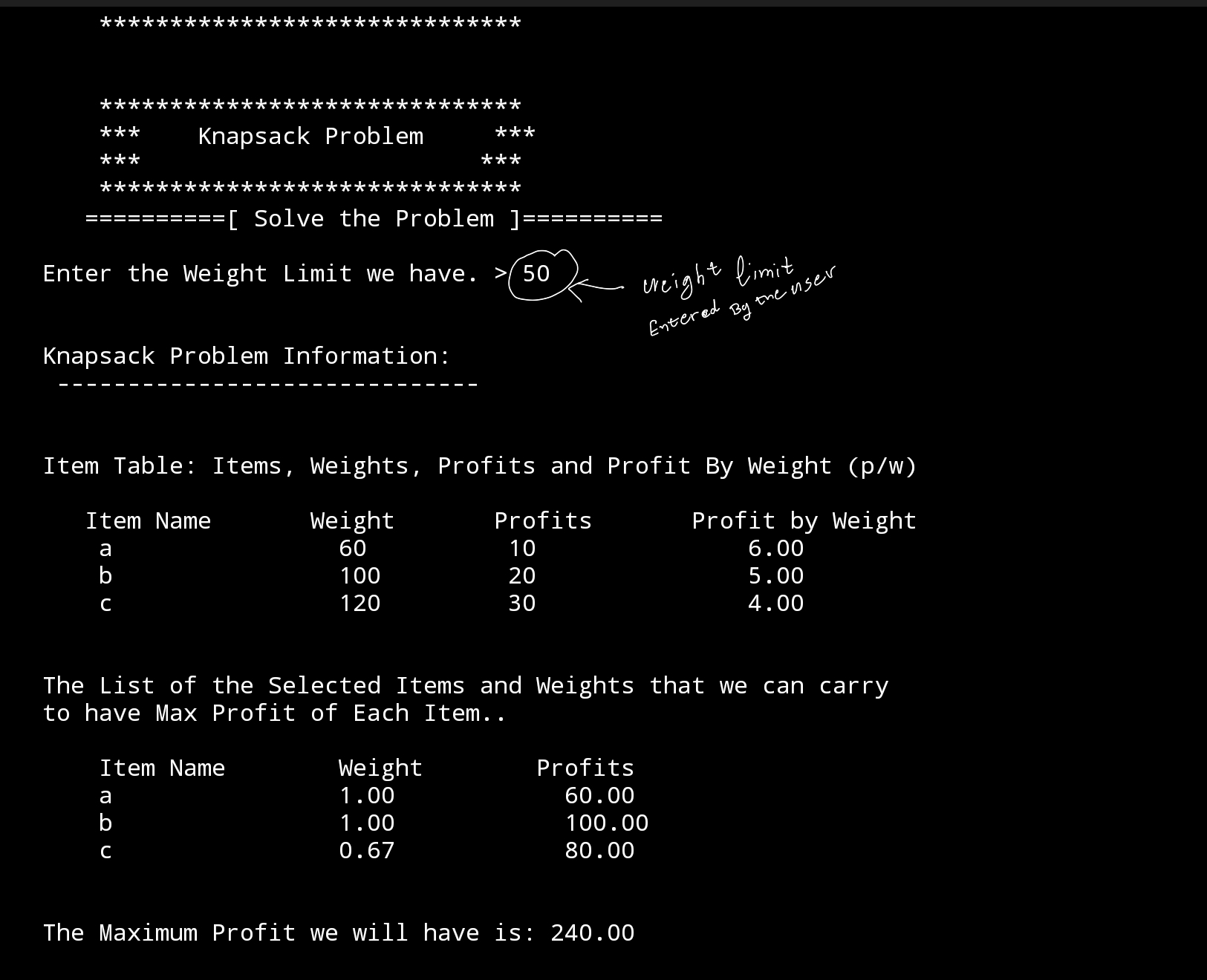 |
So from the above example, we can achieve the Maximum Profit with weight limits to 50Kg if we take Full Amount of Item a, and Full Amount of Item b and 0.666666666 (0.67) amount of Item c.
1 * 60 = 60
1 * 100 = 100
0.67 * 120 = 80
60 + 100 + 80 = 240
NOTE: The Weight in Knapsack Problem can be weight in kg, or Number/Amount of the item (60 bags, 100 bags ..) or any Unit.
Have fun and do some coding .. 🙂
To Download my Python code (.py) files Click-Here
By: Ali Radwani
Python: Sorting Algorithm (3. Merge Sort)
Learning : Python coding, Math, Algorithm,
Subject: Writing Merge Sorting Algorithm in Python
[NOTE: To keep the code as simple as we can, We WILL NOT ADD any user input Varevecations. Assuming that our user will Enter the right inputs.]
Sorting Algorithm is a way to sort a given list/Array of numbers, there are several sorting Algorithm as follow:
Type of Sorting Algorithm
1. Quick Sort. [Click Here]
2. Bubble Sort. [Click Here]
3. Merge Sort. [Click Here]
4. Insertion Sort. [Click Here]
5. Selection Sort. [Click Here]
6. Heap Sort. [Click Here]
7. Radix Sort. [Click Here]
8. Bucket Sort. [Click Here]
Here in this post we will write a function to take a given list and sort it then pass it back. We assume the user will enter a serial of numbers, that he want to sort, our function will sort it and print out the original numbers and the sorted one.
Merge Sort: Steps of Merge Sorting Algorithm are:
1. If the Array has 1 Element then return it.
2. If the givin Array has more than 1 Element then we Divide it into 2 Parts.
Left = from Element 0 T0 Element len(arr)//2 and Right = from Element len(arr)//2 To Element len(arr). And we keep repeating step 2 for each part.
3. Once we have All parts divided we tart merge them in a sorted order.
Coding: In this Post we will write the Function for Main-Mnu, another one to collect the Array [Not Sorted] Elements from the user, then we will write the Main Function, here we will have One to Divide the Array into parts and One to Merge the Element together again. And as we done with Quick & Bubble Sort projects we will have one Fast-Run Function and another one with Details Step-By-Step run to show the Algorithm.
NOTE: All the Code will be Available in the Download Page.
Let’s start with the Main-menu to list down three option were the user will select one among them, the menu options are: 1. Merge Sort Algorithm – Fast Run. & 2. Merge Sort Algorithm – Step By Step and the last one is 3. Exit. Here is the code.

|
I will Not post the code for collecting the Array Element from the user [Find it in the .py file for this project]. Here is the code for merge_sort_divider Function, it takes two arguments the Array and the user_selection, so if the user selection is 2 (2. Merge Sort Algorithm – Step By Step) We will print-out the Dividing Steps and some other Text. [We are using If Statement to print-out Text lines]. Here is the Code ..

|
Now for merging function, for merging function we will have two copies, one as Fast-Run and another for Details to print-out the running Steps, this will make the Fast-Run Function short and easy to follow-up. So, here is the Fast-Run Function code for merge the two part of array returned from the merge_sort_divider. Here is the Code ..

|
Run time screen ..
|
End of Merge Sorting Algorithm.
To Download my Python code (.py) files Click-Here
By: Ali Radwani
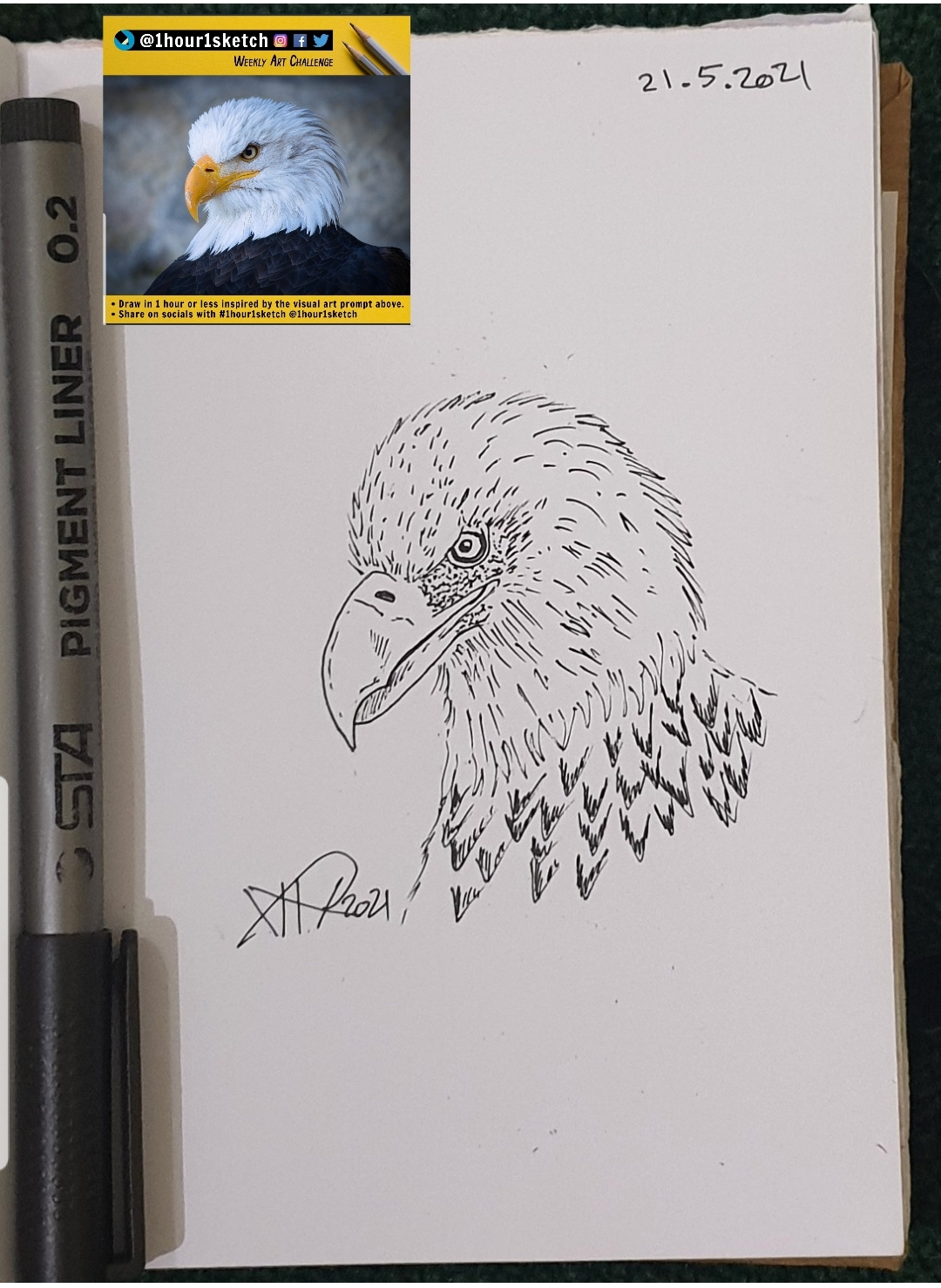
Another sketch challenge: Eagle Face
This week sketch challenge @1hour1sketch on Twitter is to Draw an Eagle Face, so here is my sketch using pencil then black Pen, it takes around 15min. More Sketches on my Sketch page ..
you may Follow me on Twitter @h_ta3kees
Here is my sketch..
Python Project: Disarium Numbers in Range
Learning : python code
Subject: Finding the Disarium number
in a range
[NOTE: To keep the code as simple as we can, We WILL NOT ADD any user input Varevecations. Assuming that our user will Enter the right inputs.]
Definition We call a Number as A Disarium Number if the Sum of it’s Ddigits Powered with their Respective Position is Equal to the Original Number.
So 89 is a Disarium Number, because 8^1 + 9^2 = 8 + 81 = (89 the original number)
and 135 is also a Disarium Number, because 1^1 = 1, 3^2 = 9, 5^3 = 125 and the Total is [1+3+125 = 135 the original number]
we have a previous post to check if a given number is a Disarium Number or not … Read The Post Here .. In this post we will write the Function to print-out all the Disarium Numbers in a given range.
So our application will ask the user to enter two Numbers as a range From and To, then the disarium_n_range(num1,num2) taking two argument will work through a For loop to check each number in the range and if it is a Disarium Number we will store it in a list (disarium_n =[]) .. Let’s start by the asking the user to Input the range numbers..
 # Code to collect the Numbers from the User

print('\n\n   This Project will Print-Out all the Disarium Numbers in a given range.')
num1 = input('\n   Enter the From Number. > ')
num2 = input('\n   Enter the To Number.   > ')
And now let’s see the main Function of the application ..
 |
Run-Screen for the range From 10 To 99 |
Another Run for the Range From 100 To 999
|
End of the post ..
To Download my Python code (.py) files Click-Here
By: Ali Radwani
A Sketch of Hoopoe
Using a pencil then black pen and a photo from the Net as a reference, here is a sketch of a Hoopoe with an insect in it mouth.
Follow me on Twitter @h_ta3kees
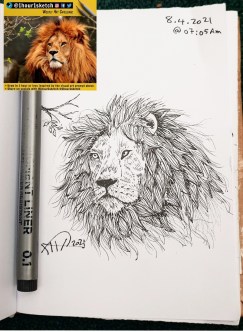
Another sketch challenge: Lion’s Face
This week sketch challenge @1hour1sketch is to Draw a Lino Face, so here is my sketch using pencil, black Pen.
I tried to do my best to draw the hair/mane am sure I can’t do better than this, I need more practice in doing fur drawing.
More Sketches on my Sketch page ..
also follow me on Twitter @h_ta3kees
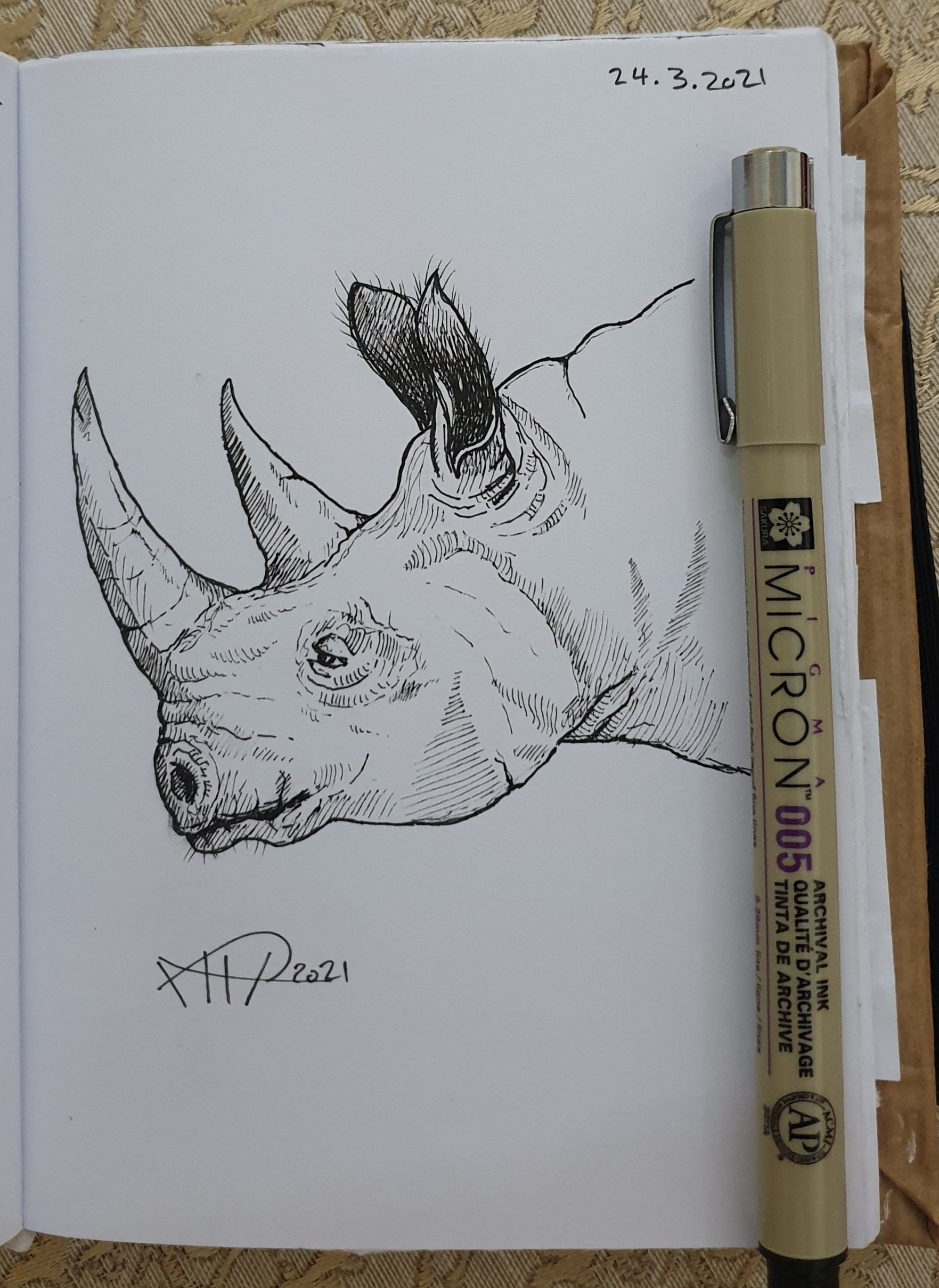
Rhino Sketch
Using a pencil then black pen and a photo from the Net as a reference and after almost 25min I finished this Rhino.
Follow me on Twitter @h_ta3kees

Taking pictures is not my main daily practices, but when i start playing with my camera, i really enjoy my self.
Thanks for visiting my Space..


 Ali's Photography Space...