Archive
Python: Coffee Consumption – P6
Learning : Python, SQlite3, Dataset, Pandas,
Subject: Create Coffee Consumption Application.
[NOTE: To keep the code as simple as we can, We WILL NOT ADD any user input Varevecations. Assuming that our user will Enter the right inputs.]
[ IF THE IS FIRST TIME DOWNLOADING THE CODE FILE, SELECT OPTION 7 FROM MAIN-MENU TO CREATE THE DATABASE]
In this part (Part-6) of Coffee Consumption App, we will write First Function of the Main Application to ADD New Record. In this Function we will do the following:
- Get the Current Date and Time.
- The user will Select the Coffee Name, Type and Size from the list in lookup tables.
- Selecting the Gender of the user.
- Entring the Rank for the order [If the customer rank it].
Beginning with adding New Record in the Coffee Consumption System. We will use the datatime.now() function get the current data and time here is the code..
now = datetime.now()
date_t = now.strftime(“%d/%m/%Y %H:%M”)
Then we will show each of the lookup table we have and the user will select the ID of the Coffee Name,Type and Size, the, we will use a simple Validation process to control the user inut. Here is the code for Entering the Coffee Name
   # Select a Coffee Name
    print('\n     List of Coffee Names:\n')
    show_list('coffee_name','cn_id')
     # check the availability of the input
    while True:
        cn_id = input('\n     Enter the ID of a Coffee Name. [E to Exit]. > ')
        if cn_id in ['e','E']:
            input('     You Select [E to Exit].. Press any Key. > ')
            return

        elif (cn_id ==" ") or (cn_id =="") or (check_availabilty('coffee_name','cn_id', int(cn_id)) != None):
            break
The same code will be apply for the Coffee Type and Coffee Size.
[NOTE] All the codes will be in the file to be Download.
Next part of the code will be to select the customer Gender [M,F] here also we will use a simple Validation that will accept M or F Not anything else. Here is the code..
# Select Customer Gender [Only M,F]
    while True:
        sex = input('\n     Enter the Gender of the customer. [M / F] [E to Exit]. > ')

        if sex in ['e','E']:
            input('     You Select [E to Exit].. Press any Key. > ')
            return
        elif sex in ['m','M','f','F']:
            break
        else:
            print('     You Must input [M,F]')
Last variable we will collect will be the Rank, the Customer will ask the user to Rank this Order, the range will be from 1 to 10, 0 will be for Not Available.. Here is the code…
# Enter the user Rank
    print('     If the User can Rank the Coffee.. 1 to 10 [1 is Bad, 10 is Great]')
    while True :
        rank = input('\n     Enter User Rank.[1 is Bad, 10 is Great] [0 is NOT Available] [E to Exit]. > ')
        if int(rank) in range (0,11):
            break
        else:
            print('\n     Rank Should be in Range of 0-10.'
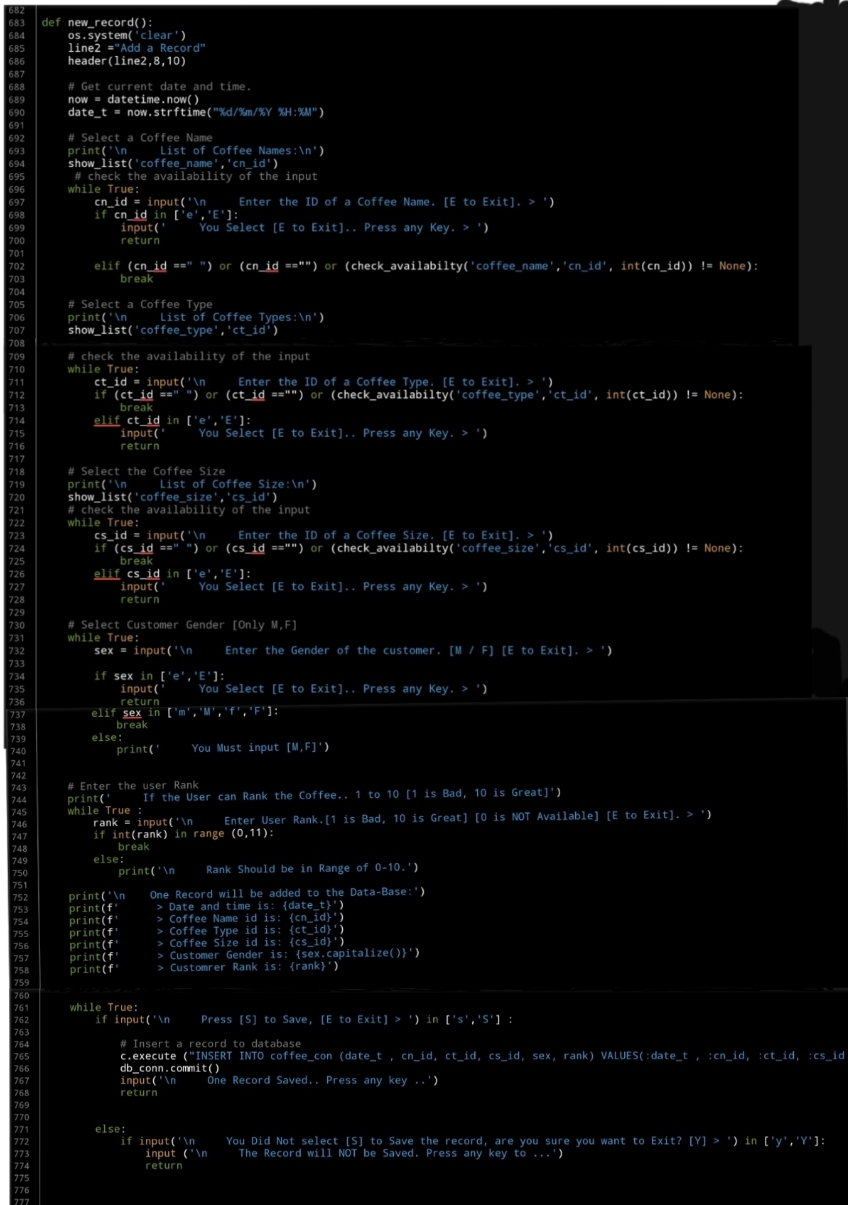
After that we will display all the Entries on the screen and ask the customer to press [S] to save the Record, and then we will use IINSERT SQL command to Insert the record. Here is the code for all the function….
 |
What’s Coming: In Part-7 we will do the Follwing:
Writing three Function to Show / Display the Records in the main Table of the Coffee Consumption Application.
..:: Have Fun with Coding ::.. 🙂
| Part 1 | Part 2 | Part 3 | Part 4 | Part 5 |
| Part 6 | Part – | Part – | Part – | Part – |
To Download my Python code (.py) files Click-Here
 Follow me on Twitter..
By: Ali Radwani

Taking pictures is not my main daily practices, but when i start playing with my camera, i really enjoy my self.
Thanks for visiting my Space..


 Ali's Photography Space...