Archive
Python Project: Is it a Prime
Python: Prime Number
Is it Prime
In a simple way, a Prime number is a number that cannot be made by multiplying other numbers. So 4 is Not Prime because we can say that 4 = 2 x 2, 6 is Not Prime because it can be produced by multiplying 3 x 2; but 5 Is Prime because we can’t find any integer numbers that can produce 5.
Numbers such as 1, 3, 5, 7, 11, 13 … all are Prime Numbers.
This function will ask the user to write a number then we will examine it to see whether it is a prime or not.
The Code:
num=int(input(“Enter a number: “))
def is_prime(num):
result=”Prime”
for t in range (2,num):
if num%t==0 :
result=”Not Prime”
break
return result
print num,’is’,is_prime(num)

Python Project: Fibonacci Numbers
Python: Fibonacci Numbers
Even Fibonacci Numbers
Fibonacci Sequence is generated by adding the previous two terms, so the N number in the sequence will be Xn=(Xn-1) + (Xn-2). Example: by starting with 1 and 2, the first 10 terms will be: 1, 2, 3, 5, 8, 13, 21, 34, 55, 89, …
The Task: Get the Fibonacci sequence range from the user and count how many even valued terms is there. The user range should not be more than 10000 number.
The Code:
def get_Fibonacci_Sequence(rfrom,rto):
n1=rfrom
n2=rfrom+1
count=0
for x in range (rfrom,rto):
fab=n1+n2
n1=n2
n2=fab
# Check if the fab is even, the increment the counter
if fab%2==0 :
count =count +1
# After finish print the output
print”Between”,rfrom,” and “,rto,” there is “,count,”even Fibonacci number.”
range_ok =”no”
while range_ok==”no”:
print(‘Your range must be less than 10,000:’)
# Get the numbers from the user.
rfrom=int(input(‘Enter the range From:’))
rto=int(input(‘Enter the range To:’))
# Check if the numbers are less than 10000
if (rto – rfrom) < 10000 : range_ok ="yes"
#Call the function
get_Fibonacci_Sequence(int(rfrom),int(rto))

Python Project: Pluralise a Word
Python: Pluralise a Word
Loop through a dictionary and pluralise a word
One of Python Exercises on @PyBites codechalleng is to loop through a given dictionary of people and the number of games they’ve won then print out the users name and how many games they’ve won in the following format: “sara has won n games” and pluralise the word game to suit the number of games won.
we assume the dictionary is games_won = dict={‘sara’:0, ‘bob’:1, ‘tim’:5, ‘julian’:3, ‘jim’:1}
The Code:
games_won ={‘sara’:0, ‘bob’:1, ‘tim’:5, ‘julian’:3, ‘jim’:1}
def print_game_stats(games_won):
for key,val in games_won.items():
print(“{} has won {}{p}”.format(key, val,p=” game” if val ==1 else ” games” ))
print_game_stats(games_won)

Python Project: Sum N Numbers
Python: Sum N Numbers
Bites of Python exercises
I found this Python Exercises on the at PyBites codechalleng and i love the idea of solving problems and this will let me learn more, so thanks guys @pybites.
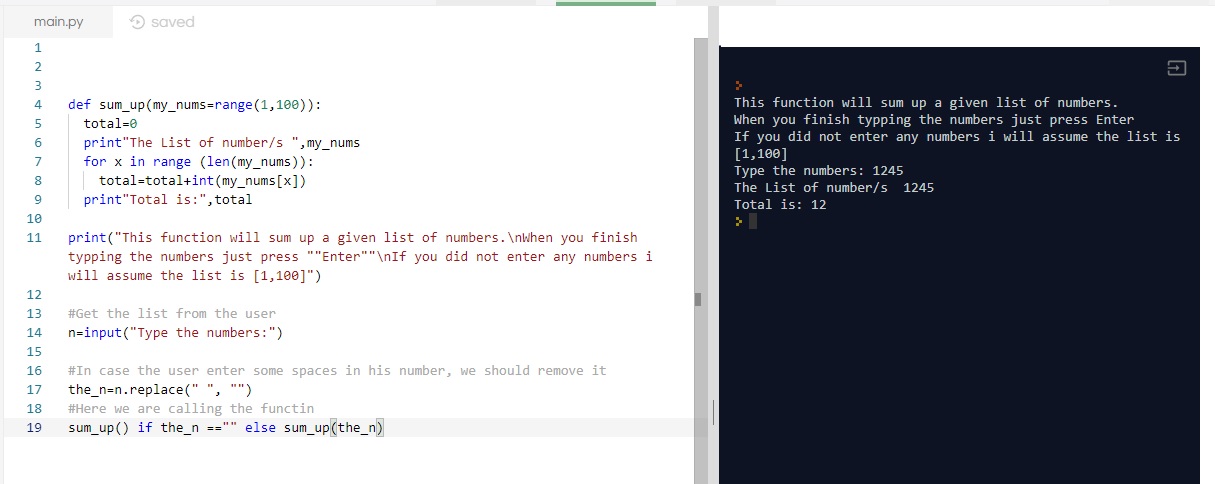
So this time the challenge is to Write a function that can sum up N numbers. The function should receive a list of N numbers, If no argument is provided, return sum of numbers 1..100.
I hope i did this right, here is my function; the result seems to be fine i am still learning so … sorry if i misunderstood.
def sum_up(my_nums=range(1,100)):
total=0
print”The List of number/s “,my_nums
for x in range (len(my_nums)):
total=total+int(my_nums[x])
print”Total is:”,total
print(“This function will sum up a given list of numbers.\nWhen you finish typping the numbers just press “”Enter””\nIf you did not enter any numbers i will assume the list is [1,100]”)
#Get the list from the user
n=input(“Type the numbers:”)
#In case the user enter some spaces in his number, we should remove it
the_n=n.replace(” “, “”)
#Here we are calling the functin
sum_up() if the_n ==”” else sum_up(the_n)
Python project: Drawing with Python – Flower
Python: Draw Flower
Drawing with Python
In this post i tried to draw another flower using arcs of circles, i get a simple one and i guess with more sizes we can do more complex shape.
You can play with the code and change the numbers, size and rotation degree and let’s see what we will have.
t = turtle.Turtle()
t.hideturtle()
t.pendown()
for x in range (30):
t.circle(60,70)
if x %3==0:
t.circle (10,90)


Python Project: Binary Search
Python: Binary Search
Binary Search
Definition:
Binary Search is a search algorithm that finds the position of a target value within a sorted array. Binary search compares the target value to the middle element of the array.
In this code we are writing a Python code to find the target in a sorted given array and get its position without using any python math packages.
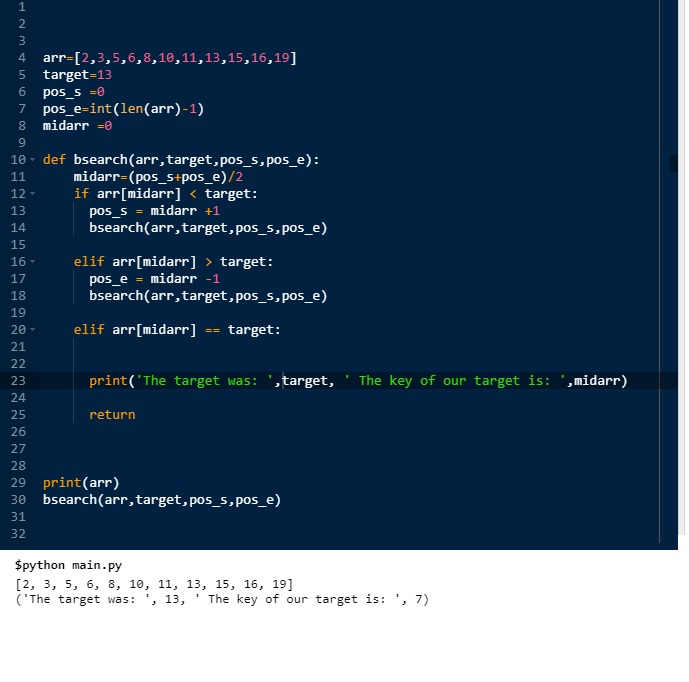
The case: We have an Array (arr=[2,3,5,6,8,10,11,13,15,16,19]) our target is 13, so we want the position of 13.
We are setting the first position as (pos_s=0) and the end position as (pos_e= the length of the array -1) and we will use recursive function.
Recursive Function: is a computer function or procedure that calling it self
The Code:
arr=[2,3,5,6,8,10,11,13,15,16,19]
target=11
pos_s =0
pos_e=int(len(arr)-1)
midarr =0
def bsearch(arr,target,pos_s,pos_e):
midarr=(pos_s+pos_e)/2
if arr[midarr] < target:
pos_s = midarr +1
bsearch(arr,target,pos_s,pos_e)
elif arr[midarr] > target:
pos_e = midarr -1
bsearch(arr,target,pos_s,pos_e)
elif arr[midarr] == target:
print(‘The target was: ‘,target, ‘ The key of our target is: ‘,midarr)
return
print(arr)
# Call the functin
bsearch(arr,target,pos_s,pos_e)

Taking pictures is not my main daily practices, but when i start playing with my camera, i really enjoy my self.
Thanks for visiting my Space..


 Ali's Photography Space...