Photo Frame by Photoshop Action..
This is the first Photoshop Action I upload.
Name: Frame Normal Shadow.
Result: [Click the image to enlarge]

Instruction:
– Un-ZIP the file.
– Copy the file to this folder :[Your Drive] .. Program Files\Adobe\Photoshop 7.0\Presets\Photoshop Actions
– Open the Photoshop (this sample is for Photoshop 7.0)
[::] If the Action panel not appear then: From the menu Press Windows > Action

[::] On the Action Panel press the small triangle on the right (see the image)
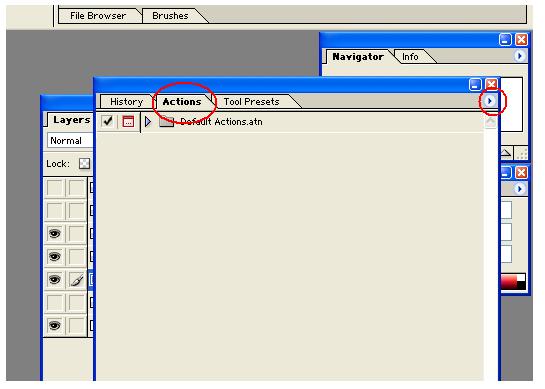
[::] Select the Load Action, then select the action file from you drive.
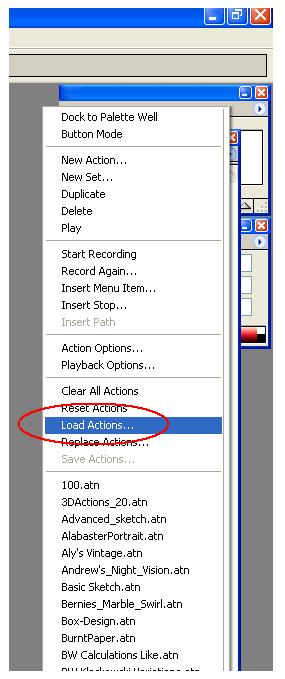
Note: You have to have your photo on a layer not on the Background layer, then run the action.
Download the File from the Photoshop Actions in my “Download Section”
-
February 18, 2011 at 3:12 pmPhoto Frame by Photoshop Action..#2 « Ali's Photography Space…
-
February 19, 2011 at 11:52 amPhoto Frame by Photoshop Action..#3 « Ali's Photography Space…
-
February 21, 2011 at 9:05 pmPhoto Frame by Photoshop Action..#4 « Ali's Photography Space…
-
March 4, 2011 at 3:24 pmPhoto Frame by Photoshop Action..#5 « Ali's Photography Space…

Taking pictures is not my main daily practices, but when i start playing with my camera, i really enjoy my self.
Thanks for visiting my Space..


 Ali's Photography Space...